1. ഉൽപ്പന്നം കഴിഞ്ഞുview
This manual provides instructions for the VSDISPLAY 8.4-inch 4-Wire Resistive Touch Panel and its accompanying USB Controller. This product is designed to add touch functionality to compatible 8.4-inch 800x600 LCD panels. Please note that this package includes the touch panel and controller only, and does not include an LCD display panel.

Figure 1: Complete VSDISPLAY 8.4-inch 4-Wire Resistive Touch Panel Kit

ചിത്രം 2: മുൻഭാഗം view of the 8.4-inch 4-Wire Resistive Touch Panel
2. പാക്കേജ് ഉള്ളടക്കം
താഴെ ലിസ്റ്റ് ചെയ്തിരിക്കുന്ന എല്ലാ ഇനങ്ങളും നിങ്ങളുടെ പാക്കേജിൽ ഉൾപ്പെടുത്തിയിട്ടുണ്ടെന്ന് ഉറപ്പാക്കുക:
- 1 × 8.4-inch 4-Wire Resistive Touch Panel (Model: VS084TP-A1)
- 1 × 4-Wire USB Controller Card
- 1 × യുഎസ്ബി കേബിൾ
- 1 × Converter Cable
3. സജ്ജീകരണ നിർദ്ദേശങ്ങൾ
3.1 Connecting the Touch Panel to the Controller
- Carefully align the Flexible Printed Circuit (FPC) connector of the 4-Wire Resistive Touch Panel with the corresponding FPC slot on the 4-Wire USB Controller Card.
- Gently insert the FPC into the controller's slot, ensuring it is fully seated and secured.

ചിത്രം 3: മുകളിൽ view of the 4-Wire USB Controller Card
3.2 Connecting the USB Controller to a Computer
- Connect the provided USB Cable to the USB port on the 4-Wire USB Controller Card.
- Connect the other end of the USB Cable to an available USB port on your computer or host device.
- The system should automatically detect the USB controller. Most modern operating systems (Windows, Linux, macOS) will install generic HID (Human Interface Device) drivers automatically, making the device plug-and-play.
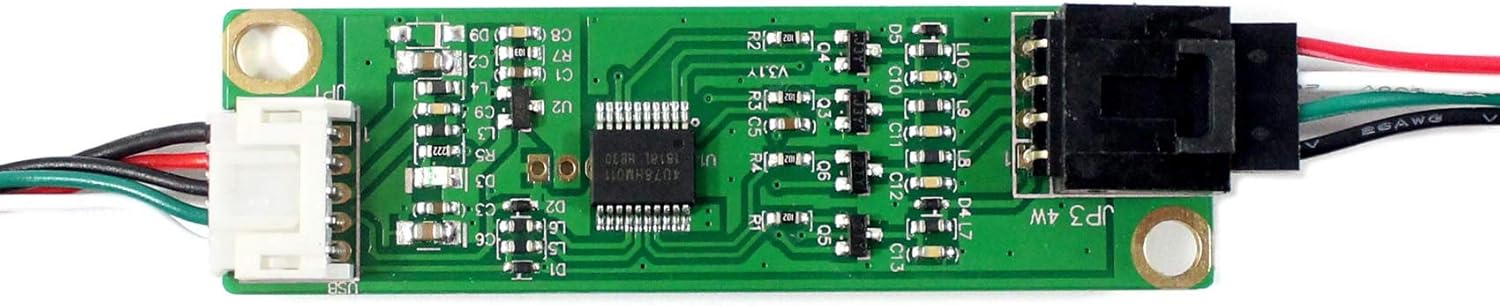
Figure 4: USB Controller Card with USB cable connected
4. പ്രവർത്തന നിർദ്ദേശങ്ങൾ
4.1 Basic Touch Functionality
Once connected and recognized by your operating system, the touch panel will function as a standard input device. You can interact with the connected LCD display (not included) by touching the surface of the resistive touch panel.
4.2 കാലിബ്രേഷൻ
Resistive touch panels may require calibration to ensure accurate touch point detection, especially after initial setup or if the display resolution changes. Calibration tools are typically provided by your operating system or can be found through third-party software. Refer to your operating system's documentation for specific calibration procedures.
5. പരിപാലനം
5.1 ടച്ച് പാനൽ വൃത്തിയാക്കൽ
- Use a soft, lint-free cloth (e.g., microfiber cloth) to gently wipe the surface of the touch panel.
- കഠിനമായ പാടുകൾക്ക്, നേരിയ തോതിൽ dampen the cloth with water or a mild, non-abrasive screen cleaner. Avoid spraying liquids directly onto the panel.
- Do not use harsh chemicals, abrasive cleaners, or solvents, as these can damage the touch panel surface.
5.2 സംഭരണം
When not in use, store the touch panel and controller in a dry, dust-free environment, away from direct sunlight and extreme temperatures.
6. പ്രശ്നപരിഹാരം
- സ്പർശന പ്രതികരണമില്ല:
- Ensure all cables (FPC and USB) are securely connected.
- Verify the USB controller is receiving power (some controllers have an indicator LED).
- നിങ്ങളുടെ കമ്പ്യൂട്ടറിലെ മറ്റൊരു യുഎസ്ബി പോർട്ടിലേക്ക് കണക്റ്റുചെയ്യാൻ ശ്രമിക്കുക.
- നിങ്ങളുടെ കമ്പ്യൂട്ടർ പുനരാരംഭിക്കുക.
- Inaccurate Touch or Jumpy Cursor:
- Perform a touch screen calibration through your operating system settings.
- Ensure the touch panel surface is clean and free from obstructions.
- Device Not Recognized by Operating System:
- Check the USB cable for damage and try a different cable if available.
- മറ്റൊരു USB പോർട്ടിലേക്ക് കണക്റ്റുചെയ്യുക.
- നിങ്ങളുടെ ഓപ്പറേറ്റിംഗ് സിസ്റ്റം കാലികമാണെന്ന് ഉറപ്പാക്കുക.
7 സാങ്കേതിക സവിശേഷതകൾ
7.1 USB Controller Specifications
- അളവിൻ്റെ വലിപ്പം: 71mm x 20mm x 10mm
- പവർ ആവശ്യകതകൾ: D.C.+5V (100mA typical, 50mV peak to peak maximum ripple and noise)
- പ്രവർത്തന താപനില: 0 മുതൽ 50 ഡിഗ്രി സെൽഷ്യസ് വരെ
- സംഭരണ താപനില: -40 മുതൽ 80 ഡിഗ്രി സെൽഷ്യസ് വരെ
- ആപേക്ഷിക ആർദ്രത: 95% at 60°C (non-condensing)
- ഇൻ്റർഫേസ്: USB 1.1 & 2.0
- റെസലൂഷൻ: 2048 × 2048 മിഴിവ്
- Report Rate (USB Model): Max. 160 points/sec
- പ്രതികരണ സമയം: പരമാവധി. 20 മി.എസ്
- ഘടിപ്പിച്ച കേബിൾ: 6' shielded cable with USB-A connector for USB port
- റെഗുലേറ്ററി അംഗീകാരങ്ങൾ: FCC-B, CE
- EMI: Unaffected by environmental EMI
- Panel Resistance (4-wire resistive model): 200 ~ 900 ohm
- MTBF: 200,000 മണിക്കൂർ
7.2 Touch Panel Specifications
- അളവിൻ്റെ വലിപ്പം: 187 മിമി x 141 മിമി
- ഡിസ്പ്ലേ ഏരിയ: 172 മിമി x 129.5 മിമി
- FPC Connector: 4pin 0.5mm pitch bottom contact
- സ്റ്റാൻഡിംഗ് സ്ക്രീൻ ഡിസ്പ്ലേ വലുപ്പം: 8.4 ഇഞ്ച്
- വീക്ഷണ അനുപാതം: 4:3
- സ്ക്രീൻ ഉപരിതല വിവരണം: തിളങ്ങുന്ന

Figure 5: Dimensions of the 8.4-inch 4-Wire Resistive Touch Panel
7.3 Pin Assignment and Detailed Drawing
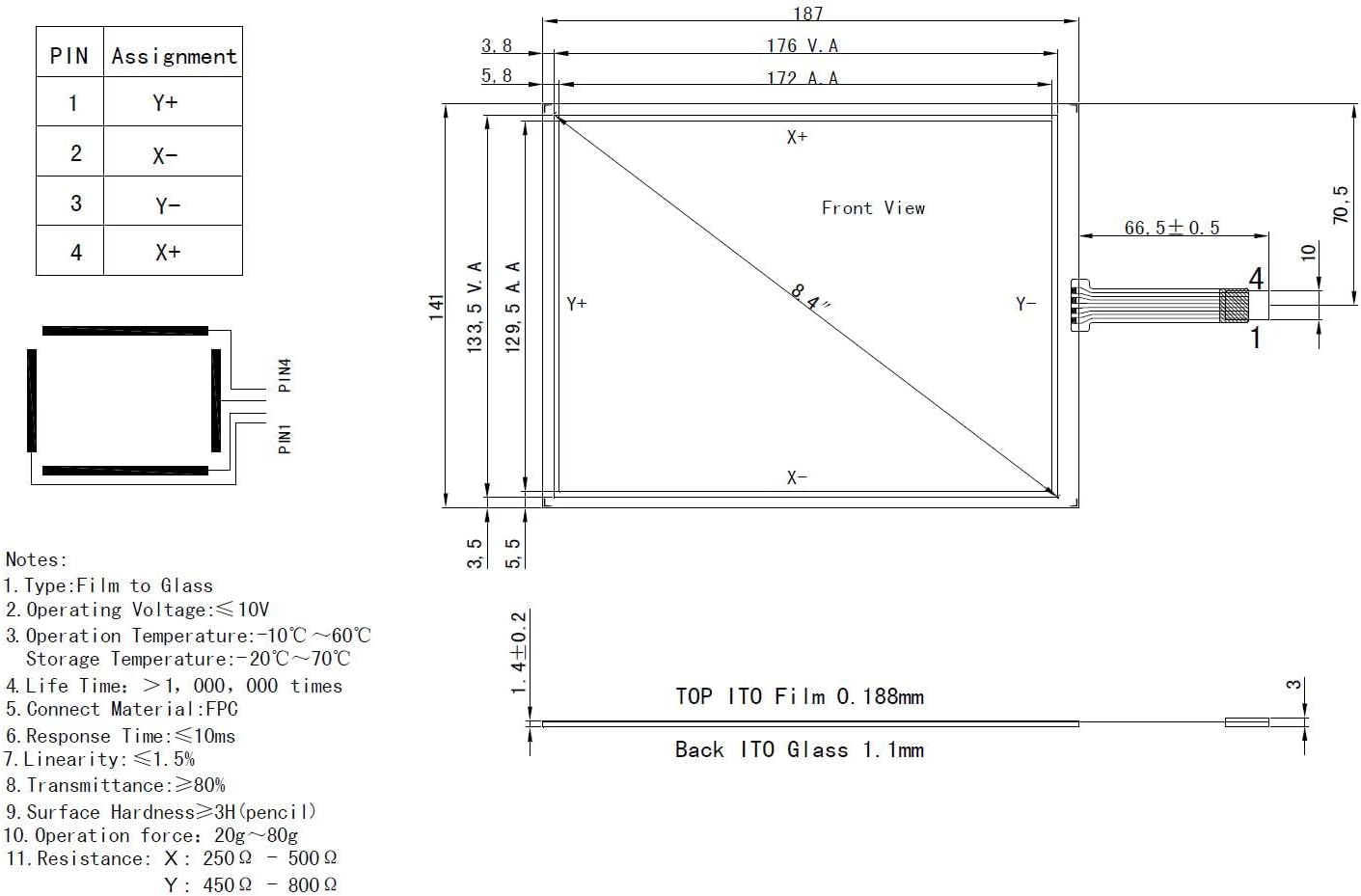
Figure 6: Technical drawing with pin assignments and notes for the touch panel
പിൻ അസൈൻമെന്റ്:
- PIN1: Y-
- PIN2: X-
- PIN3: Y+
- PIN4: X+
Additional Notes from Drawing:
- Type: Film to Glass
- ഓപ്പറേറ്റിംഗ് വോളിയംtagഇ: ≤10V
- പ്രവർത്തന താപനില: -10°C ~ 60°C
- സംഭരണ താപനില: -20 ° C ~ 70 ° C
- Life Time: >1,000,000 times
- Connect Material: FPC
- പ്രതികരണ സമയം: ≤10ms
- Linearity: ≤1.5%
- Transmittance: ≥80%
- Surface Hardness: ≥3H (pencil)
- Operation Force: 20g ~ 80g
- Resistance: X: 250 Ω ~ 500 Ω, Y: 450 Ω ~ 800 Ω
8. വാറൻ്റിയും പിന്തുണയും
Specific warranty information for this product is not provided in the available product details. For support inquiries, please refer to the vendor or retailer from whom the product was purchased. Ensure you retain your proof of purchase for any potential warranty claims or technical assistance.


