ഉൽപ്പന്നം കഴിഞ്ഞുview
The Monster Bluetooth Audio Receiver (Model WBA9-1008-BLK) is designed to wirelessly stream audio from your smartphone or tablet to any device with a 3.5mm AUX input. This compact adapter enhances your car, home stereo, headphones, or speakers with Bluetooth connectivity, enabling hands-free calls and voice assistant integration.

Image: The Monster Bluetooth Audio Receiver shown alongside its retail packaging, highlighting its compact design and key features.
പാക്കേജ് ഉള്ളടക്കം
- Monster Bluetooth Audio Receiver
- 3.5 എംഎം ഓക്സ് കേബിൾ
- മൈക്രോ-യുഎസ്ബി ചാർജിംഗ് കേബിൾ
ഉപകരണ ലേഔട്ട്

Image: A detailed diagram of the Monster Bluetooth Audio Receiver, indicating the Multi-Function Button (MFB), Microphone, Micro USB Port for Charging, 3.5mm Aux Port, LED Indicator, and On/Off Power Button.
- മൾട്ടി-ഫംഗ്ഷൻ ബട്ടൺ (MFB): Used for play/pause, answer/hang up calls, redial, and voice assistant activation.
- മൈക്രോഫോൺ: ഹാൻഡ്സ്-ഫ്രീ കോളിംഗിനായി ബിൽറ്റ്-ഇൻ.
- മൈക്രോ യുഎസ്ബി പോർട്ട്: ഉപകരണം ചാർജ് ചെയ്യുന്നതിനായി.
- 3.5mm Aux Port: Connects to your audio system's AUX input.
- LED സൂചകം: ഉപകരണ നില പ്രദർശിപ്പിക്കുന്നു (ജോടിയാക്കൽ, കണക്റ്റുചെയ്തു, ചാർജ് ചെയ്യുന്നു).
- പവർ ബട്ടൺ ഓൺ/ഓഫ്: ഉപകരണം ഓൺ അല്ലെങ്കിൽ ഓഫ് ചെയ്യാൻ.
സജ്ജീകരണ ഗൈഡ്
1 ഉപകരണം ചാർജ് ചെയ്യുന്നു
Before first use, fully charge the Bluetooth Audio Receiver. Connect the supplied Micro-USB charging cable to the receiver's Micro USB Port and the other end to a USB power source (e.g., car charger, wall adapter, computer USB port). The LED indicator will show charging status and turn off when fully charged.
2. നിങ്ങളുടെ ഓഡിയോ സിസ്റ്റവുമായി ബന്ധിപ്പിക്കുന്നു
Plug the 3.5mm AUX cable into the 3.5mm Aux Port on the receiver. Then, plug the other end of the 3.5mm AUX cable into the AUX input of your car stereo, home stereo, headphones, or speakers.

Image: The Monster Bluetooth Audio Receiver plugged into the AUX input of a car's dashboard, demonstrating a typical installation scenario.
3. പവർ ഓൺ/ഓഫ്
- പവർ ഓണാക്കാൻ: Press and hold the On/Off Power Button until the LED indicator flashes. You will hear an audible prompt "Power On".
- പവർ ഓഫ് ചെയ്യാൻ: Press and hold the On/Off Power Button until the LED indicator turns off. You will hear an audible prompt "Power Off".
4. ബ്ലൂടൂത്ത് ജോടിയാക്കൽ
- Ensure the receiver is powered on and the LED indicator is flashing, indicating it is in pairing mode. You will hear "Ready to Pair".
- നിങ്ങളുടെ സ്മാർട്ട്ഫോണിലോ ബ്ലൂടൂത്ത് പ്രവർത്തനക്ഷമമാക്കിയ ഉപകരണത്തിലോ, ബ്ലൂടൂത്ത് ക്രമീകരണങ്ങളിലേക്ക് പോകുക.
- ഇതിനായി തിരയുക new devices and select "Monster BT Receiver" (or similar name) from the list.
- Once connected, the LED indicator will stop flashing and remain solid, and you will hear "Bluetooth Connected".
പ്രവർത്തന നിർദ്ദേശങ്ങൾ
ഓഡിയോ പ്ലേബാക്ക്
- പ്ലേ/താൽക്കാലികമായി നിർത്തുക: മൾട്ടി-ഫംഗ്ഷൻ ബട്ടൺ (MFB) ഒരിക്കൽ അമർത്തുക.
- Control volume and track selection directly from your connected device.

Image: The Monster Bluetooth Audio Receiver shown in a car environment, illustrating its use for streaming music wirelessly.
ഹാൻഡ്സ് ഫ്രീ കോളിംഗ്
ബിൽറ്റ്-ഇൻ മൈക്രോഫോൺ വ്യക്തമായ ഹാൻഡ്സ്-ഫ്രീ ആശയവിനിമയം അനുവദിക്കുന്നു.
- മറുപടി കോൾ: Press the MFB once when a call comes in.
- കോൾ അവസാനിപ്പിക്കുക: Press the MFB once during a call.
- അവസാന നമ്പർ വീണ്ടും ഡയൽ ചെയ്യുക: MFB രണ്ടുതവണ അമർത്തുക.

Image: A person in a car using the Monster Bluetooth Audio Receiver for hands-free communication, demonstrating the convenience of its built-in microphone.
Voice Assistant Activation (Siri/Google Assistant)
Activate your smartphone's voice assistant for navigation, calls, texts, and music playback.
- വോയ്സ് അസിസ്റ്റന്റിനെ സജീവമാക്കുക: MFB ദീർഘനേരം അമർത്തുക.

Image: A driver interacting with a voice assistant (Siri or Google Assistant) through the Monster Bluetooth Audio Receiver, illustrating its capability for voice commands.
രണ്ട് ഉപകരണങ്ങൾ ഒരേസമയം ബന്ധിപ്പിക്കുന്നു
The receiver supports connecting two Bluetooth devices at the same time, allowing for shared control of music or hands-free talking.
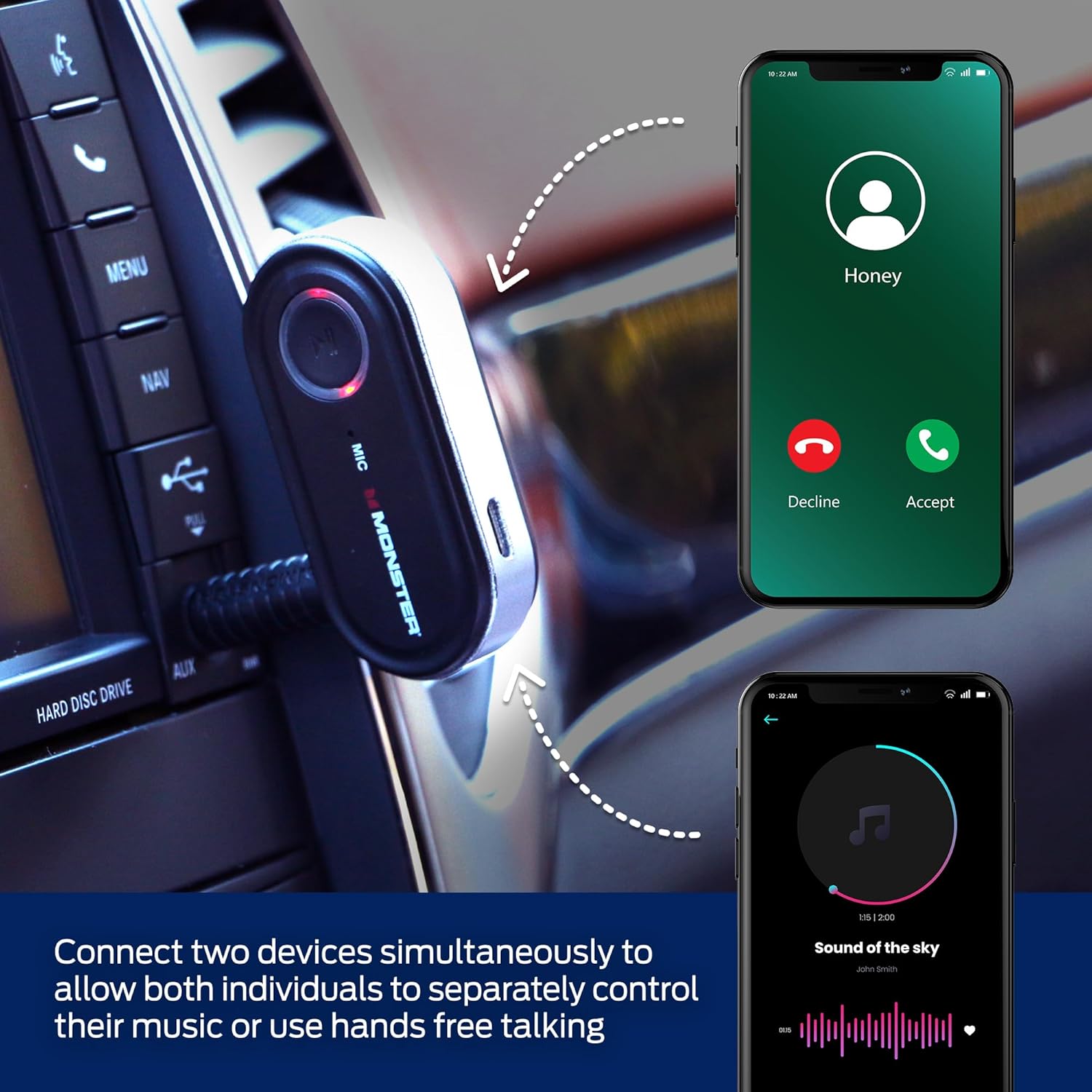
Image: A visual representation showing two smartphones simultaneously connected to the Monster Bluetooth Audio Receiver, indicating its multi-device pairing capability for shared audio or calls.
മെയിൻ്റനൻസ്
വൃത്തിയാക്കൽ
മൃദുവായതും ഉണങ്ങിയതുമായ തുണി ഉപയോഗിച്ച് ഉപകരണം തുടയ്ക്കുക. കഠിനമായ രാസവസ്തുക്കളോ അബ്രസീവ് ക്ലീനറുകളോ ഉപയോഗിക്കരുത്.
ബാറ്ററി കെയർ
- തീവ്രമായ താപനിലയിലേക്ക് ഉപകരണം തുറന്നുകാട്ടുന്നത് ഒഴിവാക്കുക.
- ബാറ്ററിയുടെ ആരോഗ്യം നിലനിർത്താൻ, പതിവായി ഉപയോഗിക്കുന്നില്ലെങ്കിലും, ഉപകരണം പതിവായി ചാർജ് ചെയ്യുക.
ട്രബിൾഷൂട്ടിംഗ്
| പ്രശ്നം | പരിഹാരം |
|---|---|
| ഉപകരണം പവർ ഓണാക്കുന്നില്ല. | Ensure the device is fully charged. Connect it to a power source using the Micro-USB cable. |
| ബ്ലൂടൂത്ത് ഉപകരണവുമായി ജോടിയാക്കാൻ കഴിയില്ല. |
|
| ഓഡിയോ ഔട്ട്പുട്ട് ഇല്ല. |
|
| മോശം ശബ്ദ നിലവാരം അല്ലെങ്കിൽ സ്റ്റാറ്റിക്. |
|
സുരക്ഷാ വിവരങ്ങൾ
Refer to the product's safety information for important guidelines:
- ബാറ്ററി: Do not expose to excessive heat or moisture. Keep away from open flames and hot surfaces.
- ഇടപെടൽ: This device may interfere with other wireless devices. Follow manufacturer's guidelines to minimize interference.
സ്പെസിഫിക്കേഷനുകൾ
| ഫീച്ചർ | വിശദാംശങ്ങൾ |
|---|---|
| മോഡൽ നമ്പർ | WBA9-1008-BLK |
| ഉൽപ്പന്ന അളവുകൾ | 7 x 7 x 2 ഇഞ്ച് |
| ഇനത്തിൻ്റെ ഭാരം | 2.39 ഔൺസ് |
| കണക്റ്റിവിറ്റി ടെക്നോളജി | ബ്ലൂടൂത്ത്, ഓക്സിലറി |
| പവർ ഉറവിടം | ബാറ്ററി പവർ |
| നിറം | കറുപ്പ് |
| നിർമ്മാതാവ് | എക്സ്ട്രീം |
വാറൻ്റിയും പിന്തുണയും
Specific warranty information for the Monster Bluetooth Audio Receiver (Model WBA9-1008-BLK) is not provided in this manual. For detailed warranty terms, technical support, or customer service inquiries, please contact the manufacturer, XTREME DIGITAL LIFESTYLE ACCESSORIES, directly through their official webസൈറ്റ് അല്ലെങ്കിൽ ഉപഭോക്തൃ പിന്തുണ ചാനലുകൾ.
You may also refer to the product listing on Amazon for any available warranty details or contact the seller, AllTech 365, for assistance.


