1. പ്രധാന സുരക്ഷാ നിർദ്ദേശങ്ങൾ
Please read these instructions carefully before operating your Marantz SR5014 AV Receiver. Keep this manual for future reference.
- വെന്റിലേഷൻ തുറസ്സുകളൊന്നും തടയരുത്. നിർമ്മാതാവിന്റെ നിർദ്ദേശങ്ങൾക്കനുസൃതമായി ഇൻസ്റ്റാൾ ചെയ്യുക.
- റേഡിയറുകൾ, ഹീറ്റ് രജിസ്റ്ററുകൾ, സ്റ്റൗകൾ, അല്ലെങ്കിൽ മറ്റ് ഉപകരണങ്ങൾ (ഉൾപ്പെടെ) പോലെയുള്ള താപ സ്രോതസ്സുകൾക്ക് സമീപം ഇൻസ്റ്റാൾ ചെയ്യരുത്. ampലൈഫയറുകൾ) ചൂട് ഉത്പാദിപ്പിക്കുന്നത്.
- പ്രത്യേകിച്ച് പ്ലഗുകൾ, കൺവീനിയൻസ് റെസെപ്റ്റക്കിളുകൾ, ഉപകരണത്തിൽ നിന്ന് പുറത്തുകടക്കുന്ന ഇടം എന്നിവയിൽ നടക്കുകയോ നുള്ളുകയോ ചെയ്യുന്നതിൽ നിന്ന് പവർ കോർഡ് സംരക്ഷിക്കുക.
- നിർമ്മാതാവ് വ്യക്തമാക്കിയ അറ്റാച്ച്മെൻ്റുകൾ/ആക്സസറികൾ മാത്രം ഉപയോഗിക്കുക.
- മിന്നൽ കൊടുങ്കാറ്റുകളുടെ സമയത്തോ ദീർഘനേരം ഉപയോഗിക്കാത്ത സമയത്തോ ഈ ഉപകരണം അൺപ്ലഗ് ചെയ്യുക.
- യോഗ്യതയുള്ള സേവന ഉദ്യോഗസ്ഥർക്ക് എല്ലാ സേവനങ്ങളും റഫർ ചെയ്യുക. ഉപകരണം ഏതെങ്കിലും വിധത്തിൽ കേടുവരുമ്പോൾ സർവീസ് ആവശ്യമാണ്.
2. ഉൽപ്പന്നം കഴിഞ്ഞുview
The Marantz SR5014 is a high-performance 7.2 channel 4K Ultra HD AV Receiver designed to deliver immersive home theater and musical experiences. It features advanced video processing, support for the latest audio formats, and HEOS Built-in for multi-room audio streaming.
2.1 പ്രധാന സവിശേഷതകൾ
- 7.2 Channel discrete power amplifier, 180 Watts per channel.
- Supports 4K Ultra HD, HDR, HLG, and Dolby Vision.
- eARC (Enhanced Audio Return Channel) support.
- Dolby Atmos, DTS:X, and DTS Virtual:X decoding.
- HEOS Built-in for multi-room audio, streaming services, and voice control.
- Audyssey MultEQ XT room acoustic correction.
- Multiple HDMI inputs and outputs.
2.2 ഫ്രണ്ട് പാനൽ ലേഔട്ട്
The front panel provides access to essential controls and connections for convenient operation.

ചിത്രം: മുൻഭാഗം view of the Marantz SR5014 AV Receiver, showcasing the central display, input selector, volume knob, and front panel connections.
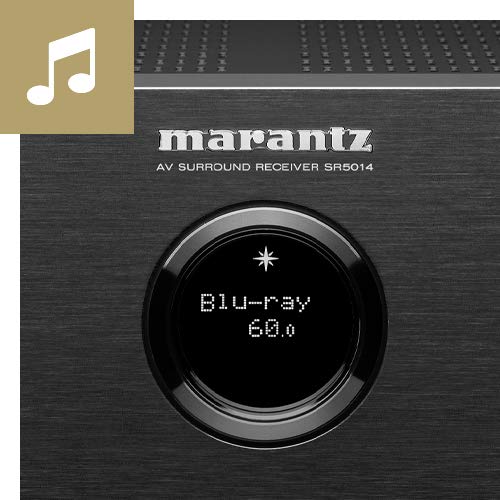
Image: Close-up of the Marantz SR5014's front panel display and controls, highlighting the input selection and volume knobs.
- പവർ ബട്ടൺ: യൂണിറ്റ് ഓണാക്കുകയോ ഓഫാക്കുകയോ ചെയ്യുന്നു.
- ഡിസ്പ്ലേ: Shows current input, volume level, and other status information.
- ഇൻപുട്ട് സെലക്ടർ: Rotates to select different audio/video sources.
- വോളിയം നോബ്: മാസ്റ്റർ വോളിയം ലെവൽ ക്രമീകരിക്കുന്നു.
- ഫോണുകൾ ജാക്ക്: ഹെഡ്ഫോണുകൾ ബന്ധിപ്പിക്കുന്നതിന്.
- USB പോർട്ട്: USB സംഭരണ ഉപകരണങ്ങൾ ബന്ധിപ്പിക്കുന്നതിന്.
- എച്ച്ഡിഎംഐ ഇൻപുട്ട്: Front HDMI input for quick connection of devices like cameras or game consoles.
2.3 പിൻ പാനൽ കണക്ഷനുകൾ
The rear panel houses all the necessary connections for your home theater system, including HDMI, audio, and speaker terminals.
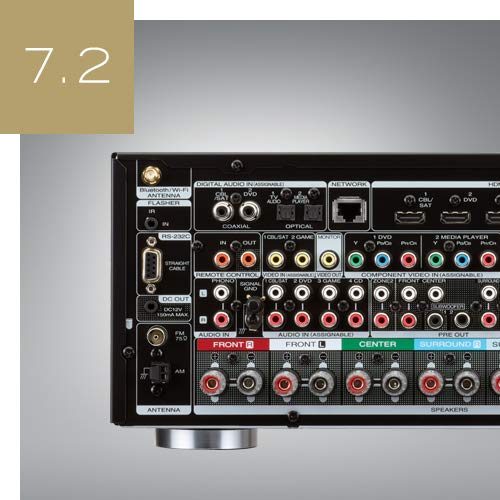
ചിത്രം: പിൻഭാഗം view of the Marantz SR5014 AV Receiver, showing the extensive array of input and output ports, including HDMI, speaker terminals, and network connections.
- HDMI Inputs/Outputs: Connect your video sources (Blu-ray player, game console) and display (TV, projector).
- സ്പീക്കർ ടെർമിനലുകൾ: Connect your speakers (Front, Center, Surround, Surround Back/Height).
- Network Port (Ethernet): വയർഡ് നെറ്റ്വർക്ക് കണക്ഷനായി.
- Wi-Fi/Bluetooth Antennas: For wireless network and Bluetooth connectivity.
- Digital Audio Inputs (Optical/Coaxial): For connecting digital audio sources.
- അനലോഗ് ഓഡിയോ ഇൻപുട്ടുകൾ: അനലോഗ് ഓഡിയോ സ്രോതസ്സുകളെ ബന്ധിപ്പിക്കുന്നതിന്.
- Pre-Outs: For connecting external power amplifiers or powered subwoofers.
3. സജ്ജീകരണ ഗൈഡ്
3.1 അൺപാക്കിംഗും പ്ലേസ്മെന്റും
Carefully remove the receiver from its packaging. Place the receiver on a sturdy, level surface with adequate ventilation around it. Ensure there is at least 10 cm (4 inches) of clear space above the unit and 5 cm (2 inches) on the sides and rear for proper heat dissipation.
3.2 സ്പീക്കർ കണക്ഷനുകൾ
The SR5014 supports 7.2 channel configurations. Connect your speakers to the corresponding terminals on the rear panel. Ensure correct polarity (+ to + and - to -) for all speakers.
- ഫ്രണ്ട് സ്പീക്കറുകൾ (ഇടത്/വലത്): Connect to the FRONT L and FRONT R terminals.
- സെന്റർ സ്പീക്കർ: Connect to the CENTER terminal.
- സറൗണ്ട് സ്പീക്കറുകൾ (L/R): Connect to the SURROUND L and SURROUND R terminals.
- Surround Back / Height Speakers (L/R): Connect to the SURROUND BACK L and SURROUND BACK R terminals. These can be configured as Surround Back or Height speakers in the setup menu.
- സബ് വൂഫറുകൾ: Connect powered subwoofers to the SUBWOOFER 1 and SUBWOOFER 2 PRE OUT jacks using an RCA cable.
3.3 HDMI കണക്ഷനുകൾ
Connect your video sources and display using high-speed HDMI cables.
- Connect your TV or projector to the HDMI MONITOR OUT port. For eARC functionality, ensure your TV's HDMI port also supports eARC and connect to the designated eARC HDMI output on the receiver.
- Connect your Blu-ray player, game console, or other HDMI devices to any of the available എച്ച്ഡിഎംഐ ഇൻപുട്ട് തുറമുഖങ്ങൾ.
3.4 നെറ്റ്വർക്ക് കണക്ഷൻ
A network connection is required for HEOS features, firmware updates, and internet radio.
- വയർഡ് കണക്ഷൻ: നിങ്ങളുടെ റൂട്ടറിൽ നിന്ന് റിസീവറിലെ NETWORK പോർട്ടിലേക്ക് ഒരു ഇതർനെറ്റ് കേബിൾ ബന്ധിപ്പിക്കുക.
- വയർലെസ് കണക്ഷൻ: Attach the two Wi-Fi/Bluetooth antennas to the rear panel. During initial setup, you will be prompted to connect to your wireless network.
3.5 Initial Setup and Audyssey Calibration
After connecting all components, power on the receiver and follow the on-screen setup assistant. This assistant will guide you through speaker configuration, network setup, and input assignments.
The included Audyssey MultEQ XT microphone should be used to perform room acoustic correction. Place the microphone at various listening positions as prompted by the on-screen guide. This process optimizes the sound for your specific room and speaker setup.
4. പ്രവർത്തന നിർദ്ദേശങ്ങൾ
4.1 അടിസ്ഥാന പ്രവർത്തനം
- പവർ ഓൺ/ഓഫ്: മുൻ പാനലിലെ പവർ ബട്ടൺ അല്ലെങ്കിൽ റിമോട്ട് കൺട്രോൾ അമർത്തുക.
- ഇൻപുട്ട് തിരഞ്ഞെടുക്കൽ: Use the INPUT SELECTOR knob on the front panel or the dedicated input buttons on the remote control to switch between connected sources (e.g., Blu-ray, TV Audio, Game).
- വോളിയം ക്രമീകരണം: Use the VOLUME knob on the front panel or the VOLUME +/- buttons on the remote control.
- നിശബ്ദമാക്കുക: Press the MUTE button on the remote control to temporarily silence the audio.
4.2 HEOS Built-in
The SR5014 features HEOS Built-in technology, allowing you to stream music from various online services, network storage, and control multi-room audio.
- ഡൗൺലോഡ് ചെയ്യുക HEOS ആപ്പ് on your smartphone or tablet (available for iOS and Android).
- Open the app and follow the instructions to add your SR5014 to your HEOS system.
- Browse and play music from streaming services (e.g., Spotify, Amazon Music), internet radio, or your local music library.
- Group multiple HEOS-enabled devices to play the same music in perfect synchronization across different rooms.
4.3 ഓഡിയോ മോഡുകൾ
The receiver automatically detects the incoming audio format and applies the appropriate decoding. You can also manually select various sound modes.
- സ്വയമേവ: Automatically selects the optimal sound mode based on the input signal.
- സിനിമ: Optimized for movie soundtracks (e.g., Dolby Atmos, DTS:X, Dolby Surround, DTS Neural:X).
- സംഗീതം: Optimized for music playback (e.g., Stereo, Multi-Channel Stereo).
- ഗെയിം: Optimized for gaming audio.
- Pure Direct: Bypasses all processing for the purest audio signal.
5. പരിപാലനം
5.1 വൃത്തിയാക്കൽ
To maintain the appearance of your receiver, wipe the cabinet and front panel with a soft, dry cloth. Do not use abrasive cleaners, waxes, or solvents as they may damage the finish.
5.2 ഫേംവെയർ അപ്ഡേറ്റുകൾ
Marantz periodically releases firmware updates to improve performance and add new features. Ensure your receiver is connected to the internet to receive these updates.
- You will typically be notified on the display when an update is available.
- Follow the on-screen prompts to initiate the update.
- Do not power off the unit during a firmware update, കാരണം ഇത് കേടുപാടുകൾക്ക് കാരണമായേക്കാം.
6. പ്രശ്നപരിഹാരം
If you experience issues with your Marantz SR5014, refer to the following common problems and solutions.
| പ്രശ്നം | സാധ്യമായ കാരണം | പരിഹാരം |
|---|---|---|
| ശക്തിയില്ല | പവർ കോർഡ് വിച്ഛേദിച്ചു; പവർ ഔട്ട്tage | Check power cord connection; Check household circuit breaker. |
| ശബ്ദമില്ല | Incorrect input selected; Volume too low; Mute engaged; Speaker wires disconnected | Select correct input; Increase volume; Disable mute; Check speaker connections. |
| വീഡിയോ ഇല്ല | Incorrect input selected; HDMI cable issue; TV input not set correctly | Select correct input; Check HDMI cable connections; Ensure TV is on correct HDMI input. |
| നെറ്റ്വർക്ക് കണക്ഷൻ പരാജയപ്പെട്ടു | Incorrect network settings; Router issue; Wi-Fi signal weak | Re-run network setup; Restart router; Ensure Wi-Fi antennas are properly attached. |
| റിമോട്ട് കൺട്രോൾ പ്രവർത്തിക്കുന്നില്ല | Batteries depleted; Obstruction between remote and receiver | Replace batteries; Remove any obstructions. |
If the problem persists after trying these solutions, please contact Marantz customer support.
7 സ്പെസിഫിക്കേഷനുകൾ
| ഫീച്ചർ | വിശദാംശങ്ങൾ |
|---|---|
| ബ്രാൻഡ് | മാരൻ്റ്സ് |
| മോഡൽ | SR5014 / N1B |
| ചാനലുകൾ | 7.2 |
| ഔട്ട്പുട്ട് പവർ | 180 Watts (Speakers Maximum Output Power) |
| ഉൽപ്പന്ന അളവുകൾ (LxWxH) | 44 x 33.8 x 16.11 സെ.മീ |
| ഇനത്തിൻ്റെ ഭാരം | 10 കി.ഗ്രാം |
| കണക്റ്റിവിറ്റി ടെക്നോളജി | HDMI, ഇതർനെറ്റ്, USB |
| HDMI പോർട്ടുകൾ | Multiple (Total HDMI Ports: 1 is listed, but typically more for AV Receiver) |
| പ്രത്യേക സവിശേഷതകൾ | HEOS ബിൽറ്റ്-ഇൻ |
| അനുയോജ്യമായ ഉപകരണങ്ങൾ | സ്പീക്കർ |
| ഓഡിയോ put ട്ട്പുട്ട് മോഡ് | സ്റ്റീരിയോ, സറൗണ്ട് |
| സറൗണ്ട് സൗണ്ട് ചാനൽ കോൺഫിഗറേഷൻ | 5.1 (Note: Product title states 7.2CH, this may be a default or minimum configuration) |
| Media Format Support | 4K |
| റിമോട്ട് ഉൾപ്പെടുന്നു | അതെ |
8. വാറൻ്റിയും പിന്തുണയും
Marantz products are designed for reliability and performance. For information regarding your product's warranty, please refer to the warranty card included in the product packaging or visit the official Marantz webനിങ്ങളുടെ പ്രദേശത്തിനായുള്ള സൈറ്റ്.
For technical support, troubleshooting assistance beyond this manual, or service inquiries, please contact Marantz customer support through their official webസൈറ്റ് അല്ലെങ്കിൽ അംഗീകൃത സേവന കേന്ദ്രങ്ങൾ.
കൂടുതൽ വിവരങ്ങളും പിന്തുണാ ഉറവിടങ്ങളും നിങ്ങൾക്ക് ഇവിടെ കണ്ടെത്താനാകും: www.marantz.com


