1 സുരക്ഷാ വിവരങ്ങൾ
ടെലിവിഷൻ ഉപയോഗിക്കുന്നതിന് മുമ്പ് എല്ലാ സുരക്ഷാ നിർദ്ദേശങ്ങളും ശ്രദ്ധാപൂർവ്വം വായിക്കുക. ഭാവിയിലെ റഫറൻസിനായി ഈ മാനുവൽ സൂക്ഷിക്കുക.
- വൈദ്യുതി വിതരണം: ശരിയായ വോളിയം ഉള്ള ഒരു പവർ സ്രോതസ്സുമായി ടിവി ബന്ധിപ്പിച്ചിട്ടുണ്ടെന്ന് ഉറപ്പാക്കുക.tage ഉൽപ്പന്ന ലേബലിൽ സൂചിപ്പിച്ചിരിക്കുന്നതുപോലെ.
- വെൻ്റിലേഷൻ: വെന്റിലേഷൻ ദ്വാരങ്ങൾ അടയ്ക്കരുത്. ശരിയായ വായുസഞ്ചാരത്തിനായി ടിവിക്ക് ചുറ്റും മതിയായ ഇടം നൽകുക.
- ജലവും ഈർപ്പവും: ടിവിയിൽ മഴയോ ഈർപ്പമോ ഏൽക്കരുത്. പാത്രങ്ങൾ പോലുള്ള ദ്രാവകങ്ങൾ നിറച്ച വസ്തുക്കൾ ടിവിയിൽ വയ്ക്കരുത്.
- വൃത്തിയാക്കൽ: Unplug the TV before cleaning. Use a soft, dry cloth. Avoid liquid cleaners or aerosol sprays.
- പ്ലേസ്മെൻ്റ്: ടിവി ഒരു സ്ഥിരതയുള്ള, നിരപ്പായ പ്രതലത്തിൽ വയ്ക്കുക. നേരിട്ട് സൂര്യപ്രകാശം ഏൽക്കുന്നതോ താപ സ്രോതസ്സുകൾക്ക് സമീപമോ വയ്ക്കുന്നത് ഒഴിവാക്കുക.
- കുട്ടികൾ: കുട്ടികൾ ടിവിയിലോ സ്റ്റാൻഡിലോ കയറുന്നത് തടയാൻ മേൽനോട്ടം വഹിക്കുക.
2. പാക്കേജ് ഉള്ളടക്കം
പാക്കേജിൽ എല്ലാ ഇനങ്ങളും ഉണ്ടെന്ന് ഉറപ്പാക്കുക:
- KMC 43-inch Smart LED TV
- റിമോട്ട് കൺട്രോൾ
- ടിവി സ്റ്റാൻഡ് (2 കഷണങ്ങൾ)
- സ്റ്റാൻഡ് ഇൻസ്റ്റാളേഷനുള്ള സ്ക്രൂകൾ
- പവർ കേബിൾ
- ഉപയോക്തൃ മാനുവൽ
3. സജ്ജീകരണം
3.1. സ്റ്റാൻഡ് ഇൻസ്റ്റലേഷൻ
- കേടുപാടുകൾ സംഭവിക്കാതിരിക്കാൻ ടിവി സ്ക്രീൻ-ഡൗൺ മൃദുവായതും പരന്നതുമായ ഒരു പ്രതലത്തിൽ ശ്രദ്ധാപൂർവ്വം വയ്ക്കുക.
- ഓരോ സ്റ്റാൻഡ് പീസും ടിവിയുടെ അടിയിലുള്ള അനുബന്ധ സ്ലോട്ടുകളുമായി വിന്യസിക്കുക.
- നൽകിയിരിക്കുന്ന സ്ക്രൂകൾ ഉപയോഗിച്ച് സ്റ്റാൻഡ് പീസുകൾ ഉറപ്പിക്കുക. അവ ദൃഢമായി മുറുക്കിയിട്ടുണ്ടെന്ന് ഉറപ്പാക്കുക.
3.2. പെരിഫറലുകൾ ബന്ധിപ്പിക്കുന്നു
The KMC 43-inch Smart LED TV offers various connection options. Refer to the image below for port locations.
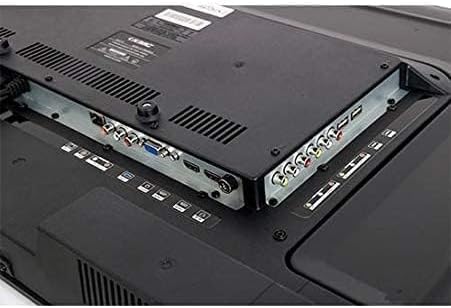
ചിത്രം: Rear panel of the KMC 43-inch Smart LED TV, displaying various input and output ports including HDMI, USB, VGA, and AV connections.
- HDMI പോർട്ടുകൾ: Connect Blu-ray players, game consoles, or set-top boxes using HDMI cables for high-definition audio and video.
- USB പോർട്ടുകൾ: USB ഡ്രൈവുകൾ ഇതിലേക്ക് ചേർക്കുക view ഫോട്ടോകൾ എടുക്കുക, സംഗീതം പ്ലേ ചെയ്യുക, അല്ലെങ്കിൽ വീഡിയോകൾ കാണുക.
- VGA പോർട്ട്: Connect a computer for use as a monitor.
- AV ഇൻപുട്ട്: കമ്പോസിറ്റ് വീഡിയോ, സ്റ്റീരിയോ ഓഡിയോ കേബിളുകൾ ഉപയോഗിച്ച് പഴയ ഉപകരണങ്ങൾ ബന്ധിപ്പിക്കുക.
- ആന്റിന/കേബിൾ ഇൻപുട്ട്: പ്രക്ഷേപണ ചാനലുകൾക്കായി ഒരു ആന്റിന അല്ലെങ്കിൽ കേബിൾ ടിവി സിഗ്നൽ ബന്ധിപ്പിക്കുക.
- പവർ ഇൻപുട്ട്: പവർ കേബിൾ ടിവിയിലേക്കും തുടർന്ന് ഒരു വാൾ ഔട്ട്ലെറ്റിലേക്കും ബന്ധിപ്പിക്കുക.
3.3. പ്രാരംഭ പവർ ഓണും ആദ്യ തവണ സജ്ജീകരണവും
- പവർ കേബിൾ ഒരു മതിൽ ഔട്ട്ലെറ്റിലേക്ക് പ്ലഗ് ചെയ്യുക.
- റിമോട്ട് കൺട്രോളിലോ ടിവിയിലോ പവർ ബട്ടൺ അമർത്തുക.
- നിങ്ങളുടെ ഭാഷ, രാജ്യം, സമയ മേഖല എന്നിവ തിരഞ്ഞെടുക്കാൻ സ്ക്രീനിലെ നിർദ്ദേശങ്ങൾ പാലിക്കുക.
- Connect to your Wi-Fi network by selecting your network and entering the password.
- Scan for available channels if you have an antenna or cable connected.
4. ടിവി പ്രവർത്തിപ്പിക്കൽ
4.1. വിദൂര നിയന്ത്രണ പ്രവർത്തനങ്ങൾ
Familiarize yourself with the remote control buttons for easy navigation:
- ശക്തി: ടിവി ഓണാക്കുകയോ ഓഫാക്കുകയോ ചെയ്യുന്നു.
- ഉറവിടം/ഇൻപുട്ട്: Selects the input source (HDMI, AV, USB, TV).
- വോളിയം +/-: വോളിയം ലെവൽ ക്രമീകരിക്കുന്നു.
- ചാനൽ +/-: ടിവി ചാനലുകൾ മാറ്റുന്നു.
- നാവിഗേഷൻ ബട്ടണുകൾ (മുകളിലേക്ക്/താഴേക്ക്/ഇടത്/വലത്) & ശരി: മെനുകളിലൂടെ നാവിഗേറ്റ് ചെയ്ത് തിരഞ്ഞെടുപ്പുകൾ സ്ഥിരീകരിക്കുന്നു.
- തിരികെ / പുറത്തുകടക്കുക: മുമ്പത്തെ മെനുവിലേക്ക് മടങ്ങുന്നു അല്ലെങ്കിൽ നിലവിലുള്ള മെനുവിൽ നിന്ന് പുറത്തുകടക്കുന്നു.
- വീട്: സ്മാർട്ട് ടിവി ഹോം സ്ക്രീൻ ആക്സസ് ചെയ്യുന്നു.
- Netflix, YouTube, Amazon Prime Video: ഈ സ്ട്രീമിംഗ് സേവനങ്ങളിലേക്ക് വേഗത്തിൽ പ്രവേശിക്കുന്നതിനായി സമർപ്പിത ബട്ടണുകൾ.
4.2. സ്മാർട്ട് ടിവി സവിശേഷതകൾ
Your KMC Smart LED TV allows you to access a variety of online content:
- വൈഫൈയിലേക്ക് കണക്റ്റുചെയ്യുന്നു: From the Home screen, navigate to Settings > Network > Wi-Fi. Select your network and enter the password.
- ആപ്പുകൾ ആക്സസ് ചെയ്യുന്നു: From the Home screen, select the desired application icon (e.g., Netflix, YouTube, Amazon Prime Video) to launch it. Ensure you have an active internet connection.
- Browsing Content: Use the remote control's navigation buttons to browse content within applications.
4.3. ചിത്ര, ശബ്ദ ക്രമീകരണങ്ങൾ
നിങ്ങളുടെ ഇഷ്ടാനുസൃതമാക്കുക viewകേൾക്കലും കേൾക്കൽ അനുഭവവും:
- ചിത്ര മോഡ്: Adjust brightness, contrast, color, and sharpness. Pre-set modes like Standard, Dynamic, Movie, and User are available.
- ശബ്ദ മോഡ്: Select from pre-set sound modes such as Standard, Music, Movie, or User to optimize audio output.
- വീക്ഷണ അനുപാതം: Change the screen aspect ratio to fit different content formats.
5. പരിപാലനം
5.1. ടിവി വൃത്തിയാക്കൽ
- സ്ക്രീൻ: മൃദുവായ, ലിന്റ് രഹിത തുണി ഉപയോഗിച്ച് സ്ക്രീൻ സൌമ്യമായി തുടയ്ക്കുക. കഠിനമായ പാടുകൾക്ക്, ചെറുതായി dampവെള്ളം അല്ലെങ്കിൽ ഒരു പ്രത്യേക സ്ക്രീൻ ക്ലീനർ ഉപയോഗിച്ച് തുണി വൃത്തിയാക്കുക (തുണിയിൽ പ്രയോഗിക്കുക, സ്ക്രീനിൽ നേരിട്ട് പ്രയോഗിക്കരുത്).
- ശരീരം: Wipe the TV body and remote control with a soft, dry cloth.
- ജാഗ്രത: അബ്രാസീവ് ക്ലീനറുകൾ, മെഴുക് അല്ലെങ്കിൽ ലായകങ്ങൾ എന്നിവ ഉപയോഗിക്കരുത്, കാരണം അവ ഫിനിഷിന് കേടുവരുത്തും.
5.2. സോഫ്റ്റ്വെയർ അപ്ഡേറ്റുകൾ
Periodically check for software updates to ensure optimal performance and access to the latest features. Navigate to Settings > System > Software Update and follow the on-screen prompts.
6. പ്രശ്നപരിഹാരം
നിങ്ങൾക്ക് പ്രശ്നങ്ങൾ നേരിടുകയാണെങ്കിൽ, ഇനിപ്പറയുന്ന പൊതുവായ പരിഹാരങ്ങൾ പരിശോധിക്കുക:
| പ്രശ്നം | സാധ്യമായ പരിഹാരം |
|---|---|
| ശക്തിയില്ല | പവർ കേബിൾ ടിവിയിലേക്കും വാൾ ഔട്ട്ലെറ്റിലേക്കും സുരക്ഷിതമായി ബന്ധിപ്പിച്ചിട്ടുണ്ടോയെന്ന് പരിശോധിക്കുക. മറ്റൊരു ഔട്ട്ലെറ്റ് പരീക്ഷിക്കുക. |
| ചിത്രമില്ല, പക്ഷേ ശബ്ദം ഉണ്ട് | Ensure the correct input source is selected. Check cable connections (HDMI, AV). |
| ശബ്ദമില്ല, പക്ഷേ ചിത്രം ഉണ്ട് | വോളിയം ലെവൽ പരിശോധിച്ച് ടിവി മ്യൂട്ട് ചെയ്തിട്ടില്ലെന്ന് ഉറപ്പാക്കുക. ഓഡിയോ കേബിൾ കണക്ഷനുകൾ പരിശോധിക്കുക. |
| റിമോട്ട് കൺട്രോൾ പ്രവർത്തിക്കുന്നില്ല | ബാറ്ററികൾ മാറ്റിസ്ഥാപിക്കുക. റിമോട്ടിനും ടിവിയുടെ ഐആർ സെൻസറിനും ഇടയിൽ തടസ്സങ്ങളൊന്നുമില്ലെന്ന് ഉറപ്പാക്കുക. |
| Wi-Fi-യിലേക്ക് കണക്റ്റുചെയ്യാൻ കഴിയില്ല | Check your Wi-Fi password. Restart your router and the TV. Ensure the TV is within range of your Wi-Fi signal. |
| Slow performance / Apps freezing | Close unused applications. Restart the TV. Check for software updates. |
6.1. ഫാക്ടറി റീസെറ്റ്
If problems persist, a factory reset may resolve them. മുന്നറിയിപ്പ്: This will erase all your settings and installed apps. Navigate to Settings > System > Reset > Factory Reset and confirm.
7 സ്പെസിഫിക്കേഷനുകൾ
| ഫീച്ചർ | വിശദാംശങ്ങൾ |
|---|---|
| ബ്രാൻഡ് | കെ.എം.സി |
| മോഡൽ നമ്പർ | K18M43262SMART |
| സ്ക്രീൻ വലിപ്പം | 43 ഇഞ്ച് |
| ഡിസ്പ്ലേ ടെക്നോളജി | എൽഇഡി |
| റെസലൂഷൻ | 1920x1080 (പൂർണ്ണ എച്ച്ഡി) |
| പുതുക്കിയ നിരക്ക് | 60 Hz |
| വീക്ഷണാനുപാതം | 16:9 |
| കണക്റ്റിവിറ്റി ടെക്നോളജി | USB, HDMI, VGA, AV (Composite) |
| പിന്തുണയ്ക്കുന്ന ഇന്റർനെറ്റ് സേവനങ്ങൾ | ആമസോൺ ഇൻസ്റ്റന്റ് വീഡിയോ, നെറ്റ്ഫ്ലിക്സ്, യൂട്യൂബ് |
| ഉൾപ്പെടുത്തിയ ഘടകങ്ങൾ | Television, Remote Control, Stand |
| Shipping Dimensions (Approx.) | 100 x 61 x 13.5 സെ.മീ |
| ഷിപ്പിംഗ് ഭാരം (ഏകദേശം.) | 10 കി.ഗ്രാം |
8. വാറൻ്റിയും പിന്തുണയും
This KMC Smart LED TV comes with a manufacturer's warranty. Please refer to the warranty card included in your package for specific terms and conditions, including warranty period and coverage details.
For technical support, service, or warranty claims, please contact KMC customer service through the contact information provided on your warranty card or the official KMC webസൈറ്റ്.


