1. ആമുഖം
This manual provides essential information for the installation, operation, and maintenance of your FORTINET FortiGate 601E Network Security/Firewall Appliance. The FortiGate 601E is designed to deliver next-generation firewall capabilities for mid-sized to large enterprises, offering robust protection against cyber threats with high performance and deep visibility. Please read this manual thoroughly before using the device to ensure proper setup and functionality.
2 സുരക്ഷാ വിവരങ്ങൾ
Observe the following safety precautions to prevent damage to the device or injury to personnel.
- അമിതമായി ചൂടാകുന്നത് തടയാൻ, ഉപകരണം നന്നായി വായുസഞ്ചാരമുള്ള സ്ഥലത്ത് സ്ഥാപിച്ചിട്ടുണ്ടെന്ന് ഉറപ്പാക്കുക.
- Use only the power supply provided or specified by FORTINET.
- ഈർപ്പം അല്ലെങ്കിൽ അങ്ങേയറ്റത്തെ താപനിലയിലേക്ക് ഉപകരണം തുറന്നുകാട്ടരുത്.
- ഏതെങ്കിലും അറ്റകുറ്റപ്പണികൾ അല്ലെങ്കിൽ ഇൻസ്റ്റാളേഷൻ നടപടിക്രമങ്ങൾ നടത്തുന്നതിന് മുമ്പ് വൈദ്യുതി വിച്ഛേദിക്കുക.
- ഈ ഉപകരണം ഇൻഡോർ ഉപയോഗത്തിന് മാത്രമുള്ളതാണ്.
3. പാക്കേജ് ഉള്ളടക്കം
പാക്കേജിൽ എല്ലാ ഇനങ്ങളും ഉണ്ടെന്ന് ഉറപ്പാക്കുക:
- FORTINET FortiGate 601E Appliance
- പവർ കേബിൾ(കൾ)
- Rack-mount Kit (if applicable)
- ദ്രുത ആരംഭ ഗൈഡ്
കുറിപ്പ്: The provided product information only lists "Base" as package contents. This list includes typical accessories for such a device.
4. ഉൽപ്പന്നം കഴിഞ്ഞുview
The FortiGate 601E is a rack-mountable network security appliance. Below are descriptions of its front and rear panels.
4.1 ഫ്രണ്ട് പാനൽ

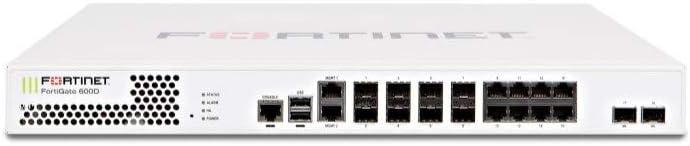
ചിത്ര വിവരണം: This image displays the front panel of the FortiGate 601E appliance. It is a white, rectangular device with various ports and indicator lights. From left to right, it features ventilation grilles, status LEDs (Power, Alarm, HA, Status), two USB ports, two console ports (RJ45 and USB), two management ports (MGMT1, MGMT2), multiple RJ45 Ethernet ports (labeled 1-10), and several SFP/SFP+ ports (labeled 1-10). The Fortinet logo and "FortiGate 601E" model name are visible on the left side.
മുൻ പാനലിൽ ഇവ ഉൾപ്പെടുന്നു:
- നില LED-കൾ: Indicate power, system status, and alarm conditions.
- USB പോർട്ടുകൾ: ബാഹ്യ സംഭരണമോ മറ്റ് USB ഉപകരണങ്ങളോ ബന്ധിപ്പിക്കുന്നതിന്.
- കൺസോൾ പോർട്ടുകൾ: RJ45 and USB for local management access.
- Management Ports (MGMT1, MGMT2): Dedicated Ethernet ports for device management.
- Ethernet Ports (RJ45): 10 x 1000Base-T ports for network connectivity.
- SFP/SFP+ Ports: 10 x 1000Base-X / 10GBase-X expansion slots for fiber or high-speed copper modules.
4.2 പിൻ പാനൽ
ചിത്ര വിവരണം: This image shows the rear panel of the FortiGate 601E appliance. It is a white, rectangular device. The rear panel primarily features two power supply unit (PSU) bays, each with a power input connector and a retention clip. There are also ventilation grilles on both sides. The overall design is clean, indicating a focus on power redundancy and cooling.
പിൻ പാനലിൽ സാധാരണയായി ഇവ ഉൾപ്പെടുന്നു:
- Power Supply Units (PSUs): Dual redundant power supply bays for high availability.
- വെൻ്റിലേഷൻ: Exhaust vents for cooling.
5. സജ്ജീകരണം
Follow these steps to properly install and power on your FortiGate 601E appliance.
- റാക്ക് ഇൻസ്റ്റാളേഷൻ:
- Attach the provided rack-mount ears to the sides of the FortiGate unit using the screws.
- Secure the FortiGate unit into a standard 19-inch equipment rack using appropriate rack screws. Ensure adequate airflow around the unit.
- പവർ ബന്ധിപ്പിക്കുക:
- Connect the power cable(s) to the power supply unit(s) at the rear of the appliance.
- Plug the other end of the power cable(s) into a grounded electrical outlet or a power distribution unit (PDU).
- മുൻ പാനലിലെ പവർ എൽഇഡി പ്രകാശിക്കണം.
- നെറ്റ്വർക്ക് കേബിളുകൾ ബന്ധിപ്പിക്കുക:
- Connect your network cables to the appropriate Ethernet or SFP/SFP+ ports on the front panel as per your network design.
- For initial configuration, connect a management workstation to one of the MGMT ports or a console port.
- പ്രാരംഭ കോൺഫിഗറേഷൻ:
- Refer to the FortiGate documentation for detailed instructions on initial configuration via the web-based manager or command-line interface (CLI).
- Typically, you will access the device via a web browser using a default IP address (e.g., 192.168.1.99) or via a serial console connection.
6. Operating the FortiGate 601E
Once the FortiGate 601E is powered on and initially configured, you can manage its operations through the FortiGate web-based manager or CLI.
- Web-based Manager: Access the FortiGate GUI by entering its IP address in a web browser. This interface allows for comprehensive configuration of security policies, network settings, VPNs, and more.
- കമാൻഡ് ലൈൻ ഇന്റർഫേസ് (CLI): For advanced configurations and troubleshooting, connect via SSH or the console port.
- ഫേംവെയർ അപ്ഡേറ്റുകൾ: Regularly update the FortiGate firmware to ensure optimal performance and security. Download firmware from the Fortinet support portal.
- Security Policies: Configure firewall policies to control traffic flow and apply security profiles (antivirus, intrusion prevention, web filtering) to protect your network.
7. പരിപാലനം
Regular maintenance ensures the longevity and optimal performance of your FortiGate 601E.
- പരിസ്ഥിതി നിയന്ത്രണം: Maintain a stable operating environment with appropriate temperature and humidity.
- വെൻ്റിലേഷൻ: Ensure that the ventilation grilles are clear of obstructions to allow for proper airflow.
- Firmware and Signature Updates: Keep the device's firmware and security signatures up-to-date to protect against the latest threats.
- കോൺഫിഗറേഷൻ ബാക്കപ്പുകൾ: Regularly back up your FortiGate configuration to a secure location.
- ശാരീരിക പരിശോധന: Periodically inspect cables and connections for any signs of wear or damage.
8. പ്രശ്നപരിഹാരം
നിങ്ങൾ നേരിട്ടേക്കാവുന്ന പൊതുവായ പ്രശ്നങ്ങളെ ഈ വിഭാഗം അഭിസംബോധന ചെയ്യുന്നു.
| പ്രശ്നം | സാധ്യമായ കാരണം | പരിഹാരം |
|---|---|---|
| ഉപകരണം പവർ ഓണാക്കുന്നില്ല. | No power, faulty power cable, or PSU issue. | Check power cable connections. Ensure the power outlet is functional. Test with a different power cable or PSU if available. |
| ആക്സസ് ചെയ്യാൻ കഴിയില്ല web-അടിസ്ഥാന മാനേജർ. | Incorrect IP address, network connectivity issue, or firewall blocking access. | Verify the FortiGate's IP address. Check network cable connections. Ensure your workstation is on the same subnet or has a route to the FortiGate. Try accessing via console. |
| Network traffic not flowing. | Incorrect firewall policies, interface configuration errors, or cable issues. | Review firewall policies. Check interface status and configuration. Verify network cable integrity. |
9 സ്പെസിഫിക്കേഷനുകൾ
Key technical specifications for the FortiGate 601E appliance:
- മോഡൽ: FG-601E
- അളവുകൾ: 15 x 17 x 2 ഇഞ്ച് (ഉൽപ്പന്ന അളവുകൾ)
- ഇഥർനെറ്റ് പോർട്ടുകൾ: 10 x 1000Base-T (RJ-45)
- വിപുലീകരണ സ്ലോട്ടുകൾ: 10 x 10GBase-X / 1000Base-X (SFP/SFP+)
- ഫോം ഘടകം: 1U റാക്ക്-മൗണ്ടബിൾ
- നിർമ്മാതാവ്: ഫോർട്ടിനെറ്റ്
10. വാറൻ്റിയും പിന്തുണയും
For warranty information and technical support, please refer to the official FORTINET website or contact your authorized FORTINET reseller.
- FORTINET Support Portal: https://support.fortinet.com
- ഡോക്യുമെൻ്റേഷൻ: https://docs.fortinet.com
Product registration may be required to activate your warranty and access full support services.


