ആമുഖം
Thank you for choosing the Tchibo Cafissimo Capsule Machine. This manual provides essential information for the safe and efficient use of your appliance. Please read it thoroughly before first use and keep it for future reference.
This machine is designed to prepare various coffee beverages, including espresso, crema, and filter coffee, as well as tea, using Tchibo Cafissimo capsules.
പ്രധാനപ്പെട്ട സുരക്ഷാ നിർദ്ദേശങ്ങൾ
- ഉപകരണം പ്രവർത്തിപ്പിക്കുന്നതിന് മുമ്പ് എല്ലാ നിർദ്ദേശങ്ങളും വായിക്കുക.
- അപ്ലയൻസ്, ചരട്, പ്ലഗ് എന്നിവ വെള്ളത്തിലോ മറ്റ് ദ്രാവകങ്ങളിലോ മുക്കരുത്.
- കുട്ടികളോ സമീപത്തോ ഏതെങ്കിലും ഉപകരണം ഉപയോഗിക്കുമ്പോൾ സൂക്ഷ്മ മേൽനോട്ടം ആവശ്യമാണ്.
- ഉപയോഗത്തിലില്ലാത്തപ്പോഴും വൃത്തിയാക്കുന്നതിന് മുമ്പും ഔട്ട്ലെറ്റിൽ നിന്ന് അൺപ്ലഗ് ചെയ്യുക. ഭാഗങ്ങൾ ധരിക്കുന്നതിനോ എടുക്കുന്നതിനോ മുമ്പും ഉപകരണം വൃത്തിയാക്കുന്നതിന് മുമ്പും തണുപ്പിക്കാൻ അനുവദിക്കുക.
- കേടായ കോർഡ് അല്ലെങ്കിൽ പ്ലഗ് ഉപയോഗിച്ച് അല്ലെങ്കിൽ ഉപകരണത്തിൻ്റെ തകരാറുകൾക്ക് ശേഷം അല്ലെങ്കിൽ ഏതെങ്കിലും വിധത്തിൽ കേടുപാടുകൾ സംഭവിച്ചതിന് ശേഷം ഒരു ഉപകരണവും പ്രവർത്തിപ്പിക്കരുത്.
- അപ്ലയൻസ് നിർമ്മാതാവ് ശുപാർശ ചെയ്യാത്ത ആക്സസറി അറ്റാച്ച്മെൻ്റുകളുടെ ഉപയോഗം തീയോ വൈദ്യുതാഘാതമോ വ്യക്തികൾക്ക് പരിക്കോ ഉണ്ടാക്കാം.
- വെളിയിൽ ഉപയോഗിക്കരുത്.
- മേശയുടെയോ കൗണ്ടറിൻ്റെയോ അരികിൽ ചരട് തൂങ്ങിക്കിടക്കാനോ ചൂടുള്ള പ്രതലങ്ങളിൽ തൊടാനോ അനുവദിക്കരുത്.
- ചൂടുള്ള വാതകത്തിലോ ഇലക്ട്രിക് ബർണറിലോ ചൂടാക്കിയ അടുപ്പിലോ വയ്ക്കരുത്.
- ആദ്യം എപ്പോഴും പ്ലഗ് ഉപകരണത്തിൽ ഘടിപ്പിക്കുക, തുടർന്ന് വയർ ഔട്ട്ലെറ്റിൽ കോർഡ് പ്ലഗ് ചെയ്യുക. വിച്ഛേദിക്കാൻ, ഏതെങ്കിലും നിയന്ത്രണം "ഓഫ്" ആക്കുക, തുടർന്ന് വയർ ഔട്ട്ലെറ്റിൽ നിന്ന് പ്ലഗ് നീക്കം ചെയ്യുക.
- ഉദ്ദേശിച്ച ഉപയോഗത്തിനല്ലാതെ ഉപകരണം ഉപയോഗിക്കരുത്.
- Scalding may occur if the capsule holder is opened during the brewing cycle.
ഉൽപ്പന്നം കഴിഞ്ഞുview
Familiarize yourself with the components of your Tchibo Cafissimo capsule machine.

ചിത്രം 1: ഫ്രണ്ട് view of the Tchibo Cafissimo capsule machine. It shows the capsule insertion area, the coffee spout, and a glass cup placed on the drip tray, filled with coffee. The machine is white with black accents.
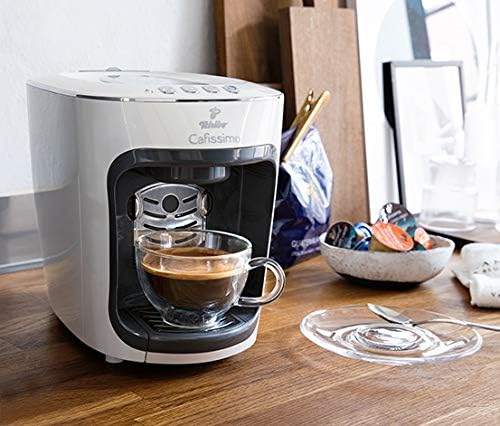
ചിത്രം 2: The Tchibo Cafissimo capsule machine positioned on a wooden kitchen counter. A glass cup with coffee is under the spout, and various coffee capsules are visible in a bowl nearby. This image provides a context of the machine in use.
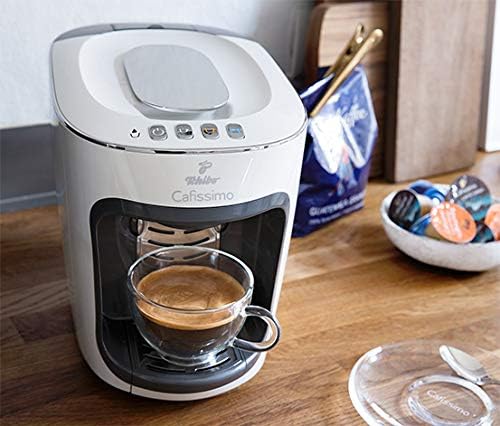
ചിത്രം 3: മറ്റൊന്ന് view of the Tchibo Cafissimo capsule machine on a kitchen counter, similar to Image 2, but from a slightly different angle. It highlights the machine's compact design and its integration into a kitchen environment, with a cup of coffee ready.

ചിത്രം 4: വശം view of the Tchibo Cafissimo capsule machine, showcasing its sleek, elongated design. A glass cup with coffee is visible under the spout, emphasizing the machine's profile and footprint.
സജ്ജമാക്കുക
- അൺപാക്ക് ചെയ്യുന്നു: Carefully remove all packaging materials. Ensure all parts are present.
- പ്ലേസ്മെൻ്റ്: മെഷീൻ ഒരു സ്ഥിരതയുള്ള, നിരപ്പായ പ്രതലത്തിൽ, താപ സ്രോതസ്സുകളിൽ നിന്നും വെള്ളത്തിൽ നിന്നും അകലെ വയ്ക്കുക.
- ജലസംഭരണി: Fill the water reservoir (capacity: 650 ml) with fresh, cold drinking water. Ensure it is properly seated.
- പവർ കണക്ഷൻ: അനുയോജ്യമായ ഒരു മതിൽ ഔട്ട്ലെറ്റിലേക്ക് പവർ കോർഡ് പ്ലഗ് ചെയ്യുക.
- പ്രാരംഭ കഴുകൽ: Before first use, perform an initial rinse cycle without a capsule to clean the internal system. Refer to the "Operating" section for brewing instructions.
- ചൂടാക്കുക: The machine has a warm-up time of approximately 40 seconds. The indicator lights will signal when it's ready for use.
പ്രവർത്തന നിർദ്ദേശങ്ങൾ
Brewing Coffee or Tea
- വാട്ടർ ടാങ്ക് നിറയ്ക്കുക: ജലസംഭരണിയിൽ ശുദ്ധജലം നിറച്ചിട്ടുണ്ടെന്ന് ഉറപ്പാക്കുക.
- പവർ ഓൺ: Turn on the machine. Wait for the indicator lights to show it's ready (approx. 40 seconds warm-up).
- കാപ്സ്യൂൾ ചേർക്കുക: Open the capsule holder. Place one Tchibo Cafissimo capsule into the holder. The magnetic function ensures easy and secure placement. Close the capsule holder firmly.
- പ്ലേസ് കപ്പ്: Position your cup or espresso glass on the magnetic drip tray. The tray is designed to accommodate various cup sizes.
- പാനീയം തിരഞ്ഞെടുക്കുക: Choose your desired beverage by pressing one of the three brew buttons:
- Button 1: Espresso
- Button 2: Crema / Filter Coffee
- Button 3: Tea
- Adjust Water Volume (Programmable): The water volume for each beverage can be individually programmed to control the aroma and intensity of your coffee or tea. Refer to the machine's specific programming instructions (usually involves holding down the brew button until desired volume is reached, then releasing to save).
- ബ്രൂവിംഗ് പ്രക്രിയ: The machine will begin brewing. The process will stop automatically once the programmed volume is dispensed.
- Capsule Ejection: After brewing, open the capsule holder. The used capsule will automatically drop into the internal capsule box, which can hold up to 4 capsules.
- സ്റ്റാൻഡ്ബൈ മോഡ്: The machine will enter standby mode after 9 minutes of inactivity to save energy.
പരിപാലനവും ശുചീകരണവും
പ്രതിദിന ക്ലീനിംഗ്
- Drip Tray and Capsule Box: Regularly empty and clean the drip tray and the used capsule box. These components are typically removable and can be rinsed with warm water and mild detergent.
- ജലസംഭരണി: Clean the water reservoir periodically with warm water and mild detergent. Rinse thoroughly.
- പുറം: ഒരു സോഫ്റ്റ്, ഡി ഉപയോഗിച്ച് മെഷീൻ്റെ പുറംഭാഗം തുടയ്ക്കുകamp തുണി. ഉരച്ചിലുകളുള്ള ക്ലീനറുകളോ ലായകങ്ങളോ ഉപയോഗിക്കരുത്.
ഡെസ്കലിംഗ്
The machine features a descaling reminder and an integrated descaling function. Regular descaling is crucial for maintaining optimal performance and extending the lifespan of your machine, especially in areas with hard water.
- ഡെസ്കലിംഗ് റിമൈൻഡർ: The machine will indicate when descaling is required (refer to your machine's specific light indicators for this).
- തയ്യാറാക്കൽ: Empty the water reservoir and fill it with a descaling solution suitable for coffee machines, following the descaler manufacturer's instructions. Place a large container under the coffee spout.
- ഡെസ്കലിംഗ് ആരംഭിക്കുക: Initiate the integrated descaling program. This usually involves a specific button combination or holding down a button for a few seconds. Consult your machine's quick start guide or the full manual for the exact procedure.
- റിൻസ് സൈക്കിൾ: After the descaling cycle is complete, rinse the water reservoir thoroughly and fill it with fresh water. Run at least two full water cycles through the machine to remove any descaling solution residue.
ട്രബിൾഷൂട്ടിംഗ്
This section addresses common issues you might encounter with your Tchibo Cafissimo capsule machine. For more complex problems, please contact customer support.
- മെഷീൻ ഓണാക്കുന്നില്ല:
- പ്രവർത്തിക്കുന്ന ഒരു ഇലക്ട്രിക്കൽ ഔട്ട്ലെറ്റിൽ പവർ കോർഡ് സുരക്ഷിതമായി പ്ലഗ് ചെയ്തിട്ടുണ്ടെന്ന് ഉറപ്പാക്കുക.
- Check if the main power switch (if present) is in the 'ON' position.
- No coffee dispensed / Slow flow:
- Check if the water reservoir is filled and correctly seated.
- Ensure a capsule is properly inserted and the capsule holder is closed.
- The machine may need descaling. Follow the descaling instructions in the Maintenance section.
- Clean the coffee spout for any blockages.
- Leaking water:
- Ensure the water reservoir is correctly positioned and not overfilled.
- Check the drip tray for proper placement.
- If leaking persists, contact customer support.
- Coffee not hot enough:
- Pre-heat your cup by rinsing it with hot water.
- Ensure the machine has completed its warm-up cycle.
- Descaling may improve heating efficiency.
സ്പെസിഫിക്കേഷനുകൾ
| ബ്രാൻഡ് | ടിച്ചിബോ |
| മോഡൽ നമ്പർ | 370892 |
| ഉൽപ്പന്ന അളവുകൾ | 18 x 29.8 x 22.3 സെ.മീ |
| ഭാരം | 4.67 കി.ഗ്രാം |
| വാട്ടർ ടാങ്ക് കപ്പാസിറ്റി | 650 മില്ലി ലിറ്റർ |
| മെറ്റീരിയൽ | പ്ലാസ്റ്റിക് |
| പ്രത്യേക സവിശേഷതകൾ | Programmable, Timer (Standby) |
| പ്രത്യേക ഉപയോഗം | എസ്പ്രെസോ |
| ഹ്യൂമൻ ഇന്റർഫേസ് ഇൻപുട്ട് | ബട്ടണുകൾ |
| ASIN | B07VB36G33 |
| GTIN | 04006083708921 |
| ആദ്യം ലഭ്യമായ തീയതി | ഫെബ്രുവരി 12, 2020 |
വാറൻ്റിയും പിന്തുണയും
Specific warranty information and detailed customer support contact details are not provided in the available product data. Please refer to the documentation included with your purchase or visit the official Tchibo website for warranty terms and customer service contact information.


