1. ആമുഖം
The Kami Nio Wireless Bluetooth Speaker is designed to provide high-quality audio from your mobile device. This manual provides essential information for setting up, operating, and maintaining your speaker, ensuring optimal performance and longevity.
പ്രധാന സവിശേഷതകൾ:
- Wireless Bluetooth connectivity with a 32 ft. signal range.
- ഒറ്റ ചാർജിൽ 6 മണിക്കൂർ വരെ പ്ലേടൈം.
- Stereo sound with dual drivers for enhanced audio experience.
- Integrated passive subwoofer bass amplifier for rich low-end frequencies.
- Convenient volume and music control directly on the device.
2. പാക്കേജ് ഉള്ളടക്കം
പാക്കേജിൽ ഇനിപ്പറയുന്ന ഇനങ്ങൾ ഉണ്ടോ എന്ന് പരിശോധിക്കുക:
- Kami Nio Wireless Bluetooth Speaker (1 unit)
- USB Charging Cable (quantity not specified, typically one)
- ഉപയോക്തൃ മാനുവൽ (ഈ പ്രമാണം)
3 സുരക്ഷാ വിവരങ്ങൾ
സുരക്ഷിതമായ പ്രവർത്തനം ഉറപ്പാക്കുന്നതിനും കേടുപാടുകൾ തടയുന്നതിനും, ദയവായി ഇനിപ്പറയുന്ന മുൻകരുതലുകൾ പാലിക്കുക:
- സ്പീക്കറിനെ വെള്ളം, ഈർപ്പം അല്ലെങ്കിൽ തീവ്രമായ താപനില എന്നിവയിൽ തുറന്നുകാട്ടരുത്.
- സ്പീക്കറെ ശക്തമായ ആഘാതങ്ങൾക്ക് വിധേയമാക്കുകയോ താഴെയിടുകയോ ചെയ്യുന്നത് ഒഴിവാക്കുക.
- Do not attempt to disassemble or repair the speaker yourself. Contact qualified service personnel.
- റേഡിയേറ്ററുകൾ, സ്റ്റൗകൾ, അല്ലെങ്കിൽ മറ്റ് ചൂട് ഉൽപ്പാദിപ്പിക്കുന്ന ഉപകരണങ്ങൾ തുടങ്ങിയ താപ സ്രോതസ്സുകളിൽ നിന്ന് സ്പീക്കറിനെ അകറ്റി നിർത്തുക.
- നിർദ്ദിഷ്ട ചാർജിംഗ് കേബിളും പവർ സ്രോതസ്സും മാത്രം ഉപയോഗിക്കുക.
4. ഉൽപ്പന്നം കഴിഞ്ഞുview
Familiarize yourself with the physical components and controls of your Kami Nio speaker.

ചിത്രം 4.1: ഫ്രണ്ട് view of the Kami Nio Wireless Bluetooth Speaker, showcasing its gray fabric grille and rounded rectangular shape.
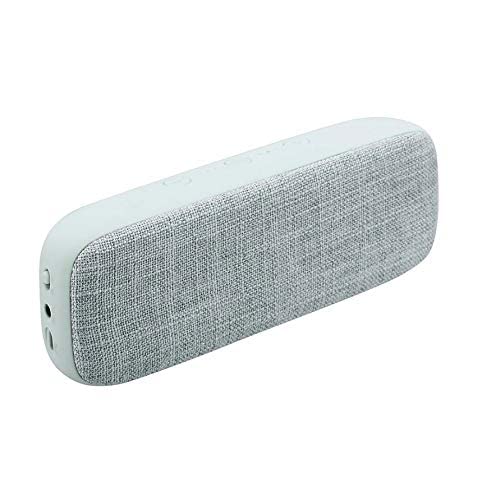
ചിത്രം 4.2: കോണാകൃതിയിലുള്ളത് view of the Kami Nio Wireless Bluetooth Speaker, highlighting the textured gray fabric covering the speaker grille and the smooth gray casing.
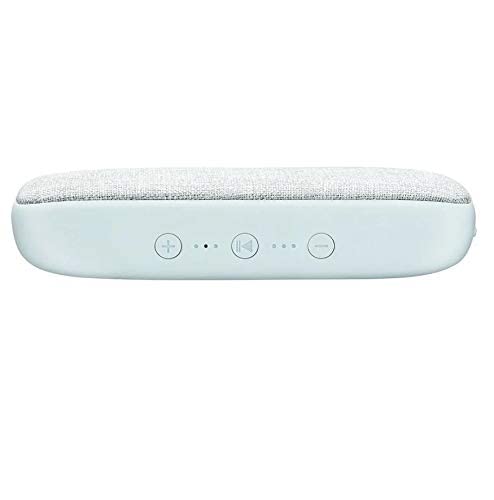
ചിത്രം 4.3: മുകളിൽ view of the Kami Nio Wireless Bluetooth Speaker, displaying the control panel with buttons for volume up (+), previous track (|<), play/pause/next track (>||), and volume down (-), along with LED indicators.
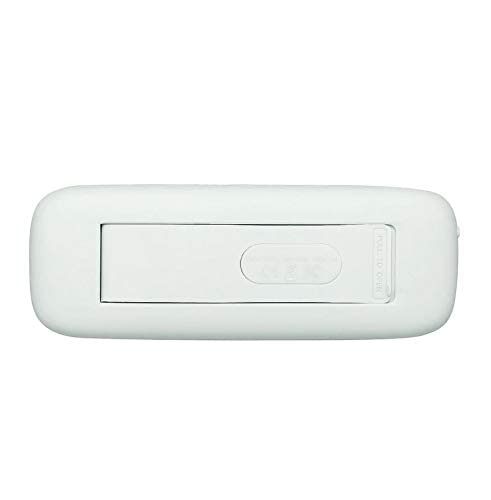
ചിത്രം 4.4: താഴെ view of the Kami Nio Wireless Bluetooth Speaker, revealing a compartment with a 'PULL TO OPEN' tab, likely for battery access or a port cover.
5. സജ്ജീകരണം
5.1. സ്പീക്കറിൽ നിന്ന് നിരക്ക് ഈടാക്കുന്നു
- Locate the charging port on the speaker (refer to Figure 4.4 for potential port location).
- നൽകിയിരിക്കുന്ന USB ചാർജിംഗ് കേബിൾ സ്പീക്കറിന്റെ ചാർജിംഗ് പോർട്ടുമായി ബന്ധിപ്പിക്കുക.
- USB കേബിളിന്റെ മറ്റേ അറ്റം അനുയോജ്യമായ ഒരു USB പവർ അഡാപ്റ്ററുമായി (ഉൾപ്പെടുത്തിയിട്ടില്ല) അല്ലെങ്കിൽ കമ്പ്യൂട്ടറിന്റെ USB പോർട്ടുമായി ബന്ധിപ്പിക്കുക.
- The LED indicator (refer to Figure 4.3) will illuminate to show charging status. It typically turns off or changes color when fully charged.
- പൂർണ്ണമായി ചാർജ് ചെയ്യാൻ ഏകദേശം 2-3 മണിക്കൂർ അനുവദിക്കുക.
5.2. ബ്ലൂടൂത്ത് ജോടിയാക്കൽ
- പവർ ഓൺ: Press and hold the power button (location not explicitly shown, typically integrated with play/pause or a separate button) until the speaker powers on and the Bluetooth indicator LED starts flashing, indicating pairing mode.
- ബ്ലൂടൂത്ത് സജീവമാക്കുക: On your mobile device (smartphone, tablet, laptop), go to the Bluetooth settings and ensure Bluetooth is enabled.
- സ്പീക്കർ തിരഞ്ഞെടുക്കുക: In the list of available devices, select "Kami Nio" (or similar name).
- കണക്ഷൻ സ്ഥിരീകരിക്കുക: Once paired, the Bluetooth indicator LED on the speaker will stop flashing and remain solid, and you may hear an audible confirmation tone.
- Your Kami Nio speaker is now ready to play audio.
6. സ്പീക്കർ പ്രവർത്തിപ്പിക്കൽ
Once paired, you can control your music directly from the speaker or your connected device.
6.1. Basic Controls (Refer to Figure 4.3):
- പവർ ഓൺ/ഓഫ്: Press and hold the power button (often combined with Play/Pause) for a few seconds.
- പ്ലേ/താൽക്കാലികമായി നിർത്തുക: Press the Play/Pause button (▶‖) once to play or pause audio.
- അടുത്ത ട്രാക്ക്: Press and hold the Play/Pause button (▶‖) for 2 seconds to skip to the next track.
- മുമ്പത്തെ ട്രാക്ക്: Press the Previous Track button (|<) once to go to the beginning of the current track or the previous track.
- വോളിയം കൂട്ടുക: Press the Volume Up button (+) to increase the volume.
- വോളിയം താഴേക്ക്: Press the Volume Down button (-) to decrease the volume.
7. പരിപാലനം
Proper care will extend the life of your Kami Nio speaker.
- വൃത്തിയാക്കൽ: Use a soft, dry cloth to wipe the exterior of the speaker. Do not use abrasive cleaners, solvents, or harsh chemicals.
- സംഭരണം: ദീർഘനേരം ഉപയോഗിക്കാത്തപ്പോൾ, സ്പീക്കർ തണുത്തതും വരണ്ടതുമായ സ്ഥലത്ത് സൂക്ഷിക്കുക, നേരിട്ടുള്ള സൂര്യപ്രകാശത്തിൽ നിന്നും കടുത്ത താപനിലയിൽ നിന്നും അകറ്റി നിർത്തുക.
- ബാറ്ററി കെയർ: To maintain battery health, avoid fully discharging the battery frequently. Charge the speaker regularly, even if not in use.
8. പ്രശ്നപരിഹാരം
If you encounter issues with your speaker, try the following solutions:
- ശക്തിയില്ല: Ensure the speaker is charged. Connect it to a power source and allow it to charge for at least 30 minutes before attempting to power on.
- ജോടിയാക്കാൻ കഴിയില്ല:
- Ensure the speaker is in pairing mode (Bluetooth LED flashing).
- നിങ്ങളുടെ ഉപകരണത്തിൽ ബ്ലൂടൂത്ത് പ്രവർത്തനക്ഷമമാക്കിയിട്ടുണ്ടെന്ന് ഉറപ്പാക്കുക.
- Move the speaker closer to your device (within 32 ft.).
- സ്പീക്കറും നിങ്ങളുടെ ഉപകരണത്തിന്റെ ബ്ലൂടൂത്തും ഓഫാക്കി ഓണാക്കുക.
- Forget/remove the speaker from your device's Bluetooth list and try pairing again.
- ശബ്ദമില്ല:
- സ്പീക്കറിലും കണക്റ്റുചെയ്ത ഉപകരണത്തിലും വോളിയം ലെവലുകൾ പരിശോധിക്കുക.
- സ്പീക്കർ വിജയകരമായി ജോടിയാക്കിയിട്ടുണ്ടെന്നും നിങ്ങളുടെ ഉപകരണവുമായി ബന്ധിപ്പിച്ചിട്ടുണ്ടെന്നും ഉറപ്പാക്കുക.
- Try playing audio from a different application or source on your device.
- Poor Sound Quality/Intermittent Connection:
- സ്പീക്കർ നിങ്ങളുടെ ഉപകരണത്തിന് അടുത്തേക്ക് നീക്കുക.
- Avoid obstacles between the speaker and your device (e.g., walls, large metal objects).
- മറ്റ് വയർലെസ് ഉപകരണങ്ങളിൽ നിന്നുള്ള (വൈ-ഫൈ റൂട്ടറുകൾ, മൈക്രോവേവ്) ഇടപെടലുകൾ കുറയ്ക്കുക.
- സ്പീക്കർ പൂർണ്ണമായി ചാർജ്ജ് ചെയ്തിട്ടുണ്ടെന്ന് ഉറപ്പാക്കുക.
9 സ്പെസിഫിക്കേഷനുകൾ
| ഫീച്ചർ | സ്പെസിഫിക്കേഷൻ |
|---|---|
| മോഡലിൻ്റെ പേര് | നിയോ |
| ഇനം മോഡൽ നമ്പർ | KNBTSGY |
| ബ്രാൻഡ് | കാമി |
| സ്പീക്കർ തരം | സബ് വൂഫർ |
| പ്രത്യേക ഫീച്ചർ | ബ്ലൂടൂത്ത്, വയർലെസ് |
| വയർലെസ് കമ്മ്യൂണിക്കേഷൻ ടെക്നോളജി | ബ്ലൂടൂത്ത് |
| കണക്റ്റിവിറ്റി ടെക്നോളജി | ബ്ലൂടൂത്ത് |
| അനുയോജ്യമായ ഉപകരണങ്ങൾ | യൂണിവേഴ്സൽ |
| പവർ ഉറവിടം | ബാറ്ററി പവർ |
| ഓഡിയോ put ട്ട്പുട്ട് മോഡ് | സ്റ്റീരിയോ |
| സറൗണ്ട് സൗണ്ട് ചാനൽ കോൺഫിഗറേഷൻ | 1 |
| മൗണ്ടിംഗ് തരം | ടേബിൾടോപ്പ് മൗണ്ട് |
| ഉൽപ്പന്ന അളവുകൾ (LxWxH) | 12.3 x 3.7 x 8.5 സെ.മീ |
| ഇനത്തിൻ്റെ ഭാരം | 562 ഗ്രാം (0.56 കിലോഗ്രാം) |
| നിർമ്മാതാവ് | Teqtronix International General Trading Llc |
| മാതൃരാജ്യം | യുഎസ്എ |
10. വാറൻ്റിയും പിന്തുണയും
വാറന്റി വിവരങ്ങൾക്കും ഉപഭോക്തൃ പിന്തുണയ്ക്കും, നിങ്ങളുടെ വാങ്ങലിനൊപ്പം നൽകിയിരിക്കുന്ന ഡോക്യുമെന്റേഷൻ പരിശോധിക്കുകയോ റീട്ടെയിലറെ ബന്ധപ്പെടുകയോ ചെയ്യുക. ഏതെങ്കിലും വാറന്റി ക്ലെയിമുകൾക്കായി നിങ്ങളുടെ വാങ്ങിയതിന്റെ തെളിവ് സൂക്ഷിക്കുക.
For further assistance, you may also visit the official Kami webസൈറ്റ് അല്ലെങ്കിൽ അവരുടെ ഉപഭോക്തൃ സേവന വിഭാഗവുമായി ബന്ധപ്പെടുക.


