1. ആമുഖം
Thank you for choosing the SV3C 5MP HD Wi-Fi Outdoor Security Camera. This manual provides detailed instructions for the installation, operation, and maintenance of your security camera. Please read this manual carefully before use and retain it for future reference.
2. പാക്കേജ് ഉള്ളടക്കം
Verify that all items listed below are included in your package. If any items are missing or damaged, please contact SV3C customer support.
- 1x SV3C 5MP HD Wi-Fi Camera
- 1x Cat5 Network Cable
- 1x Mounting Bracket and Screw Set
- 1x Power Adapter (3-meter cable)
- 1x ദ്രുത ഇൻസ്റ്റാളേഷൻ ഗൈഡ്
- 1x Waterproof Lid for Ethernet Cable

ചിത്രം 2.1: പാക്കേജ് ഉള്ളടക്കം
3. ഉൽപ്പന്നം കഴിഞ്ഞുview
The SV3C 5MP HD Wi-Fi Outdoor Security Camera is designed for robust outdoor surveillance, offering high-resolution video, advanced detection features, and reliable connectivity.
3.1 പ്രധാന സവിശേഷതകൾ
- 5MP Ultra-HD Video: Captures clear 2560x1920 resolution footage with a 3.6mm HD lens.
- 20m Night Vision: Equipped with 36 advanced IR LEDs for clear night vision up to 20 meters.
- AI Humanoid Detection: Differentiates human movement from other objects to reduce false alarms.
- ടു-വേ ഓഡിയോ: Built-in microphone and speaker for remote communication.
- IP66 കാലാവസ്ഥാ പ്രതിരോധം: Durable aluminum casing ensures protection against harsh weather conditions.
- ONVIF അനുയോജ്യത: Works with most ONVIF-supported NVRs and security monitoring software.
- റിമോട്ട് മോണിറ്ററിംഗ്: Access live streams, playback, and download recordings via mobile app or PC software.
- പ്രാദേശിക സംഭരണം: Supports up to 64GB (or 256GB as per some A+ content) Micro SD card for local video storage (SD card not included).
3.2 ക്യാമറ ഘടകങ്ങൾ

ചിത്രം 3.1: ക്യാമറ ഘടക ഡയഗ്രം
- Black Cover: സംരക്ഷണ സിasing.
- IP66 Metal Housing: Robust and weather-resistant body.
- മൈക്രോഫോൺ: ഓഡിയോ ഇൻപുട്ടിനായി.
- 3.6mm HD Lens: ഹൈ-ഡെഫനിഷൻ വീഡിയോ പകർത്തുന്നു.
- 36 LED-കൾ: Infrared LEDs for night vision.
- പകൽ സെൻസർ: Automatically switches between day and night modes.
- SD കാർഡ് സ്ലോട്ട്: For local storage (inside the camera, requires opening).
- സ്പീക്കർ: For audio output (two-way audio).
- റീസെറ്റ് ബട്ടൺ: ഫാക്ടറി ക്രമീകരണങ്ങൾ പുനഃസ്ഥാപിക്കാൻ.
- LAN Cable Port: വയർഡ് ഇതർനെറ്റ് കണക്ഷന്.
- പവർ പോർട്ട്: പവർ അഡാപ്റ്റർ ബന്ധിപ്പിക്കുന്നതിന്.
4. സജ്ജീകരണം
4.1 Initial Connection (Wired)
- പവർ ബന്ധിപ്പിക്കുക: Plug the power adapter into the camera's power port and then into an electrical outlet.
- റൂട്ടറുമായി ബന്ധിപ്പിക്കുക: Use the provided Cat5 Ethernet cable to connect the camera's LAN port directly to your Wi-Fi router.
- അപ്ലിക്കേഷൻ ഡൗൺലോഡുചെയ്യുക: Download the recommended mobile application (e.g., CamHipro or CamHi as per reviews) from your smartphone's app store (Google Play or Apple App Store).
- ഉപകരണം ചേർക്കുക: Open the app, create an account if necessary, and follow the in-app instructions to add a new device. The app should detect the camera on your local network.
4.2 Wi-Fi കോൺഫിഗറേഷൻ
Once the camera is initially connected via Ethernet and detected by the app:
- In the app, navigate to the camera's settings.
- Find the "Wi-Fi Settings" or "Wireless Settings" option.
- Select your 2.4GHz Wi-Fi network from the list and enter the password. (Note: The camera supports 2.4GHz Wi-Fi only).
- Save the settings. Once configured, you can disconnect the Ethernet cable, and the camera will connect wirelessly.
4.3 മൈക്രോ എസ്ഡി കാർഡ് ഇൻസ്റ്റാളേഷൻ (ഓപ്ഷണൽ)
For local storage, a Micro SD card (up to 64GB/256GB, not included) can be installed:
- പവർ ഓഫ്: Disconnect the camera from power before proceeding.
- സ്ലോട്ട് കണ്ടെത്തുക: The SD card slot is typically located inside the camera housing. You may need to unscrew a cover to access it. Refer to Figure 3.1 for general location.
- കാർഡ് ചേർക്കുക: Carefully insert the Micro SD card into the slot until it clicks into place.
- സുരക്ഷിത കവർ: Re-attach any covers, ensuring the waterproof seal is properly seated to maintain IP66 rating.
- ഫോർമാറ്റ് കാർഡ്: After powering on the camera and connecting to the app, navigate to storage settings and format the SD card within the app.
5. പ്രവർത്തന നിർദ്ദേശങ്ങൾ
5.1 തത്സമയം View റിമോട്ട് ആക്സസും
Access your camera's live feed from anywhere using the mobile app or PC software.
- Open the installed application on your smartphone or PC.
- ഉപകരണ ലിസ്റ്റിൽ നിന്ന് നിങ്ങളുടെ ക്യാമറ തിരഞ്ഞെടുക്കുക view തത്സമയ സ്ട്രീം.
- Ensure your device has an active internet connection for remote viewing.

ചിത്രം 5.1: ലൈവ് View സ്മാർട്ട്ഫോണിൽ

Figure 5.2: Remote Access via Mobile App
5.2 ടു-വേ ഓഡിയോ
Utilize the camera's built-in microphone and speaker for two-way communication.
- ലൈവിൽ ആയിരിക്കുമ്പോൾ view, locate the microphone icon in the app interface.
- Tap and hold the microphone icon to speak through the camera's speaker.
- Release the icon to listen for audio from the camera's microphone.

Figure 5.3: Two-Way Audio Functionality
5.3 മോഷൻ ഡിറ്റക്ഷനും അലേർട്ടുകളും
Configure motion detection settings to receive alerts for activity.
- In the app, go to the camera's settings and find "Motion Detection" or "Alarm Settings".
- മോഷൻ ഡിറ്റക്ഷൻ പ്രാപ്തമാക്കുക: Turn on the motion detection feature.
- Customize Detection Area: ക്യാമറയ്ക്കുള്ളിലെ നിർദ്ദിഷ്ട മേഖലകൾ നിർവചിക്കുക view where motion should be detected. This helps reduce false alarms from irrelevant areas.
- സംവേദനക്ഷമത ക്രമീകരിക്കുക: Set the sensitivity level to fine-tune detection. Lower sensitivity for fewer alerts, higher for more.
- Configure Alert Methods: Choose how you want to receive alerts:
- പുഷ് അറിയിപ്പുകൾ: Receive instant alerts on your smartphone.
- ഇമെയിൽ അലേർട്ടുകൾ: Get snapshots sent to your configured email address.
- FTP Upload: Upload snapshots or video clips to an FTP server.
- AI Humanoid Detection: If available, enable this feature to specifically detect human shapes, further minimizing false alarms.
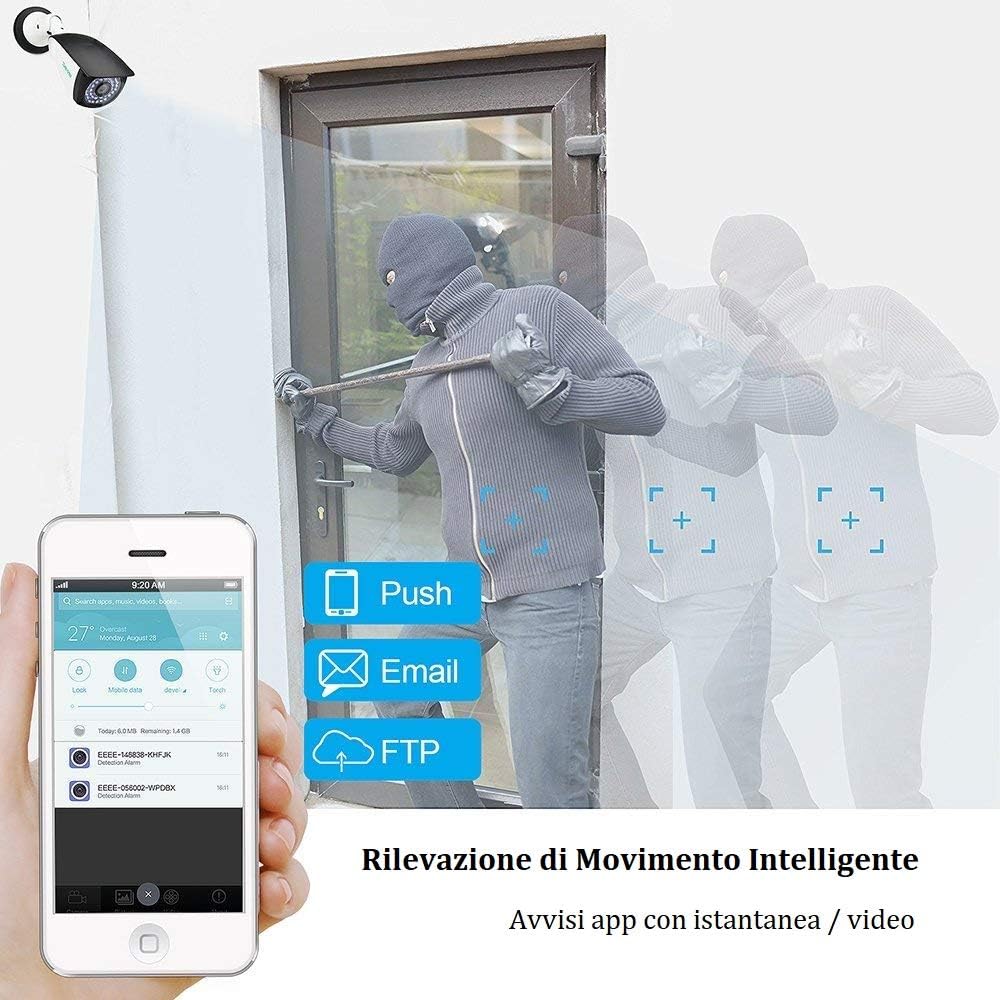
Figure 5.4: Smart Motion Detection Alerts

ചിത്രം 5.5: AI ഹ്യൂമൻ ഡിറ്റക്ഷൻ
5.4 റെക്കോർഡിംഗും പ്ലേബാക്കും
The camera supports continuous recording or event-triggered recording to a Micro SD card or NVR.
- തുടർച്ചയായ റെക്കോർഡിംഗ്: If an SD card is installed and formatted, the camera can record 24/7.
- ഇവൻ്റ് റെക്കോർഡിംഗ്: Recordings can be triggered by motion detection.
- പ്ലേബാക്ക്: റെക്കോർഡ് ചെയ്ത foo ആക്സസ് ചെയ്യുകtage through the app's "History" or "Playback" section. You can view a timeline of events and download specific clips.

Figure 5.6: 24/7 Recording Timeline
5.5 നൈറ്റ് വിഷൻ മോഡുകൾ
The camera offers flexible night vision capabilities.
- ഇൻഫ്രാറെഡ് (IR) രാത്രി കാഴ്ച: In complete darkness, the camera uses its IR LEDs to provide clear black and white footag20 മീറ്റർ വരെ.
- Color Night Vision (Low Light): In low-light conditions, the camera may produce clear color images before switching to full IR mode.
- Settings for night vision modes can usually be adjusted in the app.

Figure 5.7: Flexible Night Vision Modes
6. പരിപാലനം
പതിവ് അറ്റകുറ്റപ്പണികൾ നിങ്ങളുടെ സുരക്ഷാ ക്യാമറയുടെ മികച്ച പ്രകടനവും ദീർഘായുസ്സും ഉറപ്പാക്കുന്നു.
- ക്ലീൻ ലെൻസ്: പൊടിയും അഴുക്കും നീക്കം ചെയ്യുന്നതിനായി മൃദുവായതും ഉണങ്ങിയതുമായ തുണി ഉപയോഗിച്ച് ക്യാമറ ലെൻസ് ഇടയ്ക്കിടെ വൃത്തിയാക്കുക. ഉരച്ചിലുകൾ ഉള്ള ക്ലീനറുകൾ ഒഴിവാക്കുക.
- കണക്ഷനുകൾ പരിശോധിക്കുക: Ensure all cable connections (power, Ethernet) are secure and free from damage.
- ഫേംവെയർ അപ്ഡേറ്റുകൾ: Check the app or SV3C website for available firmware updates. Keeping the firmware updated can improve performance and security.
- ഭവനം പരിശോധിക്കുക: Regularly inspect the camera's metal housing for any signs of damage or wear, especially to the waterproof seals.
- പവർ സൈക്കിൾ: If the camera experiences issues, try power cycling it by disconnecting and reconnecting the power adapter.
7. പ്രശ്നപരിഹാരം
This section addresses common issues you might encounter with your SV3C camera.
7.1 No Power / Camera Not Turning On
- പവർ അഡാപ്റ്റർ ക്യാമറയിലേക്കും പ്രവർത്തിക്കുന്ന ഒരു ഇലക്ട്രിക്കൽ ഔട്ട്ലെറ്റിലേക്കും സുരക്ഷിതമായി ബന്ധിപ്പിച്ചിട്ടുണ്ടെന്ന് ഉറപ്പാക്കുക.
- മറ്റൊരു ഉപകരണം പ്ലഗ് ഇൻ ചെയ്ത് പവർ ഔട്ട്ലെറ്റ് പ്രവർത്തനക്ഷമമാണെന്ന് ഉറപ്പാക്കുക.
- പവർ അഡാപ്റ്ററിൽ എന്തെങ്കിലും ദൃശ്യമായ കേടുപാടുകൾ ഉണ്ടോ എന്ന് പരിശോധിക്കുക.
7.2 വൈഫൈയിലേക്ക് കണക്റ്റുചെയ്യാൻ കഴിയില്ല
- Ensure the camera is within range of your 2.4GHz Wi-Fi router.
- Double-check the Wi-Fi password entered in the app.
- Temporarily connect the camera via Ethernet to ensure it's accessible, then re-attempt Wi-Fi configuration.
- നിങ്ങളുടെ റൂട്ടറും ക്യാമറയും പുനരാരംഭിക്കുക.
- The camera only supports 2.4GHz Wi-Fi. Ensure your router is broadcasting a 2.4GHz signal and your phone is connected to it during initial setup.
7.3 ലൈവ് ഇല്ല View / Offline Status
- നിങ്ങളുടെ ഇൻ്റർനെറ്റ് കണക്ഷൻ പരിശോധിക്കുക.
- Ensure the camera has power and is connected to the network (Wi-Fi or Ethernet).
- ക്യാമറയും റൂട്ടറും പുനരാരംഭിക്കുക.
- If using Wi-Fi, check signal strength in the app. Consider relocating the camera or using a Wi-Fi extender.
7.4 False Motion Detection Alerts
- Adjust the motion detection sensitivity in the app to a lower level.
- Define specific detection zones to exclude areas with frequent irrelevant movement (e.g., trees swaying, busy roads).
- Enable AI Humanoid Detection if not already active.
7.5 SD Card Not Recording / Not Recognized
- Ensure the SD card is correctly inserted into the slot.
- Format the SD card using the camera's app settings.
- Check if the SD card is damaged or incompatible (use a high-quality Class 10 or higher card).
- Verify that recording schedules or event triggers are properly configured in the app.
7.6 ക്യാമറ റീസെറ്റ് ചെയ്യുന്നു
If you encounter persistent issues, a factory reset may resolve them. Locate the reset button (refer to Figure 3.1) and press and hold it for approximately 10-15 seconds until you hear a prompt or see an indicator light change. The camera will restart with factory default settings.
8 സ്പെസിഫിക്കേഷനുകൾ
| മോഡൽ | B06W-5MP-HX |
| വീഡിയോ റെസല്യൂഷൻ | 5 എംപി (2560 x 1920) |
| ലെൻസ് | 3.6mm HD Lens |
| നൈറ്റ് വിഷൻ റേഞ്ച് | 20 മീറ്റർ വരെ (65 അടി) |
| കണക്റ്റിവിറ്റി | Wi-Fi (2.4GHz only), Ethernet (RJ45) |
| കാലാവസ്ഥാ പ്രൂഫ് റേറ്റിംഗ് | IP66 |
| ഓഡിയോ | Two-Way Audio (Built-in Microphone & Speaker) |
| സംഭരണം | Micro SD Card (up to 64GB/256GB, not included), NVR |
| പവർ ഉറവിടം | DC 12V / 1A (Power Adapter Included) |
| വൈദ്യുതി ഉപഭോഗം | 12 വാട്ട്സ് |
| പ്രവർത്തന താപനില | -20°C മുതൽ 60°C വരെ (-4°F മുതൽ 140°F വരെ) |
| അളവുകൾ (LxWxH) | 20 x 7 x 6.5 സെ.മീ (7.87 x 2.76 x 2.56 ഇഞ്ച്) |
| ഭാരം | 660 ഗ്രാം (1.46 പൗണ്ട്) |
| Viewing ആംഗിൾ | 87 ഡിഗ്രി |
| അനുയോജ്യമായ ഉപകരണങ്ങൾ | NVRs, PC CMS Software, Mobile Apps |
9. വാറൻ്റിയും പിന്തുണയും
9.1 സാങ്കേതിക പിന്തുണ
SV3C provides lifetime technical support for this product. If you have any questions, encounter issues, or require assistance, please contact our support team:
- ഇമെയിൽ: info.it@sv3c.com
- Please include your product model (B06W-5MP-HX) and a detailed description of your issue for faster assistance.
9.2 Product Recycling and Disposal
Please dispose of this product responsibly. Electronic devices should not be disposed of with household waste. Consult your local authorities for information on proper recycling and disposal methods for electronic products.
For information on broken lamps and cleaning procedures, please refer to local guidelines and safety instructions.


