1. ആമുഖം
This manual provides essential information for the setup, operation, maintenance, and troubleshooting of your ViewSonic VX2758-2KP-MHD 27-inch WQHD 144Hz IPS Gaming Monitor. Please read this manual thoroughly before using the product to ensure optimal performance and safety.
ദി ViewSonic VX2758-2KP-MHD is designed for gaming and entertainment, offering a 27-inch WQHD (2560x1440p) IPS panel with a 144Hz refresh rate and 1ms (MPRT) response time. It features AMD FreeSync Premium technology to reduce screen tearing and stuttering, and includes Eye Care features for extended viewing comfort. Connectivity options include HDMI and DisplayPort.

2. പാക്കേജ് ഉള്ളടക്കം
താഴെ ലിസ്റ്റ് ചെയ്തിരിക്കുന്ന എല്ലാ ഇനങ്ങളും നിങ്ങളുടെ ഉൽപ്പന്ന പാക്കേജിൽ ഉൾപ്പെടുത്തിയിട്ടുണ്ടെന്ന് ഉറപ്പാക്കുക. ഏതെങ്കിലും ഇനങ്ങൾ നഷ്ടപ്പെട്ടാലോ കേടുപാടുകൾ സംഭവിച്ചാലോ, ദയവായി നിങ്ങളുടെ റീട്ടെയിലറെ ബന്ധപ്പെടുക അല്ലെങ്കിൽ Viewസോണിക് ഉപഭോക്തൃ പിന്തുണ.
- LCD മോണിറ്റർ (ViewSonic VX2758-2KP-MHD)
- പവർ കേബിൾ
- HDMI കേബിൾ
- ഓഡിയോ കേബിൾ
- ദ്രുത ആരംഭ ഗൈഡ്

3. സജ്ജീകരണം
3.1 സ്റ്റാൻഡ് കൂട്ടിച്ചേർക്കൽ
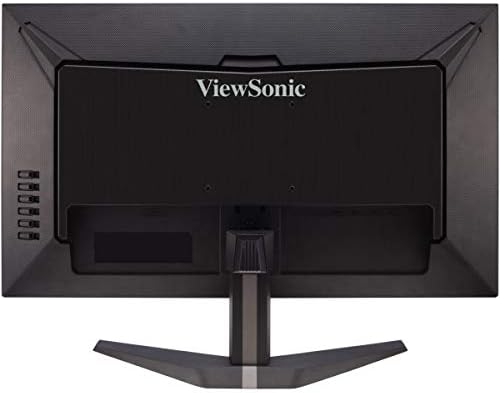
Carefully remove the monitor from its packaging. Attach the stand base to the stand neck, then secure the assembled stand to the back of the monitor. Ensure all screws are tightened appropriately to prevent instability.
3.2 മോണിറ്റർ ബന്ധിപ്പിക്കുന്നു
Connect the monitor to your computer or other video source using the appropriate cables. The VX2758-2KP-MHD supports HDMI and DisplayPort connections.
- പവർ കണക്ഷൻ: പവർ കേബിൾ മോണിറ്ററിന്റെ പവർ ഇൻപുട്ടിലേക്കും തുടർന്ന് ഒരു പവർ ഔട്ട്ലെറ്റിലേക്കും ബന്ധിപ്പിക്കുക.
- വീഡിയോ കണക്ഷൻ: Use either an HDMI cable or a DisplayPort cable to connect your computer's graphics card to the corresponding port on the monitor. For optimal performance, especially at 144Hz and WQHD resolution, a DisplayPort connection is recommended.
- ഓഡിയോ കണക്ഷൻ: If you wish to use external speakers or headphones, connect the audio cable from the monitor's audio output to your audio device.

4. മോണിറ്റർ പ്രവർത്തിപ്പിക്കുക
4.1 പവർ ഓൺ/ഓഫ്
മോണിറ്റർ ഓൺ അല്ലെങ്കിൽ ഓഫ് ചെയ്യുന്നതിന് താഴെ വലതുവശത്തുള്ള പവർ ബട്ടൺ അമർത്തുക. മോണിറ്റർ ഓൺ ആകുമ്പോൾ പവർ ഇൻഡിക്കേറ്റർ ലൈറ്റ് പ്രകാശിക്കും.
4.2 ഓൺ-സ്ക്രീൻ ഡിസ്പ്ലേ (OSD) മെനു
The OSD menu allows you to adjust various monitor settings. Use the control buttons on the right side of the monitor to navigate the menu.
- Press the menu button to open the OSD.
- Use the up/down buttons to navigate through menu options.
- Press the select button to enter a sub-menu or confirm a selection.
- തിരികെ പോകാൻ എക്സിറ്റ് ബട്ടൺ അമർത്തുക അല്ലെങ്കിൽ OSD അടയ്ക്കുക.

4.3 പ്രധാന സവിശേഷതകളും ക്രമീകരണങ്ങളും
- ഇൻപുട്ട് തിരഞ്ഞെടുക്കുക: Choose between HDMI 1, HDMI 2, or DisplayPort inputs.
- Viewമോഡ്: Select from various preset display modes optimized for different content types (e.g., Standard, Game, Movie, Web, Text, Mono).
- നിറം ക്രമീകരിക്കുക: Fine-tune brightness, contrast, color temperature, and gamma settings.
- ഓഡിയോ ക്രമീകരിക്കുക: Control volume and mute settings for the integrated speakers or audio output.
- ഗെയിം മോഡ്: Access specific game modes (FPS, RTS, MOBA) for optimized visual settings.
- FreeSync പ്രീമിയം: Enable or disable AMD FreeSync Premium for tear-free gaming. Ensure your graphics card supports FreeSync and is connected via DisplayPort or compatible HDMI.
- പ്രതികരണ സമയം (MPRT): Adjust the monitor's response time for reduced motion blur. The 1ms MPRT setting provides the fastest response.

താഴെ കൊടുത്തിരിക്കുന്ന വീഡിയോ ഒരു ഓവർ നൽകുന്നുview യുടെ ViewSonic VX58 Series, which includes the VX2758-2KP-MHD, showcasing its features and benefits for an incredible gaming experience.
5. പരിപാലനം
5.1 മോണിറ്റർ വൃത്തിയാക്കുന്നു
മോണിറ്റർ സ്ക്രീൻ വൃത്തിയാക്കാൻ, മൃദുവായ, ലിന്റ് രഹിത തുണി ഉപയോഗിച്ച് സൌമ്യമായി തുടയ്ക്കുക. കഠിനമായ പാടുകൾക്ക്, ചെറുതായി dampen the cloth with water or a mild, non-abrasive screen cleaner. Avoid using harsh chemicals, alcohol, or ammonia-based cleaners, as these can damage the screen surface.
5.2 പൊതു പരിചരണം
Keep the monitor in a well-ventilated area. Avoid exposing it to direct sunlight, excessive heat, or moisture. Do not block the ventilation openings on the monitor. When moving the monitor, handle it carefully to prevent damage.
6. പ്രശ്നപരിഹാരം
നിങ്ങളുടെ മോണിറ്ററിൽ പ്രശ്നങ്ങൾ നേരിടുകയാണെങ്കിൽ, ഇനിപ്പറയുന്ന പൊതുവായ പ്രശ്നങ്ങളും പരിഹാരങ്ങളും പരിശോധിക്കുക:
- ശക്തിയില്ല: മോണിറ്ററിലേക്കും പ്രവർത്തിക്കുന്ന ഒരു പവർ ഔട്ട്ലെറ്റിലേക്കും പവർ കേബിൾ സുരക്ഷിതമായി ബന്ധിപ്പിച്ചിട്ടുണ്ടെന്ന് ഉറപ്പാക്കുക. പവർ ഇൻഡിക്കേറ്റർ ലൈറ്റ് ഓണാണോ എന്ന് പരിശോധിക്കുക.
- സിഗ്നലില്ല: വീഡിയോ കേബിൾ (HDMI അല്ലെങ്കിൽ DisplayPort) മോണിറ്ററിലേക്കും നിങ്ങളുടെ കമ്പ്യൂട്ടറിലേക്കും ശരിയായി ബന്ധിപ്പിച്ചിട്ടുണ്ടെന്ന് ഉറപ്പാക്കുക. OSD മെനുവിൽ ശരിയായ ഇൻപുട്ട് ഉറവിടം തിരഞ്ഞെടുത്തിട്ടുണ്ടെന്ന് ഉറപ്പാക്കുക.
- Image Flickering: This can sometimes be related to cable quality, graphics card drivers, or FreeSync settings. Try using a different, high-quality DisplayPort cable. Update your graphics card drivers. Experiment with FreeSync settings (on/off) or different overdrive settings in the OSD.
- തെറ്റായ റെസല്യൂഷൻ/പുതുക്കൽ നിരക്ക്: Check your computer's display settings to ensure the resolution is set to 2560x1440 and the refresh rate to 144Hz. Ensure your video cable and graphics card support these settings.
- മോശം ചിത്രത്തിന്റെ ഗുണനിലവാരം: Adjust brightness, contrast, and color settings in the OSD menu. Ensure the monitor is set to its native resolution.
ഈ ഘട്ടങ്ങൾ പരീക്ഷിച്ചതിനുശേഷവും പ്രശ്നം നിലനിൽക്കുകയാണെങ്കിൽ, ദയവായി ബന്ധപ്പെടുക Viewസോണിക് ഉപഭോക്തൃ പിന്തുണ.
7 സ്പെസിഫിക്കേഷനുകൾ
Below are the key technical specifications for the ViewSonic VX2758-2KP-MHD monitor:
| ഫീച്ചർ | സ്പെസിഫിക്കേഷൻ |
|---|---|
| ബ്രാൻഡ് | Viewസോണിക് |
| മോഡൽ നമ്പർ | VX2758-2KP-MHD |
| സ്ക്രീൻ വലിപ്പം | 27 ഇഞ്ച് |
| സ്ക്രീൻ റെസല്യൂഷൻ | ഡബ്ലിയുഎച്ച്ഡി (2560x1440) |
| പരമാവധി സ്ക്രീൻ റെസല്യൂഷൻ | 2560 x 1440 പിക്സലുകൾ |
| പുതുക്കിയ നിരക്ക് | 144Hz |
| പ്രതികരണ സമയം | 1ms (MPRT) |
| പാനൽ തരം | ഐ.പി.എസ് |
| വീക്ഷണാനുപാതം | 16:9 |
| കണക്റ്റിവിറ്റി | HDMI, ഡിസ്പ്ലേ പോർട്ട് |
| ഫീച്ചറുകൾ | FreeSync Premium, Eye Care (Flicker-Free, Blue Light Filter) |
| ഇനത്തിൻ്റെ ഭാരം | 11.66 പൗണ്ട് |
| ഉൽപ്പന്ന അളവുകൾ | 24.2 x 17.7 x 7.4 ഇഞ്ച് |

8. വാറൻ്റിയും പിന്തുണയും
8.1 വാറൻ്റി വിവരങ്ങൾ
ViewSonic products are manufactured to the highest standards and deliver high-quality performance. For specific warranty details regarding your VX2758-2KP-MHD monitor, please refer to the warranty card included in your product package or visit the official Viewസോണിക് webസൈറ്റ്.
8.2 ഉപഭോക്തൃ പിന്തുണ
If you require technical assistance or have questions about your monitor, please contact ViewSonic customer support. Contact information can typically be found on the Viewസോണിക് website or in the Quick Start Guide provided with your product.


