1. ആമുഖം
This manual provides detailed instructions for the setup, operation, maintenance, and troubleshooting of your ONIKUMA K1B PRO Stereo Gaming Headset. Designed for immersive audio experiences, this headset is compatible with various gaming platforms and mobile devices.

Image 1.1: The ONIKUMA K1B PRO Stereo Gaming Headset, showcasing അതിന്റെ രൂപകൽപ്പനയും സംയോജിത മൈക്രോഫോണും.
2. പാക്കേജ് ഉള്ളടക്കം
താഴെ ലിസ്റ്റ് ചെയ്തിരിക്കുന്ന എല്ലാ ഇനങ്ങളും നിങ്ങളുടെ പാക്കേജിൽ ഉൾപ്പെടുത്തിയിട്ടുണ്ടെന്ന് ദയവായി പരിശോധിക്കുക:
- 1 x ONIKUMA K1B PRO Stereo Gaming Headset
- 1 x PC Adapter (3.5mm audio/mic splitter cable)
- 1 x ഉപയോക്തൃ മാനുവൽ (ഈ പ്രമാണം)

Image 2.1: Contents of the ONIKUMA K1B PRO package, including the headset, PC adapter, and user manual.
3. സജ്ജീകരണ നിർദ്ദേശങ്ങൾ
Follow these steps to connect your ONIKUMA K1B PRO headset to your device.
3.1 Connecting to PC/Laptop
- For desktop PCs with separate audio and microphone jacks, use the included PC Adapter. Connect the headset's single 3.5mm jack into the adapter.
- Plug the green jack from the PC Adapter into your computer's audio output (headphone) port.
- Plug the red jack from the PC Adapter into your computer's microphone input port.
- For laptops with a single 3.5mm combo jack, plug the headset's single 3.5mm jack directly into the laptop's audio port. The PC Adapter is not required in this scenario.
- Connect the USB plug to a USB port on your PC or laptop to power the LED lights on the headset.
3.2 Connecting to PS4/PS5
- Plug the headset's single 3.5mm jack directly into the controller's 3.5mm port.
- Go to System Settings > Devices > Audio Devices.
- Set "Output to Headphones" to "All Audio".
- Adjust microphone input level as needed.
- Connect the USB plug to a USB port on your console to power the LED lights.
3.3 Connecting to Xbox One/Xbox Series X|S
- For newer Xbox One controllers with a 3.5mm jack, plug the headset's single 3.5mm jack directly into the controller's port.
- For older Xbox One controllers without a 3.5mm jack, a Microsoft adapter (not included) is required. Plug the headset into the adapter, then plug the adapter into the controller.
- Connect the USB plug to a USB port on your console to power the LED lights.
3.4 Connecting to Mobile Devices/Tablets
- Plug the headset's single 3.5mm jack directly into your mobile device's 3.5mm audio port.
- The USB connection is only for LED lighting and is not required for audio functionality on mobile devices.

Image 3.1: Diagram illustrating the compatibility of the ONIKUMA K1B PRO headset with various devices, including PC, PS4, Xbox One, and mobile phones.
4. പ്രവർത്തന നിർദ്ദേശങ്ങൾ
Understand the features and controls of your ONIKUMA K1B PRO headset.
4.1 ഓഡിയോ നിയന്ത്രണം
- വോളിയം വീൽ: Located on the inline control unit, rotate the wheel up or down to adjust the audio volume.
- സ്റ്റീരിയോ സറൗണ്ട് സൗണ്ട്: The 50mm drivers deliver clear audio with distinct bass and treble for an immersive experience.

Image 4.1: Visual representation of the headset's 50mm drivers and 3D surround sound capabilities for enhanced audio.
4.2 മൈക്രോഫോൺ ഉപയോഗം
- Adjustable Microphone: The omnidirectional microphone can be adjusted to your preferred position for optimal voice pickup. It features noise-canceling technology for clear communication.
- മൈക്ക് മ്യൂട്ട് സ്വിച്ച്: A dedicated switch on the inline control unit allows you to quickly mute or unmute the microphone.
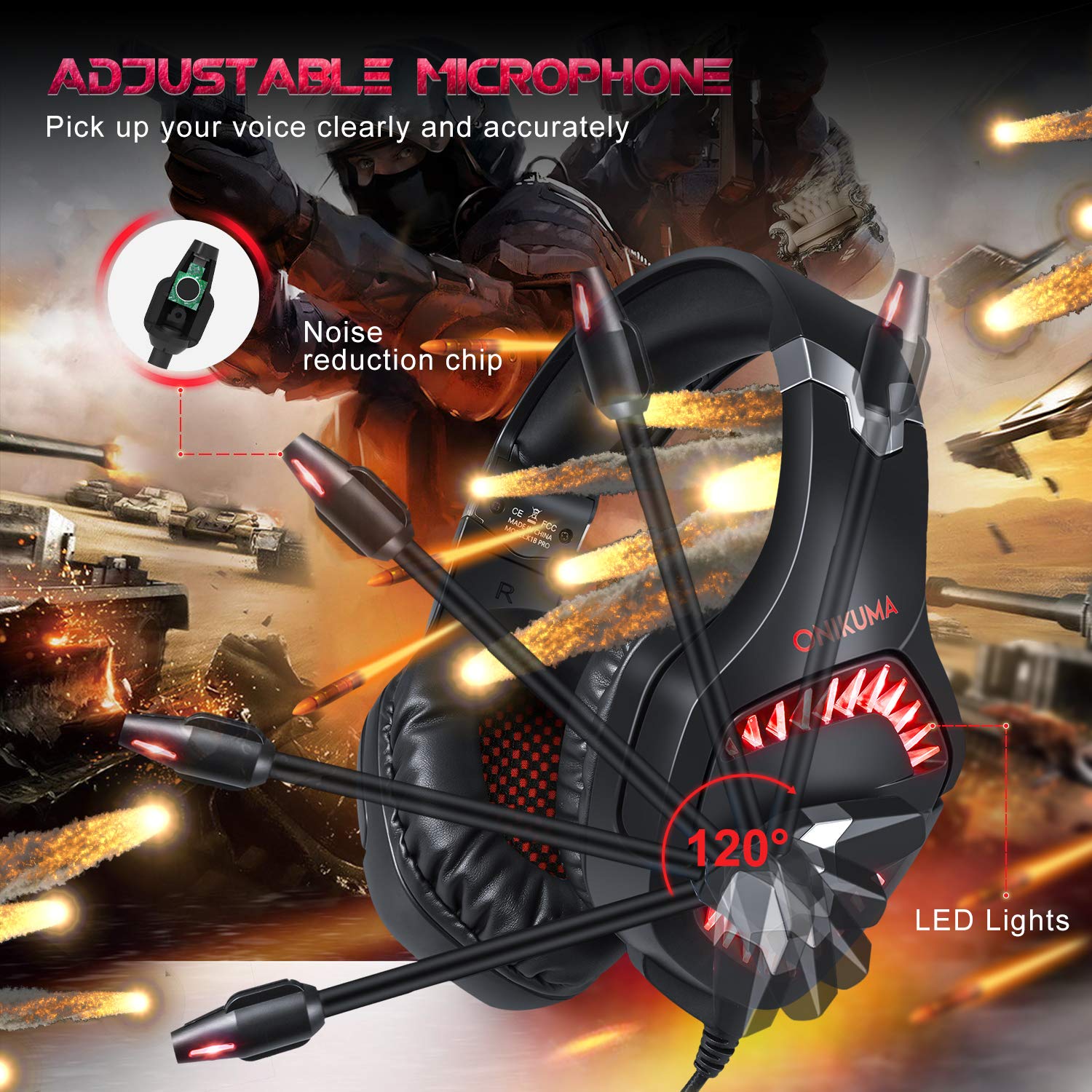
Image 4.2: The adjustable microphone of the ONIKUMA K1B PRO headset, highlighting its flexibility and noise reduction features.
4.3 LED ലൈറ്റിംഗ്
- The headset features LED lights that are powered via the USB connection. Ensure the USB plug is connected to an active USB port for the lights to function.
4.4 ആശ്വാസവും എർഗണോമിക്സും
- Soft Headband: The headband is designed for comfort during extended use.
- Adjustable Ear Cushions: The ear cushions are designed to reduce pressure and sweating, providing long-lasting comfort. The earcups can adjust up to 20 degrees.
- നീണ്ടുനിൽക്കുന്ന നിർമ്മാണം: The headset features a strong structure and steel beam for durability and flexibility.
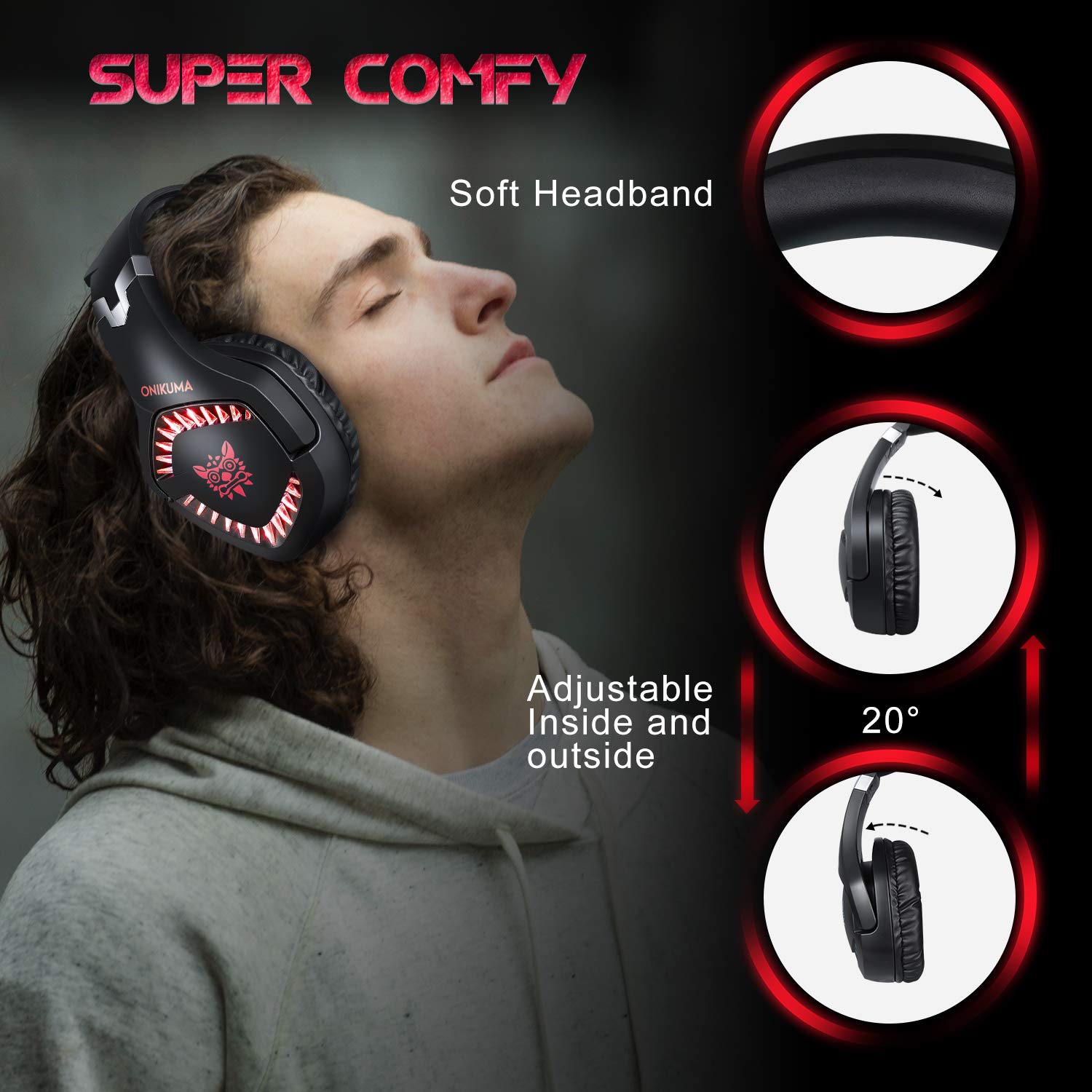
Image 4.3: Details on the headset's comfort features, including the soft headband and adjustable earcups.

Image 4.4: Illustration of the headset's ergonomic and durable design, featuring a steel beam and robust construction.
5. പരിപാലനം
Proper care will extend the lifespan of your headset.
- വൃത്തിയാക്കൽ: Use a soft, dry cloth to wipe the headset. For ear cushions, a slightly damp cloth can be used, but ensure no moisture enters the speaker grilles. Avoid harsh chemicals or abrasive cleaners.
- സംഭരണം: ഹെഡ്സെറ്റ് തണുത്തതും വരണ്ടതുമായ സ്ഥലത്ത് സൂക്ഷിക്കുക, നേരിട്ടുള്ള സൂര്യപ്രകാശത്തിൽ നിന്നും ഉയർന്ന താപനിലയിൽ നിന്നും അകറ്റി നിർത്തുക. ഭാരമുള്ള വസ്തുക്കൾ ഹെഡ്സെറ്റിൽ വയ്ക്കുന്നത് ഒഴിവാക്കുക.
- കേബിൾ കെയർ: Do not pull on the cables forcefully. Always grasp the plug when disconnecting. Avoid sharp bends or kinks in the cable.
6. പ്രശ്നപരിഹാരം
നിങ്ങളുടെ ഹെഡ്സെറ്റിൽ പ്രശ്നങ്ങൾ നേരിടുകയാണെങ്കിൽ, ഇനിപ്പറയുന്ന പൊതുവായ പരിഹാരങ്ങൾ പരിശോധിക്കുക:
6.1 ഹെഡ്സെറ്റിൽ നിന്ന് ശബ്ദമില്ല
- കണക്ഷനുകൾ പരിശോധിക്കുക: Ensure the 3.5mm audio jack is fully inserted into the correct port on your device or PC adapter.
- വോളിയം നില: Verify that the volume wheel on the inline control is turned up and that your device's volume is not muted or set too low.
- ഉപകരണ ക്രമീകരണങ്ങൾ: For PCs, check your sound settings to ensure the headset is selected as the default playback device. For consoles, verify audio output settings (e.g., "Output to Headphones" set to "All Audio" on PS4/PS5).
- മറ്റൊരു ഉപകരണത്തിൽ പരീക്ഷിക്കുക: ഹെഡ്സെറ്റിലോ യഥാർത്ഥ ഉപകരണത്തിലോ ആണോ പ്രശ്നം എന്ന് നിർണ്ണയിക്കാൻ ഹെഡ്സെറ്റ് മറ്റൊരു ഉപകരണത്തിലേക്ക് (ഉദാഹരണത്തിന്, ഒരു സ്മാർട്ട്ഫോൺ) ബന്ധിപ്പിക്കുക.
6.2 മൈക്രോഫോൺ പ്രവർത്തിക്കുന്നില്ല
- Check Mute Switch: Ensure the microphone mute switch on the inline control is in the "unmuted" position.
- കണക്ഷനുകൾ പരിശോധിക്കുക: For PCs, ensure the microphone jack (red) from the PC adapter is correctly plugged into the microphone input port. For consoles/laptops with combo jacks, ensure the single 3.5mm jack is fully inserted.
- ഉപകരണ ക്രമീകരണങ്ങൾ: Verify that the headset microphone is selected as the default recording device in your computer's sound settings or console's audio settings. Adjust microphone input levels as necessary.
- അപ്ലിക്കേഷൻ ക്രമീകരണങ്ങൾ: Check microphone settings within the specific game or communication application you are using.
6.3 LED ലൈറ്റുകൾ പ്രവർത്തിക്കുന്നില്ല
- USB കണക്ഷൻ: Ensure the USB plug is securely connected to an active USB port on your PC, console, or a USB power adapter. The LEDs require USB power to operate.
- ഊർജ്ജ സ്രോതസ്സ്: Try connecting the USB to a different USB port or power source to rule out a faulty port.
7 സ്പെസിഫിക്കേഷനുകൾ
| സ്പീക്കർ വ്യാസം | 50 മി.മീ |
| പ്രതിരോധം | 20ഓം ±15% |
| സംവേദനക്ഷമത | 117 ± 3dB |
| ഫ്രീക്വൻസി റേഞ്ച് | 20-20000Hz |
| മൈക്ക് സെൻസിറ്റിവിറ്റി | -38dB ± 3dB |
| മൈക്ക് ഇംപെഡൻസ് | 2.2 കോം |
| ദിശാബോധം | ഓമ്നി ദിശ |
| LED വർക്കിംഗ് വോളിയംtage | DC5V ±5% |
| കേബിൾ നീളം | ഏകദേശം. 2.2 മി / 7.22 അടി |
| ഉൽപ്പന്ന അളവുകൾ (LxWxH) | 21.3 x 8 x 21.5 സെ.മീ |
| ഇനത്തിൻ്റെ ഭാരം | 300 ഗ്രാം |
8. വാറൻ്റി വിവരങ്ങൾ
The ONIKUMA K1B PRO Stereo Gaming Headset comes with a 1-വർഷ പരിമിത വാറൻ്റി വാങ്ങിയ തീയതി മുതൽ. സാധാരണ ഉപയോഗത്തിലുള്ള നിർമ്മാണ വൈകല്യങ്ങളും പ്രവർത്തനക്ഷമതയും ഈ വാറന്റി ഉൾക്കൊള്ളുന്നു. ദുരുപയോഗം, അപകടങ്ങൾ, അനധികൃത പരിഷ്കാരങ്ങൾ, അല്ലെങ്കിൽ സാധാരണ തേയ്മാനം എന്നിവ മൂലമുണ്ടാകുന്ന നാശനഷ്ടങ്ങൾക്ക് ഇത് പരിരക്ഷ നൽകുന്നില്ല. വാറന്റി ക്ലെയിമുകൾക്കായി നിങ്ങളുടെ വാങ്ങലിന്റെ തെളിവ് സൂക്ഷിക്കുക.
9. പിന്തുണ
For technical assistance, warranty claims, or any other inquiries regarding your ONIKUMA K1B PRO headset, please contact the manufacturer's support team:
- ഫോൺ: 022 40224087
- ഇമെയിൽ: service@originmarketing.in
- നിർമ്മാതാവ്: ONIKUMA (via Origin Marketing Private Limited)


