1. ഉൽപ്പന്നം കഴിഞ്ഞുview
The Baseus D02 Bluetooth Headphones (Model NGD02-01) offer a versatile audio experience with both wireless Bluetooth and wired 3.5mm jack connectivity. Designed for comfort and portability, these over-ear headphones provide clear sound for music playback.
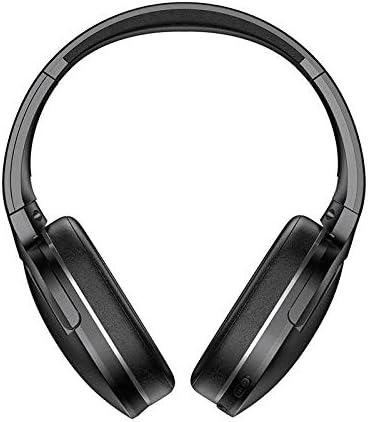
ചിത്രം 1.1: മുൻഭാഗം view of the Baseus D02 Bluetooth Headphones, showcasing their over-ear design.
2. പാക്കേജ് ഉള്ളടക്കം
പാക്കേജിൽ ഇനിപ്പറയുന്ന ഇനങ്ങൾ ഉണ്ടോ എന്ന് പരിശോധിക്കുക:
- Baseus D02 Bluetooth Headphones
- യുഎസ്ബി ചാർജിംഗ് കേബിൾ
- 3.5 എംഎം ഓഡിയോ കേബിൾ
- ഉപയോക്തൃ മാനുവൽ (ഈ പ്രമാണം)
- Ear Cushions (pre-installed or as spares)
- Headband (part of the headphone structure)
3. സജ്ജീകരണവും കണക്ഷനും
3.1 ഹെഡ്ഫോണുകൾ ചാർജ് ചെയ്യുന്നു
Before first use, fully charge the headphones. Connect the provided USB charging cable to the Micro USB charging port on the headphones and the other end to a USB power adapter (not included) or a computer's USB port.
- The indicator light will typically be red during charging.
- The indicator light will turn blue or off when charging is complete.
A full charge usually takes approximately 2 hours.
3.2 ബ്ലൂടൂത്ത് ജോടിയാക്കൽ
- ഹെഡ്ഫോണുകൾ ഓഫാണെന്ന് ഉറപ്പാക്കുക.
- Press and hold the Power/Multi-Function Button (MFB) for approximately 3-5 seconds until the indicator light flashes red and blue alternately. This indicates pairing mode.
- നിങ്ങളുടെ ഉപകരണത്തിൽ (സ്മാർട്ട്ഫോൺ, ടാബ്ലെറ്റ്, കമ്പ്യൂട്ടർ), ബ്ലൂടൂത്ത് പ്രവർത്തനക്ഷമമാക്കി ലഭ്യമായ ഉപകരണങ്ങൾക്കായി തിരയുക.
- Select "Baseus D02" from the list of found devices.
- ഒരിക്കൽ കണക്റ്റ് ചെയ്താൽ, ഇൻഡിക്കേറ്റർ ലൈറ്റ് സാധാരണയായി നീല നിറത്തിൽ സാവധാനം മിന്നുകയോ കടും നീലയായി തുടരുകയോ ചെയ്യും.
- പാസ്വേഡ് ആവശ്യപ്പെടുകയാണെങ്കിൽ, "0000" എന്ന് നൽകുക.
പവർ ഓൺ ചെയ്യുമ്പോൾ ഹെഡ്ഫോണുകൾ അവസാനം ജോടിയാക്കിയ ഉപകരണത്തിലേക്ക് വീണ്ടും കണക്റ്റുചെയ്യാൻ ശ്രമിക്കും.
3.3 വയർഡ് കണക്ഷൻ (3.5mm ഓഡിയോ ജാക്ക്)
To use the headphones in wired mode, connect one end of the 3.5mm audio cable to the 3.5mm audio port on the headphones and the other end to your audio source's 3.5mm jack. The headphones can be used in wired mode even if the battery is depleted.

ചിത്രം 3.1: വിശദമായത് view of the headphone's controls, including the power switch, 3.5mm audio port, Micro USB charging port, and volume/MFB buttons.
4. പ്രവർത്തന നിർദ്ദേശങ്ങൾ
4.1 പവർ ഓൺ/ഓഫ്
- പവർ ഓൺ: Slide the power switch to the "ON" position. The indicator light will flash blue.
- പവർ ഓഫ്: Slide the power switch to the "OFF" position. The indicator light will turn off.
4.2 മ്യൂസിക് പ്ലേബാക്ക്
- പ്ലേ/താൽക്കാലികമായി നിർത്തുക: മൾട്ടി-ഫംഗ്ഷൻ ബട്ടൺ (MFB) ഹ്രസ്വമായി അമർത്തുക.
- അടുത്ത ട്രാക്ക്: "വോളിയം +" ബട്ടൺ ദീർഘനേരം അമർത്തുക.
- മുമ്പത്തെ ട്രാക്ക്: "വോളിയം -" ബട്ടൺ ദീർഘനേരം അമർത്തുക.
4.3 വോളിയം നിയന്ത്രണം
- വോളിയം കൂട്ടുക: "Volume +" ബട്ടൺ ചുരുക്കി അമർത്തുക.
- വോളിയം താഴേക്ക്: "വോളിയം -" ബട്ടൺ ചുരുക്കി അമർത്തുക.
Note: As per product specifications, these headphones do not include a microphone. Therefore, call management features are not available directly through the headphones.
5. പരിപാലനവും പരിചരണവും
ശരിയായ അറ്റകുറ്റപ്പണി നിങ്ങളുടെ ഹെഡ്ഫോണുകളുടെ ദീർഘായുസ്സും മികച്ച പ്രകടനവും ഉറപ്പാക്കുന്നു.
- വൃത്തിയാക്കൽ: ഹെഡ്ഫോണുകൾ വൃത്തിയാക്കാൻ മൃദുവായതും ഉണങ്ങിയതും ലിന്റ് രഹിതവുമായ തുണി ഉപയോഗിക്കുക. അബ്രാസീവ് ക്ലീനറുകൾ, ആൽക്കഹോൾ, കെമിക്കൽ ലായകങ്ങൾ എന്നിവ ഉപയോഗിക്കരുത്.
- സംഭരണം: When not in use, store the headphones in a cool, dry place, away from direct sunlight and extreme temperatures. The headphones are foldable for compact storage.
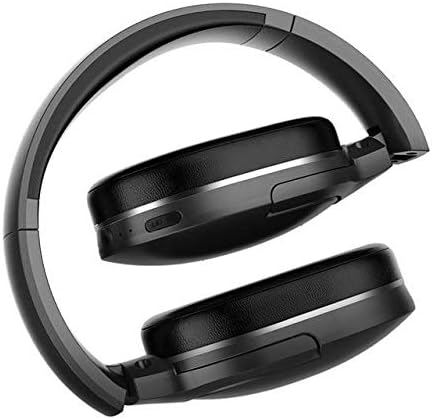
Image 5.1: The Baseus D02 Bluetooth Headphones shown in their folded configuration, ideal for travel and compact storage.
- ബാറ്ററി കെയർ: ബാറ്ററി ലൈഫ് നിലനിർത്താൻ, ഹെഡ്ഫോണുകൾ ഇടയ്ക്കിടെ പൂർണ്ണമായും ചാർജ് ചെയ്യുന്നത് ഒഴിവാക്കുക. തുടർച്ചയായ ഉപയോഗത്തിലല്ലെങ്കിൽ പോലും അവ പതിവായി ചാർജ് ചെയ്യുക.
- വെള്ളം ഒഴിവാക്കുക: ഈ ഹെഡ്ഫോണുകൾ വാട്ടർപ്രൂഫ് അല്ല. വെള്ളത്തിലോ അമിതമായ ഈർപ്പത്തിലോ സമ്പർക്കം ഒഴിവാക്കുക.
6. പ്രശ്നപരിഹാരം
| പ്രശ്നം | സാധ്യമായ കാരണം | പരിഹാരം |
|---|---|---|
| പവർ ഓണാക്കാൻ കഴിയില്ല | കുറഞ്ഞ ബാറ്ററി | ഹെഡ്ഫോണുകൾ പൂർണ്ണമായും ചാർജ് ചെയ്യുക. |
| ബ്ലൂടൂത്ത് വഴി ജോടിയാക്കാൻ കഴിയില്ല | Headphones not in pairing mode; Bluetooth disabled on device; too far from device. | Ensure headphones are in pairing mode (flashing red/blue). Enable Bluetooth on your device. Move headphones closer to the device (within 10 meters). Try restarting both devices. |
| ശബ്ദമില്ല | Volume too low; incorrect audio source selected; headphones not connected properly (wired or wireless). | Increase volume on both headphones and connected device. Check Bluetooth connection or 3.5mm cable connection. Ensure the correct audio output is selected on your device. |
| മോശം ശബ്ദ നിലവാരം | Weak Bluetooth signal; interference; low-quality audio source. | Move closer to the Bluetooth device. Avoid obstacles between headphones and device. Try a different audio source. |
7 സ്പെസിഫിക്കേഷനുകൾ
| ഫീച്ചർ | വിശദാംശങ്ങൾ |
|---|---|
| ബ്രാൻഡ് | ബേസിയസ് |
| മോഡൽ നമ്പർ | NGD02-01 |
| ടൈപ്പ് ചെയ്യുക | ഓവർ-ഇയർ ഹെഡ്ഫോണുകൾ |
| കണക്റ്റിവിറ്റി | Bluetooth (Wireless), 3.5mm Jack (Wired) |
| വയർലെസ് കമ്മ്യൂണിക്കേഷൻ ടെക്നോളജീസ് | ബ്ലൂടൂത്ത് |
| ഹെഡ്ഫോൺ ജാക്ക് | 3.5 mm ജാക്ക് |
| നിയന്ത്രണ തരം | Volume Control, Multi-Function Button (MFB) |
| മൈക്രോഫോൺ ഉൾപ്പെടുത്തിയിട്ടുണ്ട് | ഇല്ല |
| ശബ്ദം റദ്ദാക്കൽ | ഇല്ല |
| നിറം | കറുപ്പ് |
| മെറ്റീരിയൽ | പ്ലാസ്റ്റിക് |
| പവർ ഉറവിടം | ബാറ്ററി പവർ |
| പാക്കേജ് അളവുകൾ | 19.8 x 13.6 x 9 സെ.മീ |
| ഇനത്തിൻ്റെ ഭാരം | 180.98 ഗ്രാം |
8. വാറൻ്റിയും പിന്തുണയും
For warranty information, please refer to the documentation provided with your purchase or contact your retailer. For further support or inquiries, please visit the official Baseus webസൈറ്റ് അല്ലെങ്കിൽ അവരുടെ ഉപഭോക്തൃ സേവനവുമായി ബന്ധപ്പെടുക.
You can find more information about Baseus products at the ആമസോണിലെ ബേസിയസ് സ്റ്റോർ.


