1. ആമുഖം
This manual provides detailed instructions for the installation, operation, and maintenance of your Sumaote 5W Bluetooth Mesh RGBWC Recessed LED Downlight. This smart lighting solution offers versatile control options and a wide range of colors and white temperatures to enhance your living spaces.
പ്രധാന സവിശേഷതകൾ:
- ബ്ലൂടൂത്ത് മെഷ് സാങ്കേതികവിദ്യ: Provides a stable connection over larger distances and supports a greater number of devices compared to traditional Bluetooth. Devices communicate by forwarding messages across the mesh network.
- RGBWC 5-in-1 Lighting: Offers 16 million colors (RGB) plus tunable warm white (2700K) and cool white (6500K) options.
- ആപ്പ് നിയന്ത്രണം: Easily adjust brightness, color, and blinking speed via the dedicated Haodeng app.
- മങ്ങിയത്: Brightness adjustable from 10% to 100% to suit various moods and activities.
- ടൈമർ പ്രവർത്തനം: നിശ്ചിത സമയങ്ങളിൽ ലൈറ്റുകൾ ഓണാക്കാനോ ഓഫാക്കാനോ ഷെഡ്യൂൾ ചെയ്യുക.
- Voice Control Ready: Compatible with Alexa and Google Assistant when paired with a Smart Bridge (sold separately).

Image 1.1: Sumaote Bluetooth Mesh Recessed Lights illuminating a modern living room, showcasing വിവിധ വർണ്ണ ഓപ്ഷനുകൾ.
2 സുരക്ഷാ വിവരങ്ങൾ
ഇൻസ്റ്റാൾ ചെയ്യുന്നതിനും ഉപയോഗിക്കുന്നതിനും മുമ്പ് എല്ലാ സുരക്ഷാ നിർദ്ദേശങ്ങളും ദയവായി വായിക്കുക. ഈ നിർദ്ദേശങ്ങൾ പാലിക്കുന്നതിൽ പരാജയപ്പെടുന്നത് വൈദ്യുതാഘാതം, തീപിടുത്തം അല്ലെങ്കിൽ മറ്റ് അപകടങ്ങൾക്ക് കാരണമായേക്കാം.
- Always turn off power at the circuit breaker before installing or servicing the light fixture.
- ഇലക്ട്രിക്കൽ വയറിംഗിനെക്കുറിച്ച് നിങ്ങൾക്ക് ഉറപ്പില്ലെങ്കിൽ, യോഗ്യതയുള്ള ഒരു ഇലക്ട്രീഷ്യൻ ഇൻസ്റ്റാളേഷൻ നടത്തണം.
- Do not install in wet locations or areas exposed to direct water spray. This product is designed for indoor use only.
- വോളിയം ഉറപ്പാക്കുകtage supply matches the product's requirements (100-240VAC, 50/60HZ).
- Do not disassemble or modify the light fixture.
- കുട്ടികൾക്ക് ലഭ്യമാകാതെ സൂക്ഷിക്കുക.
3. പാക്കേജ് ഉള്ളടക്കം
ഇൻസ്റ്റാളേഷൻ ആരംഭിക്കുന്നതിന് മുമ്പ് എല്ലാ ഘടകങ്ങളും നിലവിലുണ്ടെന്ന് ഉറപ്പാക്കുക:
- 1 x Smart LED Downlight
- 1 x ഉപയോക്തൃ മാനുവൽ (ഈ പ്രമാണം)
4 സ്പെസിഫിക്കേഷനുകൾ
| സ്പെസിഫിക്കേഷൻ | വിശദാംശങ്ങൾ |
|---|---|
| മോഡൽ | ZJ-MHDA3-RGBWW |
| ലൈറ്റിംഗ് നിറം | RGBWC (RGB, Warm White, Cool White) |
| വർണ്ണ താപനില | 2700K-6500K |
| കണക്ഷൻ രീതികൾ | Bluetooth 4.2 (Mesh) |
| APP പേര് | Haodeng |
| Suitable System | Android 4.4 / iOS 9.0 അല്ലെങ്കിൽ ഉയർന്നത് |
| ഫ്രണ്ട് വ്യാസം | 97 മിമി / 3.8 ഇഞ്ച് |
| ഉയരം | 45 മിമി / 1.77 ഇഞ്ച് |
| Mount Hole Size | 75-80 മിമി / 2.96-3.14 ഇഞ്ച് |
| ശക്തി | 5W |
| വാല്യംtage | 100-240VAC, 50/60HZ |
| Lamp മെറ്റീരിയൽ | PC and Aluminum |
| ശരാശരി ജീവിതം | 20000H |
| ലൈറ്റ് ലുമിനസ് ഫ്ലക്സ് | 350 ല്യൂമെൻസ് |
| ബീം ആംഗിൾ | 120° |
| പ്രവർത്തന താപനില | -20°C മുതൽ +45°C വരെ |
| LED അളവ് | RGB: 5050-0.15W*8, WW: 2835-0.5W*8, CW: 2835-0.5W*8 |
| ഇനത്തിൻ്റെ ഭാരം | 4.6 ഔൺസ് |

Image 4.1: Product dimensions and recommended mounting hole size for installation.
5. സജ്ജീകരണം
5.1 ഫിസിക്കൽ ഇൻസ്റ്റലേഷൻ
- പവർ ഓഫ്: Before starting, ensure the power to the circuit where you will install the downlight is turned off at the main circuit breaker.
- ദ്വാരം തയ്യാറാക്കുക: Cut a circular hole in the ceiling with a diameter between 75-80mm (2.96-3.14 inches). Refer to Image 4.1 for guidance.
- വയറിംഗ് ബന്ധിപ്പിക്കുക: Connect the downlight's wiring to your household electrical wiring. The downlight includes a screw-in base on a plug; if hard-wiring, you may need to cut this plug and connect the black and white wires directly. Ensure all connections are secure.
- ഡൗൺലൈറ്റ് ചേർക്കുക: Push the spring clips on the sides of the downlight upwards and insert the fixture into the prepared ceiling hole. The clips will secure the downlight in place.
- പവർ പുന ore സ്ഥാപിക്കുക: Once the downlight is securely installed, restore power at the circuit breaker. The light should flash, indicating it is in pairing mode.

Image 5.1: Sumaote Recessed LED Downlight showing its components for installation.
5.2 ആപ്പ് ഡൗൺലോഡും ബ്ലൂടൂത്ത് കണക്ഷനും
- അപ്ലിക്കേഷൻ ഡൗൺലോഡുചെയ്യുക: ഇതിനായി തിരയുക "Haodeng" in your smartphone's app store (Google Play Store for Android, Apple App Store for iOS) and download the application.
- ബ്ലൂടൂത്ത് പ്രവർത്തനക്ഷമമാക്കുക: നിങ്ങളുടെ സ്മാർട്ട്ഫോണിൽ ബ്ലൂടൂത്ത് പ്രവർത്തനക്ഷമമാക്കിയിട്ടുണ്ടെന്ന് ഉറപ്പാക്കുക.
- ആപ്പ് തുറക്കുക: Launch the Haodeng app. The app will automatically search for nearby Sumaote Bluetooth Mesh devices.
- ഉപകരണങ്ങൾ ചേർക്കുക: The downlight should be flashing, indicating it's in connect mode. In the app, navigate to "Add Devices" or tap the "+" icon to initiate the search. The app will detect the downlight(s).
- കണക്ഷൻ സ്ഥിരീകരിക്കുക: Follow the on-screen prompts to add the detected downlight(s) to your app. You can assign them to groups or locations for easier management.
Video 5.2: This video demonstrates the process of connecting Sumaote smart downlights to the Haodeng app using Bluetooth functionality. It shows how to power on the lights, enable Bluetooth on a smartphone, and use the app to discover and add the devices, including creating groups and scenes.
6. പ്രവർത്തന നിർദ്ദേശങ്ങൾ
The Haodeng app provides comprehensive control over your Sumaote LED Downlights.
6.1 Basic Control (On/Off, Brightness, Color)
- ഓൺ/ഓഫ്: Tap the power icon next to each device or group in the app to turn lights on or off.
- തെളിച്ചം: ആപ്പിലെ സ്ലൈഡർ ഉപയോഗിച്ച് തെളിച്ചം 10% മുതൽ 100% വരെ ക്രമീകരിക്കുക.
- വർണ്ണ തിരഞ്ഞെടുപ്പ്:
- RGB നിറങ്ങൾ: Use the color wheel in the app to select from 16 million colors.
- White Tones (CCT): Adjust the color temperature from warm white (2700K) to cool white (6500K) using the dedicated CCT control.

Image 6.1: The Haodeng app's color selection interface, including RGB color wheel and warm/cool white options.

ചിത്രം 6.2: ഉദാamples of different color temperatures (Warm, Neutral, Cool White) achievable with the downlight.
6.2 വിപുലമായ സവിശേഷതകൾ
- ഗ്രൂപ്പിംഗ്: Create groups of lights to control multiple downlights simultaneously.
- രംഗങ്ങൾ: Save custom lighting configurations (color, brightness, effects) as scenes for quick access.
- സംഗീത മോഡ്: Synchronize light changes with music played on your device or picked up by your phone's microphone.
- ടൈമർ പ്രവർത്തനം: Set schedules for lights to turn on/off or change settings at specific times.
- ക്യാമറ മോഡ്: Use your phone's camera to capture a color from your surroundings and apply it to the lights.
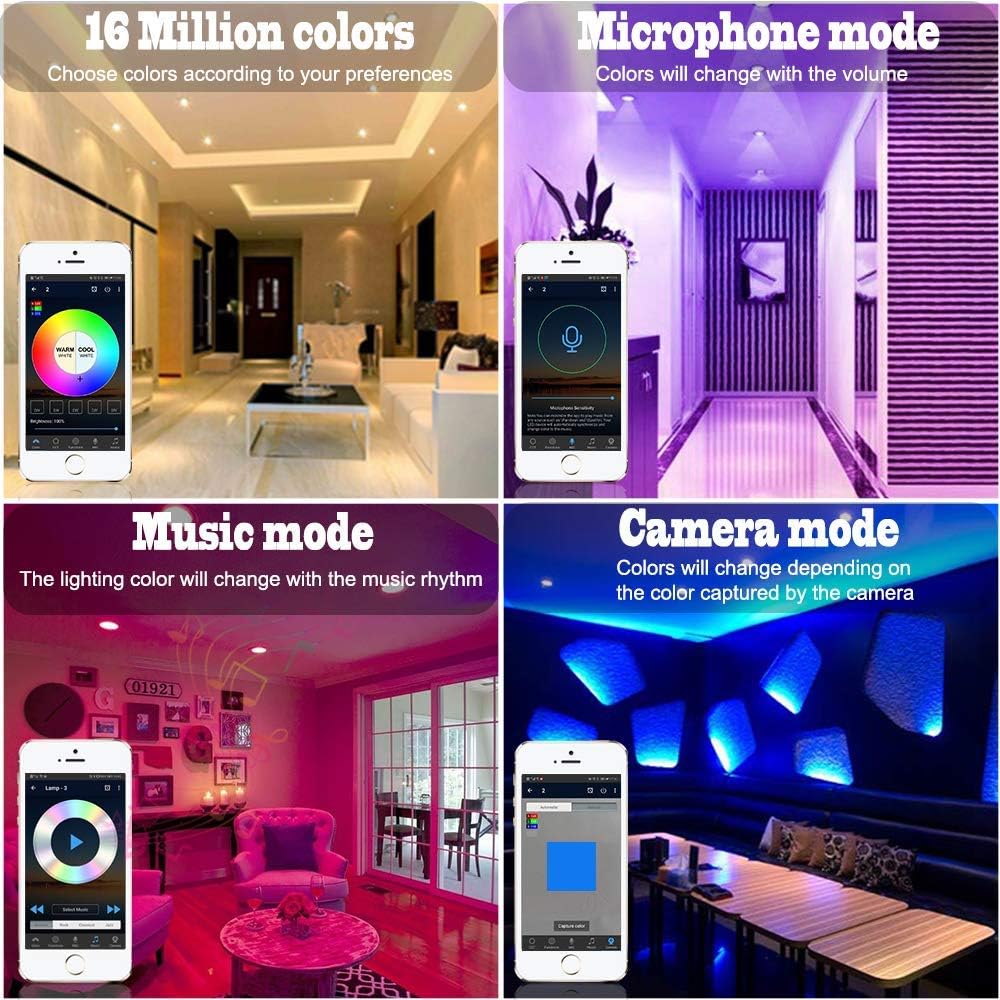
Image 6.3: Haodeng app features including 16 million colors, microphone mode, music mode, and camera mode.

Image 6.4: Various lighting patterns and colors achievable with the downlights to create different atmospheres.
7. പരിപാലനം
The Sumaote LED Downlight requires minimal maintenance.
- വൃത്തിയാക്കൽ: വൃത്തിയാക്കുന്നതിന് മുമ്പ് പവർ ഓഫ് ചെയ്തിട്ടുണ്ടെന്ന് ഉറപ്പാക്കുക. മൃദുവായതും ഉണങ്ങിയതുമായ തുണി ഉപയോഗിച്ച് ഡൗൺലൈറ്റിന്റെ ഉപരിതലം തുടയ്ക്കുക. അബ്രാസീവ് ക്ലീനറുകളോ ലായകങ്ങളോ ഉപയോഗിക്കരുത്.
- പരിശോധന: Periodically check for any loose connections or damage to the fixture. If any damage is found, discontinue use and consult a qualified technician.
8. പ്രശ്നപരിഹാരം
| പ്രശ്നം | സാധ്യമായ കാരണം | പരിഹാരം |
|---|---|---|
| ലൈറ്റ് ഓണാക്കില്ല. | വൈദ്യുതി ഇല്ല; വയറിംഗ് അയഞ്ഞിരിക്കുന്നു; ഫിക്സ്ചർ തകരാറിലായി. | Check circuit breaker. Ensure wiring connections are secure. If problem persists, contact support. |
| ആപ്പിലേക്ക് കണക്റ്റ് ചെയ്യാൻ കഴിയുന്നില്ല. | Bluetooth is off; light is out of range; app issue; light not in pairing mode. | Ensure Bluetooth is enabled on your phone. Move closer to the light (within 50 feet). Power cycle the light (turn off/on at switch) to re-enter pairing mode. Restart the Haodeng app. |
| Lights are not responding consistently. | Interference; distance from other mesh devices; weak Bluetooth signal. | Ensure there are enough Bluetooth Mesh devices to create a strong network. Reduce interference from other wireless devices. |
| ശബ്ദ നിയന്ത്രണം (അലക്സാ/ഗൂഗിൾ) പ്രവർത്തിക്കുന്നില്ല. | Smart Bridge not connected or configured; incorrect voice commands. | Ensure you have a Smart Bridge (sold separately) and it is properly connected and configured with your voice assistant. Refer to the Smart Bridge's manual for setup. |
9. വാറൻ്റിയും പിന്തുണയും
Sumaote products are designed for reliability and performance. For warranty information or technical support, please refer to the product packaging or contact Sumaote customer service through their official webഉൽപ്പന്നം വാങ്ങിയ സൈറ്റ് അല്ലെങ്കിൽ റീട്ടെയിലർ.
For additional resources and product updates, visit the Sumaote Store on Amazon.


