ആമുഖം
This manual provides comprehensive instructions for the Zerone RM-YD038 Universal Remote Control. This remote is designed as a replacement for various models, including RM-YD033, RM-ED040, RM-YD034, and RM-YD035, and is compatible with specific TV models such as KDL32EX500, KDL55HX729, and KDL40EX723. Please read this manual carefully to ensure proper setup and operation of your new remote control.
1. സജ്ജീകരണം
1.1 ബാറ്ററി ഇൻസ്റ്റാളേഷൻ
The Zerone RM-YD038 remote control requires two (2) AAA batteries (sold separately) for operation. Follow these steps to install the batteries:
- റിമോട്ട് കൺട്രോളിന്റെ പിൻഭാഗത്ത് ബാറ്ററി കമ്പാർട്ട്മെന്റ് കണ്ടെത്തുക.
- ടാബ് താഴേക്ക് അമർത്തി ബാറ്ററി കവർ താഴേക്ക് സ്ലൈഡ് ചെയ്ത് അത് തുറക്കുക.
- കമ്പാർട്ടുമെന്റിനുള്ളിലെ അടയാളപ്പെടുത്തലുകളുമായി പോസിറ്റീവ് (+), നെഗറ്റീവ് (-) ടെർമിനലുകൾ ശരിയായി വിന്യസിക്കുന്നുണ്ടെന്ന് ഉറപ്പാക്കാൻ രണ്ട് AAA ബാറ്ററികൾ ഇടുക.
- സുരക്ഷിതമായി ക്ലിക്കുചെയ്യുന്നത് വരെ ബാറ്ററി കവർ തിരികെ സ്ഥലത്തേക്ക് സ്ലൈഡ് ചെയ്യുക.

Figure 1: Battery compartment with cover removed, ready for AAA battery insertion.
1.2 പ്രാരംഭ ഉപയോഗം
No programming or setup is required for this universal remote control. Once the batteries are correctly installed, the remote is ready for immediate use with compatible devices.
2. പ്രവർത്തന നിർദ്ദേശങ്ങൾ
The Zerone RM-YD038 remote control features a standard layout for easy navigation and control of your television. Below is an overview of key functions:
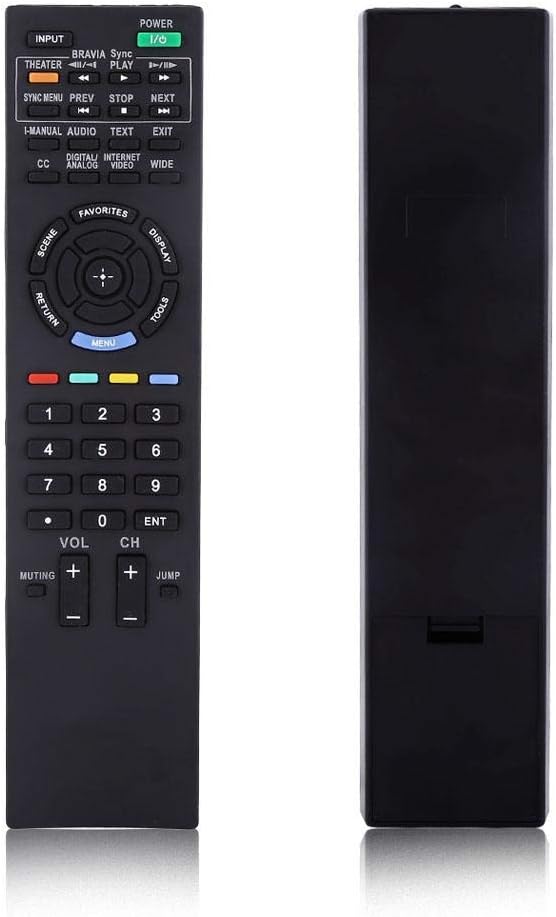
ചിത്രം 2: മുൻഭാഗം view of the Zerone RM-YD038 Remote Control.
- പവർ ബട്ടൺ (Green, top right): Turns the television on or off.
- ഇൻപുട്ട് ബട്ടൺ (Top left): Cycles through available input sources (HDMI, AV, etc.).
- നാവിഗേഷൻ കീ (Circular pad in the middle): Used for menu navigation. The central button typically acts as "Enter" or "OK". This dedicated menu navigation key allows direct access to digital TV functions.
- വോളിയം കൂട്ടുക/താഴ്ത്തുക (VOL +/-): Adjusts the audio volume.
- ചാനൽ മുകളിലേക്കും താഴേക്കും (CH +/-): Changes television channels.
- മ്യൂട്ടിംഗ് ബട്ടൺ (Muting): Mutes or unmutes the television audio.
- നമ്പർ പാഡ് (0-9): Directly enters channel numbers.
- മെനു ബട്ടൺ (Blue, below navigation pad): Accesses the television's main menu.
- റിട്ടേൺ ബട്ടൺ (Left of navigation pad): Returns to the previous screen or menu.
- പ്ലേബാക്ക് നിയന്ത്രണങ്ങൾ (Play, Stop, Pause, Rewind, Fast Forward): Controls media playback if your TV supports it.

Figure 3: The remote control held in hand, showing button layout.

ചിത്രം 4: വിശദമായി view of the remote's buttons.
3. പരിപാലനം
3.1 വൃത്തിയാക്കൽ
To maintain the remote control's functionality and appearance, clean it regularly:
- റിമോട്ടിന്റെ ഉപരിതലം തുടയ്ക്കാൻ മൃദുവായതും ഉണങ്ങിയതുമായ തുണി ഉപയോഗിക്കുക.
- കഠിനമായ അഴുക്കിന്, ചെറുതായി dampവെള്ളം അല്ലെങ്കിൽ നേരിയതും ഉരച്ചിലുകൾ ഇല്ലാത്തതുമായ ഒരു ക്ലീനർ ഉപയോഗിച്ച് തുണി തുടയ്ക്കുക. അമിതമായ ഈർപ്പം ഒഴിവാക്കുക.
- കഠിനമായ രാസവസ്തുക്കളോ, ലായകങ്ങളോ, അബ്രസീവ് ക്ലീനിംഗ് പാഡുകളോ ഉപയോഗിക്കരുത്, കാരണം ഇവ റിമോട്ടിന്റെ ഫിനിഷിനോ ആന്തരിക ഘടകങ്ങളോ കേടുവരുത്തും.
3.2 ബാറ്ററി മാറ്റിസ്ഥാപിക്കൽ
Replace batteries when the remote's response becomes sluggish or it stops functioning. Refer to Section 1.1 for battery installation instructions. Always replace both batteries at the same time with new AAA batteries.
3.3 സംഭരണം
When not in use for extended periods, it is recommended to remove the batteries to prevent leakage and potential damage to the remote control.
4. പ്രശ്നപരിഹാരം
If you experience issues with your Zerone RM-YD038 remote control, please refer to the following common troubleshooting steps:
- റിമോട്ട് പ്രതികരിക്കുന്നില്ല:
- Ensure batteries are correctly installed with proper polarity (+/-).
- Replace old batteries with new ones. Weak batteries are a common cause of unresponsiveness.
- റിമോട്ടിനും ടിവിയുടെ ഇൻഫ്രാറെഡ് റിസീവറിനും ഇടയിൽ എന്തെങ്കിലും തടസ്സങ്ങളുണ്ടോ എന്ന് പരിശോധിക്കുക.
- Ensure you are within the effective range and pointing the remote directly at the TV.
- Buttons Require Excessive Pressure:
- This can sometimes occur with new remotes or after extended use. Ensure you are pressing the buttons firmly and directly.
- If the issue persists, ensure the remote is clean and free of debris around the buttons.
- Limited Range or Poor Signal:
- Replace batteries, as low battery power can reduce signal strength.
- Ensure there are no strong light sources (like direct sunlight or certain types of lighting) interfering with the IR signal.
- Remote Makes Unusual Sounds:
- If the remote produces unusual sounds, particularly after a fall, it may indicate internal damage. Consider replacing the unit.
ഈ ഘട്ടങ്ങൾ പ്രശ്നം പരിഹരിക്കുന്നില്ലെങ്കിൽ, കൂടുതൽ സഹായത്തിനായി ഉപഭോക്തൃ പിന്തുണയുമായി ബന്ധപ്പെടുക.
5 സ്പെസിഫിക്കേഷനുകൾ
| ഫീച്ചർ | വിശദാംശങ്ങൾ |
|---|---|
| ബ്രാൻഡ് | സീറോൺ |
| മോഡൽ നമ്പർ | RM-YD038 (Internal Model: Zer oneuhiskbndp2) |
| അനുയോജ്യമായ റിമോട്ട് മോഡലുകൾ | RM-YD033, RM-ED040, RM-YD034, RM-YD035 |
| അനുയോജ്യമായ ടിവി മോഡലുകൾ | KDL32EX500, KDL55HX729, KDL40EX723 |
| പവർ ഉറവിടം | 2 x AAA ബാറ്ററികൾ (ഉൾപ്പെടുത്തിയിട്ടില്ല) |
| ഇനത്തിൻ്റെ ഭാരം | 2.39 ഔൺസ് (ഏകദേശം 67.7 ഗ്രാം) |
| പ്രത്യേക ഫീച്ചർ | സാർവത്രിക മാറ്റിസ്ഥാപിക്കൽ |
| പിന്തുണയ്ക്കുന്ന ഉപകരണങ്ങളുടെ പരമാവധി എണ്ണം | 1 (ടെലിവിഷൻ) |
| ASIN | B07WCN3S2V |
| ആദ്യ തീയതി ലഭ്യമാണ് | ഓഗസ്റ്റ് 12, 2019 |

Figure 5: Dimensions of the Zerone RM-YD038 Remote Control.
6. വാറൻ്റിയും പിന്തുണയും
6.1 വാറൻ്റി വിവരങ്ങൾ
Specific warranty details for the Zerone RM-YD038 remote control are not provided in this manual. Please refer to the product packaging or the retailer's webബാധകമായ ഏതെങ്കിലും വാറന്റി നിബന്ധനകൾക്കും വ്യവസ്ഥകൾക്കും സൈറ്റ്.
6.2 ഉപഭോക്തൃ പിന്തുണ
For further assistance, technical support, or inquiries regarding your Zerone RM-YD038 remote control, please contact the retailer or manufacturer directly. Contact information can typically be found on the product packaging or the official Zerone webസൈറ്റ്.


