1. ആമുഖം
This manual provides comprehensive instructions for the installation, operation, and maintenance of your Durablow SH3002-RH WiFi Gas Fireplace Remote Control. This device is designed to offer convenient control over your gas fireplace, integrating smart home functionalities for enhanced comfort and energy efficiency.
2 സുരക്ഷാ വിവരങ്ങൾ
- For Gas Fireplace Only: This device is designed exclusively for gas fireplaces with Millivolt gas valves and Electronic spark ignition modules. It is not a power supply or ignitor unit.
- ശ്രദ്ധിക്കപ്പെടാത്ത പ്രവർത്തനം: If your house is unattended, do not use any remote functions. Always turn off the main gas supply when leaving the house for extended periods.
- താപനില പരിധി: The controller box has an engineering plastic housing. Avoid temperatures over 130°F (54°C) to prevent damage.
- ബാറ്ററി ഉപയോഗം: Use only recommended batteries (AA or AAA lithium batteries for the handset). Corrosion caused by battery leaks will void the warranty.
- പ്രൊഫഷണൽ ഇൻസ്റ്റാളേഷൻ: If you are unsure about any installation steps or electrical wiring, consult a qualified professional.
3. പാക്കേജ് ഉള്ളടക്കം
താഴെ ലിസ്റ്റ് ചെയ്തിരിക്കുന്ന എല്ലാ ഇനങ്ങളും നിങ്ങളുടെ പാക്കേജിൽ ഉൾപ്പെടുത്തിയിട്ടുണ്ടെന്ന് ഉറപ്പാക്കുക:
- WiFi Controller Box (SH3002-RH)
- cUL listed USB Power Supply Adapter (100-240VAC to 5VDC)
- Power Cord (length 3.2')
- ഉപയോക്തൃ മാനുവൽ
- Thermostat Sensor (6' wire)
- Remote Transmitter Handset (batteries not included)
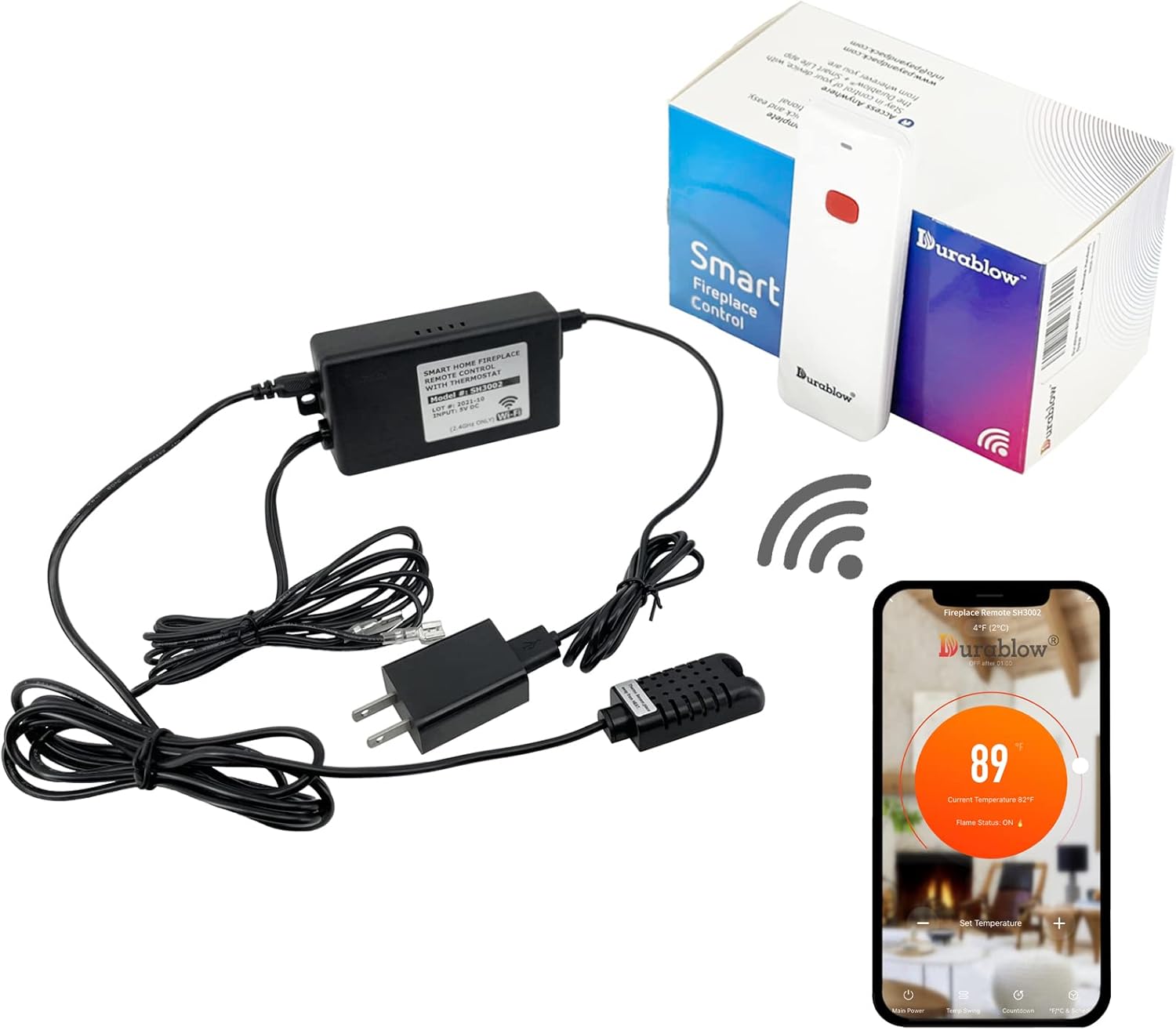
Image: Durablow SH3002-RH WiFi Gas Fireplace Remote Control Kit components, including the control box, remote handset, thermostat sensor, and power adapter.
4. ഉൽപ്പന്നം കഴിഞ്ഞുview
The Durablow SH3002-RH system consists of a main WiFi controller box, a remote handset, and a detachable thermostat sensor. The controller box connects to your fireplace's millivolt valve or electronic ignition module, allowing for smart control via the Smart-Life App or voice commands. The remote handset provides local on/off and thermostat control.
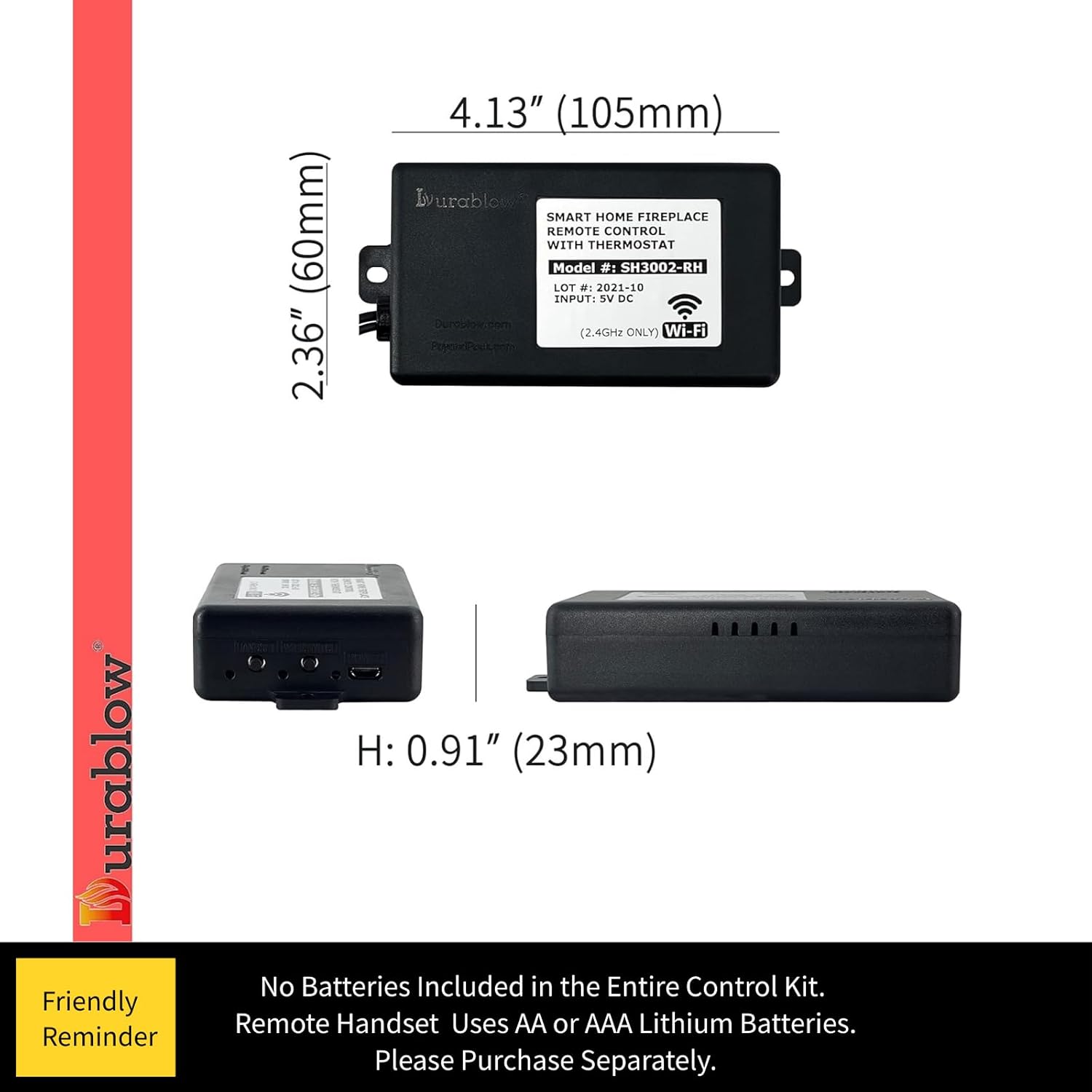
Image: Dimensions of the Durablow SH3002-RH WiFi Controller Box, showing its compact size for easy installation.
5. ഇൻസ്റ്റലേഷൻ
Installation involves connecting the WiFi controller box to your gas fireplace's control system. Ensure the main gas supply is turned off before beginning installation.
5.1 Wiring for Millivolt Gas Valves
Connect the controller box to the TH/TP and TH terminals on your millivolt gas valve. The thermopile/pilot light provides the necessary voltagപ്രവർത്തനത്തിനുള്ള ഇ.

Image: Wiring diagram illustrating connections for Millivolt gas valves and electronic ignition modules.
5.2 Wiring for Electronic Spark Ignition Modules (e.g., IPI-6000)
For fireplaces with electronic spark ignition modules, connect the controller to the appropriate terminals as indicated in the diagram. Ensure proper connection to the 110/24VAC transformer.

Image: Detailed wiring diagram for connecting the remote control to an IPI-6000 ignition module.
5.3 Wiring for SIT Control Modules
If your fireplace uses a SIT control module, follow the specific wiring instructions provided in the diagram to connect the optional remote control wires.

Image: Wiring diagram for integrating the remote control with a SIT control module.
5.4 പവർ കണക്ഷൻ
Connect the cUL listed USB power supply adapter to the controller box and plug it into a standard 100-240VAC outlet.
5.5 Thermostat Sensor Placement
Position the detachable thermostat sensor (6' wire) in a location that accurately monitors room temperature, away from direct heat sources or drafts.
5.6 Video Installation Guide
വീഡിയോ: ഈ വീഡിയോയിൽ ഒരു ഓവർ നൽകുന്നുview of the Durablow SH3002-RH Smart Fireplace Control, Thermostat & Remote, demonstrating its features and basic setup.
Video: This video showcases the Durablow SH3002-RH WiFi Gas Fireplace Remote Control Kit, detailing its components and functionality.
Video: This video demonstrates the Smart Fireplace Control & Thermostat features of the Durablow SH3002, which is functionally similar to the SH3002-RH model.
6. Smart-Life App Integration
The Durablow SH3002-RH operates on 2.4GHz WiFi (not compatible with 5GHz WiFi) and does not require a separate hub or gateway. Use the free Smart-Life App to control your fireplace.
6.1 ആപ്പിലേക്ക് കണക്റ്റുചെയ്യുന്നു
- Download the Smart-Life App from your device's app store.
- Register or log in to your Smart-Life account.
- Power on the Durablow SH3002-RH controller box.
- Follow the in-app instructions for quick pairing modes to connect the controller box to your device.

Image: Smart Life App interface showing options for adding new smart home devices, including thermostats.
6.2 Voice Control Compatibility
The device is compatible with Amazon Alexa, Google Home, Samsung SmartThings, and Siri for convenient voice control. Link your Smart-Life account to your preferred smart assistant's app.
7. പ്രവർത്തന നിർദ്ദേശങ്ങൾ
7.1 ഓൺ/ഓഫ് നിയന്ത്രണം
- Via Smart-Life App: Use the main power button within the app to turn the fireplace on or off.
- Via Remote Handset: Press the ON/OFF button on the remote handset to toggle the fireplace status.
- Via Voice Command: Use commands like "Alexa, turn on the fireplace" or "Hey Google, turn off the fireplace."
7.2 Thermostat Functionality
The detachable thermostat monitors room temperature and allows for automated control to maintain a desired temperature. Set your preferred temperature range within the Smart-Life App.
7.3 Timer and Scheduling
Utilize the Smart-Life App to set timers for automatic on/off operations or create programmable schedules to optimize comfort and energy costs.

Image: Smart Life App interface displaying options for setting timers and creating weekly schedules for fireplace operation.
8. പരിപാലനം
8.1 Remote Handset Battery Replacement
The remote handset requires AA or AAA lithium batteries (not included). Replace batteries when the indicator light dims or the remote becomes unresponsive. Ensure correct polarity when inserting new batteries.

Image: Remote handset with the battery compartment open, showing where to insert AA or AAA batteries.
പ്രധാനപ്പെട്ടത്: Any corrosion caused by battery leaks will be considered improper use and may void the product warranty.
9. പ്രശ്നപരിഹാരം
- ഉപകരണം വൈഫൈയിലേക്ക് കണക്റ്റുചെയ്യുന്നില്ല: Ensure your WiFi network is 2.4GHz. Check that the controller box is within range of your WiFi router. Restart the controller and attempt pairing again.
- Remote Handset Not Responding: Check and replace the batteries in the remote handset. Ensure the handset is paired with the controller box according to the installation manual.
- Fireplace Not Turning On/Off: Verify all wiring connections are secure and correct. Check the main gas supply to the fireplace. Ensure the controller box is receiving power.
- കൃത്യമല്ലാത്ത താപനില വായനകൾ: Ensure the thermostat sensor is placed in an optimal location, away from direct heat or cold drafts. Do not extend the thermostat wire as it may affect accuracy.
For further assistance, refer to the detailed installation manual or contact Durablow customer support.
10 സ്പെസിഫിക്കേഷനുകൾ
| ബ്രാൻഡ് | ഡ്യൂറബ്ലോ |
| മോഡൽ നമ്പർ | SH3002-RH |
| മെറ്റീരിയൽ | Smart Home Functions |
| ഇനത്തിന്റെ അളവുകൾ (L x W x H) | 5 x 5 x 5 ഇഞ്ച് |
| ഇനത്തിൻ്റെ ഭാരം | 12.8 ഔൺസ് |
| നിയന്ത്രണ രീതി | ശബ്ദം |
| കണക്റ്റിവിറ്റി പ്രോട്ടോക്കോൾ | വൈഫൈ (2.4GHz മാത്രം) |
| നിറം | കറുപ്പ് |
| സർട്ടിഫിക്കേഷനുകൾ | cUL listed USB power supply, FCC approved |
11. വാറൻ്റിയും പിന്തുണയും
For warranty information and customer support, please refer to the contact details provided in your product packaging or visit the official Durablow website. The brand name and model numbers of other products mentioned in this manual are for cross-reference purposes only and remain the property of their respective owners.


