1. ആമുഖം
This manual provides detailed instructions for the setup, operation, and maintenance of your Targus M610 AKM610AP Wireless Mouse and Keyboard Combo. This combo offers a reliable 2.4GHz wireless connection, a full-sized keyboard, and a high-definition 1600 DPI optical mouse for efficient and comfortable use.

Figure 1: Targus M610 AKM610AP Wireless Mouse and Keyboard Combo. This image shows the full-sized black wireless keyboard and the matching black wireless mouse.
2. പാക്കേജ് ഉള്ളടക്കം
നിങ്ങളുടെ പാക്കേജിൽ എല്ലാ ഇനങ്ങളും ഉണ്ടെന്ന് ഉറപ്പാക്കുക:
- Targus Wireless Keyboard
- ടാർഗസ് വയർലെസ് മൗസ്
- USB റിസീവർ
- 1 AA Battery (for mouse, included)

Figure 2: The wireless mouse shown alongside its compact USB receiver. The receiver enables wireless connectivity for both the mouse and keyboard.
3. സജ്ജീകരണ നിർദ്ദേശങ്ങൾ
Follow these steps to set up your Targus Wireless Mouse and Keyboard Combo:
- ബാറ്ററികൾ ഇൻസ്റ്റാൾ ചെയ്യുക:
- For the mouse: Open the battery compartment cover on the underside of the mouse. Insert the provided AA battery, ensuring correct polarity (+/-). Close the cover.
- For the keyboard: Open the battery compartment cover on the underside of the keyboard. Insert the required batteries (typically AAA, not included for keyboard based on JSON). Ensure correct polarity (+/-). Close the cover.
- USB റിസീവർ ബന്ധിപ്പിക്കുക:
Locate an available USB port on your computer. Insert the USB receiver firmly into the USB port. Your computer should automatically detect and install the necessary drivers. This is a plug-and-play device, requiring no additional software installation.

ചിത്രം 3: ഒരു ക്ലോസ്-അപ്പ് view of the compact USB receiver, which facilitates the wireless connection for both the keyboard and mouse.
- പവർ ഓൺ:
Ensure the power switch on both the mouse and keyboard (if present) is in the "ON" position. The devices should now be ready for use.
4. പ്രവർത്തന നിർദ്ദേശങ്ങൾ
4.1. കീബോർഡ് ഉപയോഗം
The Targus M610 keyboard features a full-sized layout for comfortable typing.
- സ്റ്റാൻഡേർഡ് ടൈപ്പിംഗ്: ടെക്സ്റ്റ് ഇൻപുട്ടിനായി ആൽഫാന്യൂമെറിക് കീകൾ ഉപയോഗിക്കുക.
- ഫംഗ്ഷൻ കീകൾ (F1-F12): These keys may have secondary multimedia functions (e.g., volume control, media playback) accessible by pressing the Fn ഒരേസമയം കീ.
- സംഖ്യാ കീപാഡ്: The dedicated numeric keypad on the right provides quick entry for numbers and calculations.
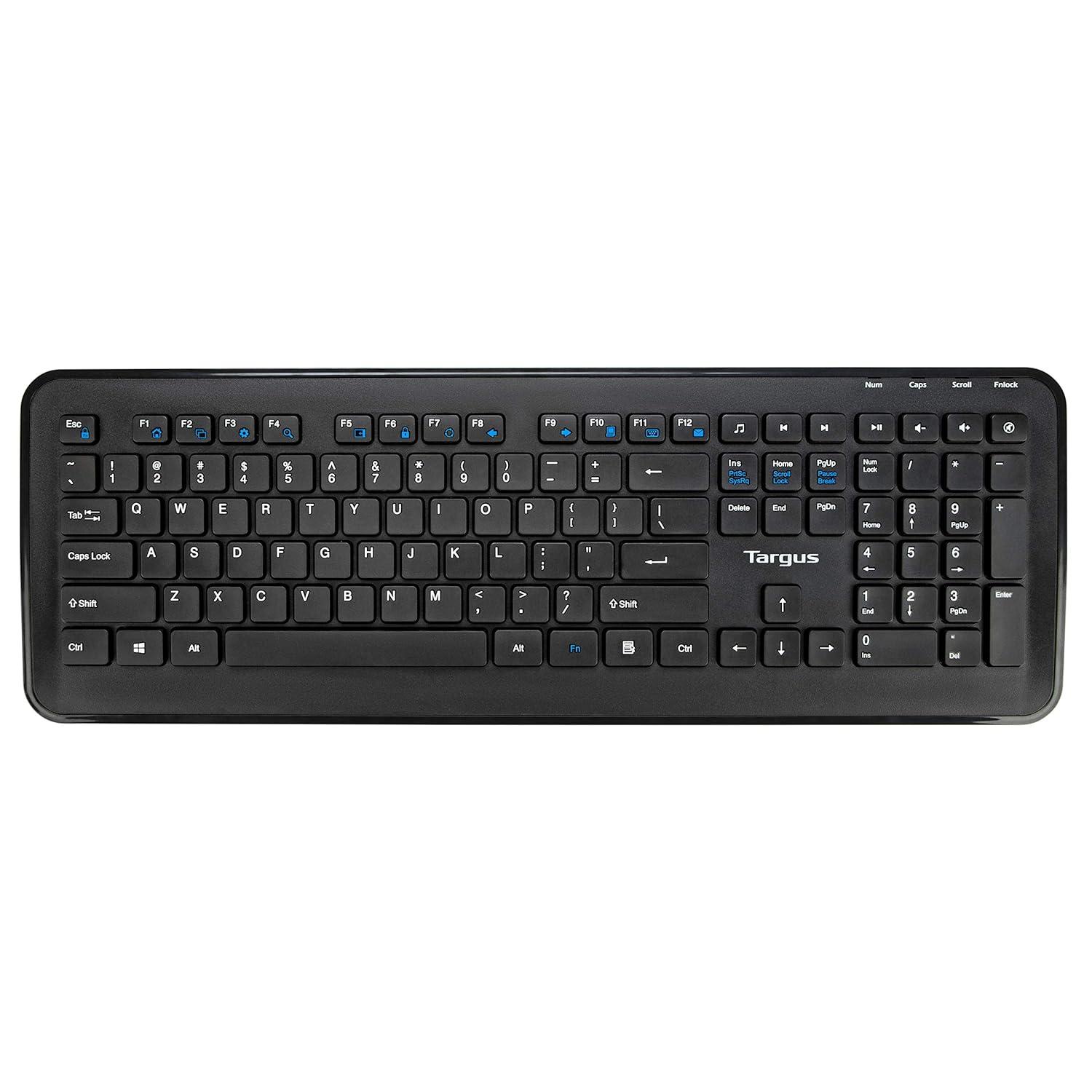
ചിത്രം 4: മുകളിൽ നിന്ന് താഴേക്ക് view of the full-sized Targus wireless keyboard, highlighting its layout and function keys.
4.2. മൗസ് ഉപയോഗം
The Targus M610 mouse is equipped with a high-definition 1600 DPI optical sensor for precise tracking.
- ഇടത്-ക്ലിക്ക് ബട്ടൺ: പ്രാഥമിക തിരഞ്ഞെടുപ്പും സജീവമാക്കലും.
- വലത്-ക്ലിക്ക് ബട്ടൺ: സന്ദർഭോചിത മെനുകൾ ആക്സസ് ചെയ്യുന്നു.
- സ്ക്രോൾ വീൽ: പ്രമാണങ്ങളിലൂടെ ലംബമായി നാവിഗേറ്റ് ചെയ്യുന്നു കൂടാതെ web pages. Can also function as a middle-click button.
- DPI Sensor: The 1600 DPI optical sensor provides accurate and responsive cursor movement.

ചിത്രം 5: മുകളിൽ view of the Targus wireless mouse, showing the left and right click buttons and the scroll wheel.
5. പരിപാലനവും പരിചരണവും
To ensure the longevity and optimal performance of your Targus Wireless Combo, follow these maintenance guidelines:
- വൃത്തിയാക്കൽ: കീബോർഡിന്റെയും മൗസിന്റെയും പ്രതലങ്ങൾ വൃത്തിയാക്കാൻ മൃദുവായതും ഉണങ്ങിയതുമായ തുണി ഉപയോഗിക്കുക. കഠിനമായ അഴുക്കിന്, ചെറുതായി dampതുണിയിൽ വെള്ളം അല്ലെങ്കിൽ നേരിയ ക്ലീനിംഗ് ലായനി ഉപയോഗിക്കുക. കഠിനമായ രാസവസ്തുക്കളോ ഉരച്ചിലുകളോ ഉള്ള വസ്തുക്കൾ ഒഴിവാക്കുക.
- ബാറ്ററി മാറ്റിസ്ഥാപിക്കൽ: Replace batteries when performance degrades or the low battery indicator (if present) illuminates. Always use fresh, high-quality batteries of the specified type (AA for mouse, typically AAA for keyboard).
- സംഭരണം: When not in use for extended periods, store the combo in a cool, dry place. Consider removing batteries to prevent leakage.
- ദ്രാവകങ്ങൾ ഒഴിവാക്കുക: ആന്തരിക ഘടകങ്ങൾക്ക് കേടുപാടുകൾ സംഭവിക്കാതിരിക്കാൻ കീബോർഡും മൗസും ദ്രാവകങ്ങളിൽ നിന്ന് അകറ്റി നിർത്തുക.
6. പ്രശ്നപരിഹാരം
If you encounter issues with your Targus Wireless Combo, refer to the following common solutions:
| പ്രശ്നം | പരിഹാരം |
|---|---|
| കീബോർഡോ മൗസോ പ്രതികരിക്കുന്നില്ല. |
|
| ഇടയ്ക്കിടെയുള്ള കണക്ഷൻ അല്ലെങ്കിൽ കാലതാമസം. |
|
| മൗസ് കഴ്സർ ക്രമരഹിതമാണ് അല്ലെങ്കിൽ സുഗമമായി നീങ്ങുന്നില്ല. |
|
7 സ്പെസിഫിക്കേഷനുകൾ
Detailed technical specifications for the Targus M610 AKM610AP Wireless Mouse and Keyboard Combo:
| ഫീച്ചർ | വിശദാംശങ്ങൾ |
|---|---|
| ബ്രാൻഡ് | ടാർഗസ് |
| മോഡൽ നമ്പർ | AKM610AP |
| കണക്റ്റിവിറ്റി ടെക്നോളജി | 2.4GHz Wireless, USB Receiver |
| നിറം | കറുപ്പ് |
| മൗസ് സെൻസർ | 1600 DPI ഒപ്റ്റിക്കൽ സെൻസർ |
| കീബോർഡ് തരം | Full-sized with Multimedia Keys |
| അനുയോജ്യമായ ഉപകരണങ്ങൾ | Personal Computer, Laptop, Television, Projector |
| പവർ ഉറവിടം | ബാറ്ററി പവർ |
| ബാറ്ററികൾ ആവശ്യമാണ് | 1 AA battery (for mouse, included) |
| ഉൽപ്പന്ന അളവുകൾ (കീബോർഡ്) | Approximately 45.5 cm (Width) x 15.7 cm (Height) |
| ഉൽപ്പന്ന അളവുകൾ (മൗസ്) | Approximately 6.6 cm (Length) x 3.8 cm (Width) x 1.1 cm (Height) |
| ഇനത്തിൻ്റെ ഭാരം | 611 g (total combo weight) |

Figure 6: Diagram illustrating the approximate dimensions of the Targus wireless keyboard, including its width and height, and highlighting the 12 multimedia keys.

Figure 7: Diagram illustrating the approximate dimensions of the Targus wireless mouse (length, width, height) and indicating the high-precision nano receiver.
8. വാറൻ്റിയും പിന്തുണയും
The Targus M610 AKM610AP Wireless Mouse and Keyboard Combo comes with a 3 വർഷത്തെ വാറൻ്റി.
For warranty claims, technical support, or further assistance, please contact Targus customer service through their official webഉൽപ്പന്നം വാങ്ങിയ സൈറ്റ് അല്ലെങ്കിൽ റീട്ടെയിലർ. വാറന്റി സാധൂകരണത്തിനായി നിങ്ങളുടെ വാങ്ങിയതിന്റെ തെളിവ് സൂക്ഷിക്കുക.
For more information, visit the official Targus webസൈറ്റ്: www.targus.com


