1. ഉൽപ്പന്നം കഴിഞ്ഞുview
This manual provides instructions for the Yimaut Replacement Remote Control, designed for use with Hisense Roku TVs and various Roku streaming devices. This package includes two remote controls and two protective silicone covers (one black, one yellow/blue glow-in-the-dark).

Figure 1: Yimaut Replacement Remote Controls with Protective Covers. The blue cover glows in the dark for easy visibility at night, while the black cover provides standard protection.
The remote controls feature dedicated shortcut buttons for popular streaming services and essential TV functions like power, volume, and mute. The included silicone covers offer enhanced grip, shock protection, and an anti-lost wrist strap.
2 അനുയോജ്യത
The Yimaut Replacement Remote Control is broadly compatible with a range of devices. Please review the compatibility details below to ensure proper function with your equipment.
2.1. Compatible with Built-in Roku TVs
This remote is a direct replacement for remotes used with various brands of TVs that have Roku built-in, including but not limited to:
- ടിസിഎൽ റോക്കു ടിവി
- ഹിസെൻസ് റോക്കു ടിവി
- ഓൺ റോക്കു ടിവി
- Sharp Roku TV
- Haier Roku TV
- ചിഹ്നം റോക്കു ടിവി
- Sanyo Roku TV
- Hitachi Roku TV
- RCA Roku TV
- ഫിലിപ്സ് റോക്കു ടിവി
- ഘടകം റോക്കു ടിവി
- LG Roku TV
- ജെവിസി റോക്കു ടിവി
- Magnavox Roku TV
- വെസ്റ്റിംഗ്ഹ house സ് റോക്കു ടിവി
2.2. Compatible with Roku Players
The remote is also compatible with various Roku streaming players, including:
- Roku Box
- Roku 1, 2, 3, 4 HD LT XS XD
- Roku Express / Express+
- Roku Premiere / Premiere+
- Roku Ultra LT
- റോക്കു അൾട്രാ
- Roku Soundbar Remote
2.3. Incompatible Devices
പ്രധാനപ്പെട്ടത്: This remote control is അല്ല compatible with Roku Stick or Roku Streaming Stick models.

Figure 2: Visual guide to compatible and incompatible Roku devices. The remote works with most Roku TVs and boxes but not with USB stick models.
3. സജ്ജീകരണവും പ്രാരംഭ ഉപയോഗവും
Follow these steps to set up your new Yimaut Replacement Remote Control.
3.1. ബാറ്ററി ഇൻസ്റ്റാളേഷൻ
- റിമോട്ട് കൺട്രോളിന്റെ പിൻഭാഗത്ത് ബാറ്ററി കമ്പാർട്ട്മെന്റ് കണ്ടെത്തുക.
- സ്ലൈഡ് ചെയ്ത് ബാറ്ററി കവർ തുറക്കുക.
- കമ്പാർട്ടുമെന്റിനുള്ളിൽ സൂചിപ്പിച്ചിരിക്കുന്നതുപോലെ ശരിയായ പോളാരിറ്റി (+ ഉം - ഉം) ഉറപ്പാക്കിക്കൊണ്ട് രണ്ട് (2) AAA ബാറ്ററികൾ (ഉൾപ്പെടുത്തിയിട്ടില്ല) തിരുകുക.
- ബാറ്ററി കവർ സുരക്ഷിതമായി അടയ്ക്കുക.
3.2. Pairing (for Roku Players)
For Roku streaming players (Roku Box, Express, Premiere, Ultra, etc.), the remote typically works immediately via infrared (IR) without complex pairing. Simply point the remote at your Roku device.
If you experience issues, ensure there are no obstructions between the remote and the Roku device's IR receiver.
3.3. Programming TV Functions (Power, Volume, Mute)
For built-in Roku TVs, the power, volume, and mute buttons may require a simple programming step to control your specific TV brand. This process typically involves using the Roku TV's settings menu:
- On your Roku TV, navigate to ക്രമീകരണങ്ങൾ.
- തിരഞ്ഞെടുക്കുക വിദൂരങ്ങളും ഉപകരണങ്ങളും.
- തിരഞ്ഞെടുക്കുക റിമോട്ട് or ടിവി നിയന്ത്രണത്തിനായി റിമോട്ട് സജ്ജീകരിക്കുക.
- Follow the on-screen prompts to select your TV brand and test the power, volume, and mute functions. You may need to try a few codes until the remote successfully controls your TV.
- If you encounter difficulties, refer to your Roku TV's specific user manual or contact Yimaut customer support for detailed instructions.
4. റിമോട്ട് കൺട്രോൾ പ്രവർത്തിപ്പിക്കുക
The Yimaut Replacement Remote Control is designed for intuitive navigation and quick access to your favorite content.
4.1. ബട്ടൺ പ്രവർത്തനങ്ങൾ
| ബട്ടൺ | ഫംഗ്ഷൻ |
|---|---|
| പവർ (⏻) | ടിവി ഓൺ/ഓഫ് ചെയ്യുന്നു. |
| തിരികെ (←Скачать по видео (എഴുത്തുകാരൻ)) | മുമ്പത്തെ സ്ക്രീനിലേക്കോ മെനുവിലേക്കോ മടങ്ങുന്നു. |
| വീട് (⌂) | Goes to the Roku Home screen. |
| ദിശാസൂചന പാഡ് (മുകളിലേക്ക്, താഴേക്ക്, ഇടത്തേക്ക്, വലത്തേക്ക്) | Navigates through menus and content. |
| OK | ഒരു ഇനം തിരഞ്ഞെടുക്കുന്നു അല്ലെങ്കിൽ ഒരു പ്രവൃത്തി സ്ഥിരീകരിക്കുന്നു. |
| റിവൈൻഡ് (⟲ ⟲ безбей) | Rewinds video playback. |
| പ്ലേ/താൽക്കാലികമായി നിർത്തുക (▶‖) | Plays or pauses video content. |
| വേഗത്തിൽ മുന്നോട്ട് (⟳) | Fast forwards video playback. |
| വോളിയം കൂട്ടുക/താഴ്ത്തുക (+ / -) | ടിവി വോളിയം ക്രമീകരിക്കുന്നു. |
| നിശബ്ദമാക്കുക (🔇) | ടിവി ഓഡിയോ നിശബ്ദമാക്കുകയോ അൺമ്യൂട്ടുചെയ്യുകയോ ചെയ്യുന്നു. |
| Sleep/Star (*) | Accesses options or settings within an app/channel. |
| ഉറവിടം | Changes the input source on your TV. |
4.2. കുറുക്കുവഴി കീകൾ
The remote includes dedicated shortcut buttons for quick access to popular streaming applications:
- നെറ്റ്ഫ്ലിക്സ്
- ഹുലു
- ഡിസ്നി+
- ആമസോൺ പ്രൈം വീഡിയോ
- YouTube
- ESPN+
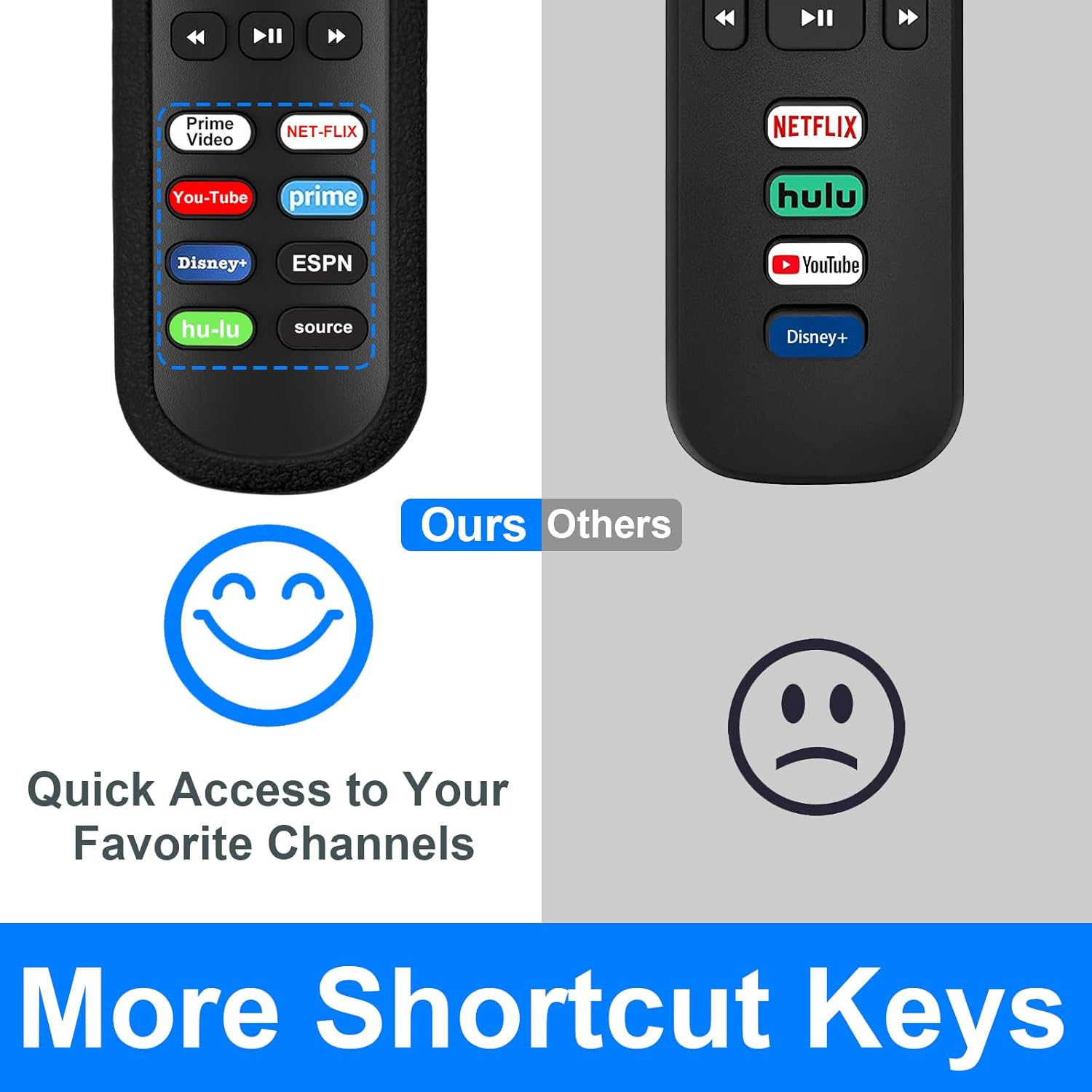
Figure 3: Dedicated shortcut buttons for popular streaming services, allowing for quick app launch.
5. പരിപാലനവും പരിചരണവും
To ensure the longevity and optimal performance of your Yimaut Replacement Remote Control, follow these maintenance guidelines:
5.1. Silicone Protective Cover
The included silicone covers provide protection against drops and impacts. The blue cover features a glow-in-the-dark property, making it easier to locate the remote in low-light conditions.
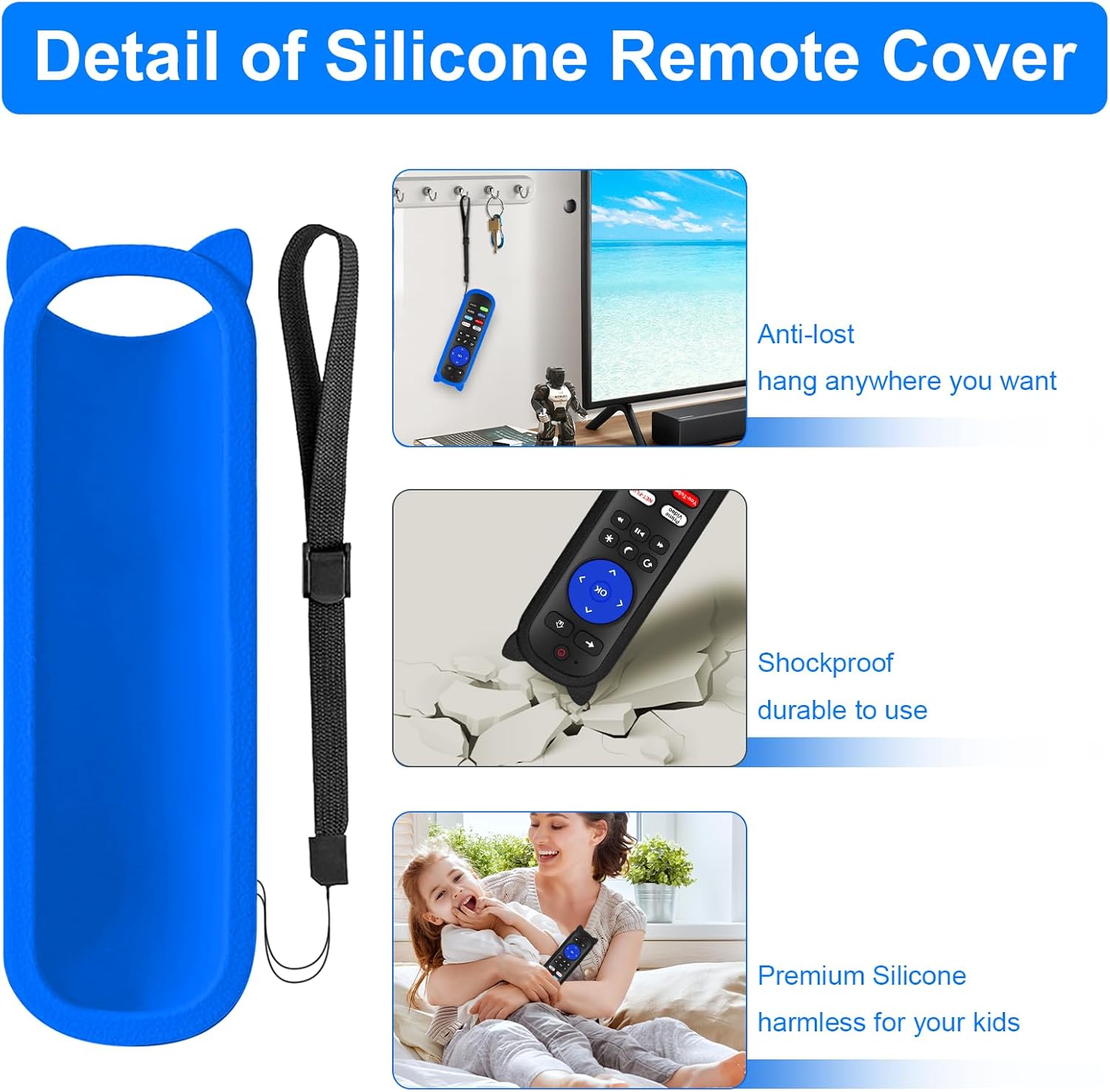
Figure 4: Features of the silicone protective cover, including the anti-lost wrist strap and shockproof design.
- വൃത്തിയാക്കൽ: The silicone cover can be removed and washed with mild soap and water if it becomes dirty. Ensure it is completely dry before placing it back on the remote.
- Glow Feature: For the blue cover to glow effectively, expose it to light (natural or artificial) for a period to "charge" its luminescence.
- റിസ്റ്റ് സ്ട്രാപ്പ്: Utilize the included wrist strap to prevent accidental drops or misplacement.
5.2. ജനറൽ കെയർ
- Avoid exposing the remote to extreme temperatures, direct sunlight, or high humidity.
- Do not drop the remote or subject it to strong impacts, even with the cover on.
- Clean the remote's surface with a soft, dry cloth. Do not use abrasive cleaners or solvents.
- Remove batteries if the remote will not be used for an extended period to prevent battery leakage.
6. പ്രശ്നപരിഹാരം
If you encounter issues with your Yimaut Replacement Remote Control, try the following troubleshooting steps:
| പ്രശ്നം | സാധ്യമായ പരിഹാരം |
|---|---|
| റിമോട്ട് പ്രതികരിക്കുന്നില്ല. |
|
| Power, Volume, or Mute buttons are not working on my Roku TV. |
|
| Remote works with Roku TV but not with my Roku Stick. |
|
| Buttons feel sticky or unresponsive. |
|
7 സ്പെസിഫിക്കേഷനുകൾ
| ഫീച്ചർ | വിശദാംശങ്ങൾ |
|---|---|
| മോഡലിൻ്റെ പേര് | Universal Remote (HU-RCRUS-20) |
| ഇനം മോഡൽ നമ്പർ | 6462717679735 |
| കണക്റ്റിവിറ്റി ടെക്നോളജി | ഇൻഫ്രാറെഡ് (IR) |
| കൺട്രോളർ തരം | ബട്ടൺ നിയന്ത്രണം |
| പരമാവധി പരിധി | 40 അടി വരെ (12 മീറ്റർ) |
| പവർ ഉറവിടം | 2 x AAA ബാറ്ററികൾ (ഉൾപ്പെടുത്തിയിട്ടില്ല) |
| ഉൽപ്പന്ന അളവുകൾ (ഏകദേശം) | 5 x 2 x 1 സെ.മീ |
| ഉൽപ്പന്ന ഭാരം (ഏകദേശം) | 159 g (with cover) |
| പ്രത്യേക സവിശേഷതകൾ | Ergonomic design, Glow-in-dark silicone cover (blue), Anti-lost wrist strap, Dedicated shortcut keys |

Figure 5: The remote offers a reliable transmitting distance of up to 40 feet (12 meters).
8. വാറൻ്റിയും പിന്തുണയും
For warranty information or technical support regarding your Yimaut Replacement Remote Control, please contact the seller or manufacturer directly through your purchase platform. Keep your purchase receipt or order number handy for faster service.
Manufacturer: YJY SHOP