1. ആമുഖം
The Maxell Bass 13 Wireless Headphones (Model B13-WHPS) are designed to provide a versatile audio experience. These headphones feature 40mm drivers for clear sound, an integrated microphone for communication, and comfortable ear pads for extended listening. They offer both wireless Bluetooth connectivity and a traditional 3.5mm wired option.
2. ബോക്സിൽ എന്താണുള്ളത്?
- Maxell Bass 13 Wireless Headphones
- യുഎസ്ബി ചാർജിംഗ് കേബിൾ
- 3.5mm Audio Cable (if applicable, not explicitly listed but common for hybrid headphones)
- ഉപയോക്തൃ മാനുവൽ
3. ഉൽപ്പന്നം കഴിഞ്ഞുview
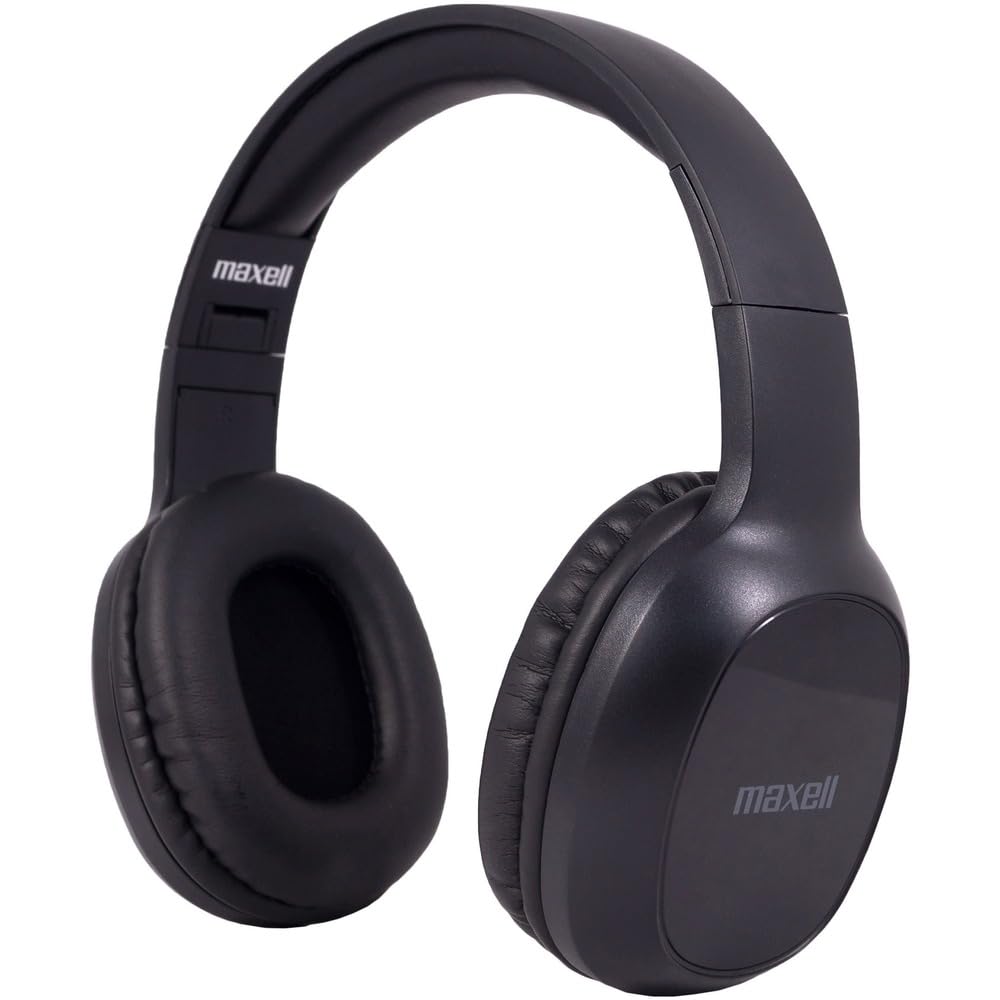
Figure 1: Maxell Bass 13 Wireless Headphones

Figure 2: Earcup Controls (Power, Volume, Play/Pause)
പ്രധാന സവിശേഷതകൾ:
- 40 എംഎം ഡൈനാമിക് ഡ്രൈവറുകൾ: Deliver clear and powerful audio performance.
- സംയോജിത മൈക്രോഫോൺ: ഹാൻഡ്സ്-ഫ്രീ കോളിംഗ് പ്രവർത്തനക്ഷമമാക്കുന്നു.
- Noise-Isolating Earpads: Provide comfort and help reduce external distractions.
- ബ്ലൂടൂത്ത് 5.0 കണക്റ്റിവിറ്റി: For stable wireless connection.
- 3.5mm ഓഡിയോ ജാക്ക്: Allows for wired connection to compatible devices.
- ക്രമീകരിക്കാവുന്ന ഹെഡ്ബാൻഡ്: Ensures a comfortable fit for various head sizes.
- 8 മണിക്കൂർ വരെ ബാറ്ററി ലൈഫ്: For extended listening and talk time.
4. സജ്ജീകരണം
4.1 ഹെഡ്ഫോണുകൾ ചാർജ് ചെയ്യുന്നു

Figure 3: Connecting the USB Charging Cable
- Locate the charging port on the headphone earcup.
- Connect the small end of the provided USB charging cable to the headphone's charging port.
- Connect the larger end of the USB cable to a USB power source (e.g., computer USB port, USB wall adapter).
- The LED indicator on the headphones will illuminate to show charging status. It will typically turn off or change color when fully charged.
- A full charge provides up to 8 hours of continuous talk/play time.
4.2 ബ്ലൂടൂത്ത് ജോടിയാക്കൽ
- ഹെഡ്ഫോണുകൾ പൂർണ്ണമായും ചാർജ്ജ് ചെയ്തിട്ടുണ്ടെന്ന് ഉറപ്പാക്കുക.
- Press and hold the Power button on the headphone earcup until the LED indicator flashes blue and red, indicating pairing mode.
- നിങ്ങളുടെ ഉപകരണത്തിൽ (സ്മാർട്ട്ഫോൺ, ടാബ്ലെറ്റ്, കമ്പ്യൂട്ടർ), ബ്ലൂടൂത്ത് ക്രമീകരണങ്ങളിലേക്ക് പോകുക.
- ഇതിനായി തിരയുക available devices. Select "Maxell Bass 13" from the list.
- Once paired, the LED indicator will typically show a solid blue light or flash blue slowly.
- ഒരു പാസ്കോഡ് ആവശ്യപ്പെടുകയാണെങ്കിൽ, "0000" എന്ന് നൽകുക.
4.3 വയർഡ് കണക്ഷൻ (3.5mm ഓഡിയോ ജാക്ക്)

Figure 4: Connecting the 3.5mm Audio Cable
For devices without Bluetooth or when battery is low, you can use the 3.5mm audio cable:
- Plug one end of the 3.5mm audio cable into the audio input jack on the headphone earcup.
- Plug the other end into the 3.5mm audio output jack of your device.
- ഹെഡ്ഫോണുകൾ പാസീവ് മോഡിൽ പ്രവർത്തിക്കും, ബ്ലൂടൂത്ത് പ്രവർത്തനം പ്രവർത്തനരഹിതമാക്കും.
5. പ്രവർത്തന നിർദ്ദേശങ്ങൾ
5.1 പവർ ഓൺ/ഓഫ്
- പവർ ഓൺ: LED ഇൻഡിക്കേറ്റർ പ്രകാശിക്കുന്നത് വരെ ഏകദേശം 3 സെക്കൻഡ് നേരത്തേക്ക് പവർ ബട്ടൺ അമർത്തിപ്പിടിക്കുക.
- പവർ ഓഫ്: LED ഇൻഡിക്കേറ്റർ ഓഫാകുന്നതുവരെ ഏകദേശം 3-5 സെക്കൻഡ് നേരത്തേക്ക് പവർ ബട്ടൺ അമർത്തിപ്പിടിക്കുക.
5.2 വോളിയം നിയന്ത്രണം
- വോളിയം വർദ്ധിപ്പിക്കുക: വോളിയം അപ്പ് (+) ബട്ടൺ അമർത്തുക.
- വോളിയം കുറയ്ക്കുക: വോളിയം ഡൗൺ (-) ബട്ടൺ അമർത്തുക.
5.3 മ്യൂസിക് പ്ലേബാക്ക്
- പ്ലേ/താൽക്കാലികമായി നിർത്തുക: മൾട്ടി-ഫംഗ്ഷൻ ബട്ടൺ (പലപ്പോഴും പവർ ബട്ടൺ അല്ലെങ്കിൽ ഒരു പ്രത്യേക പ്ലേ/പോസ് ബട്ടൺ) ഒരിക്കൽ അമർത്തുക.
- അടുത്ത ട്രാക്ക്: Press and hold the Volume Up (+) button (or double-press, refer to specific product button layout).
- മുമ്പത്തെ ട്രാക്ക്: Press and hold the Volume Down (-) button (or double-press, refer to specific product button layout).
5.4 കോൾ മാനേജ്മെന്റ്
- ഉത്തരം/അവസാന കോൾ: മൾട്ടി-ഫംഗ്ഷൻ ബട്ടൺ ഒരിക്കൽ അമർത്തുക.
- കോൾ നിരസിക്കുക: മൾട്ടി-ഫംഗ്ഷൻ ബട്ടൺ ഏകദേശം 2 സെക്കൻഡ് അമർത്തിപ്പിടിക്കുക.
- അവസാന നമ്പർ വീണ്ടും ഡയൽ ചെയ്യുക: മൾട്ടി-ഫംഗ്ഷൻ ബട്ടൺ ഇരട്ട-അമർത്തുക.
6. പരിപാലനം
6.1 വൃത്തിയാക്കൽ
- മൃദുവായതും ഉണങ്ങിയതും ലിന്റ് രഹിതവുമായ തുണി ഉപയോഗിച്ച് ഹെഡ്ഫോണുകൾ തുടയ്ക്കുക.
- അബ്രാസീവ് ക്ലീനറുകൾ, ലായകങ്ങൾ, എയറോസോൾ സ്പ്രേകൾ എന്നിവ ഉപയോഗിക്കരുത്.
- ഏതെങ്കിലും ദ്വാരങ്ങളിൽ ഈർപ്പം കയറുന്നത് ഒഴിവാക്കുക.
6.2 സംഭരണം

Figure 5: Headphones Folded for Storage
- Store the headphones in a cool, dry place away from extreme temperatures.
- When not in use for extended periods, ensure the headphones are fully charged before storage to preserve battery health.
- The headphones feature a foldable design for compact storage and portability.
6.3 ബാറ്ററി കെയർ
- ബാറ്ററി ഇടയ്ക്കിടെ പൂർണ്ണമായും ഡിസ്ചാർജ് ചെയ്യുന്നത് ഒഴിവാക്കുക.
- Charge the headphones regularly, even if not used often.
- Do not expose the battery to excessive heat or direct sunlight.
7. പ്രശ്നപരിഹാരം
| പ്രശ്നം | സാധ്യമായ കാരണം | പരിഹാരം |
|---|---|---|
| ഹെഡ്ഫോണുകൾ ഓണാകുന്നില്ല | കുറഞ്ഞ ബാറ്ററി | ഹെഡ്ഫോണുകൾ പൂർണ്ണമായും ചാർജ് ചെയ്യുക. |
| ബ്ലൂടൂത്ത് വഴി ജോടിയാക്കാൻ കഴിയില്ല | Headphones not in pairing mode; Device Bluetooth off; Too far from device | Ensure headphones are in pairing mode (flashing blue/red). Turn on device Bluetooth. Move headphones closer to device. |
| ശബ്ദമില്ല | Volume too low; Incorrect audio source; Headphones not connected | Increase headphone and device volume. Check if headphones are properly paired/connected. Verify audio output settings on your device. |
| മോശം കോൾ നിലവാരം | Weak Bluetooth signal; Microphone obstructed | Move closer to your device. Ensure microphone is not covered. |
8 സ്പെസിഫിക്കേഷനുകൾ
| ഫീച്ചർ | വിശദാംശങ്ങൾ |
|---|---|
| മോഡൽ നമ്പർ | B13-WHPS |
| ബ്രാൻഡ് | മാക്സൽ |
| കണക്റ്റിവിറ്റി ടെക്നോളജി | ബ്ലൂടൂത്ത് 5.0 |
| ഓഡിയോ ഡ്രൈവർ വലിപ്പം | 40 മി.മീ |
| ബാറ്ററി ലൈഫ് | Up to 8 Hours (continuous talk/play time) |
| ഹെഡ്ഫോണുകൾ ജാക്ക് | 3.5 mm ജാക്ക് |
| ശബ്ദ നിയന്ത്രണ സവിശേഷതകൾ | Sound Isolation, Noise Cancelling |
| പ്രതിരോധം | 32 ഓം |
| സംവേദനക്ഷമത | 100 ഡി.ബി |
| ഫ്രീക്വൻസി പ്രതികരണം | 20 Hz |
| ചെവി പ്ലേസ്മെൻ്റ് | ചെവിയിൽ |
| ഫോം ഫാക്ടർ | ചെവിക്ക് മുകളിൽ |
| ഉൽപ്പന്ന അളവുകൾ | 7.25 x 3 x 9 ഇഞ്ച് |
| ഇനത്തിൻ്റെ ഭാരം | 8.4 ഔൺസ് |
| മെറ്റീരിയൽ | Electronic Components, Foam, Plastic, Wire |
| അനുയോജ്യമായ ഉപകരണങ്ങൾ | Tablets, Laptops, Desktops, Portable Devices with 3.5mm Audio Jack |
9. ഔദ്യോഗിക ഉൽപ്പന്ന വീഡിയോ
Video 1: Maxell Bass 13 Bluetooth Headphones Overview. This video provides a visual demonstration of the headphones' features and design.
10. വാറൻ്റിയും പിന്തുണയും
Maxell products are designed for reliability and performance. For specific warranty information, please refer to the warranty card included with your purchase or visit the official Maxell website. For technical support or customer service inquiries, please contact Maxell customer support through their official channels.


