1. ആമുഖം
Thank you for choosing the Intoval Z5 3-in-1 Wireless Charging Station. This device is designed to simplify your charging experience by powering your iPhone, Apple Watch, and AirPods simultaneously with a single, compact unit. This manual provides essential information for safe and efficient use of your charging station.

Image 1.1: The Intoval Z5 3-in-1 Wireless Charging Station, black model, with an iPhone, Apple Watch, and AirPods charging.
2. പാക്കേജ് ഉള്ളടക്കം
പാക്കേജിൽ ഇനിപ്പറയുന്ന ഇനങ്ങൾ ഉണ്ടോ എന്ന് പരിശോധിക്കുക:
- 1 x Intoval Z5 3-in-1 Wireless Charging Station
- 1 x 18W പവർ അഡാപ്റ്റർ
- 1 x യുഎസ്ബി-സി ചാർജിംഗ് കേബിൾ
- 1 x Service Card / User Manual
3. ഉൽപ്പന്നം കഴിഞ്ഞുview & സവിശേഷതകൾ
The Intoval Z5 is designed for convenience and efficiency, allowing you to charge three devices simultaneously.
3.1 ഒരേസമയം ചാർജ് ചെയ്യൽ
Charge your iPhone, Apple Watch, and AirPods all at once, eliminating the need for multiple cables and adapters.

Image 3.1: The charging station powering an iPhone, Apple Watch, and AirPods simultaneously on a desk.
3.2 Clutter-Free Design
Reduce cable clutter with this integrated charging solution, providing a neat and organized charging area.

Image 3.2: A visual comparison showing the organized setup with the charging station versus a cluttered setup with multiple cables and adapters.
3.3 Quality Construction
Built with high-quality materials and internal components for durability and reliable performance.

ചിത്രം 3.3: പൊട്ടിത്തെറിച്ച ഒരു view of the charging station, highlighting its internal coils and circuitry, demonstrating its robust construction.
3.4 Versatile Viewing കോണുകൾ
The phone charging pad supports both portrait and landscape orientations, ideal for video calls, media consumption, or facial recognition while charging.

Image 3.4: Two charging stations demonstrating an iPhone charging in portrait mode (left) and landscape mode (right).
3.5 Touch Control Light
Features a touch-sensitive light control to adjust or turn off the indicator light, ensuring no disturbing light at night, perfect for bedside use.
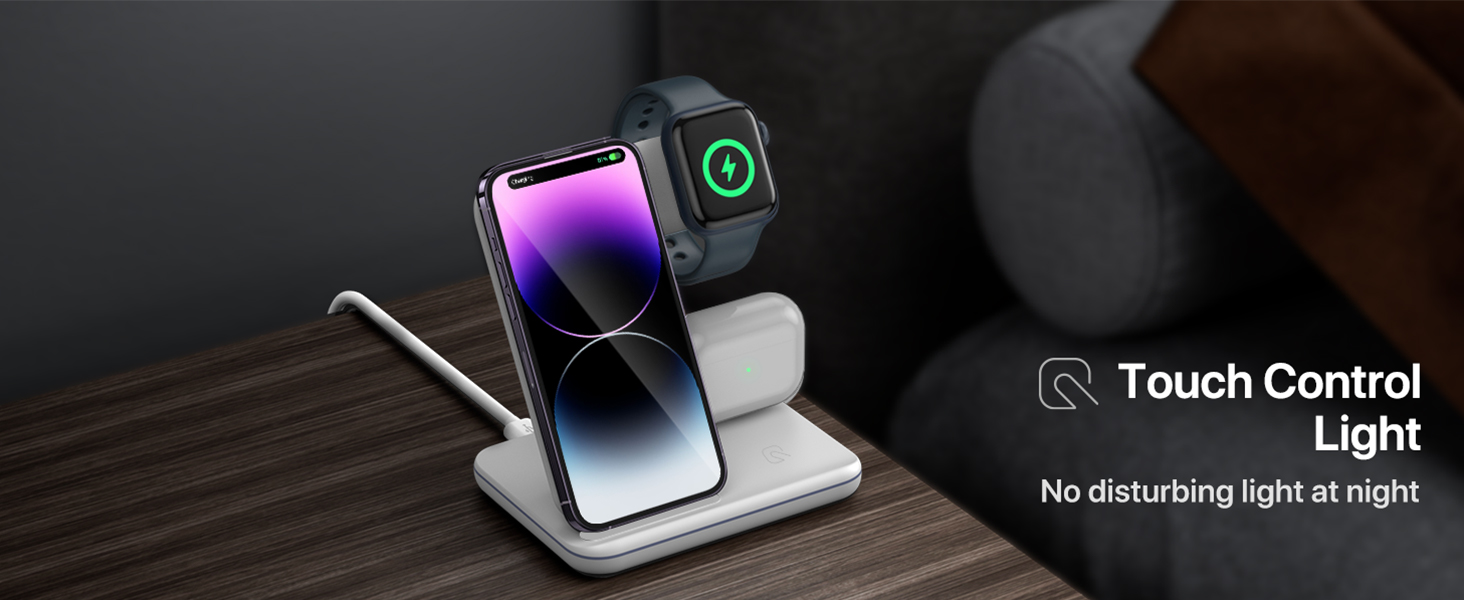
Image 3.5: The charging station on a nightstand, illustrating the subtle glow of the touch-controlled indicator light.
4. സജ്ജീകരണ ഗൈഡ്
Follow these simple steps to set up your Intoval Z5 Charging Station:
- അൺപാക്ക്: പാക്കേജിംഗിൽ നിന്ന് എല്ലാ ഘടകങ്ങളും ശ്രദ്ധാപൂർവ്വം നീക്കം ചെയ്യുക.
- പവർ ബന്ധിപ്പിക്കുക: Insert the USB-C end of the provided charging cable into the USB-C port on the back of the charging station.
- പ്ലഗ് ഇൻ: Connect the USB-A end of the cable to the included 18W power adapter, then plug the adapter into a wall outlet.
- പ്ലേസ്മെൻ്റ്: ചാർജിംഗ് സ്റ്റേഷൻ ഒരു മേശ അല്ലെങ്കിൽ നൈറ്റ്സ്റ്റാൻഡ് പോലുള്ള പരന്നതും സ്ഥിരതയുള്ളതുമായ പ്രതലത്തിൽ സ്ഥാപിക്കുക.

Image 4.1: The charging station connected to a wall outlet via its power adapter and cable.
5. പ്രവർത്തന നിർദ്ദേശങ്ങൾ
Using your Intoval Z5 is straightforward:
5.1 നിങ്ങളുടെ ഐഫോൺ ചാർജ് ചെയ്യുന്നു
- Place your iPhone vertically or horizontally onto the phone charging stand. Ensure the phone is centered on the charging area for optimal connection.
- The charging indicator light on the base will illuminate to confirm charging has begun.
5.2 നിങ്ങളുടെ ആപ്പിൾ വാച്ച് ചാർജ് ചെയ്യുന്നു
- Place your Apple Watch onto the magnetic charging module on the side of the station. The watch will snap into place magnetically.
- Ensure the watch face is visible and charging is indicated on the watch screen.
5.3 നിങ്ങളുടെ എയർപോഡുകൾ ചാർജ് ചെയ്യുന്നു
- Place your AirPods charging case (with wireless charging capability) onto the flat charging pad at the base of the station.
- The indicator light on the AirPods case will show its charging status.
6 അനുയോജ്യത
The Intoval Z5 Wireless Charging Station is compatible with a wide range of Qi-enabled devices:

Image 6.1: A visual representation of the charging station's compatibility with various Apple devices.
| ഉപകരണ തരം | അനുയോജ്യമായ മോഡലുകൾ |
|---|---|
| ഐഫോൺ | iPhone 14/14 Plus/14 Pro/14 Pro Max, 13/13 Pro/13 Pro Max, 12/12 Pro/12 Pro Max, 11/11 Pro/11 Pro Max, XS/XR/XS MAX/X/8/8 Plus (Note: 12 Mini and 13 Mini are NOT supported. Not compatible with A3058/A3059 USB-C models.) |
| ആപ്പിൾ വാച്ച് | iWatch 8/Ultra/7/6/SE/5/4/3/2 (Note: Series 1/Original are NOT supported.) |
| എയർപോഡുകൾ | AirPods Pro2/Pro1/3/2/1 (with wireless charging case) |
| മറ്റ് ഉപകരണങ്ങൾ | Other 100+ popular Qi-enabled wireless charging phones. |
7 സുരക്ഷാ വിവരങ്ങൾ
To ensure safe and optimal performance, please observe the following:
- Use only the included 18W power adapter and cable. Using other adapters may affect charging performance or damage the device.
- Avoid placing metal objects, credit cards, or other foreign objects on the charging pads, as this can interfere with charging or cause overheating.
- Do not use phone cases thicker than 5mm, as this may prevent proper wireless charging.
- വെള്ളം, ഈർപ്പം, തീവ്രമായ താപനില എന്നിവയിൽ നിന്ന് ഉപകരണം അകറ്റി നിർത്തുക.
- Do not disassemble, modify, or attempt to repair the charging station yourself. Contact customer service for assistance.
- This product incorporates intelligent protection technology against temperature control, surge protection, and short-circuit prevention.
8. പ്രശ്നപരിഹാരം
If you encounter issues with your charging station, please refer to the table below:
| പ്രശ്നം | സാധ്യമായ കാരണം | പരിഹാരം |
|---|---|---|
| ഉപകരണം ചാർജ് ചെയ്യുന്നില്ല | 1. ഉപകരണം ശരിയായി വിന്യസിച്ചിട്ടില്ല. 2. Phone case too thick. 3. Non-compatible device. 4. Power adapter/cable issue. | 1. Re-position device on the charging pad. 2. Remove phone case or use a thinner one (<5mm). 3. Verify device compatibility (refer to Section 6). 4. Ensure adapter is 18W and cable is securely connected. Try a different outlet. |
| സ്ലോ ചാർജിംഗ് | 1. Using a non-18W adapter. 2. Background apps on device. 3. ഉപകരണം അമിതമായി ചൂടാകുന്നു. | 1. Use the included 18W adapter. 2. Close unnecessary apps on your device. 3. Ensure proper ventilation; remove device temporarily if hot. |
| ഇൻഡിക്കേറ്റർ ലൈറ്റ് ഓണല്ല | 1. വൈദ്യുതി കണക്ഷൻ ഇല്ല. 2. Light turned off by touch control. | 1. Check power cable and adapter connection to outlet. 2. Tap the touch control area on the base to turn the light on. |
| ഇടയ്ക്കിടെ ചാർജിംഗ് | 1. ഉപകരണത്തിന്റെ തെറ്റായ ക്രമീകരണം. 2. Foreign objects on pad. 3. അസ്ഥിരമായ വൈദ്യുതി വിതരണം. | 1. Adjust device position. 2. Remove any metal or foreign objects. 3. Ensure power outlet is stable. |
9 സ്പെസിഫിക്കേഷനുകൾ
Key technical specifications for the Intoval Z5 Charging Station:
| ഫീച്ചർ | വിശദാംശങ്ങൾ |
|---|---|
| മോഡൽ നമ്പർ | Z5 |
| ഉൽപ്പന്ന അളവുകൾ | 15.99 x 8.99 x 1 ഇഞ്ച് |
| ഇനത്തിൻ്റെ ഭാരം | 0.023 ഔൺസ് |
| കണക്റ്റിവിറ്റി ടെക്നോളജി | വയർലെസ് |
| കണക്റ്റർ തരം | യുഎസ്ബി ടൈപ്പ് സി |
| ഇൻപുട്ട് വോളിയംtage | 9 വോൾട്ട് (എസി) |
| പ്രത്യേക ഫീച്ചർ | മൾട്ടി ഡിവൈസ് ചാർജിംഗ് |
| മൗണ്ടിംഗ് തരം | ടേബിൾടോപ്പ് മൗണ്ട് |
| നിറം | കറുപ്പ് |
10. പരിപാലനം
To maintain your charging station in optimal condition:
- വൃത്തിയാക്കൽ: Disconnect the power before cleaning. Use a soft, dry cloth to wipe the surface. Do not use abrasive cleaners or solvents.
- സംഭരണം: When not in use for extended periods, store the charging station in a cool, dry place away from direct sunlight.
11. വാറൻ്റിയും പിന്തുണയും
Intoval provides a 360 ദിവസത്തെ വാറൻ്റി for the Z5 Wireless Charging Station, covering manufacturing defects and issues arising from normal use. For warranty claims, technical support, or any inquiries, please contact Intoval customer service through the contact information provided on your service card or via the official Intoval webസൈറ്റ്.
We are committed to providing exceptional customer service and ensuring your satisfaction with our products.