1. സജ്ജീകരണ ഗൈഡ്
1.1 അൺബോക്സിംഗും ഘടക പരിശോധനയും
Carefully unpack all items from the box. Verify that all components listed below are present and in good condition.
- കണ്ടൻസർ മൈക്രോഫോൺ
- Scissor Boom Arm Stand
- C-Clamp
- പോപ്പ് ഫിൽട്ടർ
- വിൻഡ്സ്ക്രീൻ
- ഷോക്ക് മൗണ്ട്
- 8.2ft USB-B to USB Cable
- മെറ്റൽ റിംഗ്
- ഉപയോക്തൃ മാനുവൽ

ചിത്രം 1.1: All components included in the FIFINE T669 microphone kit.
1.2 Assembling the Microphone Kit
- C-Cl അറ്റാച്ചുചെയ്യുകamp: C-cl സുരക്ഷിതമാക്കുകamp to the edge of your desk or table. Ensure the table thickness is less than 2.1 inches for proper fit. Tighten the screw until the clamp ദൃഢമായി നിലകൊള്ളുന്നു.
- Insert the Boom Arm: Slide the base of the boom arm stand into the hole on the C-clamp. Tighten the locking screw on the clamp to secure the arm.
- Mount the Shock Mount: ബൂം കൈയുടെ ത്രെഡ് അറ്റത്ത് ഷോക്ക് മൗണ്ട് സ്ക്രൂ ചെയ്യുക.
- മൈക്രോഫോൺ ഘടിപ്പിക്കുക: Gently place the FIFINE T669 microphone into the shock mount. The microphone should be held securely by the elastic bands of the shock mount.
- Install the Pop Filter: Attach the pop filter's clamp to the boom arm. Position the pop filter directly in front of the microphone, approximately 2-3 inches away, to reduce plosive sounds.
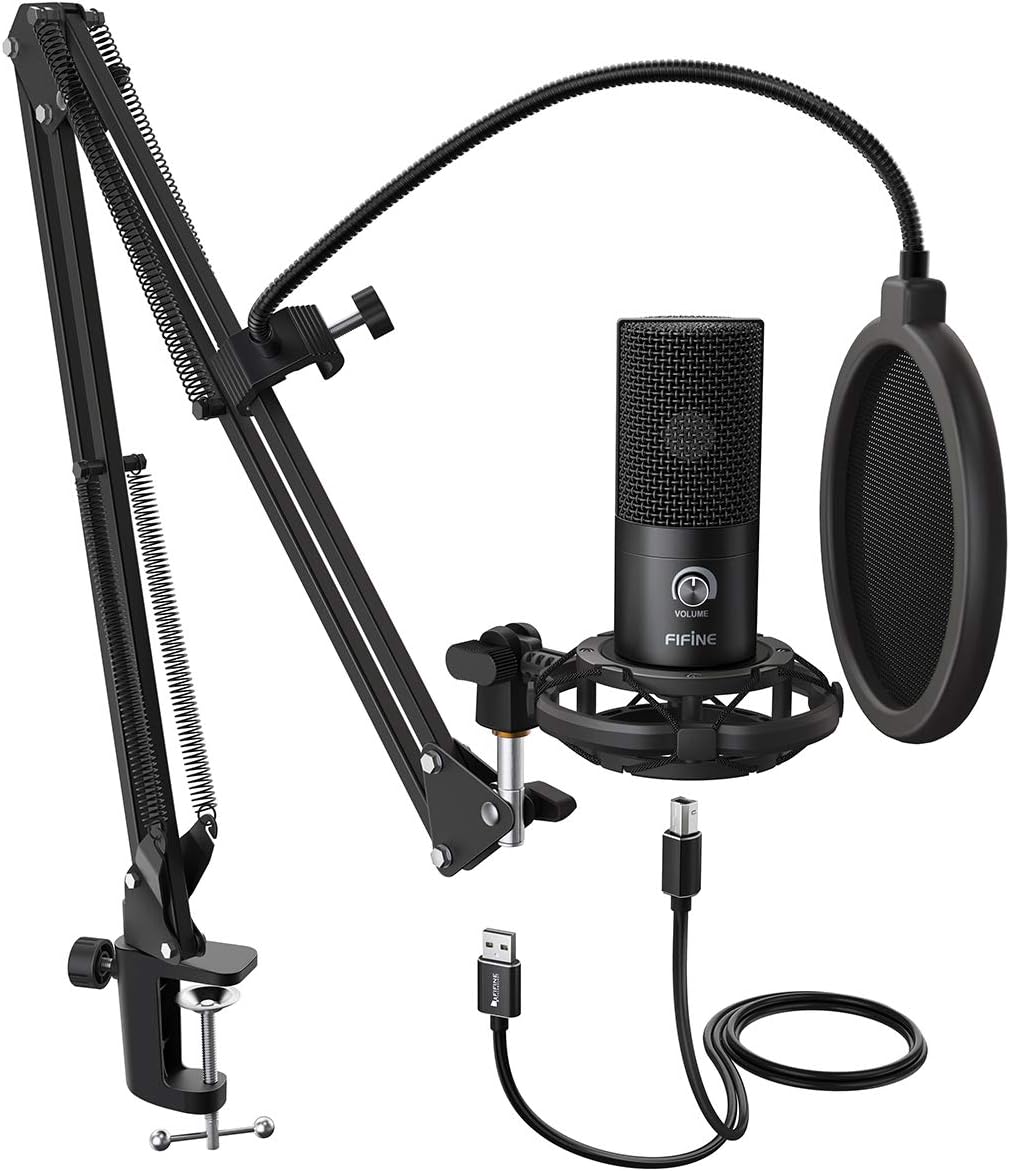
ചിത്രം 1.2: Fully assembled FIFINE T669 microphone kit.

ചിത്രം 1.3: Boom arm C-clamp attachment guidelines.
1.3 നിങ്ങളുടെ ഉപകരണത്തിലേക്ക് കണക്റ്റുചെയ്യുന്നു
The FIFINE T669 microphone features a USB output for direct connection to your computer.
- USB കേബിൾ ബന്ധിപ്പിക്കുക: Plug the USB-B end of the provided 8.2ft USB cable into the microphone's USB port.
- കമ്പ്യൂട്ടറുമായി ബന്ധിപ്പിക്കുക: Plug the USB-A end of the cable into an available USB port on your PC, laptop, or PS4/PS5.
- ഡ്രൈവർ ഇൻസ്റ്റാളേഷൻ: The microphone is plug-and-play and does not require additional drivers for Windows, Mac OS, or PS4/PS5. Your operating system should automatically recognize the device.
- ഇൻപുട്ട് ഉപാധിയായി തിരഞ്ഞെടുക്കുക: After connecting, navigate to your device's sound settings and select "FIFINE Microphone" (or similar) as your default input device.
കുറിപ്പ്: ഈ മൈക്രോഫോൺ അനുയോജ്യമല്ല with Xbox consoles or mobile phones.

ചിത്രം 1.4: Device compatibility for the FIFINE T669 microphone.

ചിത്രം 1.5: USB-A connector for the FIFINE T669 microphone.
2. പ്രവർത്തന നിർദ്ദേശങ്ങൾ
2.1 അടിസ്ഥാന പ്രവർത്തനം
Once connected, the microphone is ready for use. The T669 features a convenient volume knob for quick adjustments.
- പ്ലഗ് ആൻഡ് പ്ലേ: The microphone will be automatically detected by your computer.
- വോളിയം നോബ്: Rotate the 'VOLUME' knob on the microphone to adjust the input gain. Turn clockwise to increase sensitivity and counter-clockwise to decrease it. Adjust this to achieve optimal recording levels without distortion.

ചിത്രം 2.1: Convenient Volume Knob for input gain adjustment.
2.2 Optimizing Sound Quality
To achieve the best possible sound quality from your FIFINE T669 microphone, consider the following:
- കാർഡിയോയിഡ് പോളാർ പാറ്റേൺ: The T669 utilizes a cardioid polar pattern, meaning it primarily picks up sound from the front of the microphone and rejects sound from the sides and rear. Position the microphone directly facing the sound source (e.g., your mouth) for clear audio and to minimize ambient noise.
- പോപ്പ് ഫിൽട്ടർ ഉപയോഗം: The included pop filter is crucial for reducing plosive sounds (harsh 'p' and 'b' sounds) and protecting the microphone from moisture. Ensure it is positioned correctly between your mouth and the microphone.
- ഷോക്ക് മൗണ്ട്: The shock mount isolates the microphone from vibrations and handling noise transmitted through the boom arm or desk. Avoid bumping the desk during recording.

ചിത്രം 2.2: Microphone diaphragm and cardioid polar pattern.
2.3 അപേക്ഷകൾ
The FIFINE T669 is versatile and suitable for various audio applications:
- Podcasting and Voiceovers: Captures clear and rich vocal audio.
- Gaming and Streaming: Provides excellent voice communication for online gaming and live streaming platforms.
- സംഗീത റെക്കോർഡിംഗ്: Suitable for home studio recording of vocals and acoustic instruments.
- വീഡിയോ കോൺഫറൻസിങ്: Enhances audio clarity for Zoom, Skype, and other online meeting applications.
3. പരിപാലനവും പരിചരണവും
ശരിയായ അറ്റകുറ്റപ്പണി നിങ്ങളുടെ മൈക്രോഫോണിന്റെ ദീർഘായുസ്സും മികച്ച പ്രകടനവും ഉറപ്പാക്കുന്നു.
3.1 വൃത്തിയാക്കൽ
- Use a soft, dry cloth to wipe the microphone body and boom arm.
- For the microphone grille, use a soft brush to gently remove any dust or debris.
- ലിക്വിഡ് ക്ലീനറുകൾ, ലായകങ്ങൾ, അല്ലെങ്കിൽ അബ്രസീവ് വസ്തുക്കൾ എന്നിവ ഉപയോഗിക്കരുത്, കാരണം ഇവ മൈക്രോഫോണിന്റെ ഫിനിഷിനോ ആന്തരിക ഘടകങ്ങളോ കേടുവരുത്തും.
3.2 സംഭരണം
- ഉപയോഗിക്കാത്തപ്പോൾ, നേരിട്ടുള്ള സൂര്യപ്രകാശത്തിൽ നിന്നും തീവ്രമായ താപനിലയിൽ നിന്നും മാറി തണുത്തതും വരണ്ടതുമായ സ്ഥലത്ത് മൈക്രോഫോൺ സൂക്ഷിക്കുക.
- If disassembling, ensure all components are clean and dry before storing them in their original packaging or a protective case.
4. പ്രശ്നപരിഹാരം
If you encounter issues with your FIFINE T669 microphone, refer to the following common problems and solutions:
- സൗണ്ട് ഔട്ട്പുട്ട് ഇല്ല:
- യുഎസ്ബി കേബിൾ മൈക്രോഫോണിലേക്കും കമ്പ്യൂട്ടറിലേക്കും സുരക്ഷിതമായി ബന്ധിപ്പിച്ചിട്ടുണ്ടെന്ന് ഉറപ്പാക്കുക.
- Check your computer's sound settings to confirm the FIFINE microphone is selected as the default input device.
- Adjust the volume knob on the microphone to an audible level.
- നിങ്ങളുടെ കമ്പ്യൂട്ടറിലെ മറ്റൊരു USB പോർട്ടിലേക്ക് മൈക്രോഫോൺ കണക്റ്റ് ചെയ്യാൻ ശ്രമിക്കുക.
- നിങ്ങളുടെ കമ്പ്യൂട്ടർ പുനരാരംഭിക്കുക.
- വികലമായ അല്ലെങ്കിൽ വ്യക്തമല്ലാത്ത ശബ്ദം:
- Reduce the input gain using the volume knob on the microphone if the sound is distorted (clipping).
- Ensure the pop filter is correctly positioned to minimize plosives.
- Check for background noise in your environment and try to minimize it.
- Ensure the microphone is positioned correctly, facing the sound source directly.
- മൈക്രോഫോൺ കമ്പ്യൂട്ടർ തിരിച്ചറിയുന്നില്ല:
- മറ്റൊരു USB പോർട്ട് പരീക്ഷിക്കുക.
- നിങ്ങളുടെ ഓപ്പറേറ്റിംഗ് സിസ്റ്റം കാലികമാണെന്ന് ഉറപ്പാക്കുക.
- Verify that the microphone is compatible with your device (not compatible with Xbox or phones).
- Check Device Manager (Windows) or System Information (Mac) to see if the device appears, even with an error.
For further assistance, please refer to the official FIFINE support resources or the detailed user manual PDF available online.
5 സാങ്കേതിക സവിശേഷതകൾ
| ഫീച്ചർ | സ്പെസിഫിക്കേഷൻ |
|---|---|
| മോഡലിൻ്റെ പേര് | T669 കറുപ്പ് |
| പോളാർ പാറ്റേൺ | ഏകദിശയിലുള്ള (കാർഡിയോയിഡ്) |
| കണക്റ്റിവിറ്റി ടെക്നോളജി | USB |
| കണക്റ്റർ തരം | യുഎസ്ബി ടൈപ്പ്-എ |
| ഫ്രീക്വൻസി റേഞ്ച് | 20Hz-20KHz |
| സിഗ്നൽ-ടു-നോയിസ് അനുപാതം | 78 ഡി.ബി |
| ശബ്ദ നില | 70 ഡി.ബി |
| ഇനത്തിൻ്റെ ഭാരം | 700 ഗ്രാം (1.54 പൗണ്ട്) |
| ഉൽപ്പന്ന അളവുകൾ | 16.5 x 9.61 x 2.99 ഇഞ്ച് |
| മെറ്റീരിയൽ | ലോഹം |
| അനുയോജ്യമായ ഉപകരണങ്ങൾ | Personal Computer (Laptop, PC, PS4/PS5) |
| പവർ ഉറവിടം | കോർഡഡ് ഇലക്ട്രിക് |
6. വാറൻ്റിയും പിന്തുണയും
FIFINE products are designed for reliability and performance. For specific warranty details, please refer to the warranty information provided with your purchase or visit the official FIFINE webസൈറ്റ്.
6.1 സാങ്കേതിക പിന്തുണ
If you require technical assistance or have questions not covered in this manual, please contact FIFINE customer support. Contact information can typically be found on the FIFINE official webസൈറ്റ് അല്ലെങ്കിൽ ഉൽപ്പന്ന പാക്കേജിംഗിൽ.
An electronic version of this user manual is available for download at: FIFINE T669 User Manual (PDF)