1. ആമുഖം
The OOYCYOO 100 Amp MPPT Solar Charge Controller is designed to efficiently manage power flow from your solar panels to your battery bank. This manual provides essential information for safe installation, operation, and maintenance of your solar charge controller. Please read this manual thoroughly before installation and use.
2. ഉൽപ്പന്നം കഴിഞ്ഞുview
2.1 പ്രധാന സവിശേഷതകൾ
- 100 Amp MPPT Solar Charge Controller with 12V/24V/36V/48V automatic system voltagഇ തിരിച്ചറിയൽ.
- Equipped with a blacklight LCD display for clear visibility of operational data.
- Directly displays accumulated charge in KWH, eliminating the need for external measuring instruments.
- Features two newly designed vents for enhanced convection cooling.
- Incorporates multiple safety protection functions.
- Achieves a maximum DC/DC transfer efficiency of up to 98.7%.
- Compatible with various battery types: USER (programmable for Lithium, LiFePO4, Li(NiCoMn)O2), Flooded, Sealed, and Gel batteries.
- User-programmable settings for absorption voltagഇ, ഫ്ലോട്ടിംഗ് വോളിയംtagഇ, കുറഞ്ഞ വോളിയംtage disconnect, and load timer.
- Built-in cooling fan activates when temperature exceeds 45℃ and deactivates below 40℃, designed for extended life.
- Maximum Power Point Tracking (MPPT) rate ≥99% and conversion rate >98%.
2.2 ഉൽപ്പന്ന ഘടകങ്ങൾ
The following image illustrates the main components and connection points of the OOYCYOO 100 Amp MPPT Solar Charge Controller.

ചിത്രം 1: മുന്നിലും താഴെയും view of the OOYCYOO MPPT Solar Charge Controller with labeled ports. Key components include the LCD display, 5S Reset button, Solar Panel terminals, Battery terminals, Load terminals, USB 5V 2A ports, Remote Temp Sensor port, RS485 Communication port, and mounting holes.
- LCD ഡിസ്പ്ലേ: Shows real-time system status and parameters.
- 5S Reset Button: Used for system reset or accessing certain settings.
- Solar Panel Terminals: Connect to your solar panel array.
- ബാറ്ററി ടെർമിനലുകൾ: Connect to your battery bank.
- Load Terminals: Connect to your DC loads.
- USB 5V 2A Ports: For charging compatible USB devices.
- Remote Temp Sensor Port: Connects to the included temperature sensor for accurate battery temperature compensation.
- RS485 കമ്മ്യൂണിക്കേഷൻ പോർട്ട്: ബാഹ്യ ആശയവിനിമയത്തിനും നിരീക്ഷണത്തിനും.
- മൗണ്ടിംഗ് ദ്വാരങ്ങൾ: For secure installation of the controller.
3. സജ്ജീകരണവും ഇൻസ്റ്റാളേഷനും
3.1 സുരക്ഷാ മുൻകരുതലുകൾ
- Ensure all connections are tight and secure to prevent loose connections that can cause excessive heat.
- കത്തുന്ന വസ്തുക്കളിൽ നിന്നും നേരിട്ടുള്ള സൂര്യപ്രകാശത്തിൽ നിന്നും അകന്ന്, നന്നായി വായുസഞ്ചാരമുള്ള സ്ഥലത്ത് കൺട്രോളർ സ്ഥാപിക്കുക.
- ഇൻസ്റ്റാളേഷൻ സമയത്ത് എല്ലായ്പ്പോഴും ഉചിതമായ വ്യക്തിഗത സംരക്ഷണ ഉപകരണങ്ങൾ (പിപിഇ) ധരിക്കുക.
- Disconnect all power sources (solar panels and battery) before performing any wiring or maintenance.
3.2 മൗണ്ടിംഗ്
Mount the controller vertically on a solid surface to allow for proper heat dissipation. Ensure there is adequate clearance around the unit for airflow. The controller dimensions are approximately 12 inches (L) x 7.8 inches (W) x 3.2 inches (H).

ചിത്രം 2: Illustration of the OOYCYOO MPPT Solar Charge Controller's dimensions (12.60 inches / 32 cm height, 7.87 inches / 20 cm width, 3.15 inches / 8 cm depth) and its compatibility with AGM, Gel, Flooded, and Lithium battery types.
3.3 വയറിംഗ് നിർദ്ദേശങ്ങൾ
Follow the connection order carefully to avoid damage to the controller or other components.
- ബാറ്ററി ബന്ധിപ്പിക്കുക: First, connect the battery to the controller's battery terminals. Ensure correct polarity (positive to positive, negative to negative). The controller will automatically detect the battery voltagഇ (12V/24V/36V/48V).
- സോളാർ പാനലുകൾ ബന്ധിപ്പിക്കുക: Next, connect the solar panel array to the controller's solar panel terminals. Ensure correct polarity.
- ലോഡ് ബന്ധിപ്പിക്കുക: Finally, connect your DC loads to the controller's load terminals.
Disconnection Order: To disconnect the system, reverse the order: first disconnect the load, then the solar panels, and finally the battery.
വയർ ഗേജ്: Use 10 AWG wire for power terminals to ensure optimal performance and safety.
3.4 ബാറ്ററി അനുയോജ്യത
The controller is compatible with a wide range of battery types, including:
- AGM (ആഗിരണം ചെയ്യുന്ന ഗ്ലാസ് മാറ്റ്)
- സീൽഡ് ലെഡ്-ആസിഡ്
- ജെൽ
- ഫ്ലഡ് ലെഡ്-ആസിഡ്
- Lithium (LiFePO4, Li(NiCoMn)O2) - User programmable
4. പ്രവർത്തന നിർദ്ദേശങ്ങൾ
4.1 എൽസിഡി ഡിസ്പ്ലേ
The integrated blacklight LCD display provides real-time information about your solar system's performance. It shows parameters such as battery voltage, charging current, load current, and accumulated energy (KWH).
4.2 സിസ്റ്റം ക്രമീകരണങ്ങൾ
The controller allows for user-programmable settings to optimize charging for different battery types and system requirements. These settings typically include:
- ബാറ്ററി തരം തിരഞ്ഞെടുക്കൽ: Choose the appropriate battery type (AGM, Gel, Flooded, Lithium, or USER-defined).
- ആഗിരണം വോളിയംtage: വോളിയം സജ്ജമാക്കുകtage at which the battery is held during the absorption charging stage.
- ഫ്ലോട്ടിംഗ് വോളിയംtage: വോളിയം സജ്ജമാക്കുകtage at which the battery is maintained after absorption, to keep it fully charged.
- കുറഞ്ഞ വോളിയംtagഇ വിച്ഛേദിക്കുക (LVD): വോളിയം ക്രമീകരിക്കുകtage threshold at which the load will be disconnected to protect the battery from over-discharge.
- Load Timer: Program the operating hours for the DC load output.
Refer to the detailed instructions within the controller's interface for navigating and adjusting these settings.
5. പരിപാലനം
പതിവ് അറ്റകുറ്റപ്പണികൾ നിങ്ങളുടെ സോളാർ ചാർജ് കൺട്രോളറിന്റെ ദീർഘായുസ്സും ഒപ്റ്റിമൽ പ്രകടനവും ഉറപ്പാക്കുന്നു.
- വൃത്തിയാക്കൽ: Periodically clean the controller's exterior with a dry cloth. Ensure vents are free from dust and debris to maintain proper airflow.
- കണക്ഷൻ പരിശോധനകൾ: Annually inspect all wiring connections for tightness and signs of corrosion. Loose connections can lead to overheating and system inefficiency.
- ഫാൻ പ്രവർത്തനം: The built-in cooling fan will activate automatically when the internal temperature exceeds 45℃ and turn off when it drops below 40℃. Ensure the fan is not obstructed and operates freely.
- പരിസ്ഥിതി പരിശോധന: Verify that the installation environment remains dry and free from excessive humidity or extreme temperatures.
6. പ്രശ്നപരിഹാരം
If you encounter issues with your OOYCYOO MPPT Solar Charge Controller, consider the following general troubleshooting steps:
- ഡിസ്പ്ലേ/പവർ ഇല്ല: Check battery connections and ensure the battery voltage is within the controller's operating range. Verify that the battery is charged.
- ചാർജിംഗ് ഇല്ല: Confirm solar panel connections and polarity. Check for sufficient sunlight and ensure solar panel voltage is above the battery voltage. Inspect for any blown fuses in the solar array.
- ലോഡ് പ്രവർത്തിക്കുന്നില്ല: Check load connections and ensure the load is not exceeding the controller's rated current. Verify that the battery voltage is above the Low Voltage Disconnect (LVD) setting.
- അമിത ചൂടാക്കൽ: Ensure the controller is mounted in a well-ventilated area and that its cooling vents are not obstructed. Reduce the load if consistently overheating.
- പിശക് കോഡുകൾ: If the LCD displays an error code, consult the specific error code section of the full user manual (if available) or contact customer support.
For persistent issues, it is recommended to contact OOYCYOO customer support.
7 സ്പെസിഫിക്കേഷനുകൾ
Technical specifications for the OOYCYOO 100 Amp MPPT Solar Charge Controller (Model KP60 100):
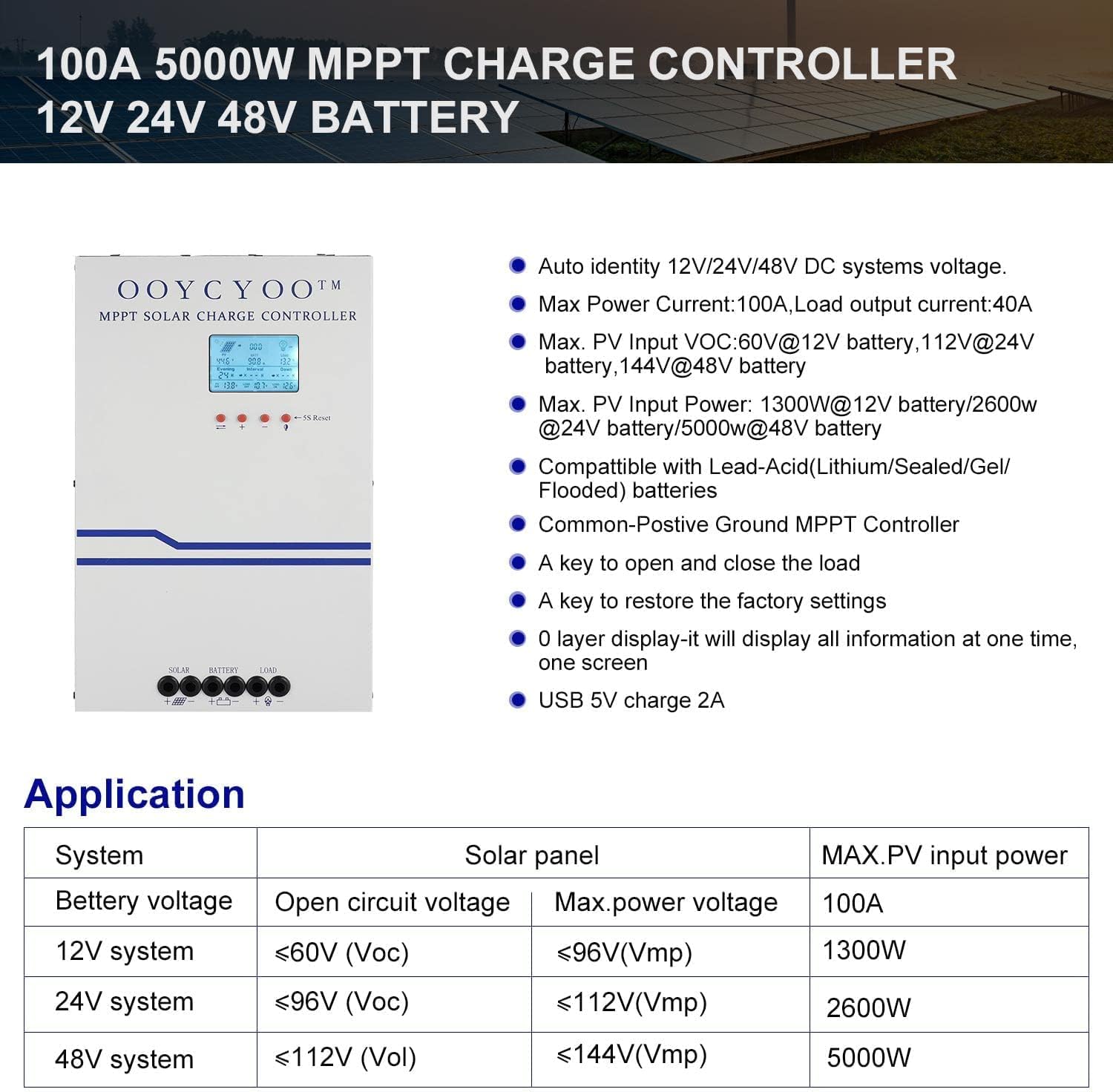
ചിത്രം 3: കഴിഞ്ഞുview of the OOYCYOO 100A 5000W MPPT Charge Controller, highlighting its auto-identification for 12V/24V/48V DC systems, maximum power current, PV input voltage limits, and maximum PV input power for different battery systems. Also shows compatibility with various battery types and key operational features.
| പരാമീറ്റർ | മൂല്യം |
|---|---|
| റേറ്റുചെയ്ത ചാർജ് കറൻ്റ് | 100എ |
| സിസ്റ്റം നോമിനൽ വോളിയംtage | 12V/24V/36V/48V DC Auto Identifying |
| പരമാവധി. പിവി ഓപ്പൺ സർക്യൂട്ട് വോളിയംtage | 150VDC |
| Max. PV Input Power (12V System) | 1300W (Voc ≤96V) |
| Max. PV Input Power (24V System) | 2600W (Voc ≤112V) |
| Max. PV Input Power (48V System) | 5000W (Voc ≤150V) |
| Power Terminal Wire Gauge | 10 AWG |
| ഉൽപ്പന്ന അളവുകൾ (L x W x H) | 12 x 7.8 x 3.2 ഇഞ്ച് (30.5 x 19.8 x 8.1 സെ.മീ) |
| ഇനത്തിൻ്റെ ഭാരം | 8.86 പൗണ്ട് (4.02 കി.ഗ്രാം) |
| പ്രവർത്തന താപനില | 40℃ (104℉) |
| ഡിസ്പ്ലേ തരം | എൽസിഡി |
8. സുരക്ഷാ വിവരങ്ങളും സംരക്ഷണങ്ങളും
The OOYCYOO MPPT Solar Charge Controller is equipped with comprehensive protection features to ensure safe operation of your solar power system:
- PV Over Current/Power Protection
- PV Short Circuit Protection
- പിവി റിവേഴ്സ് പോളാരിറ്റി പ്രൊട്ടക്ഷൻ
- Night Reverse Charging Protection
- ബാറ്ററി റിവേഴ്സ് പോളാരിറ്റി പ്രൊട്ടക്ഷൻ
- ബാറ്ററി വോളിയംtagഇ സംരക്ഷണം
- ബാറ്ററി ഓവർ ഡിസ്ചാർജ് സംരക്ഷണം
- ബാറ്ററി അമിത ചൂടാക്കൽ സംരക്ഷണം
- Controller Overheating Protection
- Lithium Battery Low Temperature Protection
- ഷോർട്ട് സർക്യൂട്ട് സംരക്ഷണം ലോഡ് ചെയ്യുക
- ഓവർലോഡ് പരിരക്ഷ ലോഡ് ചെയ്യുക
- ടിവിഎസ് ഹൈ വോളിയംtagഇ ട്രാൻസിയന്റ്സ് പ്രൊട്ടക്ഷൻ
9. വാറൻ്റിയും പിന്തുണയും
Warranty information for the OOYCYOO 100 Amp MPPT Solar Charge Controller is typically provided with the product packaging or through the point of purchase. Please retain your proof of purchase for warranty claims.
For technical support, troubleshooting assistance, or inquiries regarding your product, please refer to the contact information provided by OOYCYOO or your authorized dealer. This package includes a user manual in English for detailed guidance.


