1. ആമുഖം
The LC-dolida USB C Hub Adapter is a versatile 7-in-1 device designed to expand the connectivity of your USB-C enabled laptop, tablet, or smartphone. It provides multiple ports including HDMI, VGA, Ethernet, USB 3.0, 3.5mm audio, and Power Delivery (PD) charging, enhancing your device's capabilities for various applications such as external display connections, high-speed data transfer, and network access.
2 പ്രധാന സവിശേഷതകൾ
- മൾട്ടിപോർട്ട് കണക്റ്റിവിറ്റി: Equipped with HDMI, VGA, RJ45 Ethernet, 3.5mm audio jack, 2x USB 3.0 ports, and a Power Delivery (PD) charging port.
- ഉയർന്ന റെസല്യൂഷൻ വീഡിയോ ഔട്ട്പുട്ട്: HDMI supports resolutions up to 4K@30Hz, and VGA supports up to 1080P@60Hz. Both can be used simultaneously for dual display at 1080P.
- വേഗതയേറിയതും സ്ഥിരതയുള്ളതുമായ നെറ്റ്വർക്ക്: RJ45 Ethernet port supports up to 1000Mbps for reliable wired internet connection.
- കാര്യക്ഷമമായ പവർ ഡെലിവറി: USB-C PD charging port supports up to 87W to keep your device charged while using the hub.
- ഹൈ-സ്പീഡ് ഡാറ്റ ട്രാൻസ്ഫർ: Two USB 3.0 ports offer data transfer speeds up to 5Gbps, allowing connection of external USB devices.
- ഓഡിയോ ഔട്ട്പുട്ട്: Integrated 3.5mm audio jack for connecting headphones or speakers.
- വിശാലമായ അനുയോജ്യത: Compatible with various USB-C devices including 2018/17/16 MacBook/Pro/Air, Google Chromebook Pixel, Surface Book 2, and supports Samsung Dex for compatible smartphones.
3. പാക്കേജ് ഉള്ളടക്കം
- LC-dolida USB C Hub Adapter (Model: usb c to hdmi vga ethernet)
- ഉപയോക്തൃ മാനുവൽ
4 സ്പെസിഫിക്കേഷനുകൾ
| ഫീച്ചർ | വിശദാംശങ്ങൾ |
|---|---|
| ബ്രാൻഡ് | എൽസി-ഡോളിഡ |
| മോഡൽ നമ്പർ | usb c to hdmi vga ethernet |
| ഹാർഡ്വെയർ പ്ലാറ്റ്ഫോം | ലാപ്ടോപ്പ്, പി.സി |
| ഓപ്പറേറ്റിംഗ് സിസ്റ്റം അനുയോജ്യത | Windows 10 (and above for some features), macOS, Android (for Samsung Dex) |
| ഇനത്തിൻ്റെ ഭാരം | 3.8 ഔൺസ് |
| പാക്കേജ് അളവുകൾ | 6.69 x 3.7 x 0.71 ഇഞ്ച് |
| HDMI ഔട്ട്പുട്ട് | Up to 4K@30Hz, 1080P@60Hz (backward compatible) |
| വിജിഎ put ട്ട്പുട്ട് | 1080P@60Hz വരെ |
| ഒരേസമയം ഡിസ്പ്ലേ | HDMI and VGA can be used simultaneously (both at 1080P) |
| ഇഥർനെറ്റ് പോർട്ട് | RJ45, supports up to 1000Mbps |
| USB 3.0 പോർട്ടുകൾ | 2 ports, data transfer up to 5Gbps |
| പവർ ഡെലിവറി (പിഡി) പോർട്ട് | USB-C, max 87W charging |
| ഓഡിയോ ജാക്ക് | 3.5 മി.മീ |
| അനുയോജ്യമായ ഉപകരണങ്ങൾ | Laptops, Monitors, Projectors, Smartphones (with USB-C video output support) |
5. സജ്ജീകരണ നിർദ്ദേശങ്ങൾ
- ഹബ് ബന്ധിപ്പിക്കുക: Plug the USB-C connector of the LC-dolida hub into the USB-C port of your host device (laptop, tablet, or smartphone).
- Connect External Displays (HDMI/VGA):
- For HDMI output, connect an HDMI cable from the hub's HDMI port to your monitor or TV.
- For VGA output, connect a VGA cable from the hub's VGA port to your monitor or projector.
- For audio output via VGA, connect a 3.5mm audio cable from the hub's audio jack to your speakers or headphones.
കുറിപ്പ്: HDMI and VGA can be used simultaneously, but both displays will output at 1080P resolution.

Figure 1: Connecting to HDMI and VGA displays. HDMI supports up to 4K, VGA up to 1080P. 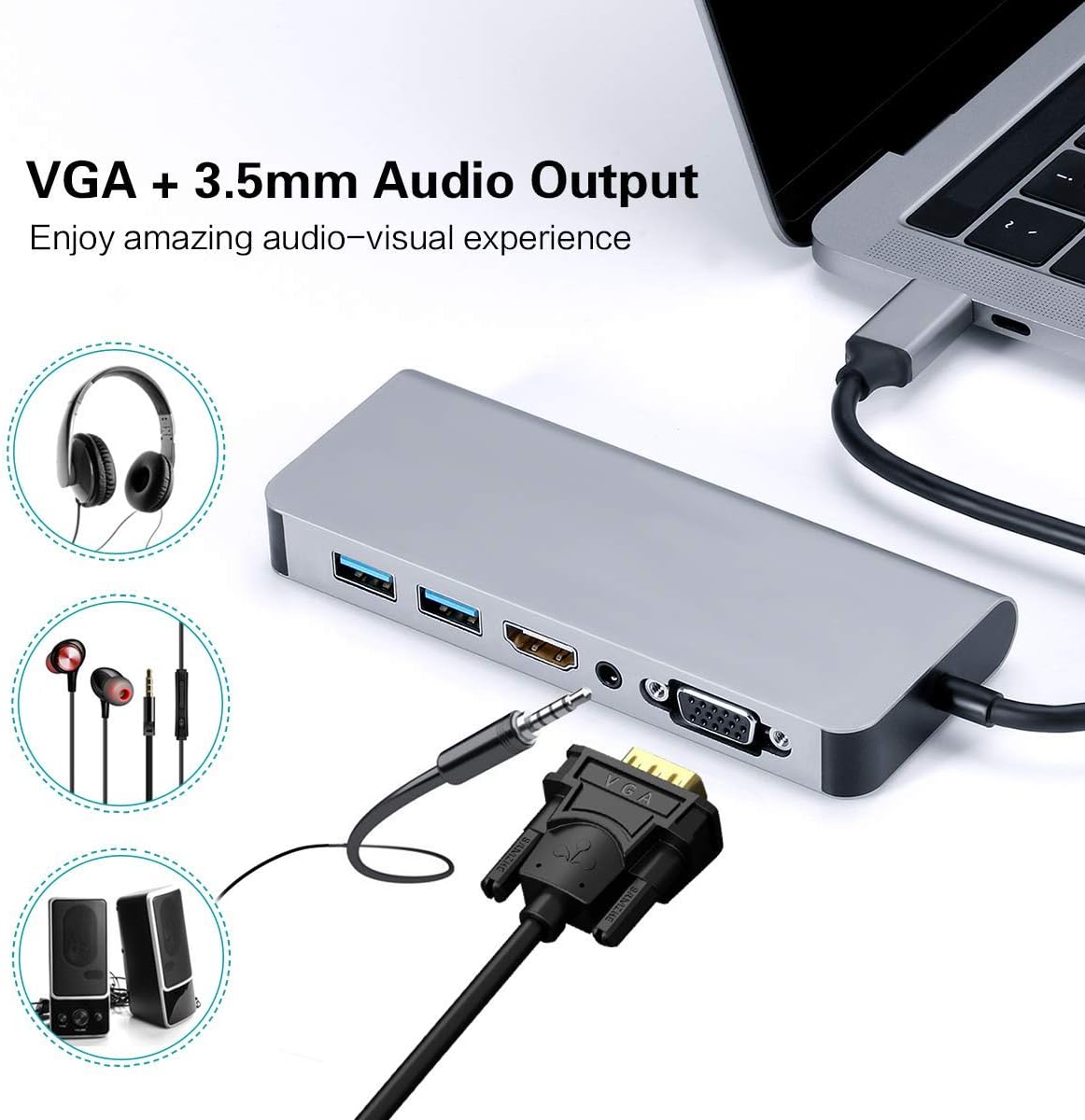
Figure 2: VGA and 3.5mm Audio Output for an enhanced audio-visual experience. - നെറ്റ്വർക്കിലേക്ക് കണക്റ്റ് ചെയ്യുക: സ്ഥിരമായ ഒരു വയർഡ് ഇന്റർനെറ്റ് കണക്ഷന്, ഹബ്ബിലെ RJ45 പോർട്ടിലേക്ക് ഒരു ഇതർനെറ്റ് കേബിൾ പ്ലഗ് ചെയ്യുക.
- USB ഉപകരണങ്ങൾ ബന്ധിപ്പിക്കുക: Plug your USB peripherals (e.g., mouse, keyboard, USB drive) into the USB 3.0 ports.
- Power the Host Device: If your host device requires charging, connect your USB-C power adapter to the Power Delivery (PD) port on the hub. This allows your device to charge while using the hub's other functions.

Figure 3: Power Delivery and Data Transfer via USB 3.0 ports.
6. പ്രവർത്തന നിർദ്ദേശങ്ങൾ
6.1 ഡിസ്പ്ലേ മോഡുകൾ
The hub supports both Mirror Mode and Extend Mode when connecting to external displays.
- മിറർ മോഡ്: Duplicates your host device's screen onto the external display(s). This is ideal for presentations or sharing content.
- വിപുലീകരണ മോഡ്: Extends your desktop across multiple screens, allowing for increased workspace. This mode is typically supported by laptops.
കുറിപ്പ്: Extend Mode functionality is primarily for laptops. For smartphones, it typically mirrors the display or activates specific desktop environments like Samsung Dex.

6.2 Samsung Dex Experience
For compatible Samsung smartphones (S10/S10+/S10e/S9/S9+/S8/S8+/S8 Active/Huawei Mate10/Pro), the hub can enable a PC-like desktop experience via Samsung Dex. To activate Dex mode, ensure external power is supplied to the hub via the PD charging port.
കുറിപ്പ്: Samsung Dex functionality may require your phone's operating system to be upgraded to Windows 10 or above. Always ensure your device is compatible and updated.


6.3 ഔദ്യോഗിക ഉൽപ്പന്ന വീഡിയോ
Video 1: An official demonstration of the 7-in-1 USB C Multiport Hub by LC-Dolida, showcasing its various functions and connectivity options.
7. പ്രശ്നപരിഹാരം
- ഡിസ്പ്ലേ ഔട്ട്പുട്ട് ഇല്ല:
- നിങ്ങളുടെ ഹോസ്റ്റ് ഉപകരണത്തിന്റെ USB-C പോർട്ട് വീഡിയോ ഔട്ട്പുട്ടിനെ പിന്തുണയ്ക്കുന്നുണ്ടെന്ന് ഉറപ്പാക്കുക (ഡിസ്പ്ലേപോർട്ട് ആൾട്ടർനേറ്റ് മോഡ്).
- Check all cable connections (USB-C to hub, HDMI/VGA to display).
- Verify the input source on your monitor/TV is set correctly (e.g., HDMI 1, VGA).
- നിങ്ങളുടെ ഹോസ്റ്റ് ഉപകരണം പുനരാരംഭിക്കാൻ ശ്രമിക്കുക.
- For Samsung Dex, ensure external power is connected to the hub.
- തിരിച്ചറിയാത്ത USB ഉപകരണങ്ങൾ:
- നിങ്ങളുടെ ഹോസ്റ്റ് ഉപകരണവുമായി ഹബ് സുരക്ഷിതമായി ബന്ധിപ്പിച്ചിട്ടുണ്ടെന്ന് ഉറപ്പാക്കുക.
- USB ഉപകരണം പ്രവർത്തനക്ഷമമാണെന്ന് ഉറപ്പാക്കാൻ അത് നിങ്ങളുടെ ഹോസ്റ്റ് ഉപകരണത്തിലേക്ക് നേരിട്ട് ബന്ധിപ്പിക്കാൻ ശ്രമിക്കുക.
- If using high-power USB devices, ensure external power is supplied to the hub via the PD port.
- കുറഞ്ഞ ഇതർനെറ്റ് വേഗത:
- Check your Ethernet cable for damage.
- നിങ്ങളുടെ ഹോസ്റ്റ് ഉപകരണത്തിൽ നെറ്റ്വർക്ക് ഡ്രൈവറുകൾ കാലികമാണെന്ന് ഉറപ്പാക്കുക.
- നിങ്ങളുടെ റൂട്ടർ/മോഡം ശരിയായി പ്രവർത്തിക്കുന്നുണ്ടെന്ന് ഉറപ്പാക്കുക.
- ചാർജിംഗ് പ്രശ്നങ്ങൾ:
- നിങ്ങളുടെ USB-C പവർ അഡാപ്റ്റർ ഹബ്ബിന്റെ PD പോർട്ടുമായി ബന്ധിപ്പിച്ചിട്ടുണ്ടെന്നും അത് പ്രവർത്തനക്ഷമമാണെന്നും ഉറപ്പാക്കുക.
- Verify your host device supports USB-C Power Delivery.
- Some devices, like the Samsung S8+, may not charge fully or quickly through the hub if the power input is insufficient for both the hub and the device.
8. പരിചരണവും പരിപാലനവും
- Keep the hub away from water, fire, and corrosive materials.
- ഹബ് വീഴ്ത്തുകയോ ശക്തമായ ആഘാതങ്ങൾക്ക് വിധേയമാക്കുകയോ ചെയ്യുന്നത് ഒഴിവാക്കുക.
- ഉപകരണം സ്വയം ഡിസ്അസംബ്ലിംഗ് ചെയ്യാനോ നന്നാക്കാനോ ശ്രമിക്കരുത്. സഹായത്തിന് ഉപഭോക്തൃ പിന്തുണയുമായി ബന്ധപ്പെടുക.
- Clean the hub with a soft, dry cloth. Avoid using harsh chemicals or abrasive cleaners.
- ഉപയോഗത്തിലില്ലാത്തപ്പോൾ തണുത്തതും വരണ്ടതുമായ സ്ഥലത്ത് ഹബ് സംഭരിക്കുക.
9. വാറൻ്റിയും പിന്തുണയും
LC-dolida products are designed for reliability and performance. For any issues or questions regarding your LC-dolida USB C Hub Adapter, please contact our customer support team. We are committed to providing assistance and ensuring your satisfaction.
Please refer to the product packaging or the official LC-dolida webനിർദ്ദിഷ്ട വാറന്റി വിശദാംശങ്ങൾക്കും ബന്ധപ്പെടാനുള്ള വിവരങ്ങൾക്കും സൈറ്റ്.


