ആമുഖം
വാങ്ങിയതിന് നന്ദി.asing the Trexonic Retro Record Player. This versatile audio system combines vintage aesthetics with modern functionality, allowing you to enjoy your favorite music from various sources including vinyl records, CDs, Bluetooth devices, AM/FM radio, and USB/SD cards. This manual provides detailed instructions for setup, operation, and maintenance to ensure optimal performance and longevity of your device.

Image: The Trexonic Retro Record Player, showcasing its classic design with the turntable lid open and a vinyl record in place.
പ്രധാനപ്പെട്ട സുരക്ഷാ വിവരങ്ങൾ
യൂണിറ്റ് പ്രവർത്തിപ്പിക്കുന്നതിന് മുമ്പ് ദയവായി ഈ സുരക്ഷാ നിർദ്ദേശങ്ങൾ ശ്രദ്ധാപൂർവ്വം വായിക്കുക. ഭാവിയിലെ റഫറൻസിനായി ഈ മാനുവൽ സൂക്ഷിക്കുക.
- ഈ ഉപകരണം മഴയിലോ ഈർപ്പത്തിലോ തുറന്നുകാട്ടരുത്.
- വെന്റിലേഷൻ തുറസ്സുകളൊന്നും തടയരുത്. നിർമ്മാതാവിന്റെ നിർദ്ദേശങ്ങൾക്കനുസൃതമായി ഇൻസ്റ്റാൾ ചെയ്യുക.
- റേഡിയറുകൾ, ഹീറ്റ് രജിസ്റ്ററുകൾ, സ്റ്റൗകൾ, അല്ലെങ്കിൽ മറ്റ് ഉപകരണങ്ങൾ (ഉൾപ്പെടെ) പോലെയുള്ള താപ സ്രോതസ്സുകൾക്ക് സമീപം ഇൻസ്റ്റാൾ ചെയ്യരുത്. ampലൈഫയറുകൾ) ചൂട് ഉത്പാദിപ്പിക്കുന്നത്.
- പ്രത്യേകിച്ച് പ്ലഗുകൾ, കൺവീനിയൻസ് റെസെപ്റ്റക്കിളുകൾ, ഉപകരണത്തിൽ നിന്ന് പുറത്തുകടക്കുന്ന ഇടം എന്നിവയിൽ നടക്കുകയോ നുള്ളുകയോ ചെയ്യുന്നതിൽ നിന്ന് പവർ കോർഡ് സംരക്ഷിക്കുക.
- നിർമ്മാതാവ് വ്യക്തമാക്കിയ അറ്റാച്ച്മെൻ്റുകൾ/ആക്സസറികൾ മാത്രം ഉപയോഗിക്കുക.
- മിന്നൽ കൊടുങ്കാറ്റുകളുടെ സമയത്തോ ദീർഘനേരം ഉപയോഗിക്കാത്ത സമയത്തോ ഈ ഉപകരണം അൺപ്ലഗ് ചെയ്യുക.
- എല്ലാ സേവനങ്ങളും യോഗ്യതയുള്ള സേവന ഉദ്യോഗസ്ഥർക്ക് റഫർ ചെയ്യുക. പവർ സപ്ലൈ കോർഡ് അല്ലെങ്കിൽ പ്ലഗ് കേടാകുക, ദ്രാവകം ഒഴുകുകയോ ഉപകരണങ്ങൾ ഉപകരണത്തിലേക്ക് വീഴുകയോ ചെയ്യുക, ഉപകരണം മഴയോ ഈർപ്പമോ സമ്പർക്കം പുലർത്തുക, സാധാരണയായി പ്രവർത്തിക്കാത്തത് എന്നിങ്ങനെയുള്ള ഏതെങ്കിലും വിധത്തിൽ ഉപകരണത്തിന് കേടുപാടുകൾ സംഭവിക്കുമ്പോൾ സേവനം ആവശ്യമാണ്. , അല്ലെങ്കിൽ ഉപേക്ഷിച്ചു.
ഉൽപ്പന്ന സവിശേഷതകൾ
The Trexonic Retro Record Player is equipped with a variety of features for a comprehensive audio experience:
- 3-Speed Belt-Driven Turntable: Plays 33 1/3, 45, and 78 RPM vinyl records.
- ബിൽറ്റ്-ഇൻ ബ്ലൂടൂത്ത്: Wirelessly stream music from compatible devices.
- സിഡി പ്ലെയർ: Supports standard audio CDs.
- AM/FM റേഡിയോ: Integrated tuner with backlit display.
- USB/SD ഇൻപുട്ട്: For MP3 playback and recording vinyl to MP3.
- സഹായ ഇൻപുട്ട് (3.5 മിമി): ബാഹ്യ ഓഡിയോ ഉപകരണങ്ങൾ ബന്ധിപ്പിക്കുക.
- ഹെഡ്ഫോൺ ജാക്ക്: സ്വകാര്യ ശ്രവണത്തിനായി.
- ആർസിഎ ലൈൻ-ഔട്ട്: Connect to external speakers or audio systems.
- Alarm Clock with Timer: Programmable alarm and sleep timer functions.
- ബിൽറ്റ്-ഇൻ സ്റ്റീരിയോ സ്പീക്കറുകൾ: For immediate audio playback.
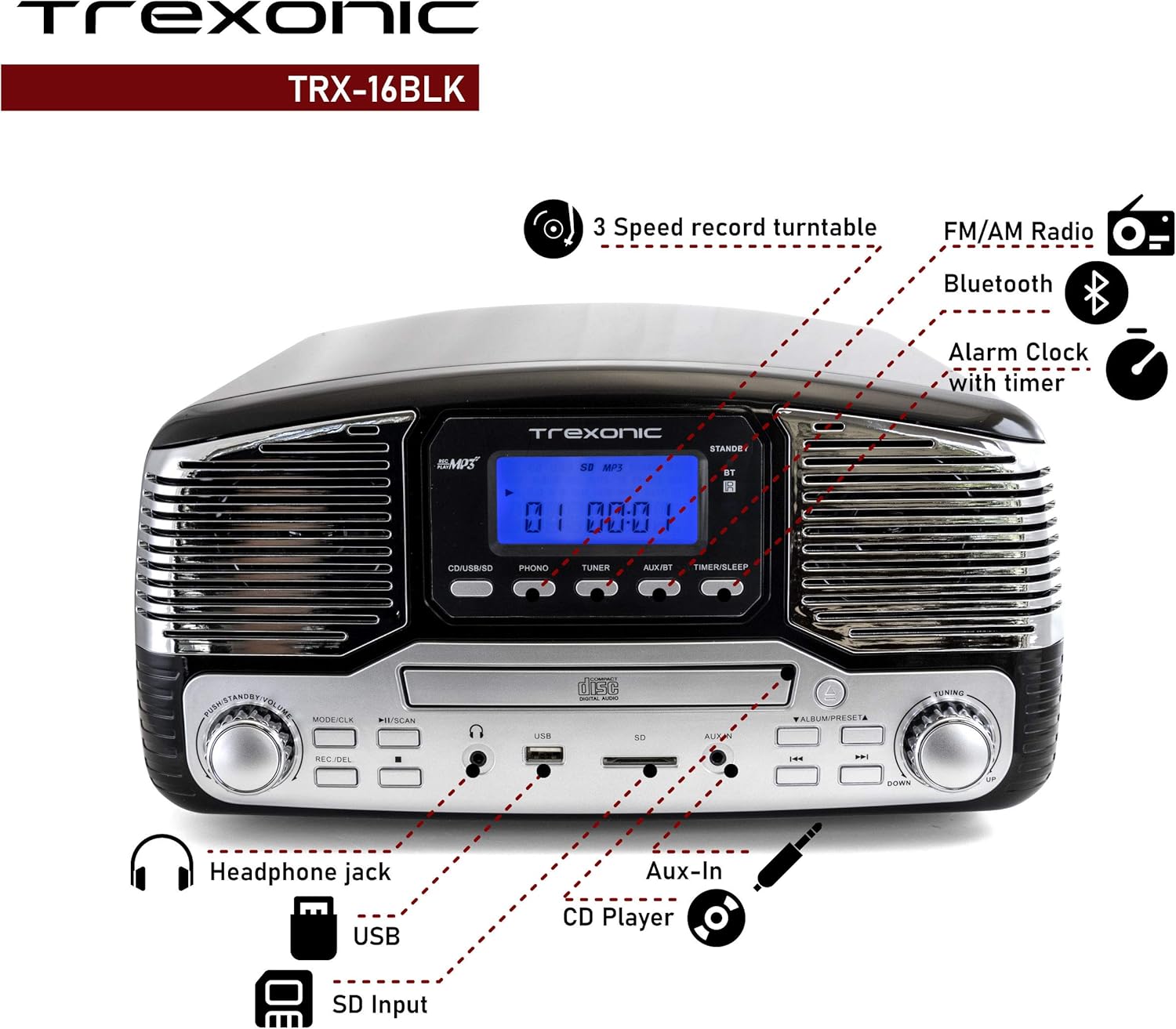
Image: A detailed diagram highlighting the key features and control locations on the Trexonic Retro Record Player.
നിയന്ത്രണങ്ങളും പ്രവർത്തനങ്ങളും
Familiarize yourself with the various controls and ports on your Trexonic Retro Record Player:

ചിത്രം: ക്ലോസ്-അപ്പ് view of the digital display and mode selection buttons (CD/USB/SD, PHONO, TUNER, AUX/BT, TIMER/SLEEP).
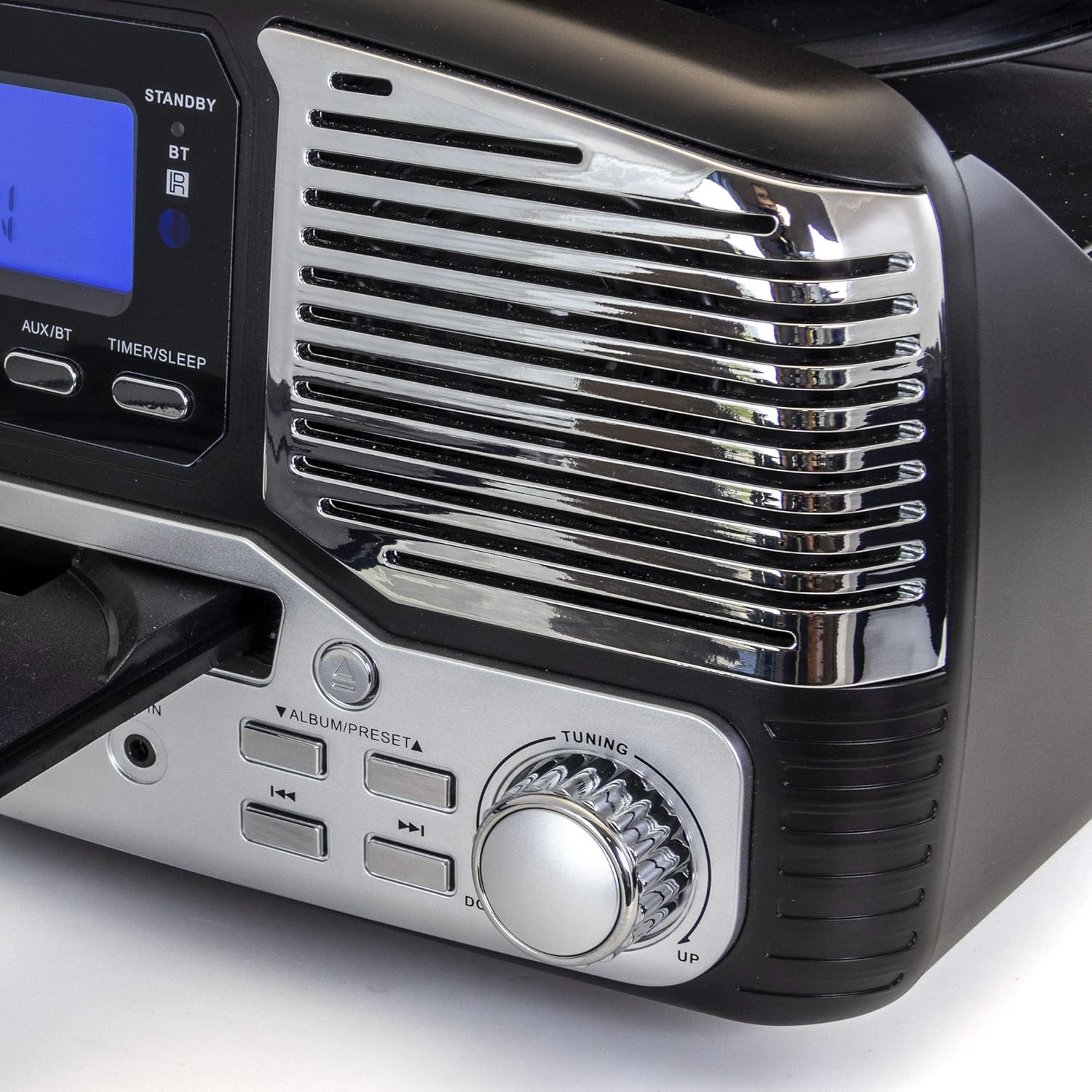
ചിത്രം: ക്ലോസ്-അപ്പ് view of the tuning knob and track navigation buttons (SCAN, ALBUM/PRESET, UP, DOWN).
പ്രധാന നിയന്ത്രണങ്ങളിൽ ഇവ ഉൾപ്പെടുന്നു:
- പവർ/വോളിയം നോബ്: യൂണിറ്റ് ഓൺ/ഓഫ് ചെയ്ത് വോളിയം ക്രമീകരിക്കുന്നു.
- Mode/CLK Button: Selects audio source (CD/USB/SD, PHONO, TUNER, AUX/BT) and sets clock.
- REC/DEL Button: Initiates recording to USB/SD or deletes files.
- Play/Pause, Stop, Skip Buttons: Standard playback controls for CD/USB/SD.
- ട്യൂണിംഗ് നോബ്: For manual radio station selection.
- Timer/Sleep Button: Activates sleep timer or alarm settings.
- ഹെഡ്ഫോൺ ജാക്ക്: ഹെഡ്ഫോണുകൾക്ക് 3.5mm ഔട്ട്പുട്ട്.
- USB പോർട്ട്: യുഎസ്ബി ഫ്ലാഷ് ഡ്രൈവുകൾക്കായി.
- SD കാർഡ് സ്ലോട്ട്: SD മെമ്മറി കാർഡുകൾക്ക്.
- ജാക്സിലെ ഓക്സ്: ബാഹ്യ ഓഡിയോ ഉപകരണങ്ങൾക്കായി 3.5mm ഇൻപുട്ട്.
- RCA Line Out (Rear): ബാഹ്യ ഉപകരണങ്ങളുമായി ബന്ധിപ്പിക്കുന്നു ampലൈഫറുകൾ അല്ലെങ്കിൽ പവർ സ്പീക്കറുകൾ.
- FM Antenna (Rear): എഫ്എം റേഡിയോ സ്വീകരണത്തിനായി.
പ്രാരംഭ സജ്ജീകരണം
Follow these steps to set up your Trexonic Retro Record Player:
- അൺപാക്ക് ചെയ്യുന്നു: പാക്കേജിംഗിൽ നിന്ന് യൂണിറ്റ് ശ്രദ്ധാപൂർവ്വം നീക്കം ചെയ്യുക. ഭാവിയിലെ ഗതാഗതത്തിനോ സംഭരണത്തിനോ വേണ്ടി പാക്കേജിംഗ് വസ്തുക്കൾ സൂക്ഷിക്കുക.
- പ്ലേസ്മെൻ്റ്: Place the unit on a flat, stable surface away from direct sunlight, heat sources, and excessive dust or moisture.
- പവർ കണക്ഷൻ: Connect the AC power adapter to the DC 12V IN (1000mA) jack on the rear of the unit, then plug the adapter into a standard wall outlet.
- എഫ്എം ആന്റിന: Extend the FM wire antenna located at the back of the unit for optimal radio reception.
- ബാഹ്യ കണക്ഷനുകൾ (ഓപ്ഷണൽ): ബാഹ്യ സ്പീക്കറുകളിലേക്ക് കണക്റ്റുചെയ്യുകയാണെങ്കിൽ അല്ലെങ്കിൽ ഒരു amplifier, use RCA cables to connect the LINE OUT jacks on the rear of the unit to the corresponding input jacks on your external audio equipment.

Image: The rear panel of the Trexonic Retro Record Player, illustrating the connection points for power, FM antenna, and RCA line-out.
പ്രവർത്തന നിർദ്ദേശങ്ങൾ
വിനൈൽ റെക്കോർഡുകൾ പ്ലേ ചെയ്യുന്നു
This unit supports 33 1/3, 45, and 78 RPM records.
- പൊടി കവർ ഉയർത്തുക.
- ടർടേബിൾ പ്ലാറ്ററിൽ ഒരു റെക്കോർഡ് സ്ഥാപിക്കുക. 45 RPM സിംഗിൾ പ്ലേ ചെയ്യുകയാണെങ്കിൽ, ഉൾപ്പെടുത്തിയിരിക്കുന്ന 45 RPM അഡാപ്റ്റർ മധ്യ സ്പിൻഡിൽ സ്ഥാപിക്കുക.
- Set the speed selector switch to the appropriate speed (33, 45, or 78 RPM) for your record.
- അമർത്തുക മോഡ്/CLK button repeatedly until "PHONO" is displayed.
- Gently lift the tone arm from its rest and move it over the record. The platter will begin to rotate.
- Carefully lower the tone arm onto the desired track of the record.
- ഉപയോഗിച്ച് വോളിയം ക്രമീകരിക്കുക പവർ / വോളിയം മുട്ട്.
- When the record finishes, the tone arm will automatically return to its rest (for most records). Lift the tone arm and return it to its rest manually if needed.

ചിത്രം: ഒരു ക്ലോസ്-അപ്പ് view of the turntable in operation, showing the stylus tracking a vinyl record.
Playing Compact Discs (CD)
- അമർത്തുക മോഡ്/CLK button repeatedly until "CD" is displayed.
- അമർത്തുക തുറക്കുക/അടയ്ക്കുക സിഡി ട്രേ തുറക്കാൻ ബട്ടൺ.
- ലേബൽ വശം മുകളിലേക്ക് അഭിമുഖീകരിക്കുന്ന തരത്തിൽ ഒരു സിഡി ട്രേയിൽ വയ്ക്കുക.
- അമർത്തുക തുറക്കുക/അടയ്ക്കുക button again to close the tray. The unit will read the CD and begin playback automatically.
- ഉപയോഗിക്കുക പ്ലേ/താൽക്കാലികമായി നിർത്തുക, നിർത്തുക, ഒപ്പം ഒഴിവാക്കുക പ്ലേബാക്ക് നിയന്ത്രിക്കുന്നതിനുള്ള ബട്ടണുകൾ.

Image: The Trexonic Retro Record Player with its CD tray extended, ready for disc insertion or removal.
ബ്ലൂടൂത്ത് വഴി ബന്ധിപ്പിക്കുന്നു
- അമർത്തുക മോഡ്/CLK button repeatedly until "BT" (Bluetooth) is displayed. The unit will enter pairing mode, indicated by a flashing Bluetooth icon on the display.
- Enable Bluetooth on your external device (smartphone, tablet, etc.) and search for available devices.
- Select "Trexonic" or "TRX-16BLK" from the list of devices.
- Once paired, the Bluetooth icon will stop flashing and remain solid. You can now stream audio wirelessly to the unit.
AM/FM റേഡിയോ ഉപയോഗിക്കുന്നു
- അമർത്തുക മോഡ്/CLK button repeatedly until "TUNER" is displayed.
- തിരിക്കുക ട്യൂണിംഗ് knob to manually select your desired AM or FM radio station.
- For better FM reception, adjust the position of the FM wire antenna on the rear of the unit.
USB/SD Card Functions (Playback & Recording)
The unit supports MP3 playback from USB flash drives and SD cards, and can record audio from vinyl to MP3 format.
- പ്ലേബാക്ക്: Insert a USB flash drive into the USB port or an SD card into the SD card slot. Press the മോഡ്/CLK button until "USB" or "SD" is displayed. The unit will automatically detect and play MP3 files. Use playback controls to navigate.
- Recording (Vinyl to MP3):
- Ensure a USB drive or SD card is inserted.
- Select "PHONO" mode.
- നിങ്ങളുടെ വിനൈൽ റെക്കോർഡ് പ്ലേ ചെയ്യാൻ തുടങ്ങൂ.
- അമർത്തുക REC/DEL റെക്കോർഡിംഗ് ആരംഭിക്കുന്നതിനുള്ള ബട്ടൺ. ഡിസ്പ്ലേ റെക്കോർഡിംഗ് നില സൂചിപ്പിക്കും.
- അമർത്തുക REC/DEL again to stop recording. The recorded MP3 file USB ഡ്രൈവിലേക്കോ SD കാർഡിലേക്കോ സംരക്ഷിക്കപ്പെടും.
Connecting External Devices (AUX-In)
- Connect one end of a 3.5mm audio cable (not included) to the AUX IN jack on the front of the unit.
- കേബിളിന്റെ മറ്റേ അറ്റം ഹെഡ്ഫോൺ ജാക്കിലേക്കോ നിങ്ങളുടെ ബാഹ്യ ഉപകരണത്തിന്റെ ഓഡിയോ ഔട്ട്പുട്ടിലേക്കോ ബന്ധിപ്പിക്കുക (ഉദാ: MP3 പ്ലെയർ, സ്മാർട്ട്ഫോൺ).
- അമർത്തുക മോഡ്/CLK button repeatedly until "AUX" is displayed.
- Play audio from your external device. The sound will be routed through the Trexonic Retro Record Player's speakers.
Setting the Alarm and Sleep Timer
Detailed instructions for setting the alarm and sleep timer are typically found in the full product manual. Generally, these functions are accessed via the ടൈമർ/സ്ലീപ്പ് button and navigation controls.
- ക്ലോക്ക് ക്രമീകരിക്കുക: അമർത്തിപ്പിടിക്കുക മോഡ്/CLK to enter clock setting mode, then use navigation buttons to adjust time.
- അലാറം ക്രമീകരണം: അമർത്തുക ടൈമർ/സ്ലീപ്പ് to cycle through alarm settings (e.g., alarm time, source).
- സ്ലീപ്പ് ടൈമർ: അമർത്തുക ടൈമർ/സ്ലീപ്പ് repeatedly to set a countdown timer for the unit to automatically turn off.
മെയിൻ്റനൻസ്
Proper care will ensure the longevity of your Trexonic Retro Record Player.
- യൂണിറ്റ് വൃത്തിയാക്കൽ: മൃദുവായതും ഉണങ്ങിയതുമായ തുണി ഉപയോഗിച്ച് പുറംഭാഗം തുടയ്ക്കുക. അബ്രാസീവ് ക്ലീനറുകളോ ലായകങ്ങളോ ഉപയോഗിക്കരുത്.
- സ്റ്റൈലസ് വൃത്തിയാക്കൽ: Use a soft brush (not included) to gently brush the stylus from back to front to remove dust. Do not touch the stylus with your fingers.
- പൊടി കവർ: പൊടിയിൽ നിന്നും അവശിഷ്ടങ്ങളിൽ നിന്നും ടർടേബിളിനെ സംരക്ഷിക്കാൻ ഉപയോഗത്തിലില്ലാത്തപ്പോൾ പൊടി കവർ അടച്ചു വയ്ക്കുക.
- റെക്കോർഡ് കെയർ: Keep your vinyl records clean and stored vertically in their sleeves to prevent warping and dust accumulation.
പ്രശ്ന പരിഹാരത്തിന് സഹായിക്കുന്ന മാർഗധർശി
If you encounter any issues, please refer to the following table before seeking professional service.
| പ്രശ്നം | സാധ്യമായ കാരണം | പരിഹാരം |
|---|---|---|
| ശക്തിയില്ല | പവർ കോർഡ് സുരക്ഷിതമായി ബന്ധിപ്പിച്ചിട്ടില്ല. | പവർ കോർഡ് യൂണിറ്റിലേക്കും വാൾ ഔട്ട്ലെറ്റിലേക്കും ദൃഢമായി പ്ലഗ് ചെയ്തിട്ടുണ്ടെന്ന് ഉറപ്പാക്കുക. |
| സ്പീക്കറുകളിൽ നിന്ന് ശബ്ദമില്ല | വോളിയം വളരെ കുറവാണ് അല്ലെങ്കിൽ മ്യൂട്ട് ചെയ്തിരിക്കുന്നു. തെറ്റായ മോഡ് തിരഞ്ഞെടുത്തു. | ശബ്ദം കൂട്ടുക. അമർത്തുക മോഡ്/CLK to select the correct audio source. |
| Turntable not spinning or sound distorted | Speed setting incorrect. Stylus dirty or damaged. Tone arm not properly lowered. | Check the speed selector. Clean or replace stylus. Ensure tone arm is fully lowered onto the record. |
| സിഡി പ്ലേ ചെയ്യുന്നില്ല | CD inserted incorrectly or disc is scratched/dirty. Incorrect mode. | Ensure CD is inserted label-side up. Clean or try another CD. Select "CD" mode. |
| ബ്ലൂടൂത്ത് ജോടിയാക്കൽ പ്രശ്നങ്ങൾ | Device too far. Bluetooth not enabled on external device. | Move devices closer. Ensure Bluetooth is enabled and "Trexonic" is selected. |
| മോശം റേഡിയോ സ്വീകരണം | എഫ്എം ആന്റിന നീട്ടിയിട്ടില്ല അല്ലെങ്കിൽ ശരിയായി സ്ഥാപിച്ചിട്ടില്ല. | Fully extend and adjust the FM wire antenna. Try repositioning the unit. |
സാങ്കേതിക സവിശേഷതകൾ
| ഫീച്ചർ | സ്പെസിഫിക്കേഷൻ |
|---|---|
| മോഡൽ നമ്പർ | TRX-16BLK |
| പവർ ഇൻപുട്ട് | DC 12V, 1000mA (via AC adapter) |
| ടേൺ ചെയ്യാവുന്ന വേഗത | 33 1/3, 45, 78 ആർപിഎം |
| കണക്റ്റിവിറ്റി | Bluetooth, Wired (AUX-In, RCA Line-Out) |
| മാധ്യമ പിന്തുണ | Vinyl Records, Audio CDs, USB (MP3), SD Card (MP3) |
| റേഡിയോ ആവൃത്തികൾ | AM/FM |
| അളവുകൾ (ഏകദേശം.) | 13 x 12 x 6 ഇഞ്ച് (പാക്കേജ് അളവുകൾ) |
| ഭാരം (ഏകദേശം) | 8 പൗണ്ട് |
| മെറ്റീരിയൽ | പ്ലാസ്റ്റിക് |
വാറന്റി വിവരങ്ങളും ഉപഭോക്തൃ പിന്തുണയും
Trexonic products are designed and manufactured to the highest quality standards. For specific warranty details, please refer to the warranty card included with your purchase or visit the official Trexonic website. If you require technical assistance or have questions regarding your product, please contact Trexonic customer support through their official channels.
വാറൻ്റി ക്ലെയിമുകൾക്കായി നിങ്ങളുടെ വാങ്ങിയതിൻ്റെ തെളിവ് സൂക്ഷിക്കുക.


