1. ആമുഖം
Welcome to the GAOMON PD1161 Drawing Tablet user manual. This guide provides essential information for setting up, operating, maintaining, and troubleshooting your new digital art tablet. The GAOMON PD1161 is designed for artists, designers, and creative professionals, offering a responsive 11.6-inch IPS display and a battery-free stylus for a natural drawing experience.
2. ഉൽപ്പന്നം കഴിഞ്ഞുview
The GAOMON PD1161 is an 11.6-inch pen display tablet that allows you to create directly on screen. It features a full HD IPS display, a battery-free stylus with 8192 levels of pressure sensitivity and tilt support, and customizable shortcut keys to enhance your workflow.
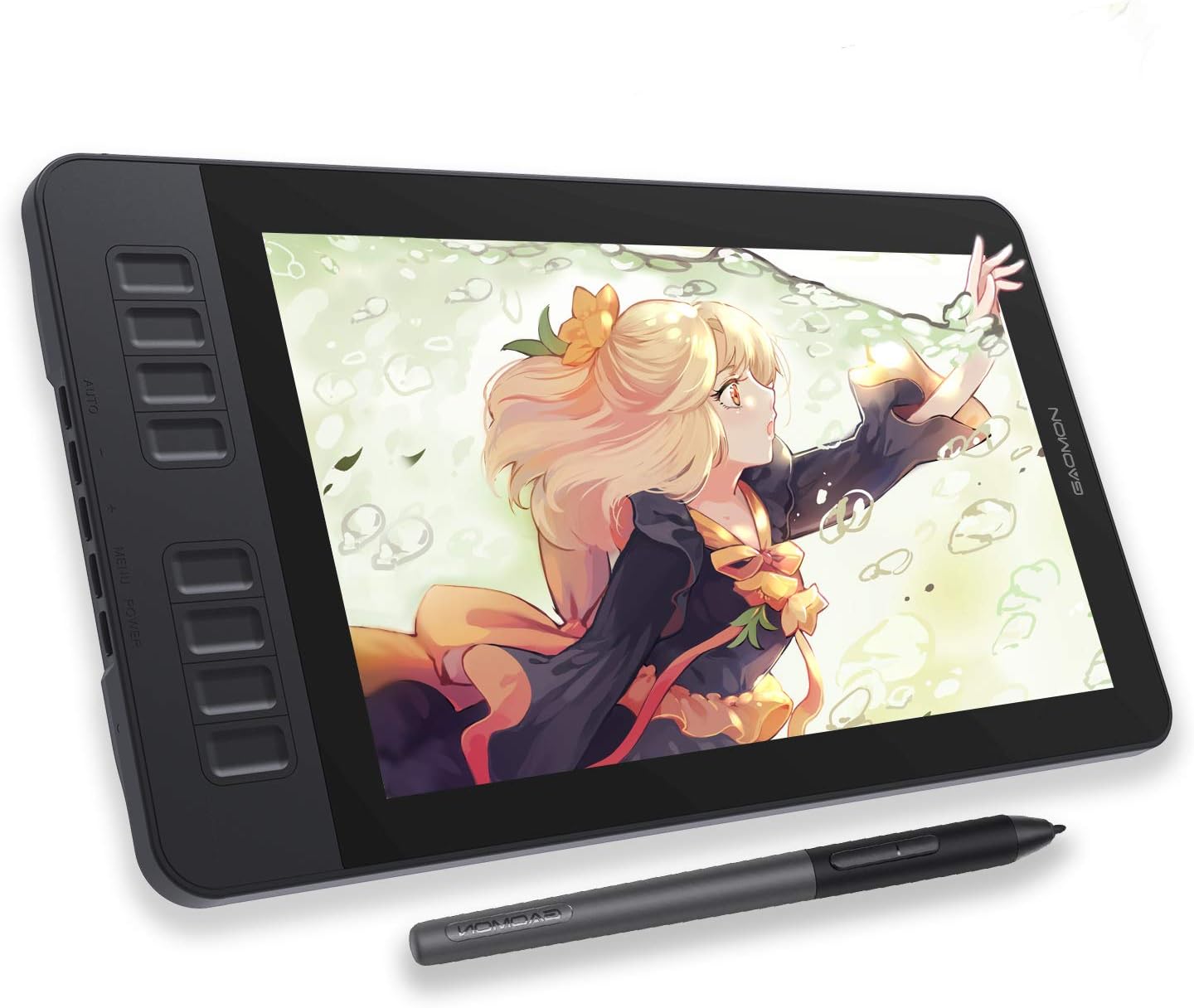
Figure 2.1: GAOMON PD1161 Drawing Tablet and Stylus.
പ്രധാന സവിശേഷതകൾ:
- 11.6 ഇഞ്ച് ഫുൾ എച്ച്ഡി ഐപിഎസ് ഡിസ്പ്ലേ: Sketch, draw, and paint directly on the screen with a pre-installed matte film for a paper-like feel and reduced glare.
- Vivid Color Performance: Features 72% NTSC (100% sRGB) color gamut and 16.7 million display colors for lifelike and smooth color gradation.
- Battery-Free Stylus AP50: Enjoy 8192 levels of pressure sensitivity and tilt function without the need for charging, providing a natural pencil-like experience.
- Customizable Express Keys: 8 programmable press keys on the tablet and 2 pen buttons allow for easy shortcuts and improved workflow.
- ബഹുമുഖ അനുയോജ്യത: Works with Windows 7 or later and macOS 10.12 or later. Compatible with major creative software like Krita, Medibang, Blender, Photoshop, Sai, and more.

Figure 2.2: Display specifications highlighting color accuracy.

Figure 2.3: The battery-free stylus AP50, pen holder, and replacement nibs.

Figure 2.4: Customizable Express Keys on the tablet.

Figure 2.5: Software and operating system compatibility.
3. ബോക്സിൽ എന്താണുള്ളത്?
Upon unboxing your GAOMON PD1161, please ensure all the following items are present:
- GAOMON PD1161 Graphics Drawing Tablet
- Battery-Free Stylus (AP50)
- Pen Holder (contains 8 replacement nibs inside)
- ഡ്രോയിംഗ് ഗ്ലോവ്
- 3-ഇൻ-2 USB കേബിൾ
- എസി അഡാപ്റ്റർ
- ദ്രുത ഗൈഡ്

Figure 3.1: All items included in the GAOMON PD1161 package.
4. സജ്ജീകരണം
4.1 സിസ്റ്റം ആവശ്യകതകൾ
- Operating System: Windows 7 or later, macOS 10.12 or later
- Available Ports: HDMI port and USB port (or appropriate adapters if your computer lacks these ports).
4.2 ടാബ്ലെറ്റ് ബന്ധിപ്പിക്കുന്നു
The GAOMON PD1161 requires connection to a computer to function. Use the provided 3-in-2 USB cable and AC adapter for proper setup.
- Connect the 3-in-2 USB cable to the GAOMON PD1161 tablet.
- Connect the HDMI connector of the 3-in-2 cable to your computer's HDMI port.
- Connect the USB-A connector of the 3-in-2 cable to your computer's USB port.
- Connect the AC adapter to the power input on the 3-in-2 cable, then plug the AC adapter into a power outlet. Ensure the tablet receives sufficient power.

Figure 4.1: Connection diagram for the GAOMON PD1161.
4.3 ഡ്രൈവർ ഇൻസ്റ്റലേഷൻ
For optimal performance and functionality, it is crucial to install the correct drivers from the official GAOMON website. If you have drivers from other tablet brands installed, it is recommended to uninstall them before installing GAOMON drivers to avoid conflicts.
- ഔദ്യോഗിക GAOMON സന്ദർശിക്കുക website and navigate to the 'Support' or 'Download' section.
- Download the driver specific to the PD1161 model and your operating system (Windows or macOS).
- ഇൻസ്റ്റാളേഷൻ പൂർത്തിയാക്കാൻ ഓൺ-സ്ക്രീൻ നിർദ്ദേശങ്ങൾ പാലിക്കുക.
- After successful installation, the driver icon should appear in your system tray, indicating the tablet is ready for use.
Video 4.1: Official GAOMON PD1161 Connection Tutorial. This video demonstrates the correct steps for connecting your tablet to your computer.
5. ടാബ്ലെറ്റ് പ്രവർത്തിപ്പിക്കൽ
5.1 സ്റ്റൈലസ് ഉപയോഗം
The battery-free stylus provides precise control for drawing, painting, and navigating. It supports 8192 levels of pressure sensitivity, allowing for varied line thickness and opacity based on pressure applied. The stylus also supports tilt function, which simulates the natural tilt of a brush or pencil for shading and calligraphic strokes.
5.2 Customizing Express Keys
The 8 express keys on the side of the tablet and the two buttons on the stylus can be customized through the GAOMON driver software. This allows you to assign frequently used functions (e.g., undo, zoom in/out, brush size) to these keys for quick access, significantly improving your efficiency.
- Open the GAOMON driver software from your computer's system tray or applications folder.
- Navigate to the 'Express Keys' or 'Pen Settings' tab.
- Select each key/button and assign your desired function from the available options.
- Click 'Apply' or 'OK' to save your changes.
5.3 Software Usage
The GAOMON PD1161 is compatible with a wide range of creative software. Once connected and drivers are installed, the tablet should be recognized by your chosen application. Ensure your software is up-to-date for the best experience.

Figure 5.1: A user actively drawing on the GAOMON PD1161.
Video 5.1: GAOMON 11.6'' Classic Graphic Drawing Monitor Model --PD1161. This video provides an overview of the tablet's features and usage.
6. പരിപാലനം
Proper care and maintenance will extend the lifespan of your GAOMON PD1161 tablet.
- വൃത്തിയാക്കൽ: ടാബ്ലെറ്റ് സ്ക്രീനും ബോഡിയും വൃത്തിയാക്കാൻ മൃദുവായതും ഉണങ്ങിയതുമായ തുണി ഉപയോഗിക്കുക. കഠിനമായ പാടുകൾക്ക്, അല്പം ഡി.amp cloth with a mild, non-abrasive cleaner can be used, but avoid spraying liquids directly onto the screen.
- സ്റ്റൈലസ് നിബ്സ്: Regularly check the stylus nib for wear. Replace worn nibs using the nib remover tool found in the pen holder.
- സംഭരണം: When not in use, store the tablet in a cool, dry place away from direct sunlight and extreme temperatures. Avoid placing heavy objects on the tablet.
- കേബിൾ കെയർ: Handle cables gently. Avoid sharp bends or excessive pulling, which can damage the connectors or internal wiring.
7. പ്രശ്നപരിഹാരം
If you encounter issues with your GAOMON PD1161, refer to the following common problems and solutions:
| പ്രശ്നം | സാധ്യമായ കാരണം | പരിഹാരം |
|---|---|---|
| No display on tablet screen | Loose cable connection, insufficient power, incorrect display settings. | Ensure all cables (HDMI, USB, power) are securely connected. Verify the AC adapter is plugged in. Check your computer's display settings to ensure the tablet is detected and set as an extended or duplicated display. Refer to Video 4.1: Connection Tutorial. |
| Stylus not working or no pressure sensitivity | Driver not installed or corrupted, conflicting drivers, worn nib. | Ensure GAOMON drivers are correctly installed. Uninstall any other tablet drivers. Restart your computer. Replace the stylus nib if it appears worn. |
| Parallax (cursor not directly under nib) | Calibration needed, inherent display design. | Perform screen calibration through the GAOMON driver software. While some minimal parallax is normal due to screen thickness, calibration can optimize accuracy. |
| Express keys not functioning | Driver issue, keys not customized. | Verify driver installation. Open the GAOMON driver software and ensure the express keys are assigned functions. Restart the driver or computer. |
| Tablet not recognized by computer | USB connection issue, driver not installed. | Try a different USB port on your computer. Reinstall the GAOMON driver. Ensure the tablet is powered on. |
If these solutions do not resolve your issue, please contact GAOMON customer support for further assistance.
8 സ്പെസിഫിക്കേഷനുകൾ
| ഫീച്ചർ | വിശദാംശങ്ങൾ |
|---|---|
| മോഡൽ നമ്പർ | ഗാമോൺ പിഡി1161 |
| ഉൽപ്പന്ന അളവുകൾ | 14.2 x 7.9 x 0.1 ഇഞ്ച് |
| ഇനത്തിൻ്റെ ഭാരം | 1.9 പൗണ്ട് |
| കണക്റ്റിവിറ്റി ടെക്നോളജി | USB, HDMI |
| പ്രഷർ സെൻസിറ്റിവിറ്റി | 8192 ലെവലുകൾ |
| ഓപ്പറേറ്റിംഗ് സിസ്റ്റം അനുയോജ്യത | Windows 7 അല്ലെങ്കിൽ അതിനുശേഷമുള്ളത്, macOS 10.12 അല്ലെങ്കിൽ അതിനുശേഷമുള്ളത് |
| പ്രത്യേക സവിശേഷതകൾ | 60° Tilt Support, Programmable Press Keys, Anti-glare protective film |
| നിർമ്മാതാവ് | ഗാമോൺ ടെക്നോളജി കോർപ്പറേഷൻ |
| മാതൃരാജ്യം | ചൈന |
9. വാറൻ്റിയും പിന്തുണയും
9.1 വാറൻ്റി വിവരങ്ങൾ
The GAOMON PD1161 drawing tablet comes with a 1-year warranty from the date of purchase. This warranty covers manufacturing defects and ensures the product functions as intended under normal use. Please retain your proof of purchase for warranty claims.
9.2 ഉപഭോക്തൃ പിന്തുണ
For any questions regarding your GAOMON PD1161 tablet, including technical support, troubleshooting, or warranty inquiries, please contact GAOMON customer service. You can typically find contact information (email, support portal) on the official GAOMON website or through the Amazon message system if purchased there.
Additional resources, including a detailed User Manual (PDF), may be available for download:


