ആമുഖം
This manual provides detailed instructions for the installation, operation, and maintenance of your JVC KD-TD91BTS CD Receiver and the PAC Audio SWI-RC Steering Wheel Control Interface. Please read this manual thoroughly before use to ensure proper operation and to prevent damage.
സുരക്ഷാ വിവരങ്ങൾ
- ഷോർട്ട് സർക്യൂട്ടുകൾ തടയുന്നതിന് എല്ലാ കണക്ഷനുകളും സുരക്ഷിതമാണെന്നും ശരിയായി ഇൻസുലേറ്റ് ചെയ്തിട്ടുണ്ടെന്നും ഉറപ്പാക്കുക.
- Do not operate the unit in a manner that distracts from driving.
- ഏതെങ്കിലും ഘട്ടങ്ങളെക്കുറിച്ച് നിങ്ങൾക്ക് ഉറപ്പില്ലെങ്കിൽ, ഇൻസ്റ്റാളേഷനായി ഒരു പ്രൊഫഷണലിനെ സമീപിക്കുക.
- ഈർപ്പം, ഉയർന്ന താപനില എന്നിവയിൽ നിന്ന് യൂണിറ്റിനെ അകറ്റി നിർത്തുക.
പാക്കേജ് ഉള്ളടക്കം
എല്ലാ ഇനങ്ങളും ഉണ്ടെന്ന് ഉറപ്പാക്കുക:
- JVC KD-TD91BTS CD Receiver
- PAC Audio SWI-RC Steering Wheel Control Interface
- വയറിംഗ് ഹാർനെസുകൾ
- മൌണ്ടിംഗ് ഹാർഡ്വെയർ
- ഇൻസ്ട്രക്ഷൻ മാനുവലുകൾ

Image: JVC KD-TD91BTS CD Receiver, PAC Audio SWI-RC Steering Wheel Control Interface, wiring, and installation tools.
സജ്ജീകരണവും ഇൻസ്റ്റാളേഷനും
JVC KD-TD91BTS CD Receiver Installation
- തയ്യാറാക്കൽ: ഇൻസ്റ്റാളേഷൻ ആരംഭിക്കുന്നതിന് മുമ്പ് വാഹനത്തിന്റെ നെഗറ്റീവ് ബാറ്ററി ടെർമിനൽ വിച്ഛേദിക്കുക.
- മൗണ്ടിംഗ്: Securely mount the JVC KD-TD91BTS receiver into the vehicle's dashboard opening using the provided mounting hardware. Ensure proper ventilation around the unit.
- വയറിംഗ് കണക്ഷനുകൾ:
- Connect the main power harness (yellow for constant 12V, red for switched 12V, black for ground).
- Connect speaker wires (typically color-coded).
- ആന്റിന കേബിൾ ബന്ധിപ്പിക്കുക.
- Connect the external microphone for Bluetooth hands-free calling.
- ബാഹ്യമായി ഉപയോഗിക്കുകയാണെങ്കിൽ amplifiers, connect RCA pre-out cables.
- പ്രാരംഭ പവർ-അപ്പ്: Reconnect the battery. Turn on the vehicle ignition and then the receiver to verify basic functionality.

ചിത്രം: പിൻഭാഗം view of the JVC KD-TD91BTS CD Receiver, illustrating the various ports for power, speakers, and auxiliary connections.
PAC Audio SWI-RC Steering Wheel Control Interface Installation
- Identify Vehicle Wiring: Refer to your vehicle's wiring diagram to identify the steering wheel control wires.
- Connect SWI-RC: Connect the SWI-RC interface to the JVC KD-TD91BTS receiver's wired remote control input. Connect the SWI-RC's vehicle-specific wires to the corresponding steering wheel control wires in your vehicle.
- പ്രോഗ്രാമിംഗ്: Follow the specific programming instructions provided with the PAC Audio SWI-RC to configure it for your vehicle and the JVC receiver. This typically involves setting DIP switches or pressing a program button in a specific sequence.
- ടെസ്റ്റ് പ്രവർത്തനം: After programming, test all steering wheel control buttons to ensure they operate the receiver as expected (e.g., volume up/down, track skip, mode).
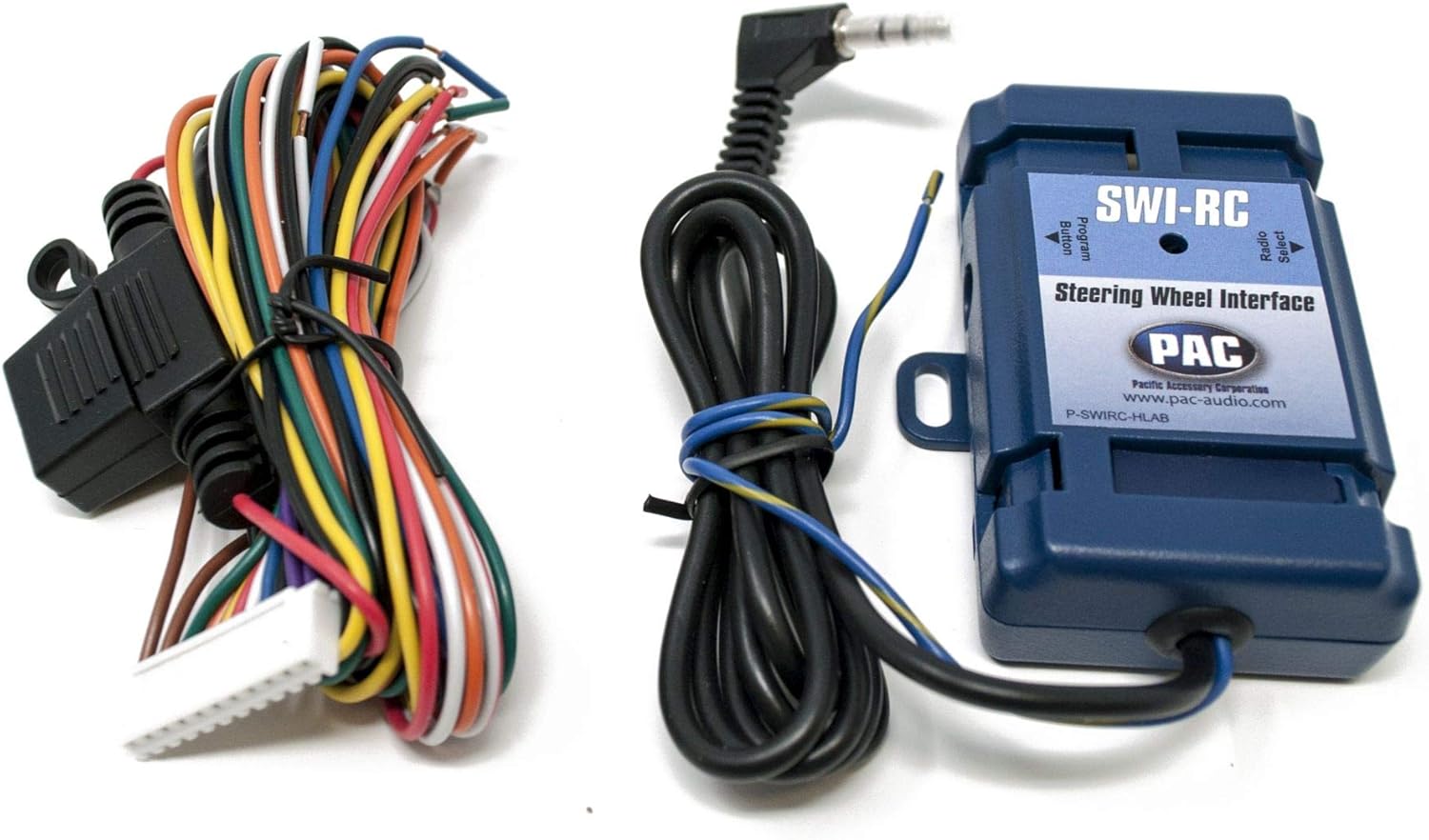
Image: The PAC Audio SWI-RC Steering Wheel Control Interface module with its associated wiring harness, ready for connection.
പ്രവർത്തന നിർദ്ദേശങ്ങൾ
അടിസ്ഥാന പ്രവർത്തനങ്ങൾ
- പവർ ഓൺ/ഓഫ്: Press the SRC button to turn the unit on. Press and hold SRC to turn off.
- ഉറവിട തിരഞ്ഞെടുപ്പ്: Press the SRC button repeatedly to cycle through available sources (CD, USB, Bluetooth Audio, Tuner, AUX, SiriusXM).
- വോളിയം നിയന്ത്രണം: Rotate the large rotary knob to adjust volume.
- മെനു നാവിഗേഷൻ: Use the rotary knob and surrounding buttons to navigate menus and settings.

Image: Front panel of the JVC KD-TD91BTS CD Receiver, displaying its illuminated buttons and LCD screen with blue accents.
ബ്ലൂടൂത്ത് കണക്റ്റിവിറ്റി
- ജോടിയാക്കൽ:
- നിങ്ങളുടെ മൊബൈൽ ഉപകരണത്തിൽ ബ്ലൂടൂത്ത് പ്രവർത്തനക്ഷമമാക്കിയിട്ടുണ്ടെന്ന് ഉറപ്പാക്കുക.
- On the KD-TD91BTS, select the Bluetooth source.
- ഇതിനായി തിരയുക "KD-TD91BTS" on your device and select it to pair.
- ആവശ്യപ്പെടുകയാണെങ്കിൽ ജോടിയാക്കൽ കോഡ് സ്ഥിരീകരിക്കുക.
- ഹാൻഡ്സ് ഫ്രീ കോളിംഗ്: Once paired, you can make and receive calls using the receiver's microphone and speakers.
- ഓഡിയോ സ്ട്രീമിംഗ്: Play audio from your paired device through the receiver.
USB പ്ലേബാക്ക്
- Insert a USB device into the front USB port.
- The unit will automatically switch to the USB source and begin playback.
- Supported formats include MP3, WMA, WAV, and FLAC (up to 96kHz/24bit).
ആമസോൺ അലക്സാ ഇന്റഗ്രേഷൻ
- Download the JVC Remote App on your smartphone.
- Connect your smartphone to the KD-TD91BTS via Bluetooth.
- Launch the JVC Remote App and follow the instructions to link with your Amazon Alexa account.
- Press the dedicated Alexa button on the receiver or use the JVC Remote App to activate Alexa voice commands.
ഓഡിയോ ക്രമീകരണങ്ങൾ
- സമനില: Access the 13-band graphic EQ to customize sound. 11 preset EQ settings are available.
- സമയ വിന്യാസം: Adjust speaker output timing for optimal sound staging.
- Loudness Control: Enhance bass and treble at low volumes.
- ബാസ് ബൂസ്റ്റ്: Increase bass output.
- High-Pass/Low-Pass Filters: Configure for speaker and subwoofer optimization.
മെയിൻ്റനൻസ്
- വൃത്തിയാക്കൽ: യൂണിറ്റിന്റെ ഡിസ്പ്ലേയും ബട്ടണുകളും വൃത്തിയാക്കാൻ മൃദുവായതും ഉണങ്ങിയതുമായ തുണി ഉപയോഗിക്കുക. അബ്രാസീവ് ക്ലീനറുകളോ ലായകങ്ങളോ ഉപയോഗിക്കരുത്.
- സിഡി സ്ലോട്ട്: Keep the CD slot free of dust and debris. Avoid inserting damaged or irregular-shaped discs.
- ഫേംവെയർ അപ്ഡേറ്റുകൾ: Periodically check the JVC webഒപ്റ്റിമൽ പ്രകടനവും അനുയോജ്യതയും ഉറപ്പാക്കാൻ ഫേംവെയർ അപ്ഡേറ്റുകൾക്കായുള്ള സൈറ്റ്.
ട്രബിൾഷൂട്ടിംഗ്
| പ്രശ്നം | സാധ്യമായ കാരണം | പരിഹാരം |
|---|---|---|
| ശക്തിയില്ല | പൊട്ടിത്തെറിച്ച ഫ്യൂസ്, തെറ്റായ വയറിംഗ്, വിച്ഛേദിക്കപ്പെട്ട ബാറ്ററി. | Check vehicle fuses and receiver fuse. Verify power and ground connections. Reconnect battery. |
| ശബ്ദമില്ല | Volume too low, mute activated, incorrect speaker wiring, incorrect source selected. | ശബ്ദം കൂട്ടുക. മ്യൂട്ട് നിർജ്ജീവമാക്കുക. സ്പീക്കർ കണക്ഷനുകൾ പരിശോധിക്കുക. ശരിയായ ഓഡിയോ ഉറവിടം തിരഞ്ഞെടുക്കുക. |
| ബ്ലൂടൂത്ത് ജോടിയാക്കൽ പരാജയപ്പെടുന്നു | Bluetooth not enabled on device, device too far, interference, previous pairing issues. | Ensure Bluetooth is on. Bring device closer. Clear previous pairings on both devices and retry. |
| സ്റ്റിയറിംഗ് വീൽ നിയന്ത്രണങ്ങൾ പ്രവർത്തിക്കുന്നില്ല | SWI-RC incorrectly wired or programmed, incompatible vehicle. | Review SWI-RC installation and programming instructions. Verify compatibility with your vehicle. |
സ്പെസിഫിക്കേഷനുകൾ
- മോഡൽ: JVC KD-TD91BTS
- പവർ ഔട്ട്പുട്ട്: 50W x 4 (MOS-FET), 22W RMS x 4
- Pre-Outs: 2 Pairs (2.5V, Front + Rear/Subwoofer Selectable)
- USB: Front USB Input (1.5A Charging), supports MP3, WMA, WAV, FLAC (96kHz/24bit)
- ബ്ലൂടൂത്ത്: Yes (Wired-Mic Included), Phone Book Access Profile (PBAP), Automatic Pairing
- സമനില: 13-Band Graphic EQ with 11 Preset EQ Settings
- ഡിസ്പ്ലേ: 2-Line VA (Vertical Alignment) LCD with Variable Color Illumination
- അനുയോജ്യത: Amazon Alexa, SiriusXM Ready (Tuner Sold Separately), Pandora/Spotify Control (Android/iPhone)
- അളവുകൾ: 17 x 15.25 x 9.75 ഇഞ്ച് (ഉൽപ്പന്നം)
- ഭാരം: 5 പൗണ്ട്
വാറൻ്റിയും പിന്തുണയും
വാറന്റി വിവരങ്ങൾക്കും സാങ്കേതിക പിന്തുണയ്ക്കും, ദയവായി ഔദ്യോഗിക JVC കാണുക. website or contact JVC customer service. Keep your proof of purchase for warranty claims.
JVC Support: Visit JVC USA Support
PAC ഓഡിയോ പിന്തുണ: For SWI-RC specific support, visit PAC Audio Support


