1. ഉൽപ്പന്നം കഴിഞ്ഞുview
This manual provides instructions for the JVC KD-TD71BT CD Receiver and the PAC SWI-RC Steering Wheel Control Interface. The JVC KD-TD71BT is a car audio receiver featuring Bluetooth connectivity, front USB and AUX inputs, and Amazon Alexa compatibility. The PAC SWI-RC allows for the retention of factory steering wheel control functions when installing an aftermarket radio.
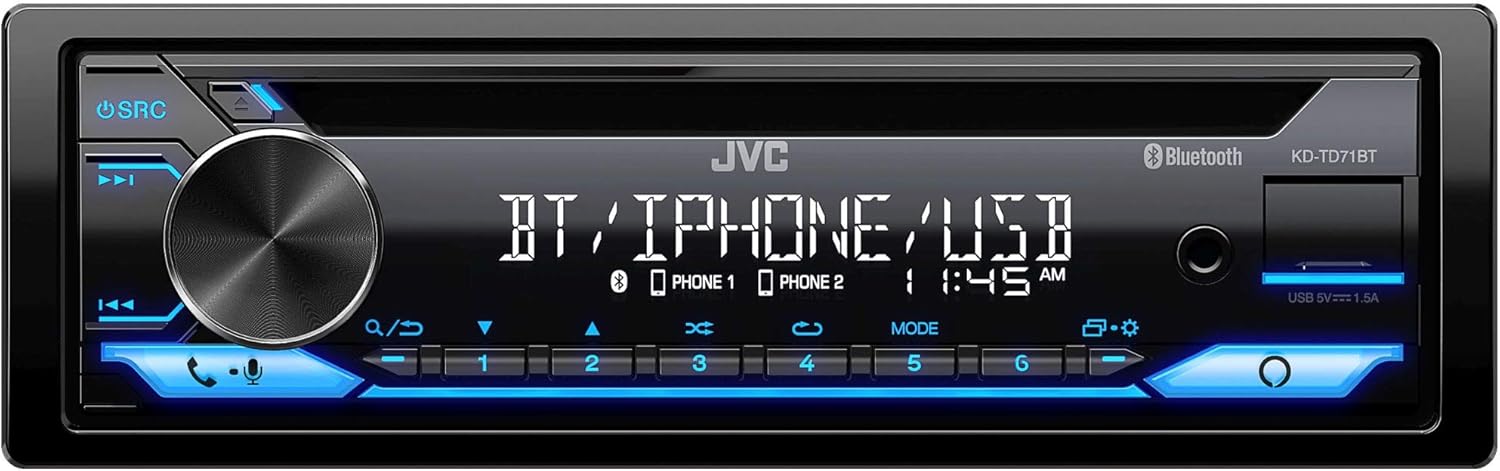
ചിത്രം 1: മുൻഭാഗം view of the JVC KD-TD71BT CD Receiver, showing the display, control knob, and various buttons.
2. ബോക്സിൽ എന്താണുള്ളത്?
ഇൻസ്റ്റാളേഷൻ ആരംഭിക്കുന്നതിന് മുമ്പ് എല്ലാ ഘടകങ്ങളും ഉണ്ടെന്ന് ഉറപ്പാക്കുക.
- JVC KD-TD71BT CD Receiver
- PAC SWI-RC Steering Wheel Control Interface
- Wired Microphone (for JVC KD-TD71BT)
- വയറിംഗ് ഹാർനെസുകളും കണക്ടറുകളും
- മൌണ്ടിംഗ് ഹാർഡ്വെയർ
3 പ്രധാന സവിശേഷതകൾ
- ആമസോൺ അലക്സ അനുയോജ്യമാണ്: Integrate voice commands for various functions.
- ബ്ലൂടൂത്ത് വയർലെസ് ടെക്നോളജി: Supports hands-free calling (HFP 1.7) and audio streaming (A2DP, AVRCP) with JVC Streaming DJ (up to 5 BT-Audio connections). Includes a wired microphone.
- ഫ്രണ്ട് യുഎസ്ബി ഇൻപുട്ട്: Provides up to 1.5A charging and supports FLAC (96kHz/24bit), MP3, WMA, WAV, AAC playback.
- Front AUX Input: ബാഹ്യ ഓഡിയോ ഉപകരണങ്ങൾ ബന്ധിപ്പിക്കുന്നതിന്.
- ഓഡിയോ നിയന്ത്രണം: 13-Band Graphic EQ with 11 Preset EQ Settings, Time Alignment, Space Enhancement, Sound Lift, K2 Technology, Loudness Control, Bass Boost Control.
- Pre-Outs: 1 Pair 2.5V Pre-Outs (Rear/Subwoofer Selectable) with High-Pass and Low-Pass Filters, and Subwoofer Level Control.
- ഡിസ്പ്ലേ: 2-Line VA (Vertical Alignment) LCD Display with Music Sync Illumination Effect.
- സ്റ്റിയറിംഗ് വീൽ കൺട്രോൾ നിലനിർത്തൽ: The PAC SWI-RC retains factory steering wheel control functions (volume, mode, track) for compatible radios.
- അസ്ഥിരമല്ലാത്ത മെമ്മറി: The PAC SWI-RC retains programming even if the vehicle's battery is disconnected.
4 സുരക്ഷാ വിവരങ്ങൾ
Read all instructions carefully before installation and use. Improper installation or operation can lead to serious injury or damage. Always consult a professional for installation if you are unsure.
- ഡ്രൈവിംഗിൽ നിന്ന് നിങ്ങളെ വ്യതിചലിപ്പിക്കുന്ന രീതിയിൽ യൂണിറ്റ് പ്രവർത്തിപ്പിക്കരുത്.
- ഷോർട്ട് സർക്യൂട്ടുകളോ കേടുപാടുകളോ തടയുന്നതിന് എല്ലാ വയറിംഗും ശരിയായി ബന്ധിപ്പിച്ചിട്ടുണ്ടെന്ന് ഉറപ്പാക്കുക.
- Avoid installing the unit in locations exposed to direct sunlight, high temperatures, or excessive moisture.
- നിർദ്ദിഷ്ട ഫ്യൂസുകൾ മാത്രം ഉപയോഗിക്കുക.
- Keep the volume at a level where you can still hear outside traffic sounds.
5. സജ്ജീകരണവും ഇൻസ്റ്റാളേഷനും
Professional installation is recommended. Disconnect the vehicle's negative battery terminal before starting any electrical work.
5.1 JVC KD-TD71BT CD Receiver Installation
Follow the wiring diagram provided with your unit. Connect the power, ground, speaker, and accessory wires correctly. Secure the unit in the dashboard opening using the supplied mounting hardware.

ചിത്രം 2: പിൻഭാഗം view of the JVC KD-TD71BT CD Receiver, illustrating the various wiring harness connections and audio output ports.
5.2 PAC SWI-RC Steering Wheel Control Interface Installation
The SWI-RC connects between your vehicle's factory steering wheel control wiring and the JVC KD-TD71BT's wired remote input. Refer to the specific vehicle application guide provided by PAC for detailed wiring instructions for your vehicle model.
- Identify the steering wheel control wires in your vehicle.
- Connect the SWI-RC's wires to the vehicle's wiring and the JVC receiver's wired remote input.
- Program the SWI-RC according to the PAC instructions to map the steering wheel buttons to the desired functions on the JVC receiver.

Figure 3: The PAC SWI-RC Steering Wheel Control Interface packaging and included components, including the main module and wiring harness.
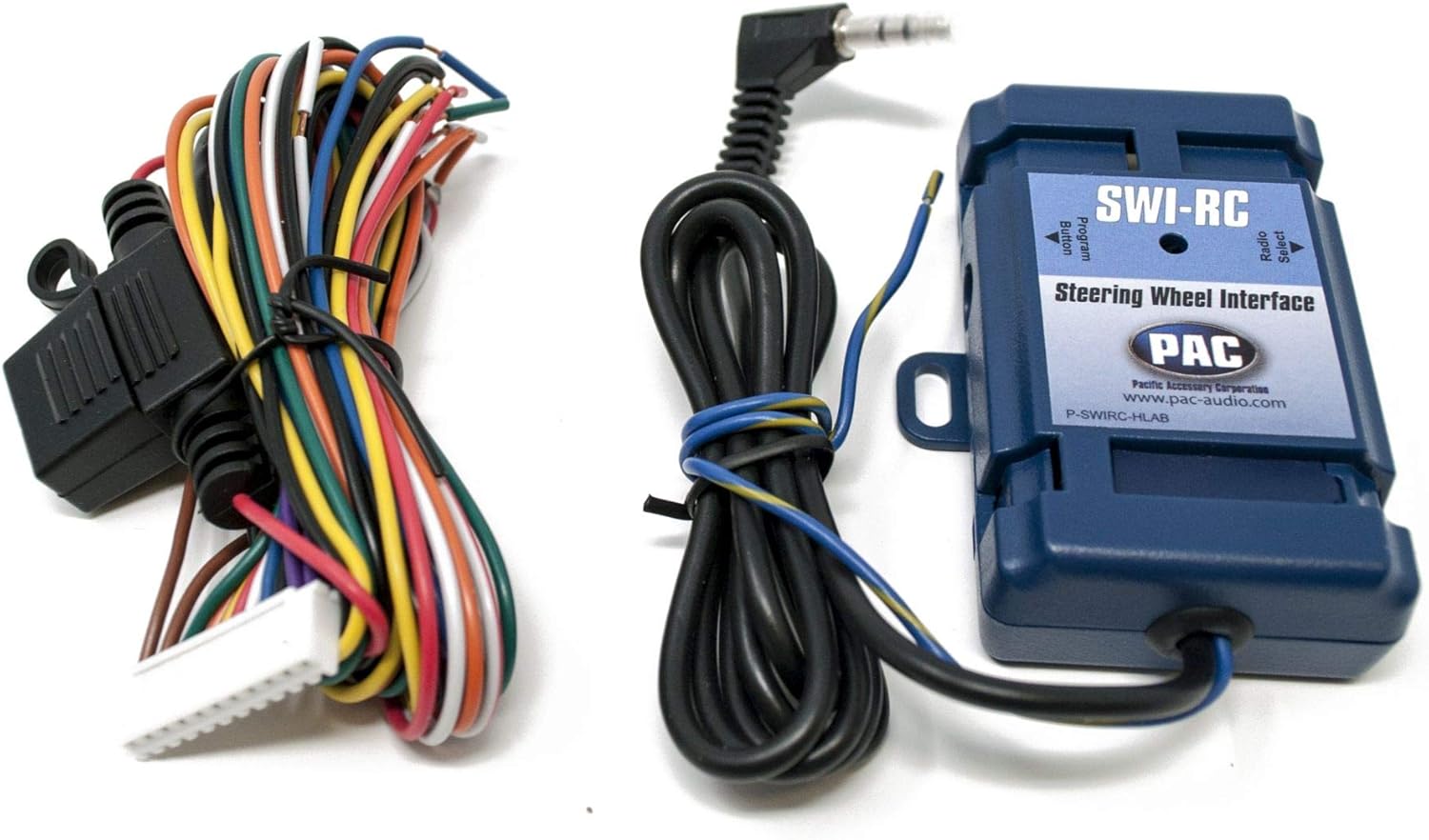
ചിത്രം 4: വിശദമായ ഒരു view of the PAC SWI-RC module and its multi-colored wiring harness, essential for connecting to the vehicle's electrical system.
6. പ്രവർത്തന നിർദ്ദേശങ്ങൾ
6.1 JVC KD-TD71BT Basic Operation
- പവർ ഓൺ/ഓഫ്: യൂണിറ്റ് ഓണാക്കാൻ SRC ബട്ടൺ അമർത്തുക. ഓഫാക്കാൻ SRC അമർത്തിപ്പിടിക്കുക.
- വോളിയം നിയന്ത്രണം: Rotate the large rotary knob to adjust the volume.
- ഉറവിട തിരഞ്ഞെടുപ്പ്: Press the SRC button repeatedly to cycle through available sources (CD, Tuner, Bluetooth, USB, AUX, Alexa).
6.2 ബ്ലൂടൂത്ത് പ്രവർത്തനം
- ജോടിയാക്കൽ: Enable Bluetooth on your smartphone. Select 'KD-TD71BT' from the device list. Confirm the pairing code if prompted.
- ഓഡിയോ സ്ട്രീമിംഗ്: Once paired, select Bluetooth as the source. Play audio from your smartphone, and it will stream to the receiver. Use the receiver's controls or your phone to manage playback (play/pause, skip track).
- ഹാൻഡ്സ് ഫ്രീ കോളിംഗ്: When a call comes in, the display will show the caller ID. Press the phone button to answer, or press and hold to reject. Use the wired microphone for clear communication.
- JVC Streaming DJ: Connect up to 5 Bluetooth audio devices simultaneously. Switch between devices for audio playback.
6.3 USB/AUX Operation
- USB: Connect a USB storage device to the front USB port. The unit will automatically switch to the USB source and begin playback.
- ഓക്സ്: Connect an external audio player to the front AUX input using a 3.5mm stereo cable. Select AUX as the source.
6.4 ആമസോൺ അലക്സാ ഇന്റഗ്രേഷൻ
To use Amazon Alexa, ensure your smartphone is connected via Bluetooth and the JVC Alexa app is installed and configured. Press the dedicated Alexa button on the receiver to activate Alexa and issue voice commands for music, navigation, and more.
6.5 ഓഡിയോ ക്രമീകരണങ്ങൾ
Access the audio menu to adjust sound settings:
- സമനില: Select from 11 preset EQ settings or customize the 13-band graphic equalizer.
- സമയ വിന്യാസം: Adjust the sound output timing for each speaker to create an optimal sound stage.
- Space Enhancement / Sound Lift: Digital sound processing features to enhance the listening experience.
- K2 Technology: JVC's proprietary technology to reproduce the original master sound by expanding the bit rate and frequency range.
- Loudness Control / Bass Boost: Enhance low and high frequencies at lower volumes.
6.6 Steering Wheel Control (via SWI-RC)
Once the PAC SWI-RC is correctly installed and programmed, your vehicle's factory steering wheel buttons will control corresponding functions on the JVC KD-TD71BT, such as:
- വോളിയം കൂട്ടുക/താഴ്ത്തുക
- മുകളിലേക്കും താഴേക്കും ട്രാക്ക് ചെയ്യുക
- മോഡ്/ഉറവിടം തിരഞ്ഞെടുക്കൽ
- ഉത്തരം / കോൾ അവസാനിപ്പിക്കുക
7. പരിപാലനം
- വൃത്തിയാക്കൽ: Use a soft, dry cloth to clean the unit's front panel. For stubborn dirt, dampതുണിയിൽ വെള്ളം ഒഴിക്കുക. അബ്രാസീവ് ക്ലീനറുകളോ ലായകങ്ങളോ ഒഴിവാക്കുക.
- സിഡി സ്ലോട്ട്: Keep the CD slot free of dust and debris. Do not insert foreign objects.
- കണക്ഷനുകൾ: എല്ലാ വയറിംഗ് കണക്ഷനുകളും സുരക്ഷിതമാണെന്ന് ഉറപ്പാക്കാൻ ഇടയ്ക്കിടെ പരിശോധിക്കുക.
8. പ്രശ്നപരിഹാരം
| പ്രശ്നം | സാധ്യമായ കാരണം | പരിഹാരം |
|---|---|---|
| ശക്തിയില്ല | Blown fuse; incorrect wiring; vehicle battery low. | Check and replace fuse; verify wiring connections; charge vehicle battery. |
| ശബ്ദമില്ല | Volume too low; speaker wires disconnected; incorrect source selected. | Increase volume; check speaker connections; select correct audio source. |
| ബ്ലൂടൂത്ത് ജോടിയാക്കൽ പരാജയപ്പെടുന്നു | Bluetooth not enabled on phone; incorrect device selected; interference. | Ensure phone Bluetooth is on; select 'KD-TD71BT'; move closer to unit; restart both devices. |
| സ്റ്റിയറിംഗ് വീൽ നിയന്ത്രണങ്ങൾ പ്രവർത്തിക്കുന്നില്ല | SWI-RC incorrectly wired; SWI-RC not programmed; radio not compatible. | Verify SWI-RC wiring; reprogram SWI-RC; ensure JVC unit has wired remote input. |
| USB ഉപകരണം തിരിച്ചറിഞ്ഞില്ല. | പൊരുത്തമില്ലാത്തത് file format; damaged USB device; device requires too much power. | പരിശോധിക്കുക file formats; try a different USB device; ensure device is self-powered if needed. |
9 സ്പെസിഫിക്കേഷനുകൾ
| ഫീച്ചർ | സ്പെസിഫിക്കേഷൻ |
|---|---|
| ബ്രാൻഡ് | ജെ.വി.സി |
| മോഡൽ നമ്പർ | KD-TD71BT |
| ഉൽപ്പന്ന അളവുകൾ | 17 x 15.25 x 9.75 ഇഞ്ച് |
| ഇനത്തിൻ്റെ ഭാരം | 5 പൗണ്ട് |
| കണക്റ്റിവിറ്റി ടെക്നോളജി | ഓക്സിലറി, ബ്ലൂടൂത്ത്, യുഎസ്ബി |
| കൺട്രോളർ തരം | ആമസോൺ അലക്സ, ആൻഡ്രോയിഡ് |
| പ്രത്യേക സവിശേഷതകൾ | Equalizer, Pandora, Spotify |
| അനുയോജ്യമായ ഉപകരണങ്ങൾ | സ്മാർട്ട്ഫോൺ, സ്പീക്കർ |
| കണക്റ്റർ തരം | 3.5എംഎം ജാക്ക്, യുഎസ്ബി |
| ഓഡിയോ put ട്ട്പുട്ട് മോഡ് | മോണോ, സ്റ്റീരിയോ |
| ഔട്ട്പുട്ട് വാട്ട്tage | 50 Watts (MOS-FET 50W x 4 Power Output, 22W RMS x 4) |
10. വാറൻ്റിയും പിന്തുണയും
This product is covered by a manufacturer's warranty. Please refer to the warranty card included with your purchase for specific terms and conditions. For technical support, troubleshooting assistance, or warranty claims, please contact JVC customer service or visit the official JVC website. For support regarding the PAC SWI-RC interface, please refer to PAC Audio's official documentation and support channels.