ആമുഖം
This manual provides detailed instructions for the setup, operation, and maintenance of your HORI PS4 Onyx Plus Wireless Controller. Please read this manual thoroughly before use to ensure proper functionality and longevity of your device.
ഉൽപ്പന്നം കഴിഞ്ഞുview
The HORI PS4 Onyx Plus Wireless Controller is designed for use with the PlayStation 4 console, offering wireless connectivity and a range of features for an enhanced gaming experience.
പ്രധാന സവിശേഷതകൾ
- വയർലെസ് കണക്റ്റിവിറ്റി: Connects wirelessly to the PS4 console.
- Adjustable Triggers: Customizable trigger pressure.
- ഡ്യുവൽ അനലോഗ് സ്റ്റിക്കുകൾ: കൃത്യമായ നിയന്ത്രണത്തിനായി.
- അന്തർനിർമ്മിത മൈക്ക്: For online chat and voice commands.
- മൾട്ടി-ഫങ്ഷണൽ: Various buttons and features for diverse gameplay.
കൺട്രോളർ ലേഔട്ട്
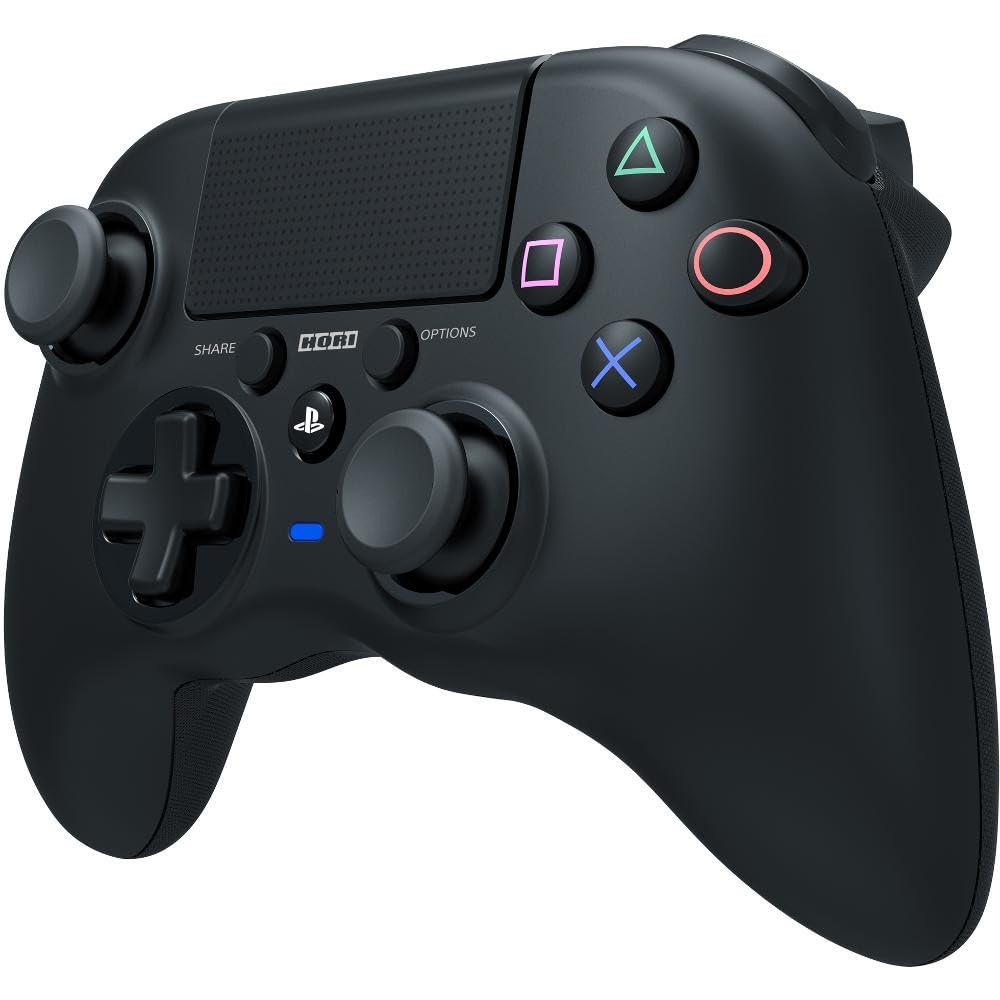
ചിത്രം: മുൻഭാഗം view of the HORI PS4 Onyx Plus Wireless Controller. It features two analog sticks, a D-pad, four action buttons (Triangle, Circle, Cross, Square), Share and Options buttons, a PS button, a touchpad, and a light bar. The controller is black with textured grips.
സജ്ജീകരണവും പ്രാരംഭ കണക്ഷനും
കൺട്രോളർ ചാർജ് ചെയ്യുന്നു
The controller includes a built-in rechargeable battery. Before first use, fully charge the controller using a standard USB charging cable. Connect the cable to the controller's charging port and a powered USB port on your PS4 console or a USB wall adapter. The light bar on the controller will indicate charging status.
പ്ലേസ്റ്റേഷൻ 4-മായി ജോടിയാക്കുന്നു
- നിങ്ങളുടെ പ്ലേസ്റ്റേഷൻ 4 കൺസോൾ ഓണാക്കിയിട്ടുണ്ടെന്ന് ഉറപ്പാക്കുക.
- With the controller powered off, press and hold the PS ബട്ടൺ കൂടാതെ പങ്കിടുക ബട്ടൺ simultaneously until the light bar begins to flash rapidly.
- On your PS4 console, navigate to ക്രമീകരണങ്ങൾ > ഉപകരണങ്ങൾ > ബ്ലൂടൂത്ത് ഉപകരണങ്ങൾ.
- Select the "HORI Onyx Plus" controller from the list of available devices.
- Once paired, the light bar will glow a solid color, indicating a successful connection.
Note: Some versions of this controller may require a USB wireless dongle for connection. If direct Bluetooth pairing is unsuccessful, refer to any included quick start guide for dongle-specific instructions.
കൺട്രോളർ പ്രവർത്തിപ്പിക്കുന്നു
അടിസ്ഥാന നിയന്ത്രണങ്ങൾ
The HORI PS4 Onyx Plus Wireless Controller features standard PlayStation button layouts:
- അനലോഗ് സ്റ്റിക്കുകൾ: Used for movement and camera control. Push the sticks in for L3/R3 functions.
- ഡി-പാഡ്: For directional input in menus and certain games.
- ആക്ഷൻ ബട്ടണുകൾ (ത്രികോണം, വൃത്തം, കുരിശ്, ചതുരം): Perform in-game actions.
- പങ്കിടുക ബട്ടൺ: Access sharing options (screenshots, video clips).
- ഓപ്ഷനുകൾ ബട്ടൺ: Pause games or access in-game menus.
- പി.എസ് ബട്ടൺ: Access the PS4 Home screen, switch users, or power off the console.
- ടച്ച്പാഡ്: Functions as a clickable button and a touch-sensitive surface for specific game interactions.
Adjustable Triggers
The L2 and R2 triggers feature adjustable pressure. Consult your game's settings or the controller's specific software (if available) for customization options. This allows users to fine-tune trigger sensitivity for different game genres.
ബിൽറ്റ്-ഇൻ മൈക്രോഫോൺ
The integrated microphone allows for voice chat in online multiplayer games and voice commands for the PS4 system. Ensure your PS4 audio settings are configured to use the controller's microphone.
പരിപാലനവും പരിചരണവും
വൃത്തിയാക്കൽ
കൺട്രോളർ വൃത്തിയാക്കാൻ, മൃദുവായതും ഉണങ്ങിയതുമായ ഒരു തുണി ഉപയോഗിക്കുക. കഠിനമായ അഴുക്കിന്, ചെറുതായി dampen the cloth with water. Avoid using harsh chemicals, solvents, or abrasive materials, as these can damage the controller's finish and internal components.
ബാറ്ററി കെയർ
- ബാറ്ററിയുടെ ആയുസ്സ് വർദ്ധിപ്പിക്കുന്നതിന് ഇടയ്ക്കിടെ പൂർണ്ണമായും ഡിസ്ചാർജ് ചെയ്യുന്നത് ഒഴിവാക്കുക.
- ദീർഘനേരം ഉപയോഗിക്കാത്തപ്പോൾ കൺട്രോളർ തണുത്തതും വരണ്ടതുമായ സ്ഥലത്ത് സൂക്ഷിക്കുക.
- Do not expose the controller to extreme temperatures.
ട്രബിൾഷൂട്ടിംഗ്
കണക്ഷൻ പ്രശ്നങ്ങൾ
- കൺട്രോളർ കണക്റ്റുചെയ്യുന്നില്ല: Ensure the controller is charged. Re-attempt the pairing process as described in the "Pairing with PlayStation 4" section. Move closer to the PS4 console to rule out range issues.
- ഇടവിട്ടുള്ള കണക്ഷൻ: Check for potential interference from other wireless devices. Ensure the controller is fully charged. If using a dongle, ensure it is securely plugged into the PS4.
ടച്ച്പാഡ് സെൻസിറ്റിവിറ്റി
Some users may find the touchpad to be highly sensitive. If accidental inputs occur, adjust your grip or check in-game settings for touchpad sensitivity options. There is no physical adjustment for touchpad sensitivity on the controller itself.
ബാറ്ററി ലൈഫ് സൂചന
The controller does not display battery life on the PS4 system menu. The light bar will indicate charging status, and the controller will power off when the battery is depleted.
Controller Not Turning On Console
This controller may not support turning on the PS4 console directly from a powered-off state. Power on the console manually before connecting the controller.
സ്പെസിഫിക്കേഷനുകൾ
| ഫീച്ചർ | വിശദാംശങ്ങൾ |
|---|---|
| മോഡൽ നമ്പർ | PS4-149E |
| കണക്റ്റിവിറ്റി | വയർലെസ് |
| അളവുകൾ (L x W x H) | 2.76 x 6.3 x 7.09 ഇഞ്ച് |
| ഭാരം | 8.1 ഔൺസ് |
| ബാറ്ററി | 1 എ ബാറ്ററി (ഉൾപ്പെടുന്നു) |
| ആദ്യം ലഭ്യമായത് | 30 ജനുവരി 2022 |
വാറൻ്റിയും പിന്തുണയും
ഉൽപ്പന്ന വാറൻ്റി
For information regarding the product warranty, please refer to the warranty card included with your purchase or visit the official HORI webസൈറ്റ്. വാറന്റി നിബന്ധനകളും വ്യവസ്ഥകളും പ്രദേശത്തിനനുസരിച്ച് വ്യത്യാസപ്പെടാം.
ഉപഭോക്തൃ പിന്തുണ
If you encounter any issues not covered in this manual or require further assistance, please contact HORI customer support. You can find contact information on the official HORI webസൈറ്റ് അല്ലെങ്കിൽ നിങ്ങൾ ഉൽപ്പന്നം വാങ്ങിയ റീട്ടെയിലർ വഴി.
Visit the HORI Store on Amazon കൂടുതൽ ഉൽപ്പന്ന വിവരങ്ങൾക്കും പിന്തുണാ ഉറവിടങ്ങൾക്കും.


