1. ആമുഖം
The Altice Amplify is an intelligent, high-fidelity smart speaker designed to enhance your home entertainment experience. Powered by Devialet technologies, it delivers exceptional sound quality with rich detail. Integrated with Alexa Voice Control, it allows for hands-free operation, music playback, smart home control, and seamless connection to various streaming services.

പ്രധാന സവിശേഷതകളിൽ ഇവ ഉൾപ്പെടുന്നു:
- Devialet sound processing technologies for extraordinary audio quality through 5 speakers.
- Far-field AI voice assistant powered by Alexa for convenient hands-free control.
- Multiple connectivity options: Wi-Fi, Bluetooth, and Optical audio input for TV playback.
- Native streaming music support for popular services like Spotify, Pandora, Amazon Music, Apple Music, Audible, TuneIn, Tidal, and iHeartRadio.
- Control of smart home accessories leveraging Alexa skills.
ഔദ്യോഗിക വീഡിയോ പ്രദർശനംasing the features and design of the Altice Amplify Smart Speaker.
2. ഉൽപ്പന്നം കഴിഞ്ഞുview
2.1. ബോക്സിൽ എന്താണുള്ളത്?
- ആൾട്ടീസ് Amplify Smart Speaker
- ഒപ്റ്റിക്കൽ കേബിൾ
- വൈദ്യുതി വിതരണ യൂണിറ്റ്
2.2. സ്പീക്കർ ഘടകങ്ങൾ


3. സജ്ജീകരണം
3.1. പ്ലേസ്മെന്റ്
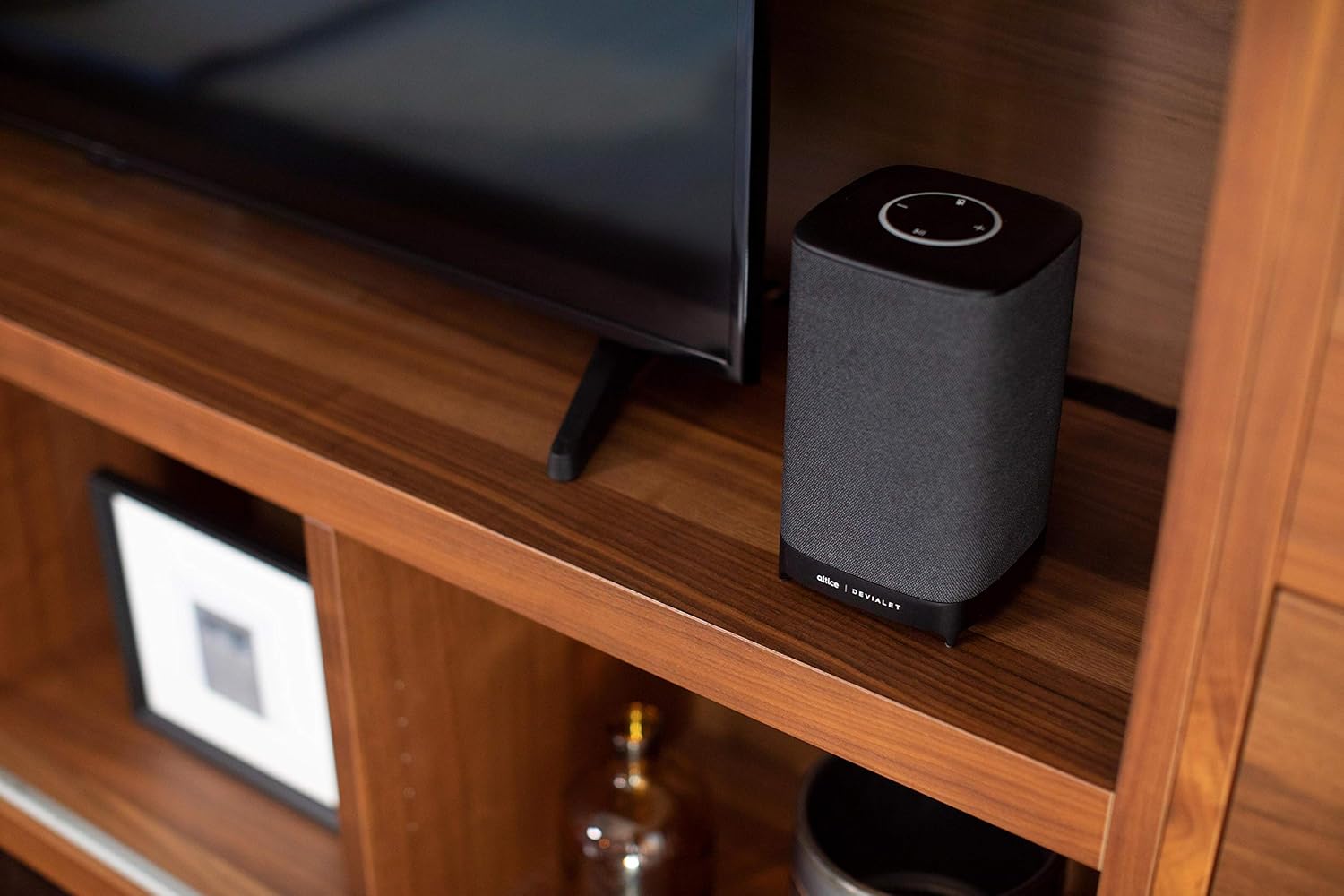
Place your Altice Amplify speaker indoors on a stable, flat surface such as a tabletop or floor. Ensure it is positioned to provide optimal sound distribution in your desired listening area.
3.2. പവർ കണക്ഷൻ
Connect the provided power supply unit to the speaker's power input port and then plug it into a wall outlet. The speaker will power on automatically.
3.3. ടിവിയിലേക്ക് കണക്റ്റുചെയ്യുന്നു
For TV audio, use the included optical cable to connect the speaker's optical input to your TV's optical audio output. To switch to the optical input, press and hold the play/pause button on the speaker's top panel until the input changes.
3.4. Network and App Setup
To utilize smart features and streaming services, connect the speaker to your Wi-Fi network. Download the Altice Amplify companion app on your smartphone or tablet. Follow the in-app instructions for initial setup, including Wi-Fi configuration and linking your Alexa account. The app facilitates the setup process and allows for management of speaker settings.
4. നിങ്ങളുടെ സ്പീക്കർ പ്രവർത്തിപ്പിക്കുക
4.1. അലക്സ ഉപയോഗിച്ചുള്ള ശബ്ദ നിയന്ത്രണം
With Alexa built-in, you can control your speaker and smart home devices using voice commands. Simply say "Alexa" followed by your request. For example, "Alexa, play music," "Alexa, what's the weather?" or "Alexa, turn off the lights."
4.2. Audio Streaming
The Altice Amplify supports premier audio streaming from various services. Once connected to Wi-Fi, you can stream directly from Spotify, Amazon Music, Apple Music, Pandora, Audible, TuneIn, Tidal, and iHeartRadio. You can also stream audio via Bluetooth from any compatible device.
4.3. Adjusting Volume and Sources
Volume can be adjusted using the touch controls on the top of the speaker (plus and minus symbols) or via voice commands through Alexa. To switch between audio sources (Optical, Bluetooth, Wi-Fi), press and hold the play/pause button on the top panel. Note that the volume control may not be highly incremental, so adjust carefully.
5. പരിപാലനം
To maintain the performance and appearance of your Altice Amplify speaker, follow these guidelines:
- വൃത്തിയാക്കൽ: Use a soft, dry cloth to wipe the exterior surfaces. Avoid using liquid cleaners, aerosols, or abrasive materials.
- പ്ലേസ്മെൻ്റ്: Keep the speaker away from direct sunlight, heat sources, and areas with high humidity or dust.
- വെൻ്റിലേഷൻ: Ensure proper airflow around the speaker to prevent overheating. Do not block any ventilation openings.
- ശക്തി: Disconnect the power supply during electrical storms or when unused for long periods.
6. പ്രശ്നപരിഹാരം
If you encounter issues with your Altice Amplify speaker, refer to the following common problems and solutions:
- ശക്തിയില്ല: Ensure the power supply unit is securely connected to both the speaker and a working electrical outlet.
- ഓഡിയോ ഔട്ട്പുട്ട് ഇല്ല:
- Verify the correct audio source is selected (Optical, Bluetooth, Wi-Fi) by pressing and holding the play/pause button to cycle through inputs.
- സ്പീക്കറിലും കണക്റ്റുചെയ്ത ഉപകരണത്തിലും വോളിയം ലെവൽ പരിശോധിക്കുക.
- If using optical, ensure the optical cable is securely connected and your TV's audio output is set to PCM/Stereo (not Bitstream or Dolby Digital).
- വൈഫൈ കണക്റ്റിവിറ്റി പ്രശ്നങ്ങൾ:
- സ്പീക്കർ നിങ്ങളുടെ വൈഫൈ റൂട്ടറിന്റെ പരിധിയിലാണെന്ന് ഉറപ്പാക്കുക.
- Restart your Wi-Fi router and the speaker.
- If the speaker loses contact with the Wi-Fi network and cannot reconnect, try resetting the speaker (refer to the app or online resources for specific reset instructions).
- Some users have reported difficulties with the Android app for setup; ensure your app is updated to the latest version.
- ബ്ലൂടൂത്ത് ജോടിയാക്കൽ പ്രശ്നങ്ങൾ:
- സ്പീക്കർ ബ്ലൂടൂത്ത് ജോടിയാക്കൽ മോഡിലാണെന്ന് ഉറപ്പാക്കുക.
- Make sure Bluetooth is enabled on your device and it is discoverable.
- Delete previous pairings on your device and try pairing again.
- അലക്സ പ്രതികരിക്കുന്നില്ല:
- Check if the microphone is muted on the speaker (indicated by a specific light pattern or button).
- Ensure the speaker has a stable internet connection.
- Verify your Alexa account is properly linked in the companion app.
For persistent issues, consult the Altice support webസൈറ്റ് അല്ലെങ്കിൽ അവരുടെ ഉപഭോക്തൃ സേവനവുമായി ബന്ധപ്പെടുക.
7 സ്പെസിഫിക്കേഷനുകൾ
| ഫീച്ചർ | സ്പെസിഫിക്കേഷൻ |
|---|---|
| മോഡലിൻ്റെ പേര് | ആൾട്ടീസ് Ampജീവനുള്ള |
| സ്പീക്കർ തരം | സ്മാർട്ട് സ്പീക്കർ, 3D/അറ്റ്മോസ്ഫെറിക്, സൗണ്ട്ബാർ, സബ് വൂഫർ |
| പ്രത്യേക ഫീച്ചർ | Devialet Sound Processing Technology |
| ഉൽപ്പന്നത്തിനുള്ള ശുപാർശിത ഉപയോഗങ്ങൾ | Music, home entertainment, parties, or background music |
| അനുയോജ്യമായ ഉപകരണങ്ങൾ | സ്മാർട്ട്ഫോൺ, ടാബ്ലെറ്റ്, ലാപ്ടോപ്പ് |
| കൺട്രോളർ തരം | vera, Amazon Alexa |
| സറൗണ്ട് സൗണ്ട് ചാനൽ കോൺഫിഗറേഷൻ | 2.1 |
| നിറം | കറുപ്പ് |
| ഉൾപ്പെടുത്തിയ ഘടകങ്ങൾ | Optical cable, Power supply unit |
| ഇനത്തിൻ്റെ ഭാരം | 5.73 പൗണ്ട് |
| വാട്ടർപ്രൂഫ് ആണ് | തെറ്റ് |
| വാറൻ്റി തരം | പരിമിത വാറൻ്റി |
| ഇനങ്ങളുടെ എണ്ണം | 1 |
| നിയന്ത്രണ രീതി | ശബ്ദം |
| വയർലെസ് കമ്മ്യൂണിക്കേഷൻ ടെക്നോളജി | ബ്ലൂടൂത്ത്, വൈഫൈ |
| പവർ ഉറവിടം | കോർഡഡ് ഇലക്ട്രിക് |
| സിഗ്നൽ-ടു-നോയിസ് അനുപാതം | 5 ഡി.ബി |
| ഉപഭോക്തൃ പാക്കേജ് തരം | സ്റ്റാൻഡേർഡ് പാക്കേജിംഗ് |
| ഓഡിയോ ഡ്രൈവർ തരം | ഡൈനാമിക് ഡ്രൈവർ |
| ബ്ലൂടൂത്ത് ശ്രേണി | 10 മീറ്റർ |
| സബ്വൂഫർ കണക്റ്റിവിറ്റി സാങ്കേതികവിദ്യ | വയർലെസ് |
| കണക്റ്റിവിറ്റി പ്രോട്ടോക്കോൾ | ബ്ലൂടൂത്ത്, വൈഫൈ |
| MP3 പ്ലെയർ ഉൾപ്പെടുമോ? | ഇല്ല |
| യു.പി.സി | 810038290003 |
| ഇൻഡോർ/ഔട്ട്ഡോർ ഉപയോഗം | ഇൻഡോർ |
| ഗ്ലോബൽ ട്രേഡ് ഐഡൻ്റിഫിക്കേഷൻ നമ്പർ | 00810038290003 |
| നിർമ്മാതാവ് | Altice, Devialet |
| പാക്കേജ് അളവുകൾ | 12.2 x 8.6 x 7 ഇഞ്ച് |
| ഇനത്തിൻ്റെ മോഡൽ നമ്പർ | SBDV01 |
| ആദ്യ തീയതി ലഭ്യമാണ് | നവംബർ 4, 2019 |
| സ്പീക്കർ പരമാവധി ഔട്ട്പുട്ട് പവർ | 5 വാട്ട്സ് |
| ഓഡിയോ put ട്ട്പുട്ട് മോഡ് | സ്റ്റീരിയോ |
| മൗണ്ടിംഗ് തരം | Floor Standing, Tabletop Mount |
8. വാറൻ്റിയും പിന്തുണയും
The Altice Amplify Smart Speaker comes with a Limited Warranty. For detailed information regarding warranty coverage, terms, and conditions, please refer to the documentation included with your product or visit the official Altice support webസൈറ്റ്.
For technical support, troubleshooting assistance beyond this manual, or to inquire about service, please contact Altice customer support through their official channels. Keep your product model number (SBDV01) and proof of purchase ready when contacting support.