1. ആമുഖം
Thank you for choosing the Maul MAULarc 8200490 LED Desk Lamp. നിങ്ങളുടെ പുതിയ കമ്പ്യൂട്ടറിന്റെ സുരക്ഷിതവും കാര്യക്ഷമവുമായ ഉപയോഗത്തിന് ആവശ്യമായ വിവരങ്ങൾ ഈ മാനുവൽ നൽകുന്നു.amp. ഇൻസ്റ്റാളേഷനും പ്രവർത്തനത്തിനും മുമ്പ് ദയവായി ഈ നിർദ്ദേശങ്ങൾ ശ്രദ്ധാപൂർവ്വം വായിക്കുക, ഭാവിയിലെ റഫറൻസിനായി അവ സൂക്ഷിക്കുക.

Image 1.1: The Maul MAULarc 8200490 LED Desk Lamp in a typical office environment.
2. സുരക്ഷാ നിർദ്ദേശങ്ങൾ
സുരക്ഷിതമായ പ്രവർത്തനം ഉറപ്പാക്കാൻ, എല്ലായ്പ്പോഴും ഈ അടിസ്ഥാന സുരക്ഷാ മുൻകരുതലുകൾ പാലിക്കുക:
- ഈ ഉൽപ്പന്നം രൂപകൽപ്പന ചെയ്തിരിക്കുന്നത് ഇൻഡോർ ഉപയോഗം മാത്രം. Do not expose to rain or moisture.
- വൈദ്യുതി വിതരണം വോളിയം ഉറപ്പാക്കുകtage, l-മായി പൊരുത്തപ്പെടുന്നുamp's requirements (220 Volts).
- l തുറക്കാനോ പരിഷ്ക്കരിക്കാനോ ശ്രമിക്കരുത്.amp. The LED light source is permanently installed and cannot be replaced.
- എൽ സൂക്ഷിക്കുകamp താപ സ്രോതസ്സുകളിൽ നിന്നും നേരിട്ടുള്ള സൂര്യപ്രകാശത്തിൽ നിന്നും അകലെ.
- എൽ അൺപ്ലഗ് ചെയ്യുകamp from the power outlet before cleaning or if it will not be used for an extended period.
- എൽ പ്രവർത്തിപ്പിക്കരുത്amp കേടായ ചരട് അല്ലെങ്കിൽ പ്ലഗ് ഉപയോഗിച്ച്.
3. പാക്കേജ് ഉള്ളടക്കം
Carefully unpack the box and ensure all items are present and undamaged. The package should contain:
- 1 x Maul MAULarc 8200490 LED Desk Lamp (with integrated power cord)
4. സജ്ജീകരണം
Follow these steps to set up your LED desk lamp:
- പ്ലേസ്മെൻ്റ്: l-ന് വേണ്ടി ഒരു സ്ഥിരതയുള്ളതും പരന്നതുമായ പ്രതലം തിരഞ്ഞെടുക്കുക.amp, such as a desk or table. Ensure there is adequate space around the lamp for ventilation and adjustment.
- പവർ ബന്ധിപ്പിക്കുക: Insert the power plug into a standard 220V electrical outlet.
- സ്ഥാനം ക്രമീകരിക്കുക: എൽamp features a flexible arm. Gently bend the arm to position the light head as desired for optimal illumination.
5. പ്രവർത്തന നിർദ്ദേശങ്ങൾ
The Maul MAULarc 8200490 LED Desk Lamp പ്രവർത്തിക്കാൻ എളുപ്പമാണ്:
- പവർ ഓൺ/ഓഫ്: Locate the switch on the lamp base. Press the switch to turn the lamp ഓൺ അല്ലെങ്കിൽ ഓഫ്.
- പ്രകാശ ക്രമീകരണം: The flexible arm allows for easy adjustment of the light direction. Gently reposition the lamp ആവശ്യമുള്ളിടത്ത് നേരിട്ടുള്ള വെളിച്ചത്തിലേക്ക് പോകുക.
6. പരിപാലനം
ശരിയായ പരിചരണം നിങ്ങളുടെ കുഞ്ഞിന്റെ ദീർഘായുസ്സ് ഉറപ്പാക്കും.amp:
- വൃത്തിയാക്കൽ: വൃത്തിയാക്കുന്നതിന് മുമ്പ്, എല്ലായ്പ്പോഴും എൽ അൺപ്ലഗ് ചെയ്യുകamp from the power outlet. Use a soft, dry cloth to wipe the lampന്റെ പ്രതലങ്ങൾ. അബ്രാസീവ് ക്ലീനറുകളോ, ലായകങ്ങളോ, കഠിനമായ രാസവസ്തുക്കളോ ഉപയോഗിക്കരുത്, കാരണം ഇവ ഫിനിഷിന് കേടുവരുത്തും.
- LED ലൈറ്റ് ഉറവിടം: ഈ l ലെ LED പ്രകാശ സ്രോതസ്സ്amp is permanently installed and does not require replacement. Do not attempt to remove or replace the LEDs.
7. പ്രശ്നപരിഹാരം
നിങ്ങളുടെ എൽ-യിൽ എന്തെങ്കിലും പ്രശ്നങ്ങൾ നേരിടുകയാണെങ്കിൽamp, ഇനിപ്പറയുന്ന ട്രബിൾഷൂട്ടിംഗ് ഗൈഡ് കാണുക:
| പ്രശ്നം | സാധ്യമായ കാരണം | പരിഹാരം |
|---|---|---|
| Lamp ഓണാക്കുന്നില്ല. | വൈദ്യുതി വിതരണം ഇല്ല. | Check if the power plug is securely inserted into the outlet. Ensure the outlet is functional by testing with another device. |
| Lamp ഫ്ലിക്കറുകൾ. | Unstable power supply or loose connection. | Ensure the power plug is firmly connected. Try plugging the lamp into a different outlet. If flickering persists, discontinue use and contact support. |
| Lamp head is difficult to adjust. | സാധാരണ പ്രവർത്തനം. | The flexible arm is designed to hold its position. Apply gentle, steady pressure to adjust. Do not force it excessively. |
8 സ്പെസിഫിക്കേഷനുകൾ
Detailed technical specifications for the Maul MAULarc 8200490 LED Desk Lamp:
| ഫീച്ചർ | സ്പെസിഫിക്കേഷൻ |
|---|---|
| ബ്രാൻഡ് | മൗൽ |
| മോഡൽ നമ്പർ | 8200490 |
| ഉൽപ്പന്ന അളവുകൾ | 29 x 13.5 x 38 സെ.മീ (D x W x H) |
| ഭാരം | 660 ഗ്രാം |
| നിറം | കറുപ്പ് |
| മെറ്റീരിയൽ | ലോഹം |
| Lamp ടൈപ്പ് ചെയ്യുക | LED (fixed light source) |
| വാട്ട്tage | 5 വാട്ട്സ് |
| തിളങ്ങുന്ന ഫ്ലക്സ് | 290 ല്യൂമെൻസ് |
| വാല്യംtage | 220 വോൾട്ട് |
| ശരാശരി ആയുസ്സ് | 20,000 മണിക്കൂർ |
| പ്രത്യേക സവിശേഷതകൾ | With cord |
| എനർജി എഫിഷ്യൻസി ക്ലാസ് | D (A - G scale) |
| ഇൻസ്റ്റലേഷൻ തരം | ടേബിൾടോപ്പ് |
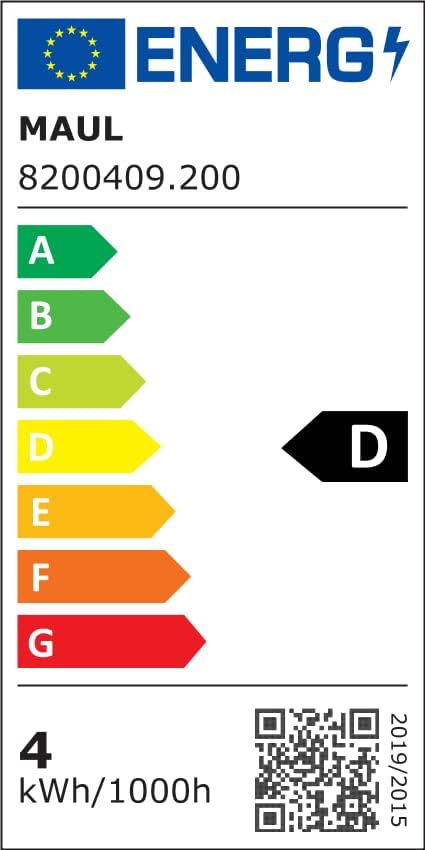
Image 8.1: Energy Efficiency Label. For more details, visit the official EPREL database: EPREL ഡാറ്റാബേസ്
9. വാറൻ്റിയും പിന്തുണയും
This product comes with a minimum 2 വർഷത്തെ വാറൻ്റി വാങ്ങിയ തീയതി മുതൽ, സാധാരണ ഉപയോഗത്തിലുള്ള നിർമ്മാണ വൈകല്യങ്ങളും തകരാറുകളും ഉൾക്കൊള്ളുന്നു. വാറന്റി ക്ലെയിമുകൾക്കായി നിങ്ങളുടെ വാങ്ങിയതിന്റെ തെളിവ് സൂക്ഷിക്കുക.
For technical support, warranty claims, or any questions regarding your Maul MAULarc 8200490 LED Desk Lamp, please contact your retailer or the manufacturer's customer service department. Contact details can typically be found on the product packaging or the manufacturer's official webസൈറ്റ്.


