ആമുഖം
Welcome to the Hot Pepper Ghost Smartphone User Manual. This guide provides essential information on setting up, operating, maintaining, and troubleshooting your new device. The Hot Pepper Ghost is a certified unlocked smartphone designed for compatibility with major carriers, featuring 3GB RAM, 32GB ROM, and an expandable microSD slot.
ബോക്സിൽ എന്താണുള്ളത്
- ഹോട്ട് പെപ്പർ ഗോസ്റ്റ് സ്മാർട്ട്ഫോൺ
- USB കേബിൾ
- (Note: Other accessories like charger, headphones, or SIM ejector tool may be sold separately or vary by region.)
ഉൽപ്പന്നം കഴിഞ്ഞുview

ചിത്രം 1: ഫ്രണ്ട് view of the Hot Pepper Ghost smartphone, showcasinഡിസ്പ്ലേ g ചെയ്യുക.
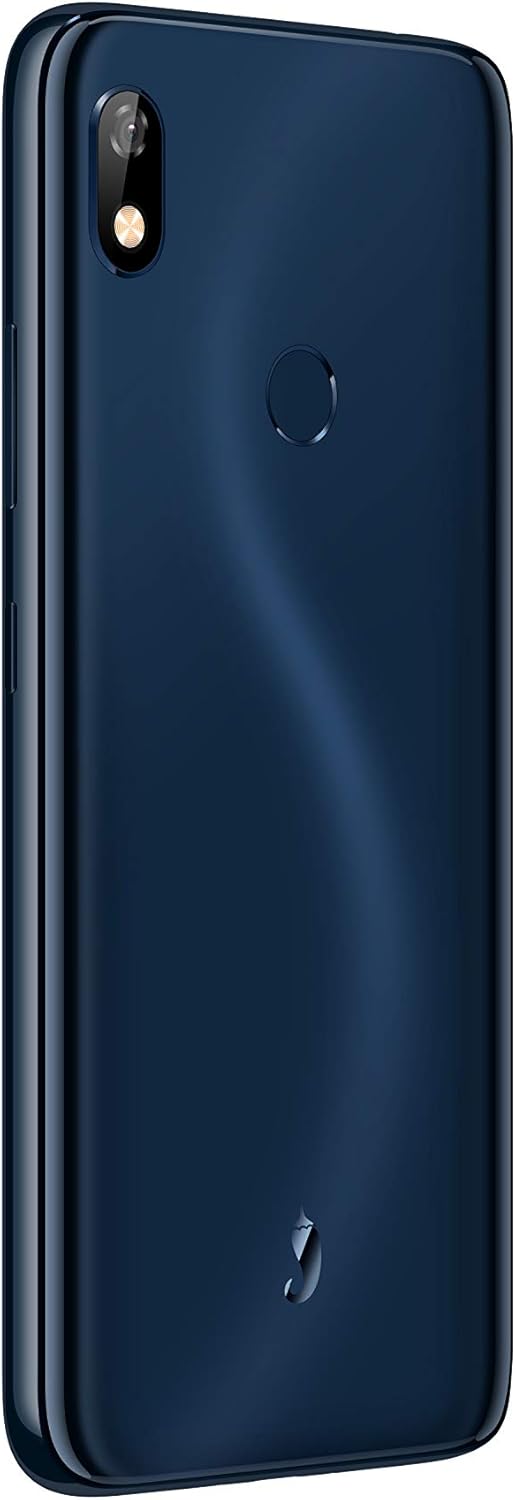
ചിത്രം 2: തിരികെ view of the Hot Pepper Ghost smartphone, showing the camera module and fingerprint sensor.
പ്രധാന ഘടകങ്ങൾ:
- ഡിസ്പ്ലേ: 6-inch LCD touchscreen.
- പിൻ ക്യാമറ: പിൻ പാനലിന്റെ മുകളിൽ ഇടതുവശത്ത് സ്ഥിതിചെയ്യുന്നു.
- ഫിംഗർപ്രിന്റ് സെൻസർ: Circular sensor located on the back panel for secure unlocking.
- ഓഡിയോ ജാക്ക്: ഹെഡ്ഫോണുകൾക്കായി 3.5mm ഓഡിയോ ജാക്ക്.
- ചാർജിംഗ് പോർട്ട്: ടൈപ്പ്-സി ചാർജിംഗ് പോർട്ട്.
- സ്പീക്കറുകൾ: ഉപകരണത്തിൻ്റെ അടിയിൽ സ്ഥിതിചെയ്യുന്നു.
സജ്ജമാക്കുക
1. സിം കാർഡ് ഇൻസ്റ്റാളേഷൻ
- നിങ്ങളുടെ ഉപകരണത്തിന്റെ വശത്ത് സിം ട്രേ കണ്ടെത്തുക.
- Insert a SIM ejector tool (if available) or a small paperclip into the small hole next to the tray to open it.
- സിം ട്രേ ശ്രദ്ധാപൂർവ്വം പുറത്തെടുക്കുക.
- നിങ്ങളുടെ നാനോ-സിം കാർഡ്(കൾ) ട്രേയിലെ നിയുക്ത സ്ലോട്ടുകളിൽ വയ്ക്കുക, സ്വർണ്ണ കോൺടാക്റ്റുകൾ താഴേക്ക് അഭിമുഖമാണെന്ന് ഉറപ്പാക്കുക.
- ട്രേ അതിന്റെ സ്ഥാനത്ത് ക്ലിക്കായി വരുന്നത് വരെ ഫോണിലേക്ക് പതുക്കെ തിരികെ തള്ളുക.
2. മൈക്രോ എസ്ഡി കാർഡ് ഇൻസ്റ്റാളേഷൻ
The Hot Pepper Ghost supports expandable storage via a microSD slot.
- Follow steps 1-3 for SIM card installation to open the tray.
- Place your microSD card into the dedicated slot on the tray.
- Gently push the tray back into the phone.
3. പ്രാരംഭ പവർ ഓണും ചാർജിംഗും
- To power on, press and hold the Power button (usually on the right side) until the Hot Pepper logo appears.
- For first use, it is recommended to fully charge the device. Connect the provided USB cable to the Type-C port on your phone and the other end to a compatible USB power adapter (not included) or computer.
- ഒരു ഫുൾ ചാർജിന് ഏകദേശം 2.75 മണിക്കൂർ എടുക്കും.
നിങ്ങളുടെ ഉപകരണം പ്രവർത്തിപ്പിക്കുന്നു
Basic Navigation (Android 9 Pie)
- ഹോം സ്ക്രീൻ: വ്യത്യസ്ത ഹോം സ്ക്രീനുകൾ ആക്സസ് ചെയ്യാൻ ഇടത്തോട്ടോ വലത്തോട്ടോ സ്വൈപ്പ് ചെയ്യുക.
- ആപ്പ് ഡ്രോയർ: ഇൻസ്റ്റാൾ ചെയ്ത എല്ലാ ആപ്ലിക്കേഷനുകളും ആക്സസ് ചെയ്യാൻ സ്ക്രീനിന്റെ താഴെ നിന്ന് മുകളിലേക്ക് സ്വൈപ്പ് ചെയ്യുക.
- അറിയിപ്പുകളും ദ്രുത ക്രമീകരണങ്ങളും: സ്ക്രീനിന്റെ മുകളിൽ നിന്ന് താഴേക്ക് സ്വൈപ്പ് ചെയ്യുക view notifications and quick settings toggles.
- ബാക്ക്, ഹോം, സമീപകാല ആപ്പുകൾ: ഡിസ്പ്ലേയുടെ അടിയിലുള്ള ഓൺ-സ്ക്രീൻ നാവിഗേഷൻ ബട്ടണുകൾ ഉപയോഗിക്കുക.
കണക്റ്റിവിറ്റി
- വൈഫൈ: Go to Settings > Network & internet > Wi-Fi to connect to available networks. Supports 2.4GHz/5GHz.
- ബ്ലൂടൂത്ത്: Go to Settings > Connected devices > Bluetooth to pair with Bluetooth 5.0 compatible devices.
- മൊബൈൽ ഡാറ്റ: ക്രമീകരണം > നെറ്റ്വർക്കും ഇന്റർനെറ്റും > മൊബൈൽ നെറ്റ്വർക്ക് എന്നതിൽ നിങ്ങളുടെ സിം കാർഡ് സജീവമാണെന്നും മൊബൈൽ ഡാറ്റ പ്രവർത്തനക്ഷമമാക്കിയിട്ടുണ്ടെന്നും ഉറപ്പാക്കുക.
ക്യാമറ ഉപയോഗം
- നിങ്ങളുടെ ഹോം സ്ക്രീനിൽ നിന്നോ ആപ്പ് ഡ്രോയറിൽ നിന്നോ ക്യാമറ ആപ്പ് തുറക്കുക.
- ഒരു ഫോട്ടോ എടുക്കാൻ ഷട്ടർ ബട്ടൺ ടാപ്പ് ചെയ്യുക.
- ക്യാമറ ടോഗിൾ ഐക്കൺ ഉപയോഗിച്ച് മുൻ ക്യാമറയും പിൻ ക്യാമറയും തമ്മിൽ മാറുക.
ഫിംഗർപ്രിൻ്റ് സെൻസർ
- To set up your fingerprint, go to Settings > Security & location > Fingerprint.
- നിങ്ങളുടെ വിരലടയാളം(കൾ) രജിസ്റ്റർ ചെയ്യാൻ സ്ക്രീനിലെ നിർദ്ദേശങ്ങൾ പാലിക്കുക.
- Once registered, you can use your fingerprint to unlock the device and authorize purchases.
മെയിൻ്റനൻസ്
ബാറ്ററി കെയർ
- ബാറ്ററിയുടെ ആയുസ്സ് കുറയ്ക്കുന്ന, ഉയർന്ന താപനില ഒഴിവാക്കുക.
- 100% ചാർജ് ആയതിനു ശേഷവും ഫോൺ കൂടുതൽ നേരം ചാർജ് ചെയ്യാൻ വയ്ക്കരുത്.
- ബാറ്ററിയുടെ മികച്ച ആരോഗ്യത്തിന്, ചാർജ് ലെവൽ 20% നും 80% നും ഇടയിൽ നിലനിർത്താൻ ശ്രമിക്കുക.
നിങ്ങളുടെ ഉപകരണം വൃത്തിയാക്കുന്നു
- സ്ക്രീനും ബോഡിയും വൃത്തിയാക്കാൻ മൃദുവായ, ലിന്റ് രഹിത തുണി ഉപയോഗിക്കുക.
- കഠിനമായ പാടുകൾക്ക്, ചെറുതായി dampen വെള്ളമുള്ള തുണി അല്ലെങ്കിൽ ഒരു സ്ക്രീൻ ക്ലീനർ.
- കഠിനമായ രാസവസ്തുക്കളോ ഉരച്ചിലുകളോ ഉള്ള വസ്തുക്കളോ ഒഴിവാക്കുക.
സോഫ്റ്റ്വെയർ അപ്ഡേറ്റുകൾ
Your Hot Pepper Ghost smartphone runs on Android 9 Pie and receives regular updates for up to 2 years. These updates provide security patches, performance improvements, and new features.
- To check for updates, go to Settings > System > Advanced > System update.
- അപ്ഡേറ്റ് ചെയ്യുന്നതിന് മുമ്പ് നിങ്ങളുടെ ഉപകരണം വൈഫൈയിലേക്ക് കണക്റ്റ് ചെയ്തിട്ടുണ്ടെന്നും മതിയായ ബാറ്ററി ലൈഫ് ഉണ്ടെന്നും ഉറപ്പാക്കുക.
ട്രബിൾഷൂട്ടിംഗ്
If you encounter issues with your Hot Pepper Ghost smartphone, please refer to the following common solutions:
- Device Not Responding/Freezing: റീസ്റ്റാർട്ട് ചെയ്യാൻ പവർ ബട്ടൺ ഏകദേശം 10-15 സെക്കൻഡ് അമർത്തിപ്പിടിക്കുക.
- ബാറ്ററി വേഗത്തിൽ തീർന്നു: പശ്ചാത്തല ആപ്പ് ഉപയോഗം ക്രമീകരണം > ബാറ്ററി എന്നതിൽ പരിശോധിക്കുക. സ്ക്രീൻ തെളിച്ചം കുറയ്ക്കുക, ഉപയോഗത്തിലില്ലാത്തപ്പോൾ GPS അല്ലെങ്കിൽ ബ്ലൂടൂത്ത് പോലുള്ള അനാവശ്യ സവിശേഷതകൾ പ്രവർത്തനരഹിതമാക്കുക.
- Connectivity Issues (Wi-Fi/Bluetooth/Mobile Data):
- Toggle Wi-Fi/Bluetooth/Mobile Data off and on.
- നിങ്ങളുടെ ഫോൺ പുനരാരംഭിക്കുക.
- For Wi-Fi, try forgetting the network and reconnecting.
- For mobile data, ensure your APN settings are correct for your carrier (Settings > Network & internet > Mobile network > Advanced > Access Point Names).
- Call Quality Issues (Cannot Hear/Be Heard):
- Ensure nothing is blocking the microphone or earpiece.
- Test with headphones to determine if the issue is with the phone's speaker/mic or the network.
- ഉപകരണം പുനരാരംഭിക്കുക.
- Slow Performance/App Loading:
- പശ്ചാത്തലത്തിൽ പ്രവർത്തിക്കുന്ന ഉപയോഗിക്കാത്ത ആപ്പുകൾ അടയ്ക്കുക.
- Clear app caches (Settings > Apps & notifications > [App Name] > Storage & cache > Clear cache).
- നിങ്ങൾക്ക് സൗജന്യമായി മതിയായ സംഭരണ സ്ഥലം ഉണ്ടെന്ന് ഉറപ്പാക്കുക.
- ഫിംഗർപ്രിന്റ് സെൻസർ പ്രവർത്തിക്കുന്നില്ല:
- നിങ്ങളുടെ വിരൽ വൃത്തിയുള്ളതും വരണ്ടതുമാണെന്ന് ഉറപ്പാക്കുക.
- Re-register your fingerprint if the issue persists (Settings > Security & location > Fingerprint).
- Text Message Issues:
- Verify your mobile data connection.
- Check your messaging app settings.
- Contact your carrier if the issue persists across different messaging apps.
- ഫാക്ടറി പുന et സജ്ജമാക്കുക: അവസാന ആശ്രയമെന്ന നിലയിൽ, സോഫ്റ്റ്വെയർ പ്രശ്നങ്ങൾ നിലനിൽക്കുകയാണെങ്കിൽ, നിങ്ങൾക്ക് ഒരു ഫാക്ടറി റീസെറ്റ് നടത്താം. മുന്നറിയിപ്പ്: ഇത് നിങ്ങളുടെ ഫോണിലെ എല്ലാ ഡാറ്റയും മായ്ക്കും. തുടരുന്നതിന് മുമ്പ് പ്രധാനപ്പെട്ട ഡാറ്റയുടെ ബാക്കപ്പ് എടുക്കുക. Go to Settings > System > Advanced > Reset options > Erase all data (factory reset).
സ്പെസിഫിക്കേഷനുകൾ
| ഫീച്ചർ | വിശദാംശങ്ങൾ |
|---|---|
| മോഡൽ നമ്പർ | HPP-GS1 |
| ഓപ്പറേറ്റിംഗ് സിസ്റ്റം | ആൻഡ്രോയിഡ് 9 പൈ |
| റാം | 3 ജിബി |
| ആന്തരിക സംഭരണം | 32 ജിബി |
| വികസിപ്പിക്കാവുന്ന സംഭരണം | മൈക്രോ എസ്ഡി സ്ലോട്ട് |
| പ്രോസസ്സർ | Mediatek MTK6762 8-core |
| സ്ക്രീൻ വലിപ്പം | 6 ഇഞ്ച് |
| റെസലൂഷൻ | 1280 x 720 |
| ഡിസ്പ്ലേ ടെക്നോളജി | എൽസിഡി |
| ബാറ്ററി ശേഷി | 3850 mAh ലിഥിയം അയൺ (ഉൾപ്പെടുത്തിയത്) |
| ചാർജിംഗ് സമയം | ഏകദേശം 2.75 മണിക്കൂർ |
| വയർലെസ് ടെക്നോളജീസ് | Bluetooth 5.0, Wi-Fi (2.4GHz/5GHz) |
| സെല്ലുലാർ ടെക്നോളജി | 4G (Compatible with AT&T, Cricket, T-Mobile, Verizon) |
| ഓഡിയോ ജാക്ക് | 3.5 മി.മീ |
| ചാർജിംഗ് പോർട്ട് | ടൈപ്പ്-സി |
| അളവുകൾ (L x W x H) | 6.43 x 3.06 x 0.37 ഇഞ്ച് (163.4mm x 77.7mm x 9.5mm) |
| ഇനത്തിൻ്റെ ഭാരം | 14.8 ഔൺസ് (160 ഗ്രാം) |
| നിറം | നീല |
വാറൻ്റി വിവരങ്ങൾ
The Hot Pepper Ghost smartphone comes with a US Warranty. For specific details regarding warranty coverage, terms, and conditions, please refer to the warranty card included with your product or visit the official Hot Pepper webസൈറ്റ്. വാറന്റി ക്ലെയിമുകൾക്കായി നിങ്ങളുടെ വാങ്ങലിന്റെ തെളിവ് സൂക്ഷിക്കുക.
പിന്തുണ
For further assistance, technical support, or service inquiries, please contact Hot Pepper customer support.
- ഓൺലൈൻ പിന്തുണ: Visit the official Hot Pepper webപതിവുചോദ്യങ്ങൾ, പിന്തുണാ ലേഖനങ്ങൾ, കോൺടാക്റ്റ് ഫോമുകൾ എന്നിവയ്ക്കുള്ള സൈറ്റ്.
- ഇമെയിൽ പിന്തുണ: നിങ്ങളുടെ ഉൽപ്പന്ന പാക്കേജിംഗ് അല്ലെങ്കിൽ ഔദ്യോഗിക website for email contact information.
- ഫോൺ പിന്തുണ: നിങ്ങളുടെ ഉൽപ്പന്ന പാക്കേജിംഗ് അല്ലെങ്കിൽ ഔദ്യോഗിക webഫോൺ സപ്പോർട്ട് നമ്പറുകൾക്കായുള്ള സൈറ്റ്.
When contacting support, please have your model number (HPP-GS1) and purchase information ready.


