1. ഉൽപ്പന്നം കഴിഞ്ഞുview
The SSONTONG A16 Dash Cam is designed to record your driving journey, offering features such as night vision, parking monitoring, G-sensor, loop recording, and motion detection. This manual provides instructions for proper setup, operation, and maintenance.

Image 1.1: The SSONTONG A16 Dash Cam with its included accessories, including the main camera unit, car charger, USB cable, and user manual.

Image 1.2: The SSONTONG A16 Dash Cam, highlighting the wide-angle lens and the slot for the included 32GB SD card.
2. പാക്കേജ് ഉള്ളടക്കം
നിങ്ങളുടെ പാക്കേജിൽ എല്ലാ ഇനങ്ങളും ഉണ്ടെന്ന് ദയവായി പരിശോധിക്കുക:
- SSONTONG A16 Dash Cam Unit
- കാർ ചാർജർ
- USB കേബിൾ
- സക്ഷൻ മൗണ്ട്
- 32GB Micro SD Card (pre-inserted)
- ഉപയോക്തൃ മാനുവൽ
3. സജ്ജീകരണം
3.1. മൈക്രോ എസ്ഡി കാർഡ് ഇൻസ്റ്റാളേഷൻ
The 32GB Micro SD card is typically pre-inserted into the dash cam. Ensure it is properly seated. For optimal performance, use a Class 10 or above Micro SD card (8GB-32GB recommended). Format the card before first use and periodically thereafter.
3.2. ഡാഷ് കാം മൌണ്ട് ചെയ്യുന്നു
- നിങ്ങളുടെ വിൻഡ്ഷീൽഡിൽ ആവശ്യമുള്ള ഭാഗം വൃത്തിയാക്കുക.
- സക്ഷൻ മൗണ്ട് ഡാഷ് കാമിൽ ഘടിപ്പിക്കുക.
- Press the suction cup firmly against the windshield and engage the lever to secure it.
- വ്യക്തമായ ദൃശ്യങ്ങൾ ഉറപ്പാക്കാൻ ക്യാമറ ആംഗിൾ ക്രമീകരിക്കുക. view റോഡിൻ്റെ.
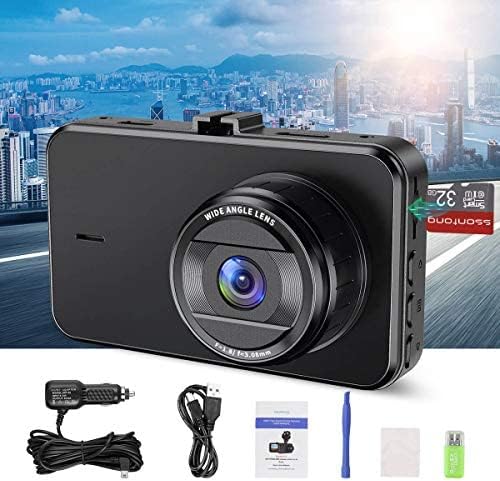
Image 3.1: The compact size of the SSONTONG A16 Dash Cam, featuring a 3-inch IPS screen, designed for easy installation and minimal obstruction of view.
3.3. പവർ കണക്ഷൻ
Connect the dash cam to your vehicle's power outlet using the provided car charger. The USB cable is primarily for connecting to a computer for file playback, not for continuous power supply during operation. The built-in 200mAh battery is for maintaining settings and saving the last recording upon power loss; it is not intended for standalone operation.
4. പ്രവർത്തന നിർദ്ദേശങ്ങൾ
4.1. അടിസ്ഥാന പ്രവർത്തനം
Once connected to power, the dash cam will typically power on and begin recording automatically. Use the touch controls to navigate the menu and adjust settings.
4.2 പ്രധാന സവിശേഷതകൾ
- ലൂപ്പ് റെക്കോർഡിംഗ്: Records video in continuous loops, overwriting the oldest fileSD കാർഡ് നിറയുമ്പോൾ s.
- ജി-സെൻസർ: പെട്ടെന്നുള്ള കുലുക്കങ്ങളോ കൂട്ടിയിടികളോ യാന്ത്രികമായി കണ്ടെത്തുകയും നിലവിലെ വീഡിയോ ഫൂ ലോക്ക് ചെയ്യുകയും ചെയ്യുന്നു.tage to prevent it from being overwritten.
- ചലനം കണ്ടെത്തൽ: When enabled, the camera will start recording automatically if it detects movement in front of the vehicle while parked.
- പാർക്കിംഗ് മോണിറ്റർ: Provides surveillance when the vehicle is parked, often triggered by G-sensor events.
- രാത്രി കാഴ്ച: Enhanced recording capability in low-light conditions.
- HDR (ഹൈ ഡൈനാമിക് റേഞ്ച്): Improves video quality by balancing exposure in varying light conditions.
- ഓഡിയോ റെക്കോർഡിംഗ്: Records audio inside the vehicle. This feature can usually be toggled on or off in the settings.

Image 4.1: The SSONTONG A16 Dash Cam demonstrating its night vision capabilities, providing clear video footage even in low-light urban environments.

Image 4.2: The SSONTONG A16 Dash Cam capturing a 170-degree wide-angle view, ensuring comprehensive coverage of the road ahead.

Image 4.3: Visual representation of the SSONTONG A16 Dash Cam's core features, including Loop Recording, G-sensor, HDR, Motion Detection, Night Vision, Parking Monitor, Screen Saver, Audio Recording, and 1080P Full HD video resolution.
5. പരിപാലനം
5.1. SD കാർഡ് മാനേജ്മെൻ്റ്
To prevent the SD card from becoming full and affecting recording, it is recommended to format the card monthly. This helps maintain optimal performance and storage capacity.
5.2. വൃത്തിയാക്കൽ
Gently wipe the camera lens and screen with a soft, dry cloth to remove dust or smudges. Avoid using abrasive cleaners or solvents.
6. പ്രശ്നപരിഹാരം
- Camera not recording or freezing:
- Ensure the Micro SD card is Class 10 or above and between 8-32GB.
- Format the SD card regularly (monthly is recommended).
- Try resetting the camera to factory settings if issues persist.
- SD card full error:
- Ensure Loop Recording is enabled.
- Turn off Motion Detection if not needed, or adjust G-sensor sensitivity to 'Low'.
- SD കാർഡ് ഫോർമാറ്റ് ചെയ്യുക.
- Camera prompts to connect power:
- The built-in battery is for saving settings and emergency shutdown only. The dash cam requires continuous power from the car charger during operation. Ensure the car charger is properly connected.
- കളിക്കാൻ കഴിയില്ല fileകമ്പ്യൂട്ടറിൽ:
- The dash cam records in .AVI format. Some computers may require specific codecs or a third-party media player to view ഇവ files.
- Ensure you are using the USB cable to connect the camera to the computer, not the car charger.
7 സ്പെസിഫിക്കേഷനുകൾ
| ഫീച്ചർ | സ്പെസിഫിക്കേഷൻ |
|---|---|
| മോഡൽ നമ്പർ | A16 |
| പാക്കേജ് അളവുകൾ | 5.55 x 4.37 x 2.83 ഇഞ്ച് |
| ഇനത്തിൻ്റെ ഭാരം | 8 ഔൺസ് |
| ബാറ്ററികൾ | 1 ബാറ്ററി ആവശ്യമാണ് (ഉൾപ്പെടുത്തിയിരിക്കുന്നു) |
| കണക്റ്റിവിറ്റി ടെക്നോളജി | USB |
| പ്രത്യേക സവിശേഷതകൾ | G-Sensor, Loop Recording, Night Vision, Motion Detection, Parking Monitor |
| മറ്റ് ഡിസ്പ്ലേ സവിശേഷതകൾ | വയർലെസ് |
| നിറം | കറുപ്പ് |
| വീഡിയോ ക്യാപ്ചർ റെസല്യൂഷൻ | 1080p |
| മൗണ്ടിംഗ് തരം | സക്ഷൻ മൗണ്ട് |
| നിയന്ത്രണ രീതി | സ്പർശിക്കുക |
| ഉൾപ്പെടുത്തിയ ഘടകങ്ങൾ | മെമ്മറി കാർഡ് |
8 പ്രധാനപ്പെട്ട സുരക്ഷാ വിവരങ്ങൾ
- Do not operate the dash cam in extreme temperatures.
- Ensure the dash cam does not obstruct your view ഡ്രൈവിംഗ് സമയത്ത്.
- ജലത്തിൽ നിന്നും ഈർപ്പത്തിൽ നിന്നും ഉപകരണം അകറ്റി നിർത്തുക.
- ഉപകരണം സ്വയം ഡിസ്അസംബ്ലിംഗ് ചെയ്യാനോ നന്നാക്കാനോ ശ്രമിക്കരുത്.


