1. ആമുഖം
The iJoy ISO Bluetooth 5.0 Wireless Over-Ear Headphones are designed to provide a high-quality audio experience with convenience and comfort. This manual provides instructions for setting up, operating, and maintaining your headphones.
- വയർലെസ് സ്വാതന്ത്ര്യം: Enjoy seamless connectivity with Bluetooth 5.0, ensuring a stable and fast connection to your devices.
- വിപുലീകരിച്ച കളിസമയം: Powered by a rechargeable battery, these headphones offer up to 30 hours of playtime on a single charge.
- Comfortable Over-Ear Design: The soft, cushioned ear cups and headband provide long-lasting comfort, perfect for extended listening sessions.
- ബിൽറ്റ്-ഇൻ മൈക്രോഫോൺ: Stay connected on the go with the integrated microphone, ideal for hands-free calls and voice commands.
- മടക്കാവുന്നതും പോർട്ടബിളും: The headphones fold flat for easy storage and transportation, making them perfect for travel and on-the-go use.

Figure 1: iJoy ISO Bluetooth Headphones in White and Gold. The headphones feature a sleek white and gold design, offering a comfortable over-ear fit.
2. സജ്ജീകരണം
2.1 ഹെഡ്ഫോണുകൾ ചാർജ് ചെയ്യുന്നു
Before first use, fully charge your iJoy ISO headphones. A full charge takes approximately 2.5 hours and provides up to 30 hours of talk time or 26 hours of playback.
- Locate the charging port on the ear cup.
- Connect the provided USB charging cable to the headphones and a compatible USB power source.
- The LED indicator will illuminate during charging and turn off or change color when fully charged (refer to specific LED behavior in the full manual if available).
2.2 ബ്ലൂടൂത്ത് ജോടിയാക്കൽ
നിങ്ങളുടെ ഹെഡ്ഫോണുകൾ ഒരു ഉപകരണവുമായി ബന്ധിപ്പിക്കാൻ:
- ഹെഡ്ഫോണുകൾ ചാർജ് ചെയ്തിട്ടുണ്ടെന്നും പവർ ഓഫ് ചെയ്തിട്ടുണ്ടെന്നും ഉറപ്പാക്കുക.
- ജോടിയാക്കൽ മോഡ് സൂചിപ്പിക്കുന്ന LED ഇൻഡിക്കേറ്റർ മിന്നുന്നതുവരെ പവർ ബട്ടൺ അമർത്തിപ്പിടിക്കുക.
- നിങ്ങളുടെ ഉപകരണത്തിൽ (സ്മാർട്ട്ഫോൺ, ടാബ്ലെറ്റ്, പിസി), ബ്ലൂടൂത്ത് പ്രവർത്തനക്ഷമമാക്കി ലഭ്യമായ ഉപകരണങ്ങൾക്കായി തിരയുക.
- Select "iJoy ISO" from the list of devices.
- Once connected, the LED indicator will stop flashing or show a steady light.

Figure 2: Bluetooth 5.0 Connectivity. The headphones connect wirelessly via Bluetooth 5.0 to various devices like smartphones, tablets, PCs, and TVs for seamless music streaming.
3. പ്രവർത്തന നിർദ്ദേശങ്ങൾ
3.1 അടിസ്ഥാന നിയന്ത്രണങ്ങൾ
The iJoy ISO headphones feature intuitive controls located on the ear cup:
- പവർ ഓൺ/ഓഫ്: Press and hold the multi-function button (usually the center button) for a few seconds.
- പ്ലേ/താൽക്കാലികമായി നിർത്തുക: മൾട്ടി-ഫംഗ്ഷൻ ബട്ടൺ ഹ്രസ്വമായി അമർത്തുക.
- വോളിയം കൂട്ടുക: '+' ബട്ടൺ അമർത്തുക.
- വോളിയം താഴേക്ക്: '-' ബട്ടൺ അമർത്തുക.
- അടുത്ത ട്രാക്ക്: '+' ബട്ടൺ ദീർഘനേരം അമർത്തുക.
- മുമ്പത്തെ ട്രാക്ക്: '-' ബട്ടൺ ദീർഘനേരം അമർത്തുക.

Figure 3: Headphone Controls. The right ear cup features integrated controls for play/pause, answering/hanging up calls, adjusting volume, and skipping tracks.
3.2 കോളുകൾ ചെയ്യലും സ്വീകരിക്കലും
The built-in microphone allows for hands-free communication:
- മറുപടി കോൾ: ഒരു കോൾ വരുമ്പോൾ മൾട്ടി-ഫംഗ്ഷൻ ബട്ടൺ ഹ്രസ്വമായി അമർത്തുക.
- കോൾ അവസാനിപ്പിക്കുക: ഒരു കോൾ സമയത്ത് മൾട്ടി-ഫംഗ്ഷൻ ബട്ടൺ ഹ്രസ്വമായി അമർത്തുക.
- കോൾ നിരസിക്കുക: ഒരു കോൾ വരുമ്പോൾ മൾട്ടി-ഫംഗ്ഷൻ ബട്ടൺ ദീർഘനേരം അമർത്തുക.
- അവസാന നമ്പർ വീണ്ടും ഡയൽ ചെയ്യുക: മൾട്ടി-ഫംഗ്ഷൻ ബട്ടൺ രണ്ടുതവണ അമർത്തുക.
3.3 Wired Mode Operation
If your headphones run out of battery, you can continue listening using the included 3.5mm audio cable:
- 3.5mm ഓഡിയോ കേബിളിന്റെ ഒരറ്റം ഹെഡ്ഫോണിന്റെ ഓഡിയോ ജാക്കിലേക്ക് പ്ലഗ് ചെയ്യുക.
- Plug the other end into your audio device's 3.5mm port.
- Note: Bluetooth functions and integrated controls on the headphones will not work in wired mode. Audio playback is controlled directly from your connected device.

Figure 4: Wired Audio Connection. When the battery is low, the headphones can be used in wired mode with the included 3.5mm audio cable.
4. പരിപാലനം
4.1 വൃത്തിയാക്കൽ
നിങ്ങളുടെ ഹെഡ്ഫോണുകളുടെ അവസ്ഥ നിലനിർത്താൻ:
- Wipe the ear cups and headband with a soft, dry cloth.
- ഉരച്ചിലുകളുള്ള ക്ലീനറുകളോ ലായകങ്ങളോ ഉപയോഗിക്കരുത്.
- Avoid exposing the headphones to excessive moisture. The headphones are not water resistant.
4.2 സംഭരണം
When not in use, store your headphones in a safe place:
- Utilize the foldable design to minimize space.
- നേരിട്ടുള്ള സൂര്യപ്രകാശത്തിൽ നിന്നും അങ്ങേയറ്റത്തെ താപനിലയിൽ നിന്നും അകലെ തണുത്തതും വരണ്ടതുമായ സ്ഥലത്ത് സൂക്ഷിക്കുക.
- Avoid placing heavy objects on top of the headphones to prevent damage.

Figure 5: Foldable Design. The foldable design allows for easy storage and portability, making them ideal for travel.

Figure 6: Comfortable Earpads. The headphones feature ultra-comfortable earpads and a premium sound quality for extended listening.
5. പ്രശ്നപരിഹാരം
If you encounter issues with your iJoy ISO headphones, refer to the following common solutions:
| പ്രശ്നം | പരിഹാരം |
|---|---|
| ഹെഡ്ഫോണുകൾ ഓണാകുന്നില്ല | Ensure the headphones are fully charged. Connect to a power source and allow at least 30 minutes of charging before attempting to power on again. |
| ഉപകരണവുമായി ജോടിയാക്കാൻ കഴിയില്ല | Ensure headphones are in pairing mode (flashing LED). Turn off and on Bluetooth on your device. Move headphones closer to the device. Clear previous Bluetooth connections on your device. |
| ശബ്ദമോ കുറഞ്ഞ വോളിയമോ ഇല്ല | Check volume levels on both headphones and the connected device. Ensure the headphones are properly paired. If using wired mode, ensure the 3.5mm cable is fully inserted. |
| ഇടവിട്ടുള്ള കണക്ഷൻ | Ensure no obstacles are between the headphones and the device. Move closer to the device (wireless range is up to 10m). Avoid environments with strong Wi-Fi or other wireless interference. |
6 സ്പെസിഫിക്കേഷനുകൾ
Detailed technical specifications for the iJoy ISO Headphones:
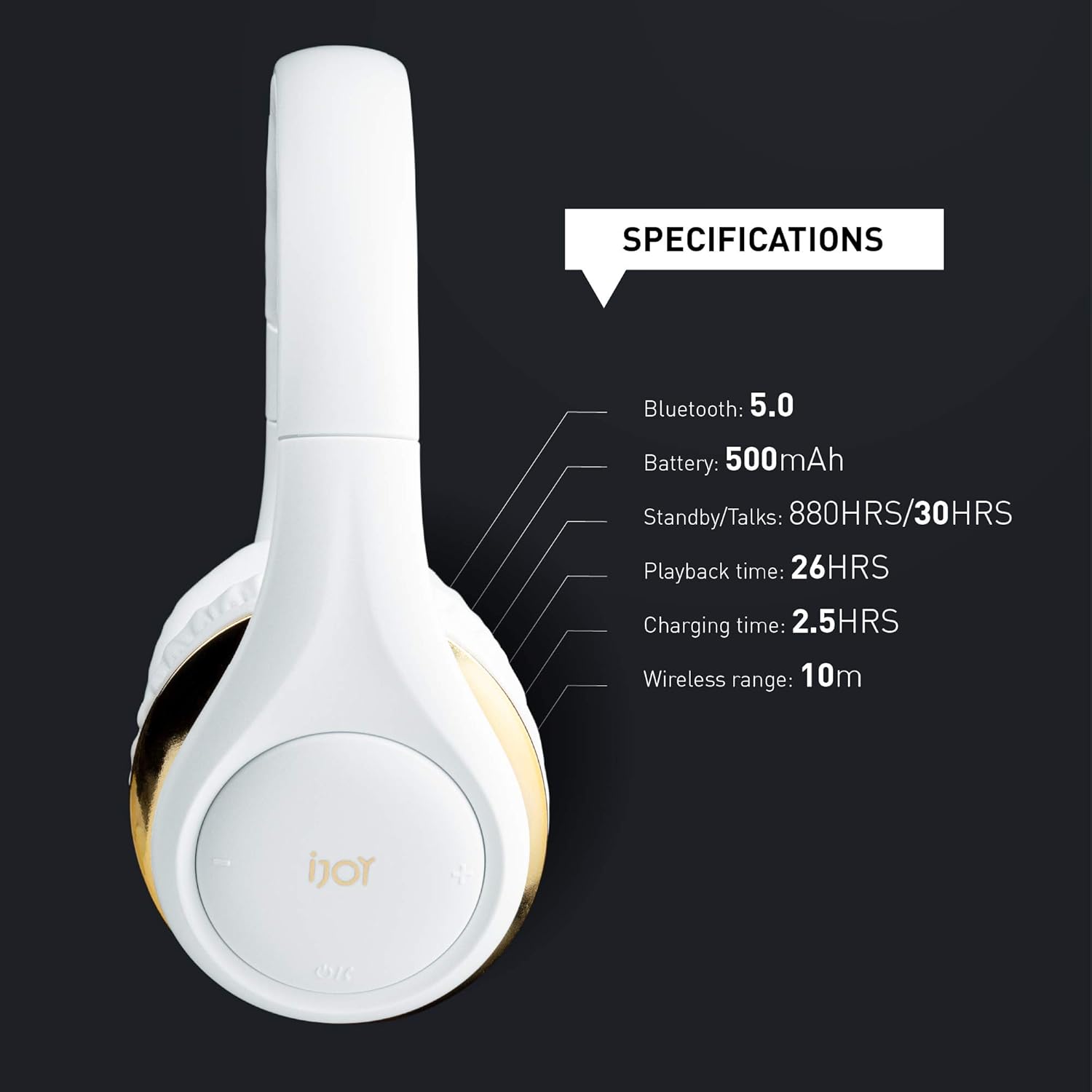
Figure 7: Technical Specifications. This image details the technical specifications of the iJoy ISO headphones, including Bluetooth 5.0, 500mAh battery, 30 hours talk time, 26 hours playback, 2.5 hours charging time, and a 10m wireless range.
| ഫീച്ചർ | വിശദാംശങ്ങൾ |
|---|---|
| മോഡലിൻ്റെ പേര് | ഐഎസ്ഒ |
| ഇനം മോഡൽ നമ്പർ | IJ2001WGISOAZ |
| കണക്റ്റിവിറ്റി ടെക്നോളജി | വയർലെസ്സ് (ബ്ലൂടൂത്ത് 5.0) |
| ഹെഡ്ഫോണുകൾ ജാക്ക് | 3.5 mm ജാക്ക് |
| ബാറ്ററി ലൈഫ് | 30 Hours (Talk), 26 Hours (Playback) |
| ചാർജിംഗ് സമയം | 2.5 മണിക്കൂർ |
| വയർലെസ് ശ്രേണി | 10 മീറ്റർ (ഏകദേശം 33 അടി) |
| ഇയർപീസ് ആകൃതി | ഓവർ-ഇയർ |
| മെറ്റീരിയൽ | പ്ലാസ്റ്റിക് |
| പ്രത്യേക സവിശേഷതകൾ | Foldable, Microphone Included |
| ജല പ്രതിരോധ നില | വാട്ടർ റെസിസ്റ്റൻ്റ് അല്ല |
| ഉൽപ്പന്ന അളവുകൾ | 6 x 3.5 x 6 ഇഞ്ച് |
| ഇനത്തിൻ്റെ ഭാരം | 12.3 ഔൺസ് |
| യു.പി.സി | 842700129922 |
7. ഔദ്യോഗിക ഉൽപ്പന്ന വീഡിയോ
Video 1: iJoy ISO Wireless Bluetooth Headphones. This official product video demonstrates the features and usage of the iJoy ISO Wireless Bluetooth Headphones.
8. വാറൻ്റിയും പിന്തുണയും
For warranty information and customer support, please refer to the documentation included with your product or visit the official iJoy webസൈറ്റ്. വാറൻ്റി ക്ലെയിമുകൾക്കായി നിങ്ങളുടെ വാങ്ങൽ രസീത് സൂക്ഷിക്കുക.


