Elekpia Elekpia mag 254 remote

മാറ്റിസ്ഥാപിക്കൽ വിദൂര നിയന്ത്രണ ഉപയോക്തൃ മാനുവൽ

മോഡൽ: Elekpia mag 254 remote | ബ്രാൻഡ്: എലെക്പിയ

ഉൽപ്പന്നം കഴിഞ്ഞുview

This manual provides instructions for the Elekpia Replacement Remote Control, designed for use with various MAG IPTV Linux Set-Top Box models. This remote offers a direct replacement solution, requiring no complex programming or pairing.
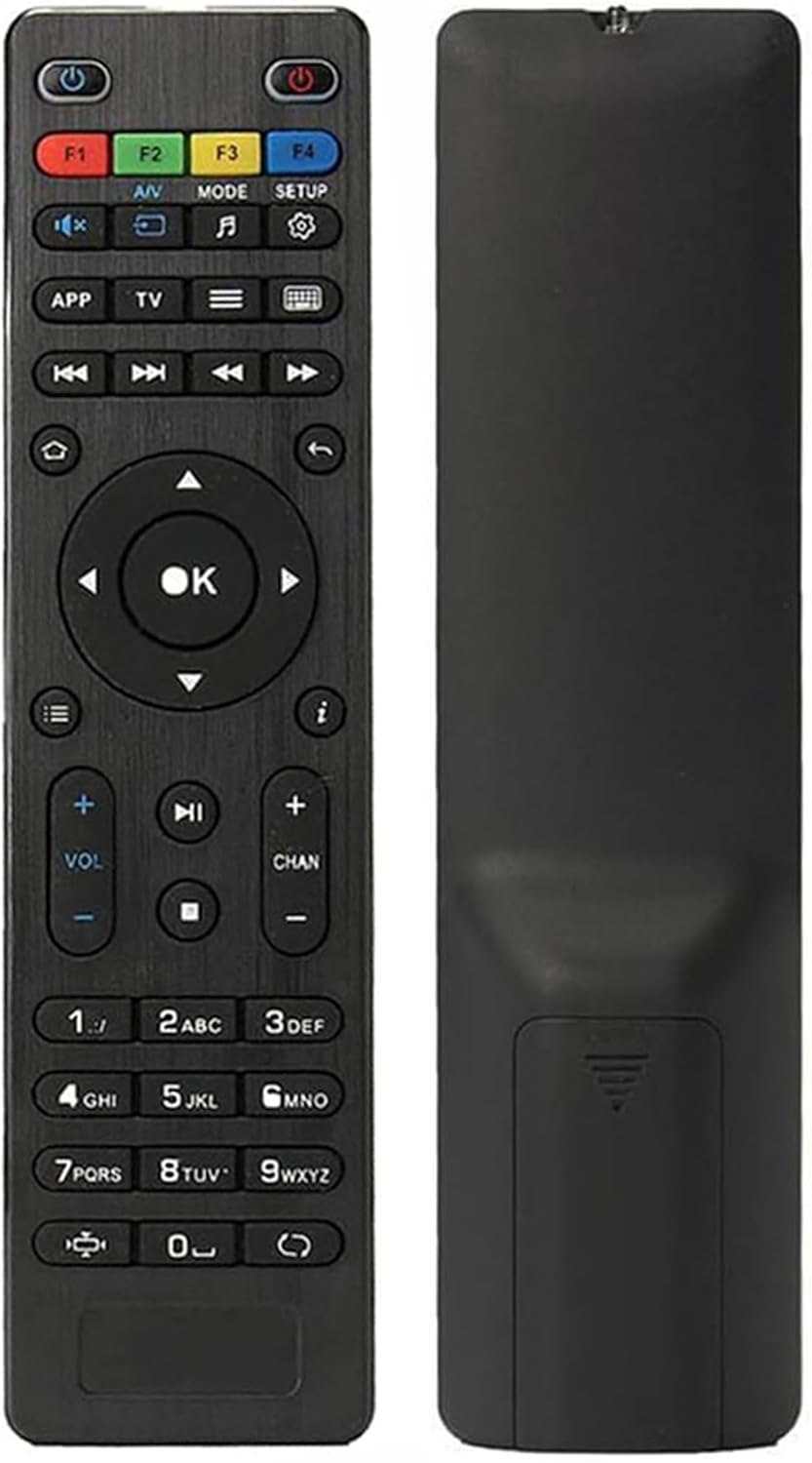
മുന്നിലും പിന്നിലും view of the Elekpia replacement remote control.

ചിത്രം: മുന്നിലും പിന്നിലും view of the Elekpia replacement remote control. The remote is black with clearly labeled buttons on the front, and a smooth, ergonomic back.

പ്രധാന സവിശേഷതകൾ:

Image showing the remote control and a list of compatible MAG models.

Image: The remote control is shown alongside a list of compatible MAG models, emphasizing its broad compatibility with various MAG IPTV Linux Set-Top Boxes.

സജ്ജമാക്കുക

Setting up your new Elekpia remote control is a straightforward process. Follow these steps to begin using your remote.

1. ബാറ്ററി ഇൻസ്റ്റാളേഷൻ

  1. റിമോട്ട് കൺട്രോളിന്റെ പിൻഭാഗത്ത് ബാറ്ററി കമ്പാർട്ട്മെന്റ് കണ്ടെത്തുക.
  2. സ്ലൈഡ് ബാറ്ററി കമ്പാർട്ട്മെന്റ് കവർ തുറക്കുക.
  3. രണ്ട് (2) AAA ബാറ്ററികൾ ഇടുക, പോസിറ്റീവ് (+) ഉം നെഗറ്റീവ് (-) ടെർമിനലുകളും കമ്പാർട്ടുമെന്റിനുള്ളിലെ സൂചകങ്ങളുമായി ശരിയായി വിന്യസിക്കുന്നുണ്ടെന്ന് ഉറപ്പാക്കുക.
  4. ബാറ്ററി കമ്പാർട്ട്മെൻ്റ് കവർ സുരക്ഷിതമായി അടയ്ക്കുക.

2. പ്രാരംഭ ഉപയോഗം

This remote control is designed to work directly with compatible MAG IPTV Linux Set-Top Boxes without the need for programming or pairing. Once batteries are installed, point the remote at your set-top box and begin using it.

പ്രവർത്തന നിർദ്ദേശങ്ങൾ

Familiarize yourself with the functions of each button on your Elekpia remote control to effectively navigate and control your MAG IPTV Linux Set-Top Box.

Detailed diagram of the remote control buttons and their functions.

Image: A detailed diagram illustrating the layout and function of each button on the remote control, including power, navigation, volume, channel, and media playback controls.

റിമോട്ട് കൺട്രോൾ ബട്ടൺ പ്രവർത്തനങ്ങൾ
ബട്ടൺഫംഗ്ഷൻ
പവർ ബട്ടൺ ()Turns the Media Player On/Off.
F1, F2, F3, F4Additional functions (may vary by device).
എ/വിChanges audio mode.
മോഡ്Accesses setup menu.
സജ്ജമാക്കുകAccesses setup menu.
APPസന്ദർഭ മെനു.
TVQuick TV access.
മെനു ()ടിവി ഗൈഡ്.
കീബോർഡ് ()Virtual keyboard.
നാവിഗേഷൻ അമ്പുകൾ (Up, Down, Left, Right)മെനുകളിലൂടെയും ഓപ്ഷനുകളിലൂടെയും നാവിഗേറ്റ് ചെയ്യുന്നു.
ശരി ബട്ടൺതിരഞ്ഞെടുക്കലുകൾ സ്ഥിരീകരിക്കുന്നു.
തിരികെ / മടങ്ങുക ()മുമ്പത്തെ സ്‌ക്രീനിലേക്ക് തിരികെ പോകുന്നു.
വീട് ()ഹോം സ്‌ക്രീനിലേക്ക് മടങ്ങുന്നു.
വിവരം ()വിവരങ്ങൾ പ്രദർശിപ്പിക്കുന്നു.
വോളിയം കൂട്ടുക/താഴ്ത്തുക (VOL + / -)വോളിയം ലെവൽ ക്രമീകരിക്കുന്നു.
ചാനൽ മുകളിലേക്കും താഴേക്കും (CHAN + / -)Switches channels.
നിശബ്ദമാക്കുക (🔇)ശബ്‌ദം ഓൺ / ഓഫ് ടോഗിൾ ചെയ്യുന്നു.
പ്ലേ/താൽക്കാലികമായി നിർത്തുക (▶⏸)മീഡിയ പ്ലേ ചെയ്യുകയോ താൽക്കാലികമായി നിർത്തുകയോ ചെയ്യുന്നു.
നിർത്തുക (⏹ ⏹ മിനിസ്റ്റർ)മീഡിയ പ്ലേബാക്ക് നിർത്തുന്നു.
Skip Forward/Backward (⏭⏮)Skips to the next/previous track or chapter.
ഫാസ്റ്റ് പ്ലേ ()Fast forwards through media.
സംഖ്യാ കീപാഡ് (0-9)Direct input for channel numbers or other numerical data.
വീക്ഷണാനുപാതം ()വീക്ഷണാനുപാതം മാറ്റുന്നു.
അപ്ഡേറ്റ് ()Initiates an update (functionality may vary).

മെയിൻ്റനൻസ്

ശരിയായ അറ്റകുറ്റപ്പണി നിങ്ങളുടെ റിമോട്ട് കൺട്രോളിന്റെ ദീർഘായുസ്സും മികച്ച പ്രകടനവും ഉറപ്പാക്കുന്നു.

1. ബാറ്ററി മാറ്റിസ്ഥാപിക്കൽ

റിമോട്ടിന്റെ പ്രതികരണശേഷി കുറയുമ്പോഴോ അത് പ്രവർത്തിക്കുന്നത് നിർത്തുമ്പോഴോ ബാറ്ററികൾ മാറ്റിസ്ഥാപിക്കുക. എല്ലായ്പ്പോഴും പുതിയ AAA ബാറ്ററികൾ ഉപയോഗിക്കുക, പ്രാദേശിക നിയന്ത്രണങ്ങൾ അനുസരിച്ച് പഴയ ബാറ്ററികൾ ഉത്തരവാദിത്തത്തോടെ നശിപ്പിക്കുക.

2. വൃത്തിയാക്കൽ

To clean the remote, gently wipe its surface with a soft, dry cloth. For stubborn dirt, slightly dampen the cloth with water or a mild, non-abrasive cleaner. Avoid using excessive liquid or harsh chemicals, as these can damage the remote's electronics or finish.

3. സംഭരണം

When not in use for extended periods, it is recommended to remove the batteries to prevent potential leakage and damage to the remote.

ട്രബിൾഷൂട്ടിംഗ്

If you encounter issues with your remote control, refer to the following common problems and their solutions.

പൊതുവായ പ്രശ്നങ്ങളും പരിഹാരങ്ങളും
പ്രശ്നംസാധ്യമായ കാരണംപരിഹാരം
റിമോട്ട് പ്രതികരിക്കുന്നില്ല.Dead or incorrectly installed batteries. Obstruction between remote and set-top box. Remote out of range.Replace batteries with new AAA batteries, ensuring correct polarity. Remove any obstructions. Ensure you are within effective range of the set-top box.
Buttons are sticky or hard to press.Accumulation of dirt or debris under the buttons. Internal mechanism issue.Gently clean around the buttons with a soft, dry cloth or a cotton swab. If the issue persists, it may indicate internal wear.
റിമോട്ട് ഇടയ്ക്കിടെ പ്രവർത്തിക്കുന്നു.Low battery power. Infrared sensor on remote or set-top box is dirty or obstructed.Replace batteries. Clean the infrared sensor on both the remote and the set-top box. Ensure a clear line of sight.
Remote does not control the set-top box.Incompatible set-top box model.Verify that your MAG IPTV Linux Set-Top Box model is listed as compatible (MAG250, MAG254, 255, 256, 257, 260, 275, 349, 350, 351, 352, MAG322W1).

സ്പെസിഫിക്കേഷനുകൾ

ഉൽപ്പന്ന സവിശേഷതകൾ
ഫീച്ചർവിശദാംശങ്ങൾ
മോഡൽ നമ്പർElekpia mag 254 remote
അനുയോജ്യമായ ഉപകരണങ്ങൾMAG250, MAG254, 255, 256, 257, 260, 275, 349, 350, 351, 352 IPTV Linux Set-Top Box, MAG322W1
പവർ ഉറവിടം2 x AAA ബാറ്ററികൾ (ഉൾപ്പെടുത്തിയിട്ടില്ല)
അളവുകൾ (L x W x H)7 x 1.8 x 0.6 ഇഞ്ച് (ഏകദേശം)
ഇനത്തിൻ്റെ ഭാരം1.76 ഔൺസ് (ഏകദേശം)
നിറംകറുപ്പ്
പ്രത്യേക ഫീച്ചർഎർഗണോമിക് ഡിസൈൻ

വാറൻ്റിയും പിന്തുണയും

Information regarding product warranty and customer support is not provided within this instruction manual. For warranty details or technical assistance, please refer to the product packaging or contact the retailer/manufacturer directly.

Manufacturer: Elekpia Factory

അനുബന്ധ രേഖകൾ - Elekpia mag 254 remote

പ്രീview പോട്രെബിറ്റേലിയ എസ്ടിബി മാഗ് 250/254/322, ടിഎച്ച്-100
STB MAG 250/254/322, TH-100, ഒബ്ഹ്വാഷോ നാസ്‌ട്രോയ്‌ക, എക്‌സ്‌പ്ലോയറ്റ്‌സ്‌വോയ്‌സ് ഡിസ്റ്റാൻഷ്യൻനോട്ടോ അപ്രാവ്ലെനിയും റെജിമിയും ന വ്ജ്പ്രോയിസ്വേഡ്ഡനെ.
പ്രീview ട്രോൺസ്മാർട്ട് വേഗ എസ്95 ടെലോസ് & മാഗ് ഐപിടിവി റിമോട്ട് കൺട്രോൾ കോംപാറ്റിബിലിറ്റി ഗൈഡ്
MAG-250HD, MAG-245HD പോലുള്ള മോഡലുകൾ ഉൾപ്പെടെ, Tronsmart Vega S95 Telos മീഡിയ പ്ലെയറുകളിലും MAG IPTV സെറ്റ്-ടോപ്പ് ബോക്സുകളിലും ഉപയോഗിക്കുന്ന റിമോട്ട് കൺട്രോളുകൾക്കുള്ള അനുയോജ്യതാ വിവരങ്ങൾ ഈ പ്രമാണം നൽകുന്നു.
പ്രീview സൺറൈസ് ഐപിടിവി ബോക്സ് ക്വിക്ക് ഇൻസ്റ്റാൾ ഗൈഡ് - സജ്ജീകരണവും ഇൻസ്റ്റാളേഷനും
റിമോട്ട് കൺട്രോൾ നുറുങ്ങുകൾ, ട്രബിൾഷൂട്ടിംഗ്, കണക്ഷൻ നിർദ്ദേശങ്ങൾ എന്നിവയുൾപ്പെടെ നിങ്ങളുടെ സൺറൈസ് IPTV ബോക്സ് ഇൻസ്റ്റാൾ ചെയ്യുന്നതിനും സജ്ജീകരിക്കുന്നതിനുമുള്ള സമഗ്ര ഗൈഡ്.
പ്രീview Interaktīvās televīzijas lietošanas instrukcija - Baltcom
Lietotāja rokasgrāmata Baltcom interaktīvajai televīzijai, kas sniedz detalizētus norādījumus par dekodera pults lietošanu, funkcijām, iestatījumiem un problēmu risināšanu.
പ്രീview NVC Remote Control and Cloud DVR User Guide
Comprehensive guide to operating your NVC remote control and Cloud DVR service, covering setup, program guide navigation, recording, managing content, and accessing apps like Video On Demand and Weather.
പ്രീview MEGAOTT പാനൽ ഗൈഡ്: IPTV ലൈനുകൾ സൃഷ്ടിക്കുകയും കൈകാര്യം ചെയ്യുകയും ചെയ്യുക
IPTV സബ്‌സ്‌ക്രിപ്‌ഷനുകൾ കൈകാര്യം ചെയ്യുന്നതിനും, പുതിയ ലൈനുകൾ സൃഷ്ടിക്കുന്നതിനും, MAG ഉപകരണങ്ങൾ കൈകാര്യം ചെയ്യുന്നതിനും MEGAOTT പാനൽ ഉപയോഗിക്കുന്നതിനുള്ള ഒരു സമഗ്ര ഗൈഡ്. ഉപയോക്തൃ ക്രെഡൻഷ്യലുകൾ എങ്ങനെ സജ്ജീകരിക്കാമെന്നും, പാക്കേജുകൾ തിരഞ്ഞെടുക്കാമെന്നും, പൊതുവായ പ്രശ്നങ്ങൾ പരിഹരിക്കാമെന്നും മനസ്സിലാക്കുക.