ആമുഖം
Thank you for choosing the Havit E303P Wired In-Ear Earphones. This manual provides essential information for the proper setup, operation, and maintenance of your earphones. Please read it carefully before use to ensure optimal performance and longevity.
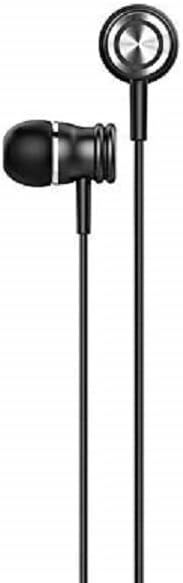
ചിത്രം: മുൻഭാഗം view of the Havit E303P Wired In-Ear Earphones, showcasing the black earbuds and cable.
പാക്കേജ് ഉള്ളടക്കം
The Havit E303P package typically includes:
- Havit E303P Wired In-Ear Earphones
- Multiple sizes of silicone ear tips (ear pads)
- ഉപയോക്തൃ മാനുവൽ (ഈ പ്രമാണം)
ഉൽപ്പന്നം കഴിഞ്ഞുview
The Havit E303P earphones feature a durable design with 10mm speaker drivers for clear audio. The in-ear design provides passive noise isolation for an immersive listening experience.

ചിത്രം: പൊട്ടിത്തെറിച്ചു view of an E303P earbud, illustrating the internal speaker driver and acoustic components.
പ്രധാന സവിശേഷതകൾ:
- 10mm Speaker Drivers: Deliver balanced audio for music and calls.
- In-Ear Design: Provides passive noise isolation and a secure fit.
- എർഗണോമിക് ഫിറ്റ്: Engineered for comfort during extended use.
- In-line Control: Integrated microphone and control buttons for calls and music playback.
- 3.5mm ഓഡിയോ ജാക്ക്: Universal compatibility with most audio devices.
സജ്ജമാക്കുക
- ചെവി നുറുങ്ങുകൾ തിരഞ്ഞെടുക്കുക: Choose the ear tips that provide the most comfortable and secure fit for your ears. A good seal is crucial for optimal sound quality and bass response.
- ഉപകരണത്തിലേക്ക് കണക്റ്റുചെയ്യുക: Insert the 3.5mm audio jack into the headphone port of your smartphone, tablet, computer, or other audio device.
- വോളിയം ക്രമീകരിക്കുക: Start with a low volume level on your device before playing audio to prevent sudden loud sounds.
പ്രവർത്തന നിർദ്ദേശങ്ങൾ
The Havit E303P earphones feature an in-line remote with a microphone for convenient control of your audio and calls.
Image: Havit E303P earphones with in-line controls connected to a mobile phone, demonstrating typical usage.
സംഗീത പ്ലേബാക്ക്:
- പ്ലേ/താൽക്കാലികമായി നിർത്തുക: മൾട്ടി-ഫംഗ്ഷൻ ബട്ടൺ ഒരിക്കൽ അമർത്തുക.
- അടുത്ത ട്രാക്ക്: മൾട്ടി-ഫംഗ്ഷൻ ബട്ടൺ രണ്ടുതവണ വേഗത്തിൽ അമർത്തുക.
- മുമ്പത്തെ ട്രാക്ക്: മൾട്ടി-ഫംഗ്ഷൻ ബട്ടൺ മൂന്ന് തവണ വേഗത്തിൽ അമർത്തുക.
കോൾ മാനേജ്മെൻ്റ്:
- ഉത്തരം/അവസാന കോൾ: മൾട്ടി-ഫംഗ്ഷൻ ബട്ടൺ ഒരിക്കൽ അമർത്തുക.
- കോൾ നിരസിക്കുക: മൾട്ടി-ഫംഗ്ഷൻ ബട്ടൺ ഏകദേശം 2 സെക്കൻഡ് അമർത്തിപ്പിടിക്കുക.
Note: Functionality of in-line controls may vary slightly depending on your device's operating system and specific applications.
മെയിൻ്റനൻസ്
- വൃത്തിയാക്കൽ: Regularly clean the ear tips with a soft, dry cloth. For deeper cleaning, remove the ear tips and wash them with mild soap and water, ensuring they are completely dry before reattaching. Do not use harsh chemicals or abrasive materials on the earphones.
- സംഭരണം: When not in use, store your earphones in a clean, dry place, preferably in a protective pouch, to prevent tangling and damage.
- കേബിൾ കെയർ: Avoid pulling the cable forcefully or wrapping it too tightly, as this can damage the internal wires.
- ഈർപ്പം: Keep the earphones away from water and excessive moisture. They are not waterproof.
ട്രബിൾഷൂട്ടിംഗ്
| പ്രശ്നം | സാധ്യമായ കാരണം | പരിഹാരം |
|---|---|---|
| ശബ്ദമോ കുറഞ്ഞ വോളിയമോ ഇല്ല |
|
|
| Poor sound quality (e.g., muffled, distorted) |
|
|
| മൈക്രോഫോൺ പ്രവർത്തിക്കുന്നില്ല |
|
|
സ്പെസിഫിക്കേഷനുകൾ

ചിത്രം: പിൻഭാഗം view of the Havit E303P packaging, detailing product specifications in multiple languages.
| ഫീച്ചർ | വിശദാംശങ്ങൾ |
|---|---|
| ബ്രാൻഡ് | ഹവിറ്റ് |
| മോഡൽ നമ്പർ | E303P |
| നിറം | കറുപ്പ് |
| സ്പീക്കർ ഡ്രൈവർ | 10 മി.മീ |
| സംവേദനക്ഷമത | 93 ± 3dB |
| പ്രതിരോധം | 32Ω ± 15% |
| ഫ്രീക്വൻസി പ്രതികരണം | 20Hz - 20KHz |
| പ്ലഗ് തരം | 3.5 മി.മീ |
| ചരട് നീളം | ഏകദേശം. 1.2 മി |
| മെറ്റീരിയൽ | പ്ലാസ്റ്റിക് |
| ഉൽപ്പന്ന അളവുകൾ | 16 x 5 x 2 സെ.മീ |
| ഭാരം | 200 grams (approximate, for product and packaging) |
| മാതൃരാജ്യം | വിർജിൻ ദ്വീപുകൾ (യുഎസ്) |
വാറൻ്റിയും പിന്തുണയും
For warranty information and technical support, please refer to the warranty card included in your product packaging or visit the official Havit webവാറന്റി ക്ലെയിമുകൾക്കുള്ള വാങ്ങലിന്റെ തെളിവായി നിങ്ങളുടെ വാങ്ങൽ രസീത് സൂക്ഷിക്കുക.
ഔദ്യോഗിക ഹാവിറ്റ് Webസൈറ്റ്: www.havit.hk


