1. ആമുഖം
This manual provides comprehensive instructions for the setup, operation, and maintenance of your Western Digital Easystore 5TB External USB 3.0 Portable Hard Drive. This device offers high-capacity storage and fast data transfer speeds, designed for reliable data backup and storage.
2. പാക്കേജ് ഉള്ളടക്കം
നിങ്ങളുടെ ഉൽപ്പന്ന പാക്കേജിംഗിൽ എല്ലാ ഇനങ്ങളും ഉണ്ടെന്ന് ഉറപ്പാക്കുക:
- Western Digital Easystore 5TB Portable Hard Drive
- യുഎസ്ബി 3.0 കേബിൾ
- Quick Install Guide (or similar documentation)
3. ഉൽപ്പന്നം കഴിഞ്ഞുview
Familiarize yourself with the components of your Easystore portable hard drive.

ചിത്രം 3.1: ഫ്രണ്ട് view of the Western Digital Easystore 5TB Portable Hard Drive, showcasing its sleek black design and the WD Easystore logo.
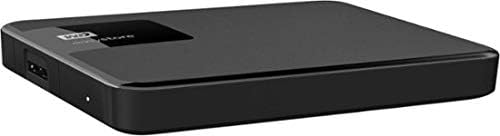
ചിത്രം 3.2: വശം view of the Easystore hard drive, highlighting the USB 3.0 port for connectivity and the power indicator light.

ചിത്രം 3.3: Retail packaging for the Western Digital Easystore Portable Hard Drive, showing product branding and compatibility information.
4. സജ്ജീകരണ നിർദ്ദേശങ്ങൾ
4.1 Connecting the Hard Drive
- Connect one end of the provided USB 3.0 cable to the USB port on the Western Digital Easystore portable hard drive.
- Connect the other end of the USB 3.0 cable to an available USB port on your computer (PC or Mac). For optimal performance, use a USB 3.0 port. The drive is backward compatible with USB 2.0 ports, but data transfer speeds will be reduced.
- The drive will power on automatically. The power indicator light on the drive will illuminate.
4.2 വിൻഡോസിനായുള്ള പ്രാരംഭ സജ്ജീകരണം
The Western Digital Easystore drive is pre-formatted for Windows operating systems (NTFS). It should be recognized automatically by your computer and appear as a new drive letter in 'This PC' or 'My Computer'.
- No additional drivers are typically required for Windows.
- നിങ്ങൾക്ക് കൈമാറ്റം ആരംഭിക്കാം fileഉടനെ എസ്.
4.3 Initial Setup for Mac
For Mac users, the drive may require reformatting to HFS+ (Mac OS Extended) or APFS for full compatibility and optimal performance with macOS. Reformatting will erase all data on the drive, so ensure it is empty or back up any pre-loaded software if desired.
- നിങ്ങളുടെ മാക്കിലേക്ക് ഡ്രൈവ് ബന്ധിപ്പിക്കുക.
- 'ഡിസ്ക് യൂട്ടിലിറ്റി' (ആപ്ലിക്കേഷനുകൾ > യൂട്ടിലിറ്റീസ് > ഡിസ്ക് യൂട്ടിലിറ്റി) തുറക്കുക.
- Select the Western Digital Easystore drive from the sidebar.
- 'മായ്ക്കുക' ക്ലിക്ക് ചെയ്യുക.
- Choose a format (e.g., 'Mac OS Extended (Journaled)' or 'APFS') and a scheme (e.g., 'GUID Partition Map').
- സ്ഥിരീകരിക്കാൻ വീണ്ടും 'മായ്ക്കുക' ക്ലിക്ക് ചെയ്യുക.
Alternatively, you can install the WD Discovery software for Mac, which may offer tools for managing the drive without reformatting, though reformatting is generally recommended for native Mac performance.
5. പ്രവർത്തന നിർദ്ദേശങ്ങൾ
5.1 കൈമാറ്റം Files
കൈമാറാൻ files, simply drag and drop them to and from the Easystore drive icon on your desktop or in your file explorer/finder window, similar to using any other folder.
- For Windows: Open 'This PC' or 'File Explorer', locate the drive, and drag files.
- For Mac: The drive icon will appear on your desktop. Drag fileഅങ്ങോട്ടും ഇങ്ങോട്ടും.
5.2 ബാക്കപ്പ് സോഫ്റ്റ്വെയർ ഉപയോഗം
The Western Digital Easystore drive supports backup software for scheduling regular automatic file transfers. Refer to the included software or download WD Discovery from the official Western Digital website for backup solutions. WD Discovery also allows management of drive settings, including LED control.
5.3 ഡ്രൈവ് സുരക്ഷിതമായി പുറത്തെടുക്കൽ
Always safely eject the hard drive before disconnecting it to prevent data corruption.
- വിൻഡോസ്: Click the 'Safely Remove Hardware and Eject Media' icon in the system tray, then select the Easystore drive.
- മാക്: Drag the drive icon from your desktop to the Trash, or right-click (Control-click) the drive icon and select 'Eject'.
6. പരിപാലനം
- ശാരീരിക പരിചരണം: Keep the drive in a clean, dry environment. Avoid extreme temperatures, direct sunlight, and high humidity.
- സംരക്ഷണം: The drive is portable but contains moving parts. Avoid dropping or subjecting it to strong impacts.
- പതിവ് ബാക്കപ്പുകൾ: While the Easystore drive is excellent for storage, it is recommended to maintain multiple copies of critical data across different storage solutions.
- വൃത്തിയാക്കൽ: ഡ്രൈവിന്റെ പുറംഭാഗം വൃത്തിയാക്കാൻ മൃദുവായതും ഉണങ്ങിയതുമായ തുണി ഉപയോഗിക്കുക. ലിക്വിഡ് ക്ലീനറുകളോ ലായകങ്ങളോ ഉപയോഗിക്കരുത്.
7. പ്രശ്നപരിഹാരം
7.1 ഡ്രൈവ് തിരിച്ചറിഞ്ഞിട്ടില്ല
- യുഎസ്ബി കേബിൾ ഡ്രൈവിലേക്കും കമ്പ്യൂട്ടറിലേക്കും സുരക്ഷിതമായി ബന്ധിപ്പിച്ചിട്ടുണ്ടെന്ന് ഉറപ്പാക്കുക.
- നിങ്ങളുടെ കമ്പ്യൂട്ടറിലെ മറ്റൊരു USB പോർട്ടിലേക്ക് ഡ്രൈവ് ബന്ധിപ്പിക്കാൻ ശ്രമിക്കുക.
- Test the drive with a different USB cable, if available.
- നിങ്ങളുടെ കമ്പ്യൂട്ടർ പുനരാരംഭിക്കുക.
- For Mac users, ensure the drive has been formatted correctly (see Section 4.3).
7.2 മന്ദഗതിയിലുള്ള ഡാറ്റാ ട്രാൻസ്ഫർ വേഗത
- Ensure the drive is connected to a USB 3.0 port on your computer. USB 2.0 ports will result in significantly slower speeds.
- നിങ്ങളുടെ കമ്പ്യൂട്ടറിന്റെ USB 3.0 ഡ്രൈവറുകൾ കാലികമാണെന്ന് ഉറപ്പാക്കുക.
- നിരവധി ചെറിയവ കൈമാറ്റം ചെയ്യുന്നത് ഒഴിവാക്കുക. files simultaneously; large files transfer more efficiently.
- സിസ്റ്റം റിസോഴ്സുകൾ ഉപയോഗിക്കുന്നതോ ഡിസ്ക് പ്രവർത്തനങ്ങൾ നടത്തുന്നതോ ആയ മറ്റ് ആപ്ലിക്കേഷനുകൾ അടയ്ക്കുക.
7.3 Drive Light Not On
- Check the USB cable connection. The drive is USB-powered, so a secure connection is essential for power.
- Try a different USB port or computer to rule out a port issue.
8 സ്പെസിഫിക്കേഷനുകൾ
| ഫീച്ചർ | വിശദാംശങ്ങൾ |
|---|---|
| ബ്രാൻഡ് | വെസ്റ്റേൺ ഡിജിറ്റൽ |
| മോഡൽ നമ്പർ | WDBKUZ0050BBK-WESN |
| ഡിജിറ്റൽ സ്റ്റോറേജ് കപ്പാസിറ്റി | 5 ടിബി (5000 ജിബി) |
| കണക്റ്റിവിറ്റി ടെക്നോളജി | USB 3.0 (യുഎസ്ബി 2.0-ന് പിന്നിലേക്ക് അനുയോജ്യം) |
| ഹാർഡ് ഡിസ്ക് ഫോം ഫാക്ടർ | 3.5 Inches (Internal drive type, external enclosure is portable) |
| ഹാർഡ് ഡിസ്ക് വിവരണം | മെക്കാനിക്കൽ ഹാർഡ് ഡിസ്ക് |
| ഹാർഡ്വെയർ പ്ലാറ്റ്ഫോം | മാക്, പിസി |
| നിറം | കറുപ്പ് |
| ഇനത്തിൻ്റെ ഭാരം | 8.1 ഔൺസ് |
| ഉൽപ്പന്ന അളവുകൾ (LxWxH) | 4.6 x 6 x 1.6 ഇഞ്ച് |
| പ്രത്യേക ഫീച്ചർ | പോർട്ടബിൾ |
9. വാറൻ്റിയും പിന്തുണയും
For detailed warranty information and technical support, please visit the official Western Digital support website. You will typically need your product's model number (WDBKUZ0050BBK-WESN) and serial number (located on the drive itself or its packaging) when contacting support.
ഓൺലൈൻ പിന്തുണ: support.wdc.com


