ആമുഖം
This manual provides essential instructions for the safe and efficient use of your BLACK+DECKER EM044KJN-P2 1.6-Cu. Ft. Over-the-Range Microwave. Please read all instructions carefully before installation and operation, and retain this manual for future reference.

ചിത്രം 1: മുൻഭാഗം view of the BLACK+DECKER EM044KJN-P2 Over-the-Range Microwave with the door open, revealing the interior cavity and glass turntable.
പ്രധാനപ്പെട്ട സുരക്ഷാ വിവരങ്ങൾ
നിങ്ങളുടെ ഉപകരണം ഉപയോഗിക്കുമ്പോൾ തീ, വൈദ്യുതാഘാതം, വ്യക്തികൾക്ക് പരിക്കേൽക്കൽ, അല്ലെങ്കിൽ അമിതമായ മൈക്രോവേവ് ഊർജ്ജത്തിന് വിധേയമാകൽ എന്നിവയുടെ അപകടസാധ്യത കുറയ്ക്കുന്നതിന്, ഇനിപ്പറയുന്നവ ഉൾപ്പെടെയുള്ള അടിസ്ഥാന മുൻകരുതലുകൾ പാലിക്കുക:
- ഉപകരണം ഉപയോഗിക്കുന്നതിന് മുമ്പ് എല്ലാ നിർദ്ദേശങ്ങളും വായിക്കുക.
- Do not operate the microwave if it is damaged or malfunctioning.
- Ensure proper grounding to avoid electrical shock hazards.
- സീൽ ചെയ്ത പാത്രങ്ങൾ ചൂടാക്കരുത്, കാരണം അവ പൊട്ടിത്തെറിച്ചേക്കാം.
- ഒരിക്കലും ഓവൻ ശൂന്യമായി പ്രവർത്തിപ്പിക്കരുത്.
- കുട്ടികൾ ഉപകരണത്തിന് സമീപം ആയിരിക്കുമ്പോൾ എപ്പോഴും മേൽനോട്ടം വഹിക്കുക.
- മൈക്രോവേവ് സുരക്ഷിതമായ പാചകം മാത്രം ഉപയോഗിക്കുക.
പാക്കേജ് ഉള്ളടക്കം
അൺപാക്ക് ചെയ്യുമ്പോൾ എല്ലാ ഘടകങ്ങളും ഉണ്ടെന്നും കേടുപാടുകൾ സംഭവിച്ചിട്ടില്ലെന്നും ഉറപ്പാക്കുക:
- BLACK+DECKER EM044KJN-P2 Over-the-Range Microwave Unit
- ഗ്ലാസ് ടേൺടബിൾ
- Installation Hardware (mounting bracket, screws, template)
- ഉപയോക്തൃ മാനുവൽ
സജ്ജീകരണവും ഇൻസ്റ്റാളേഷനും
Installation of an over-the-range microwave requires careful planning and may necessitate two people due to the unit's weight and size. The microwave weighs approximately 55.1 pounds and measures 15 x 29.9 x 16.4 inches.

Figure 2: Product dimensions for the BLACK+DECKER EM044KJN-P2 microwave, indicating height, depth, and width.
പ്രീ-ഇൻസ്റ്റലേഷൻ ഘട്ടങ്ങൾ:
- Remove Old Microwave: If replacing an existing unit, carefully remove it. Note the location of existing screws and the power cord.
- ഇൻസ്റ്റലേഷൻ ഏരിയ മായ്ക്കുക: For easier installation, consider temporarily removing the stove from beneath the cabinet.
- സ്റ്റഡുകൾ കണ്ടെത്തുക: Use a stud finder to identify suitable locations for the two lag bolts that secure the back brace.
- Drilling Considerations: If drilling through ceramic tile on the backsplash, use an appropriate masonry drill bit.
- Ventilation Configuration: The microwave supports both rear exhaust and top exhaust (recirculating) options. Ensure the vent blower is configured correctly for your chosen setup. If using top exhaust, verify the vent cut-out in the cabinet allows for proper clearance. If replacing a non-like model, a new flange transition to your existing ducting may be required.
Mounting the Microwave:
- മൗണ്ട് വാൾ ബ്രാക്കറ്റ്: Use the provided template to accurately position and mount the wall bracket on the back wall.
- Secure Top Screws: The microwave is typically secured with three screws from the top cabinet. Ensure these holes are pre-drilled according to the template.
- പവർ കോർഡ് മാനേജ്മെൻ്റ്: A hole in the cabinet floor is required for the power cord to pass through and plug into a receptacle located inside the upper cabinet.
- ലിഫ്റ്റിംഗും സ്ഥാനനിർണ്ണയവും: With assistance, lift the microwave onto the wall bracket. The unit will hinge onto this bracket.
- അന്തിമ സുരക്ഷ: Once hinged, secure the microwave by inserting the screws from the top cabinet into the designated mounting points on the microwave. Additionally, ensure the back brace is perfectly installed, utilizing the lag screws and any spring-loaded fasteners as directed.

ചിത്രം 3: പിൻഭാഗം view of the microwave, highlighting the power cord and potential mounting locations.
പ്രവർത്തന നിർദ്ദേശങ്ങൾ
Your BLACK+DECKER EM044KJN-P2 microwave features 1000 watts of cooking power and 10 different power levels for versatile cooking. The control panel is designed for ease of use.
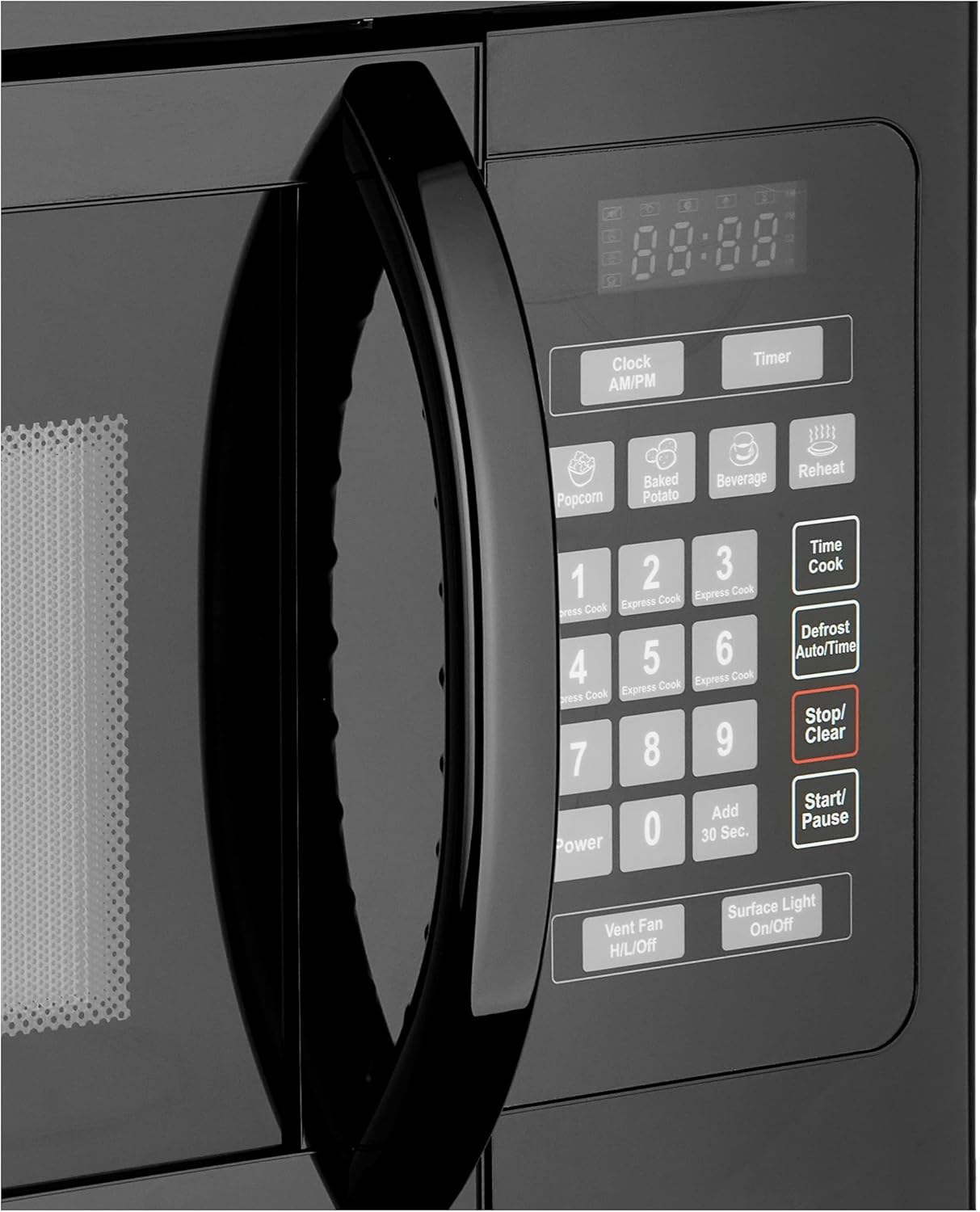
ചിത്രം 4: വിശദമായി view മൈക്രോവേവിന്റെ നിയന്ത്രണ പാനലിന്റെ.
അടിസ്ഥാന പ്രവർത്തനം:
- ക്രമീകരണ സമയം: Use the 'Clock AM/PM' button to set the current time.
- ദ്രുത തുടക്കം: For quick cooking, press the 'Add 30 Sec.' button to start cooking for 30 seconds at full power. You can press it repeatedly to add more time. The 1-6 minute quick start buttons also allow for immediate cooking.
- ടൈം കുക്ക്: Press 'Time Cook', enter the desired cooking time using the number pad, then press 'Start/Pause'.
- പവർ ലെവൽ: After entering cooking time, press 'Power' and then a number (1-10) to select a power level. (10 is 100% power).
- വൺ-ടച്ച് പാചകം: Utilize the 'Press N' Go' programs for common foods like Popcorn, Baked Potato, Beverage, and Reheat. Simply press the corresponding button.
- ഡിഫ്രോസ്റ്റ്: Use the 'Defrost Auto/Time' button to defrost food by weight or time.
- നിർത്തുക/മായ്ക്കുക: Press 'Stop/Clear' to cancel a program or clear the display.
പ്രത്യേക സവിശേഷതകൾ:
- കുട്ടികളുടെ സുരക്ഷാ ലോക്ക്: Lock the control panel to prevent accidental use or access by children. Refer to the manual for specific instructions on activating and deactivating the child lock.
- വെന്റ് ഫാൻ: Control the vent fan with the 'Vent Fan H/L/Off' button to exhaust smoke, steam, and odors from your cooktop.
- Surface Light: The 'Surface Light On/Off' button controls the incandescent lighting above the range, illuminating your cooking space.
മെയിൻ്റനൻസ്
Regular maintenance ensures the longevity and optimal performance of your microwave.
വൃത്തിയാക്കൽ:
- ഇൻ്റീരിയർ: Clean the interior cavity with a mild detergent and a soft cloth. The glass turntable is removable and can be washed with warm, soapy water.
- പുറം: ഒരു മൃദുവായ, ഡി ഉപയോഗിച്ച് ബാഹ്യ പ്രതലങ്ങൾ തുടയ്ക്കുകamp തുണി. ഉരച്ചിലുകൾ ഉള്ള ക്ലീനറുകൾ ഒഴിവാക്കുക.
- നിയന്ത്രണ പാനൽ: Gently wipe the control panel with a damp cloth. Do not spray cleaners directly onto the panel.
ഫിൽട്ടർ മാറ്റിസ്ഥാപിക്കൽ:
The microwave is equipped with a vent system that may include grease filters and a charcoal filter (for recirculating models). These filters should be cleaned or replaced periodically.

Figure 5: Underside of the microwave, showing the location of the grease filters and surface lights.
- ഗ്രീസ് ഫിൽട്ടറുകൾ: Located on the underside of the microwave, these filters should be removed and cleaned regularly (e.g., monthly) with warm, soapy water. Ensure they are completely dry before re-installing.
- Charcoal Filter (if applicable): If your microwave is set up for recirculating ventilation, it will have a charcoal filter to remove odors. This filter is typically located behind the vent grille and should be replaced every 6-12 months, depending on usage. Refer to the full installation guide for specific replacement instructions.
ലൈറ്റ് ബൾബ് മാറ്റിസ്ഥാപിക്കൽ:
The incandescent surface lights on the underside of the microwave can be replaced when they burn out. Ensure the appliance is unplugged before attempting to replace bulbs.
ട്രബിൾഷൂട്ടിംഗ്
If you encounter issues with your microwave, consult the following table for common problems and solutions.
| പ്രശ്നം | സാധ്യമായ കാരണം | പരിഹാരം |
|---|---|---|
| മൈക്രോവേവ് ആരംഭിക്കുന്നില്ല | വാതിൽ ശരിയായി അടച്ചിട്ടില്ല; പവർ കോർഡ് ഊരിമാറ്റിയിരിക്കുന്നു; ഫ്യൂസ് ഊരിപ്പോയി/ സർക്യൂട്ട് ബ്രേക്കർ ട്രിപ്പ് ചെയ്തിരിക്കുന്നു; ചൈൽഡ് ലോക്ക് സജീവമാക്കിയിരിക്കുന്നു. | വാതിൽ സുരക്ഷിതമായി പൂട്ടിയിട്ടുണ്ടെന്ന് ഉറപ്പാക്കുക; പവർ കണക്ഷൻ പരിശോധിക്കുക; സർക്യൂട്ട് ബ്രേക്കർ പുനഃസജ്ജമാക്കുക; ചൈൽഡ് ലോക്ക് നിർജ്ജീവമാക്കുക. |
| No heat during cooking | Incorrect power level set; Door not closed properly. | Verify power level setting; Ensure door is securely latched. |
| ടേൺടേബിൾ കറങ്ങുന്നില്ല | Turntable not seated correctly; Debris under turntable; Motor malfunction. | Reposition turntable; Clean area under turntable; Contact customer support if issue persists. |
| ഓവൻ ലൈറ്റ് പ്രവർത്തിക്കുന്നില്ല | ബൾബ് കത്തിനശിച്ചു. | Replace bulb (ensure microwave is unplugged). |
| Timer cannot be used while cooking | This model's design limitation. | The microwave timer function is independent and cannot run concurrently with a cooking cycle. |
സ്പെസിഫിക്കേഷനുകൾ
| ഫീച്ചർ | വിശദാംശങ്ങൾ |
|---|---|
| ബ്രാൻഡ് | ബ്ലാക്ക്+ഡെക്കർ |
| മോഡൽ നമ്പർ | EM044KJN-P2 |
| ശേഷി | 1.6 ക്യുബിക് അടി |
| ഇൻസ്റ്റലേഷൻ തരം | ഓവർ-ദി-റേഞ്ച് |
| വാട്ട്tage | 1000 വാട്ട്സ് |
| വാല്യംtage | 120 വോൾട്ട് (എസി) |
| ഇനത്തിൻ്റെ ഭാരം | 55.1 പൗണ്ട് |
| ഉൽപ്പന്ന അളവുകൾ (D x W x H) | 15 x 29.9 x 16.4 ഇഞ്ച് |
| നിറം | കറുപ്പ് |
| മെറ്റീരിയൽ തരം | ഗ്ലാസ് |
| പ്രത്യേക സവിശേഷതകൾ | Child Safety Lock, Quick Defrost |
| ഉൾപ്പെടുത്തിയ ഘടകങ്ങൾ | തിരിയാവുന്ന |
വാറൻ്റിയും പിന്തുണയും
For warranty information, product registration, or technical support, please refer to the warranty card included with your product or visit the official BLACK+DECKER webസൈറ്റ്. ഏതെങ്കിലും വാറന്റി ക്ലെയിമുകൾക്ക് വാങ്ങിയതിന്റെ തെളിവായി നിങ്ങളുടെ വാങ്ങൽ രസീത് സൂക്ഷിക്കുക.
ഓൺലൈൻ പിന്തുണ: www.blackanddecker.com/support (സപ്പോർട്ട്)
കസ്റ്റമർ സർവീസ്: പ്രാദേശിക കോൺടാക്റ്റ് നമ്പറുകൾക്കായി നിങ്ങളുടെ ഉൽപ്പന്ന ഡോക്യുമെന്റേഷൻ പരിശോധിക്കുക.