1. ആമുഖം
This manual provides essential instructions for setting up, operating, and maintaining your LG Phoenix 4 X210 smartphone. Please read this manual thoroughly to ensure proper use and to maximize the device's features.
The LG Phoenix 4 X210 is a GSM unlocked smartphone featuring a 5.0-inch display, 8 MP rear camera, 5 MP front camera, 16 GB internal memory, 2 GB RAM, and runs on Android 7.1 Nougat.
2. ഉപകരണ ലേഔട്ട്
Familiarize yourself with the physical components of your LG Phoenix 4 X210.
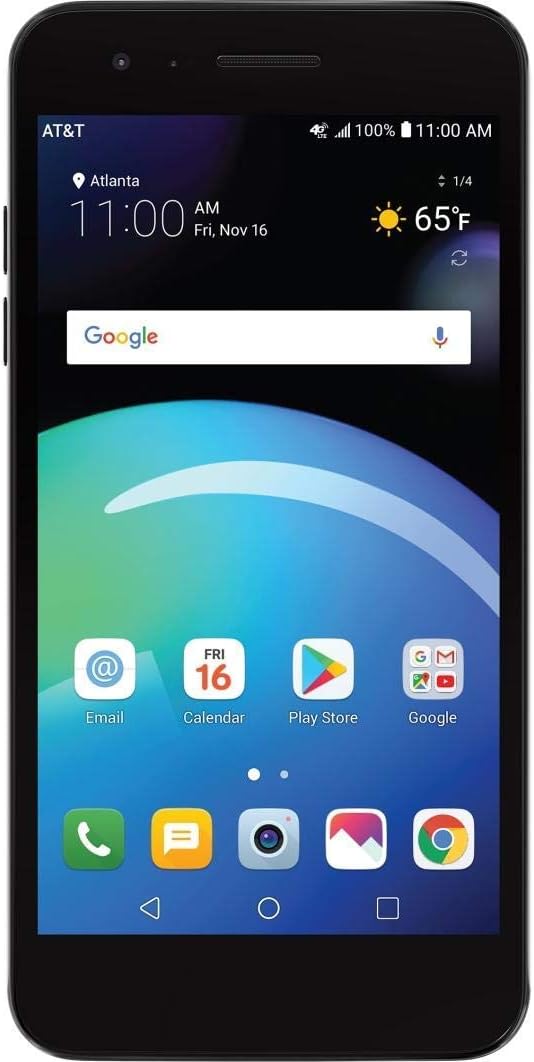
ചിത്രം 2.1: മുൻഭാഗം View. This image shows the front of the LG Phoenix 4 X210 smartphone. The screen is active, displaying the home screen with various application icons, the current time, date, and weather information. The AT&T carrier logo is visible in the top left corner, indicating network connectivity.

ചിത്രം 2.2: പിൻഭാഗം View. This image displays the back of the LG Phoenix 4 X210. Prominently featured are the main camera lens, the LED flash, and a circular fingerprint sensor located below the camera. The LG logo is visible towards the bottom of the device.

ചിത്രം 2.3: വലതുവശം View. This image illustrates the right side of the LG Phoenix 4 X210, where the volume up and down buttons, along with the power/lock button, are located.

ചിത്രം 2.4: താഴെ View. This image shows the bottom edge of the LG Phoenix 4 X210, featuring the 3.5mm headphone jack, the micro USB charging/data port, and the primary microphone opening.
3. സജ്ജീകരണം
3.1 സിം കാർഡ് ചേർക്കൽ
The LG Phoenix 4 X210 requires a Nano-sized SIM card for network connectivity. The SIM card is not included with the device.
- Power off the device completely.
- Locate the SIM card slot, typically on the side or under the back cover. Refer to the device diagram for exact location.
- Insert the Nano SIM card into the designated slot with the gold contacts facing down, ensuring it is correctly oriented.
- Close the SIM card tray or replace the back cover securely.
കുറിപ്പ്: This device is GSM unlocked and compatible with GSM carriers such as AT&T and T-Mobile. It will not work with CDMA carriers like Verizon or Sprint.
3.2 പ്രാരംഭ പവർ ഓൺ
- Press and hold the Power button (located on the right side of the device) until the LG logo appears on the screen.
- ഭാഷാ തിരഞ്ഞെടുപ്പ്, വൈ-ഫൈ കണക്ഷൻ, ഗൂഗിൾ അക്കൗണ്ട് സജ്ജീകരണം, സുരക്ഷാ ക്രമീകരണങ്ങൾ എന്നിവയുൾപ്പെടെയുള്ള പ്രാരംഭ സജ്ജീകരണം പൂർത്തിയാക്കാൻ ഓൺ-സ്ക്രീൻ നിർദ്ദേശങ്ങൾ പാലിക്കുക.
4. പ്രവർത്തന നിർദ്ദേശങ്ങൾ
4.1 അടിസ്ഥാന നാവിഗേഷൻ
- ടച്ച് സ്ക്രീൻ: Tap, swipe, pinch, and spread gestures are used to interact with the device.
- ഹോം സ്ക്രീൻ: Access apps, widgets, and notifications. Customize by long-pressing on empty space.
- നാവിഗേഷൻ ബാർ: The bottom of the screen typically features Back, Home, and Recent Apps buttons.
4.2 കോളുകൾ വിളിക്കുകയും സന്ദേശങ്ങൾ അയയ്ക്കുകയും ചെയ്യുന്നു
- കോളുകൾ: ഫോൺ ഐക്കണിൽ ടാപ്പ് ചെയ്യുക, നമ്പർ നൽകുക, കോൾ ബട്ടൺ ടാപ്പ് ചെയ്യുക.
- സന്ദേശങ്ങൾ: Tap the Messages icon, start a new conversation, enter the recipient and message, then send.
4.3 ക്യാമറ ഉപയോഗം
The device features an 8 MP rear camera with autofocus and flash, and a 5 MP front camera with Auto Shot for selfies.
- ക്യാമറ ആപ്ലിക്കേഷൻ തുറക്കുക.
- ക്യാമറ സ്വിച്ച് ഐക്കൺ ഉപയോഗിച്ച് മുൻ ക്യാമറയ്ക്കും പിൻ ക്യാമറയ്ക്കും ഇടയിൽ തിരഞ്ഞെടുക്കുക.
- Tap the screen to focus, then tap the shutter button to capture a photo or start/stop video recording.
4.4 ബാറ്ററി മാനേജ്മെൻ്റ്
The LG Phoenix 4 X210 is equipped with a 2,500 mAh removable battery. To optimize battery life:
- സ്ക്രീൻ തെളിച്ചം ക്രമീകരിക്കുക.
- ഉപയോഗത്തിലില്ലാത്തപ്പോൾ വൈഫൈ, ബ്ലൂടൂത്ത്, ജിപിഎസ് എന്നിവ ഓഫാക്കുക.
- പശ്ചാത്തലത്തിൽ പ്രവർത്തിക്കുന്ന ഉപയോഗിക്കാത്ത ആപ്ലിക്കേഷനുകൾ അടയ്ക്കുക.
- Utilize power-saving modes available in Settings.
5. പരിപാലനം
5.1 ഉപകരണം വൃത്തിയാക്കുന്നു
- ഫോണിന്റെ സ്ക്രീനും ബോഡിയും വൃത്തിയാക്കാൻ മൃദുവായ, ലിന്റ് രഹിത തുണി ഉപയോഗിക്കുക.
- കഠിനമായ രാസവസ്തുക്കളോ ഉരച്ചിലുകളോ ഉപയോഗിക്കുന്നത് ഒഴിവാക്കുക.
- ചാർജ് ചെയ്യുന്നതിനുമുമ്പ് എല്ലാ പോർട്ടുകളും വരണ്ടതാണെന്ന് ഉറപ്പാക്കുക.
5.2 സോഫ്റ്റ്വെയർ അപ്ഡേറ്റുകൾ
Regularly check for software updates to ensure optimal performance and security. Updates can typically be found in Settings > About phone > Software updates.
5.3 ബാറ്ററി കെയർ
- അങ്ങേയറ്റത്തെ താപനിലയിലേക്ക് ബാറ്ററി തുറന്നുകാട്ടുന്നത് ഒഴിവാക്കുക.
- അംഗീകൃത ചാർജറുകളും കേബിളുകളും മാത്രം ഉപയോഗിക്കുക.
- ബാറ്ററി നീക്കം ചെയ്യാവുന്നതാണെങ്കിൽ, അത് ശരിയായി സ്ഥാപിച്ചിട്ടുണ്ടെന്ന് ഉറപ്പാക്കുക.
6. പ്രശ്നപരിഹാരം
6.1 പൊതുവായ പ്രശ്നങ്ങളും പരിഹാരങ്ങളും
| ഇഷ്യൂ | സാധ്യമായ പരിഹാരം |
|---|---|
| ഉപകരണം ഓണാക്കുന്നില്ല | ബാറ്ററി ചാർജ്ജ് ചെയ്തിട്ടുണ്ടെന്ന് ഉറപ്പാക്കുക. ചാർജർ കണക്റ്റ് ചെയ്ത് വീണ്ടും പവർ ചെയ്യാൻ ശ്രമിക്കുന്നതിന് മുമ്പ് കുറച്ച് മിനിറ്റ് കാത്തിരിക്കുക. |
| നെറ്റ്വർക്ക് സിഗ്നൽ ഇല്ല | Verify SIM card is correctly inserted. Check network settings (Settings > Network & internet > Mobile network). Ensure you are within a GSM network coverage area. |
| ബാറ്ററി പെട്ടെന്ന് തീരുന്നു | Reduce screen brightness, disable unused features (Wi-Fi, Bluetooth, GPS), close background apps, and check for power-intensive apps in Battery settings. |
| ആപ്പുകൾ ക്രാഷാകുന്നു അല്ലെങ്കിൽ മരവിക്കുന്നു | Restart the device. Clear the cache of the problematic app (Settings > Apps & notifications > App info > Storage > Clear cache). If the issue persists, consider uninstalling and reinstalling the app. |
| ഉപകരണം മന്ദഗതിയിലാണ് അല്ലെങ്കിൽ പ്രതികരിക്കുന്നില്ല. | Close unnecessary apps. Clear device cache. Consider performing a factory reset as a last resort (backup data first). |
6.2 ഫാക്ടറി റീസെറ്റ്
A factory reset will erase all data from your device and restore it to its original factory settings. തുടരുന്നതിന് മുമ്പ് എല്ലാ പ്രധാനപ്പെട്ട ഡാറ്റയും ബാക്കപ്പ് ചെയ്യുക.
- പോകുക ക്രമീകരണങ്ങൾ > സിസ്റ്റം > റീസെറ്റ് ഓപ്ഷനുകൾ.
- തിരഞ്ഞെടുക്കുക എല്ലാ ഡാറ്റയും മായ്ക്കുക (ഫാക്ടറി റീസെറ്റ്).
- നിങ്ങളുടെ തീരുമാനം സ്ഥിരീകരിച്ച് ആവശ്യപ്പെടുകയാണെങ്കിൽ നിങ്ങളുടെ പിൻ/പാസ്വേഡ് നൽകുക.
7 സ്പെസിഫിക്കേഷനുകൾ
- മോഡൽ: LG Phoenix 4 X210 (LM-X210APM-cr)
- ഓപ്പറേറ്റിംഗ് സിസ്റ്റം: Android 7.1 Nougat
- ഡിസ്പ്ലേ: 5.0 ഇഞ്ച്
- പ്രോസസ്സർ: 1.4GHz Quad-Core Qualcomm Snapdragon (MSM8917)
- ആന്തരിക സംഭരണം: 16 GB (approximately 9 GB available to user)
- റാം: 2 ജിബി
- പിൻ ക്യാമറ: ഫ്ലാഷോടുകൂടി 8 MP ഓട്ടോഫോക്കസ്
- മുൻ ക്യാമറ: 5 MP Auto Shot
- ബാറ്ററി: 2,500 mAh Removable Lithium Ion
- സംസാര സമയം: 14 മണിക്കൂർ വരെ
- സ്റ്റാൻഡ്ബൈ സമയം: 16.5 ദിവസം വരെ
- അളവുകൾ: 5.69 x 2.86 x 0.31 ഇഞ്ച്
- ഭാരം: 4.8 ഔൺസ് (136 ഗ്രാം)
- നെറ്റ്വർക്ക് അനുയോജ്യത: GSM 850/900/1800/1900 MHz, UMTS Bands 2/4/5, LTE Bands 2/4/5/12
- കണക്റ്റിവിറ്റി: വൈ-ഫൈ, ബ്ലൂടൂത്ത്, ജിപിഎസ്
8. വാറൻ്റിയും പിന്തുണയും
For warranty information and technical support, please refer to the documentation provided with your purchase or visit the official LG support webസൈറ്റ്. വാറന്റി ക്ലെയിമുകൾക്കായി നിങ്ങളുടെ വാങ്ങലിന്റെ തെളിവ് സൂക്ഷിക്കുക.
This device is sold as an unlocked unit. For network-specific issues, contact your chosen GSM carrier.