ആമുഖം
This user manual provides comprehensive instructions for the Bixolon SLP-T400 Barcode Printer. It covers setup, operation, maintenance, and troubleshooting to ensure optimal performance and longevity of your device. The SLP-T400 is designed for efficient direct thermal and thermal transfer printing of invoices and labels.
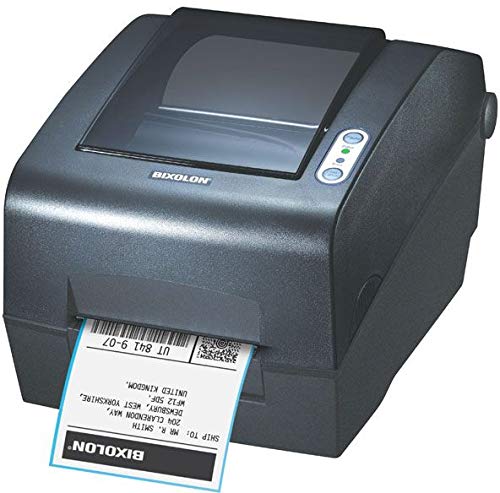
ചിത്രം 1: The Bixolon SLP-T400 printer, a compact black device, is shown from an angled front view. A white label with black text and a barcode is partially ejected from the front slot. The top cover is slightly transparent, revealing the internal paper path. On the right side of the top surface, there are two circular buttons with indicator lights. The brand name "BIXOLON" is visible on the front panel below the transparent cover.
സജ്ജമാക്കുക
1 അൺപാക്ക് ചെയ്യുന്നു
Carefully remove the printer and all accessories from the packaging. Verify that all components listed in the packing list are present. Retain the packaging for future transportation or storage.
2. പ്രിന്റർ ബന്ധിപ്പിക്കുന്നു
- പവർ കണക്ഷൻ: Connect the power adapter to the printer's power port and then plug it into a suitable electrical outlet.
- ഡാറ്റ കണക്ഷൻ:
- USB കണക്ഷൻ: യുഎസ്ബി കേബിളിന്റെ ഒരു അറ്റം പ്രിന്ററിന്റെ യുഎസ്ബി പോർട്ടിലേക്കും മറ്റേ അറ്റം നിങ്ങളുടെ കമ്പ്യൂട്ടറിൽ ലഭ്യമായ യുഎസ്ബി പോർട്ടിലേക്കും ബന്ധിപ്പിക്കുക.
- Serial/Parallel Connection: If using a serial or parallel interface, connect the appropriate cable to the printer and your computer.
- ഇതർനെറ്റ് കണക്ഷൻ (ഓപ്ഷണൽ): നെറ്റ്വർക്ക് പ്രിന്റിംഗിനായി, പ്രിന്ററിന്റെ ഇതർനെറ്റ് പോർട്ടിൽ നിന്ന് നിങ്ങളുടെ നെറ്റ്വർക്ക് റൂട്ടറിലേക്കോ സ്വിച്ചിലേക്കോ ഒരു ഇതർനെറ്റ് കേബിൾ ബന്ധിപ്പിക്കുക.
3. മീഡിയ ലോഡ് ചെയ്യുന്നു
Open the printer's top cover. Place the roll of labels or receipt paper onto the media spindle, ensuring the media feeds smoothly into the print mechanism. Adjust the media guides to fit the width of your media. Close the top cover securely.
പ്രവർത്തന നിർദ്ദേശങ്ങൾ
1. ഡ്രൈവർ ഇൻസ്റ്റാളേഷൻ
Before printing, you must install the printer drivers on your computer. Drivers are typically provided on a CD included with the printer or can be downloaded from the official Bixolon website. Follow the on-screen instructions during installation.
2. അടിസ്ഥാന പ്രിന്റിംഗ്
- പ്രിന്റർ ഓണാക്കിയിട്ടുണ്ടെന്നും നിങ്ങളുടെ കമ്പ്യൂട്ടറുമായി ബന്ധിപ്പിച്ചിട്ടുണ്ടെന്നും ഉറപ്പാക്കുക.
- നിങ്ങൾ അച്ചടിക്കാൻ ആഗ്രഹിക്കുന്ന പ്രമാണമോ ആപ്ലിക്കേഷനോ തുറക്കുക.
- Select "Print" from the file മെനു.
- Choose the "Bixolon SLP-T400" printer from the list of available printers.
- Adjust print settings such as media type, size, and print quality as needed.
- Click "Print" to start the printing process.
3. സോഫ്റ്റ്വെയർ അനുയോജ്യത
The Bixolon SLP-T400 is compatible with various operating systems and label design software. Refer to the Bixolon website for the latest compatibility information and software downloads.
മെയിൻ്റനൻസ്
1. പ്രിന്റ് ഹെഡ് വൃത്തിയാക്കൽ
To maintain print quality, regularly clean the print head using a lint-free cloth moistened with isopropyl alcohol. Ensure the printer is turned off and cooled down before cleaning.
2. Replacing Media
When the media roll is depleted, open the top cover, remove the empty core, and replace it with a new roll following the media loading instructions in the Setup section.
3. ജനറൽ കെയർ
Keep the printer in a clean, dust-free environment. Avoid exposing it to extreme temperatures or direct sunlight. Do not use abrasive cleaners or solvents on the printer's exterior.
ട്രബിൾഷൂട്ടിംഗ്
| പ്രശ്നം | സാധ്യമായ കാരണം | പരിഹാരം |
|---|---|---|
| പ്രിന്റർ അച്ചടിക്കുന്നില്ല |
|
|
| മോശം പ്രിന്റ് നിലവാരം |
|
|
| പേപ്പർ ഇടയ്ക്കിടെ കുടുങ്ങിപ്പോകുന്നു |
|
|
സ്പെസിഫിക്കേഷനുകൾ
| ഫീച്ചർ | വിശദാംശങ്ങൾ |
|---|---|
| പ്രിൻ്റിംഗ് ടെക്നോളജി | Direct Thermal, Thermal Transfer |
| റെസലൂഷൻ | Standard: 203 dpi, Optional: 300 dpi |
| പ്രിൻ്റ് വേഗത | 152 മിമി/സെക്കൻഡ് |
| പ്രിൻ്റ് വീതി | 104 മി.മീ |
| കണക്റ്റിവിറ്റി ടെക്നോളജി | Standard: Serial, Parallel, USB; Optional: Ethernet, Serial, USB |
| Printer Unit Life | 70 ദശലക്ഷം ലൈനുകൾ |
| ടിപിഎച്ച് ലൈഫ് | 150 കി.മീ |
| ഓട്ടോ കട്ടർ ലൈഫ് | 1.8 ദശലക്ഷം വെട്ടിക്കുറച്ചു |
| ബ്രാൻഡ് | ബിക്സോളോൺ |
| മോഡലിൻ്റെ പേര് | SLP T400 |
| പ്രിൻ്റർ ഔട്ട്പുട്ട് | മോണോക്രോം |
| മീഡിയ തരം | ലേബലുകൾ |
| ഇനത്തിൻ്റെ ഭാരം | 3 ഗ്രാം |
| പാക്കേജ് അളവുകൾ | 48 x 29 x 27 സെ.മീ |
| ആദ്യം ലഭ്യമായ തീയതി | നവംബർ 22, 2019 |
വാറൻ്റിയും പിന്തുണയും
For warranty information and technical support, please refer to the documentation included with your product at the time of purchase or visit the official Bixolon webസൈറ്റ്. വാറന്റി നിബന്ധനകളും വ്യവസ്ഥകളും പ്രദേശത്തിനനുസരിച്ച് വ്യത്യാസപ്പെടാം.
ഓൺലൈൻ ഉറവിടങ്ങൾ:


