ആമുഖം
The TP-Link Tapo P100 Smart Plug Mini is a compact Wi-Fi enabled smart plug designed to automate and remotely control your home appliances. This manual provides detailed instructions for setting up, operating, and maintaining your Tapo P100 Smart Plug Mini.
ബോക്സിൽ എന്താണുള്ളത്
- 2 x Tapo P100 Smart Plugs
- 1 x ദ്രുത ഇൻസ്റ്റലേഷൻ ഗൈഡ്
ഉൽപ്പന്നം കഴിഞ്ഞുview
The Tapo P100 Smart Plug Mini is a small, white device that plugs directly into a standard electrical outlet. It features a single power button and an LED indicator for status.
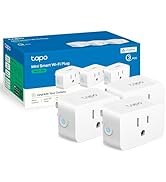
ചിത്രം: മുൻഭാഗം view of the TP-Link Tapo P100 Smart Plug Mini.
സജ്ജമാക്കുക
Follow these steps to set up your Tapo P100 Smart Plug Mini:
- പ്ലഗ് ഇൻ: Insert the Tapo P100 Smart Plug Mini into a standard electrical outlet.
- ടാപ്പോ ആപ്പ് ഡൗൺലോഡ് ചെയ്യുക: Scan the QR code on the product packaging or search for "Tapo" in your device's app store (App Store for iOS, Google Play Store for Android) and download the app.
- Create a Tapo Account: Open the Tapo app and follow the on-screen instructions to create a new TP-Link ID (Tapo account) or log in if you already have one.
- ഉപകരണം ചേർക്കുക: In the Tapo app, tap the "+" icon to add a new device. Select "Smart Plug" from the list.
- ഇൻ-ആപ്പ് നിർദ്ദേശങ്ങൾ പാലിക്കുക: The app will guide you through connecting the smart plug to your home Wi-Fi network. Ensure your phone's Bluetooth is enabled for easier discovery.
- കണക്ഷൻ സ്ഥിരീകരിക്കുക: Once connected, the LED on the smart plug should turn solid green. You can then test by turning the plug on and off within the app.
Video: This video demonstrates the unboxing and initial setup process for the Tapo P100 Smart Plug Mini, including connecting it to the Tapo app.
പ്രവർത്തന നിർദ്ദേശങ്ങൾ
The Tapo P100 Smart Plug Mini offers various ways to control your connected devices.
Remote Control via Tapo App
Once set up, you can control your smart plug from anywhere using the Tapo app on your smartphone. Simply open the app, select your device, and tap the power icon to turn it on or off.

Image: A user controlling multiple Tapo smart plugs from the Tapo mobile application.
ആമസോൺ അലക്സ ഉപയോഗിച്ചുള്ള ശബ്ദ നിയന്ത്രണം
Integrate your Tapo P100 with Amazon Alexa for convenient voice control:
- Open Tapo App: Ensure your Tapo devices are working correctly within the Tapo app.
- Alexa ആപ്പ് തുറക്കുക: Launch the Amazon Alexa app on your smartphone.
- Enable Tapo Skill: Tap the three-line menu icon, then select "Skills & Games." ഇതിനായി തിരയുക "Tapo" and tap on the Tapo skill.
- Enable to Use: Tap "ENABLE TO USE."
- അക്കൗണ്ട് ലിങ്ക് ചെയ്യുക: Sign in with your TP-Link ID (Tapo account credentials) and tap "Log In," then "Authorize."
- ഉപകരണങ്ങൾ കണ്ടെത്തുക: Tap "DISCOVER DEVICES" to allow Alexa to find your Tapo smart plugs.
Video: This video provides a step-by-step guide on how to link your TP-Link Tapo account with Amazon Alexa for voice control.
ഗൂഗിൾ അസിസ്റ്റന്റിനൊപ്പം ശബ്ദ നിയന്ത്രണം
Integrate your Tapo P100 with Google Assistant for convenient voice control:
- Open Tapo App: Ensure your Tapo devices are working correctly within the Tapo app.
- Open Google Assistant App: Launch the Google Assistant app on your smartphone.
- അക്കൗണ്ട് ക്രമീകരണങ്ങൾ: നിങ്ങളുടെ പ്രോയിൽ ടാപ്പ് ചെയ്യുകfile icon (top right) to access Account Settings.
- ഉപകരണം ചേർക്കുക: Go to the "Home" tab, then tap "Add" (+). Select "Set up device" and then "Works with Google."
- ഇതിനായി തിരയുക Tapo: ഇതിനായി തിരയുക "Tapo" and select it from the results.
- അക്കൗണ്ട് ലിങ്ക് ചെയ്യുക: Sign in with your TP-Link ID (Tapo account credentials) and tap "Log In," then "Authorize."
- Assign Rooms (Optional): You can assign each device to a specific room for better organization and voice commands.
Video: This video demonstrates how to link your TP-Link Tapo account with your Google Assistant account for voice control.
ഷെഡ്യൂളിംഗ്
Set schedules for your devices to automate their operation. For example, you can schedule a lamp to turn on at 9 PM and off at 11 PM daily.

Image: Screenshot of the Tapo app's scheduling interface, showing options to set on/off times for a device.
എവേ മോഡ്
Activate Away Mode to randomly turn your devices on and off, simulating occupancy when you are away from home. This feature can enhance home security.

Image: Screenshot of the Tapo app's Away Mode settings, showing options to set a period for random device operation.
ടൈമർ
Use the Timer function to set a countdown for your device to turn on or off after a specified duration.
മെയിൻ്റനൻസ്
To ensure optimal performance and longevity of your Tapo P100 Smart Plug Mini:
- ഉപകരണം വൃത്തിയായി സൂക്ഷിക്കുക, പൊടിയിൽ നിന്ന് മുക്തമാക്കുക.
- അമിതമായ ഈർപ്പം അല്ലെങ്കിൽ തീവ്രമായ ഊഷ്മാവിൽ ഉപകരണം തുറന്നുകാട്ടുന്നത് ഒഴിവാക്കുക.
- Do not overload the smart plug beyond its rated capacity (13 Ampഎസ്).
- Regularly check for firmware updates through the Tapo app to ensure you have the latest features and security enhancements.
ട്രബിൾഷൂട്ടിംഗ്
If you encounter issues with your Tapo P100 Smart Plug Mini, try the following:
- ഉപകരണം കണക്റ്റുചെയ്യുന്നില്ല:
- Ensure your Wi-Fi network is 2.4 GHz. Tapo devices do not support 5 GHz Wi-Fi.
- Check if the smart plug is within range of your Wi-Fi router.
- Restart your Wi-Fi router and the smart plug.
- Try resetting the smart plug by pressing and holding the power button for about 10 seconds until the LED blinks orange and green.
- ശബ്ദ നിയന്ത്രണ പ്രശ്നങ്ങൾ:
- Verify that your Tapo account is correctly linked to your Alexa or Google Assistant account.
- Ensure your smart plug has been discovered by your voice assistant.
- Use the exact device names you set in the Tapo app or voice assistant app.
- അപ്രതീക്ഷിത പെരുമാറ്റം:
- Check your schedules and timers in the Tapo app for any conflicting settings.
- Ensure the device connected to the smart plug is functioning correctly.
സ്പെസിഫിക്കേഷനുകൾ
| ഫീച്ചർ | സ്പെസിഫിക്കേഷൻ |
|---|---|
| മോഡൽ നമ്പർ | തപോ P100 |
| അളവുകൾ | 2.15 x 2.15 x 2.09 ഇഞ്ച് |
| ഇനത്തിൻ്റെ ഭാരം | 12 ഔൺസ് |
| Ampഉന്മേഷം | 13 Amps |
| വാല്യംtage | 120 വോൾട്ട് |
| കണക്റ്റിവിറ്റി | വൈഫൈ (2.4 GHz മാത്രം) |
| സ്മാർട്ട് ഹോം അനുയോജ്യത | അലക്സ, ഗൂഗിൾ അസിസ്റ്റന്റ് |
| പ്ലഗ് ഫോർമാറ്റ് | സ്റ്റാൻഡേർഡ് |
| മെറ്റീരിയൽ | ചെമ്പ് |
| ജിടിഐഎൻ / യുപിസി | 840030700484 |
വാറൻ്റി
The TP-Link Tapo P100 Smart Plug Mini comes with a 2 വർഷത്തെ നിർമ്മാതാവിൻ്റെ വാറൻ്റിവാറന്റി ക്ലെയിമുകൾക്കായി നിങ്ങളുടെ വാങ്ങിയതിന്റെ തെളിവ് സൂക്ഷിക്കുക.
പിന്തുണ
For further assistance or technical support, please contact TP-Link customer service:
- ഫോൺ: (866) 225-8139
- Webസൈറ്റ്: myproducts.tp-link.com/us (www.myproducts.tp-link.com) എന്ന വിലാസത്തിൽ നിന്നും നിങ്ങൾക്ക് ഏറ്റവും പുതിയ വിവരങ്ങൾ ലഭിക്കും.
- ഇമെയിൽ: support.USA@tp-link.com


