ആമുഖം
The KitVision 4K Action Camera Adventure Pack is designed to capture your most thrilling moments in stunning 4K resolution. This comprehensive kit provides all the essential tools for recording high-quality videos and photos, whether on land or underwater. With its robust design and versatile accessories, you can document every adventure with clarity and ease.
പാക്കേജ് ഉള്ളടക്കം
Before you begin, please ensure all components listed below are present in your KitVision 4K Action Camera Adventure Pack:
- KitVision 4K Action Camera
- 32 ജിബി മെമ്മറി കാർഡ്
- Waterproof Housing (up to 30m)
- Floating Grip
- വിപുലീകരണ ധ്രുവം
- സ്മാർട്ട്ഫോൺ അഡാപ്റ്റർ
- മൈക്രോ ഫൈബർ ലെൻസ് തുണി
- യുഎസ്ബി ചാർജിംഗ് കേബിൾ
- റീചാർജ് ചെയ്യാവുന്ന ലിഥിയം-അയൺ ബാറ്ററി

Image: All components of the KitVision 4K Action Camera Adventure Pack, including the camera, waterproof case, various mounts, memory card, and charging cable.
സജ്ജീകരണ ഗൈഡ്
1 ബാറ്ററി ചാർജ് ചെയ്യുന്നു
The camera comes with a rechargeable Lithium-ion battery. For first use, fully charge the battery. Insert the battery into the camera's battery compartment. Connect the camera to a USB power source using the provided USB cable. The charging indicator light will typically show the charging status and turn off or change color when fully charged.
2. മെമ്മറി കാർഡ് ചേർക്കുന്നു
The KitVision 4K Action Camera supports SDHC memory cards. A 32 GB memory card is included in your pack. Locate the memory card slot on the camera, usually on the side or bottom. Insert the memory card with the gold contacts facing the correct direction until it clicks into place. Ensure the camera is powered off before inserting or removing the memory card.
3. Assembling with Waterproof Housing
For underwater use or protection against dust and impact, place the camera inside the waterproof housing. Ensure the housing is clean and free of debris, and the rubber seal is properly seated. Close the latch securely. The housing allows for operation of the camera's buttons.

ചിത്രം: മുൻഭാഗം view of the KitVision 4K Action Camera, showing the lens and mode button.
4. ആക്സസറികൾ ഘടിപ്പിക്കൽ
The Adventure Pack includes several accessories for versatile mounting:
- Floating Grip: Attach the camera (preferably in its waterproof housing) to the floating grip using the standard action camera mount. This accessory helps keep your camera afloat in water.
- വിപുലീകരണ പോൾ: Extend your reach for selfies or wider shots. Attach the camera (with or without housing) to the top of the extension pole.
- സ്മാർട്ട്ഫോൺ അഡാപ്റ്റർ: This adapter allows you to mount your smartphone onto the extension pole, useful for remote viewing or capturing different perspectives.
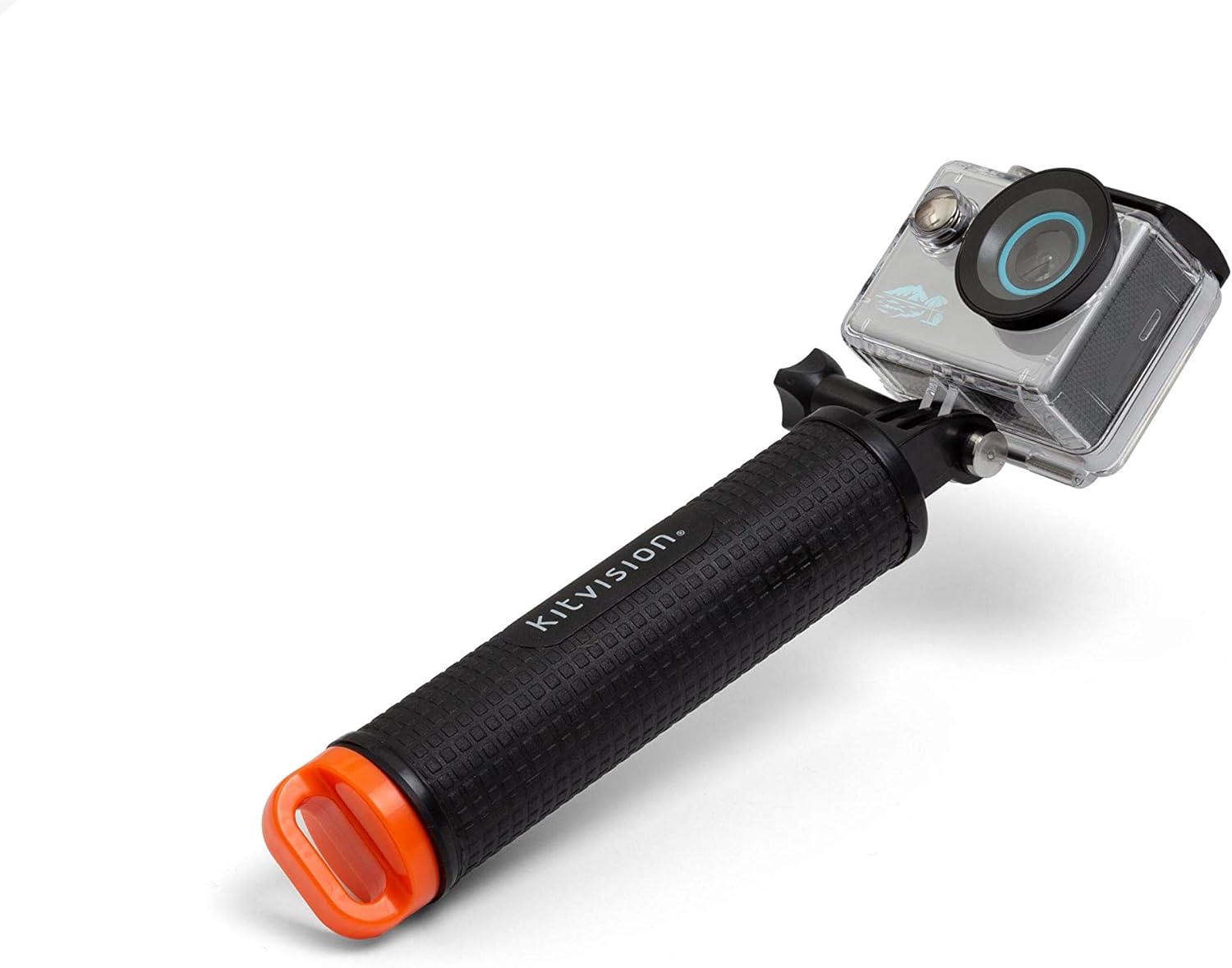
Image: The KitVision 4K Action Camera, enclosed in its waterproof housing, securely mounted on the floating grip.

Image: The KitVision 4K Action Camera, inside its waterproof housing, attached to the extension pole for extended reach.

Image: A smartphone mounted on the extension pole using the provided smartphone adapter.
പ്രവർത്തന നിർദ്ദേശങ്ങൾ
പവർ ഓൺ/ഓഫ്
To power on the camera, press and hold the Power/Mode button (usually on the front or top) for a few seconds until the LCD screen illuminates. To power off, press and hold the same button until the screen turns off.
മോഡ് തിരഞ്ഞെടുക്കൽ
Press the Power/Mode button repeatedly to cycle through different modes: Video Recording, Photo Capture, Playback, and Settings. The current mode will be displayed on the 2-inch LCD screen.
Video Recording (4K)
In Video Recording mode, press the Shutter/OK button (usually on the top) to start recording. Press it again to stop recording. The camera records in 4K (2160p) resolution, capturing high-definition video with a 140-degree wide-angle lens.
ഫോട്ടോ ക്യാപ്ചർ
In Photo Capture mode, press the Shutter/OK button to take a still photograph. The camera's high-resolution sensor ensures clear and detailed images.
Using the 2-inch LCD Screen
The integrated 2-inch LCD screen provides a live preview of your shot, allowing you to frame your videos and photos accurately. It also serves as a display for navigating menus, reviewing captured content, and adjusting settings.
Connectivity (Bluetooth, USB)
The camera supports Bluetooth and USB connectivity. Use the USB cable to transfer files to a computer or for charging. Bluetooth can be used for remote control via a compatible smartphone app (if available, refer to camera settings for pairing instructions).
അണ്ടർവാട്ടർ ഓപ്പറേഷൻ
When using the camera with the waterproof housing, ensure all seals are clean and properly closed. The housing is rated for depths up to 30 meters. Buttons on the housing allow you to operate the camera's functions underwater.
മെയിൻ്റനൻസ്
- വൃത്തിയാക്കൽ: Use the provided microfiber lens cloth to clean the camera lens and LCD screen. For the waterproof housing, rinse with fresh water after saltwater use and allow to air dry. Do not use harsh chemicals.
- ബാറ്ററി കെയർ: Store the battery in a cool, dry place when not in use. Avoid extreme temperatures. If storing for extended periods, charge the battery to about 50% capacity.
- സംഭരണം: Store the camera and accessories in a protective case to prevent damage from dust, moisture, and impacts.
ട്രബിൾഷൂട്ടിംഗ്
| പ്രശ്നം | സാധ്യമായ കാരണം / പരിഹാരം |
|---|---|
| ക്യാമറ പവർ ഓൺ ചെയ്യുന്നില്ല. | ബാറ്ററി തീർന്നു. ബാറ്ററി പൂർണ്ണമായും ചാർജ് ചെയ്യുക. ബാറ്ററി ശരിയായി ചേർത്തിട്ടുണ്ടെന്ന് ഉറപ്പാക്കുക. |
| വീഡിയോ റെക്കോർഡ് ചെയ്യാൻ/ഫോട്ടോ എടുക്കാൻ കഴിയില്ല. | Memory card is full or not inserted correctly. Format the memory card (this will erase all data). Ensure camera is in the correct mode. |
| മോശം വീഡിയോ/ഫോട്ടോ നിലവാരം. | Lens may be dirty. Clean with microfiber cloth. Ensure sufficient lighting. Check resolution settings. |
| Water inside waterproof housing. | Housing not properly sealed. Check for debris on the rubber seal. Ensure latch is securely closed. Do not exceed 30m depth limit. |
സ്പെസിഫിക്കേഷനുകൾ
| ഫീച്ചർ | വിശദാംശങ്ങൾ |
|---|---|
| ബ്രാൻഡ് | KitVision |
| മോഡലിൻ്റെ പേര് | KVACTLAP4K |
| വീഡിയോ റെക്കോർഡിംഗ് റെസല്യൂഷൻ | 2160p (4K) |
| ഫോട്ടോ സെൻസർ ടെക്നോളജി | സിസിഡി |
| ഫ്ലാഷ് മെമ്മറി തരം | എസ്.ഡി.എച്ച്.സി |
| സ്ക്രീൻ വലിപ്പം | 2 ഇഞ്ച് (എൽസിഡി) |
| കണക്റ്റിവിറ്റി ടെക്നോളജി | ബ്ലൂടൂത്ത്, യുഎസ്ബി |
| നിറം | ചാരനിറം |
| ഒപ്റ്റിക്കൽ സൂം | 1x |
| ഉൾപ്പെടുത്തിയ ഘടകങ്ങൾ | Camera Body & Accessories (32 GB Memory Card, Waterproof Housing, Floating Grip, Extension Pole, Smartphone Holder, Microfiber Lens Cloth) |
| ബാറ്ററികൾ | 1 ലിഥിയം അയോൺ ബാറ്ററി (ഉൾപ്പെടുത്തിയിരിക്കുന്നു) |
| പാക്കേജ് അളവുകൾ | 24.7 x 17.1 x 6.4 സെ.മീ; 470 ഗ്രാം |
| ആദ്യം ലഭ്യമായ തീയതി | 15 ജനുവരി 2020 |
വാറൻ്റിയും പിന്തുണയും
KitVision cameras and accessories are designed for life's adventures and come with a 1 വർഷത്തെ വാറൻ്റി വാങ്ങിയ തീയതി മുതൽ. ഈ വാറന്റി നിർമ്മാണ വൈകല്യങ്ങൾ ഉൾക്കൊള്ളുന്നു. വാറന്റി ക്ലെയിമുകൾക്കായി നിങ്ങളുടെ വാങ്ങിയതിന്റെ തെളിവ് സൂക്ഷിക്കുക.
For technical support, troubleshooting assistance, or warranty inquiries, please visit the official KitVision webസൈറ്റിൽ നൽകുകയോ അവരുടെ ഉപഭോക്തൃ സേവന വിഭാഗവുമായി ബന്ധപ്പെടുകയോ ചെയ്യുക. കോൺടാക്റ്റ് വിശദാംശങ്ങൾ സാധാരണയായി ഉൽപ്പന്ന പാക്കേജിംഗിലോ നിർമ്മാതാവിന്റെയോ webസൈറ്റ്.


