1. ആമുഖം
This user manual provides detailed instructions for the setup, operation, maintenance, and troubleshooting of your PAX A80 Countertop Smart Card Terminal. Please read this manual thoroughly before using the device to ensure proper functionality and safety.
2. ഉൽപ്പന്നം കഴിഞ്ഞുview
2.1 പ്രധാന സവിശേഷതകൾ
- Versatile countertop or indoor portable device (with optional backup battery)
- WiFi + Bluetooth + Ethernet + Dial connectivity
- PCI PTS 5.x & Full Contactless compliance
- Cortex A53 Processor for efficient performance
- 4-inch HD Touch Screen for intuitive operation
2.2 ഘടകങ്ങൾ
Familiarize yourself with the main components of your PAX A80 terminal:

ചിത്രം 2.2.1: ഫ്രണ്ട് view of the PAX A80 terminal, showing the 4-inch HD touchscreen displaying a transaction amount and the integrated keypad below it. The keypad includes numerical keys, function keys, and navigation buttons.
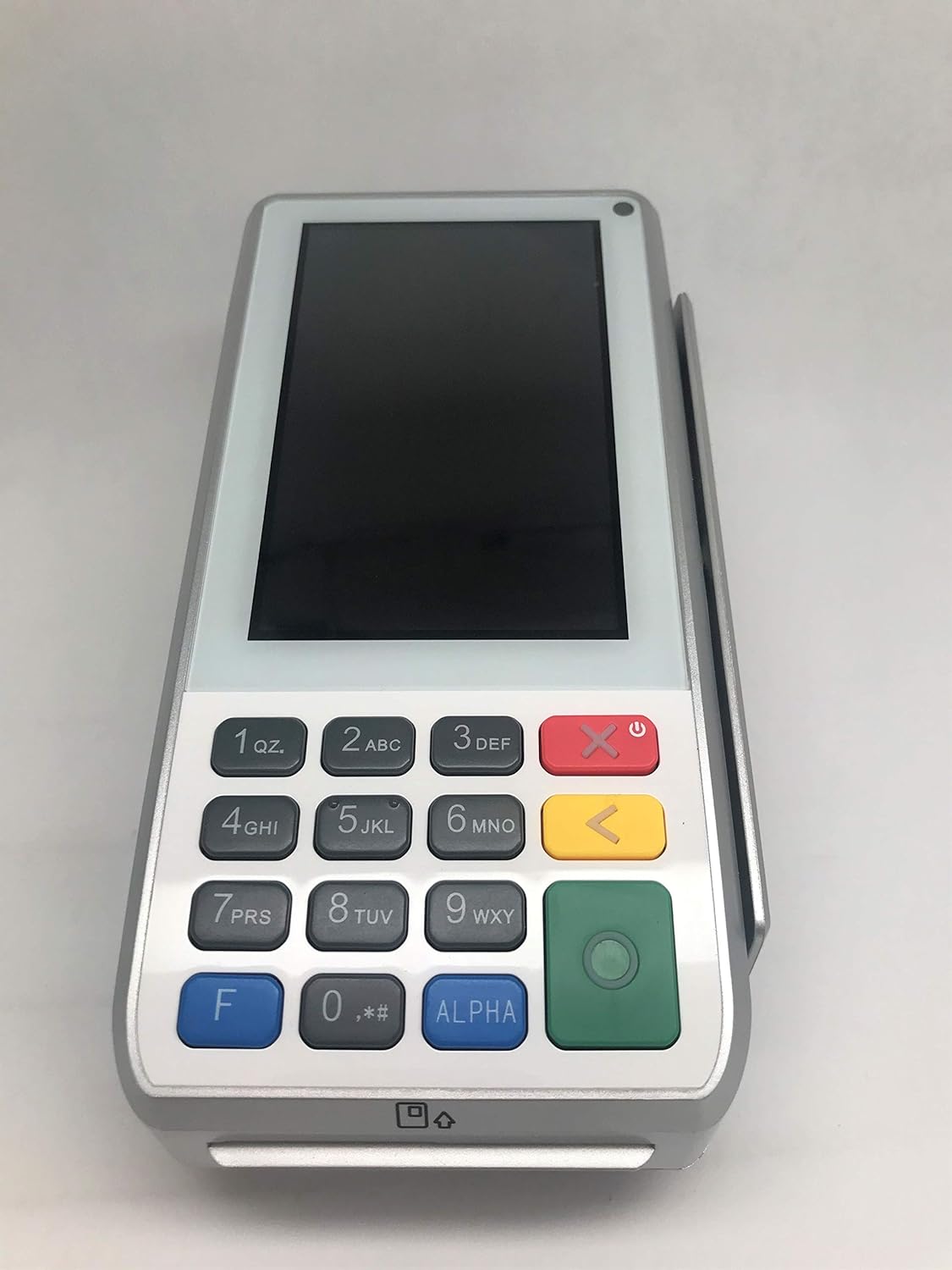
ചിത്രം 2.2.2: കോണാകൃതിയിലുള്ള മുൻഭാഗം view of the PAX A80 terminal, providing a clear perspective of the device's overall design, the blank touchscreen, and the full keypad layout.

ചിത്രം 2.2.3: വശം view of the PAX A80 terminal, highlighting the integrated magnetic stripe card reader slot on the right side of the device.

ചിത്രം 2.2.4: എതിർവശം view of the PAX A80 terminal, showing the smooth profile of the device without any visible ports or slots on this particular side.
3. സജ്ജീകരണം
3.1 അൺബോക്സിംഗും പ്രാരംഭ പരിശോധനയും
- Carefully remove the terminal and all accessories from the packaging.
- Inspect the device for any signs of damage. If damaged, contact your vendor immediately.
- പാക്കിംഗ് ലിസ്റ്റിൽ ലിസ്റ്റ് ചെയ്തിരിക്കുന്ന എല്ലാ ഘടകങ്ങളും ഉണ്ടെന്ന് ഉറപ്പാക്കുക.
3.2 പവർ കണക്ഷൻ
- Connect the power adapter to the power port on the terminal.
- പവർ അഡാപ്റ്റർ ഒരു സാധാരണ ഇലക്ട്രിക്കൽ ഔട്ട്ലെറ്റിലേക്ക് പ്ലഗ് ചെയ്യുക.
- The terminal will automatically power on or can be powered on by pressing the power button.
3.3 നെറ്റ്വർക്ക് കണക്ഷൻ
A80 ഒന്നിലധികം കണക്റ്റിവിറ്റി ഓപ്ഷനുകളെ പിന്തുണയ്ക്കുന്നു:
- ഇഥർനെറ്റ്: Connect an Ethernet cable from your router/modem to the LAN port on the terminal.
- വൈഫൈ: Navigate to the settings menu on the terminal, select Wi-Fi, choose your network, and enter the password.
- ഡയൽ അപ്: Connect a telephone line to the modem port (if available) on the terminal.
4. പ്രവർത്തന നിർദ്ദേശങ്ങൾ
4.1 Basic Payment Processing
The PAX A80 supports various payment methods:
- Contactless (NFC): Tap the card or mobile device near the contactless symbol on the terminal's screen.
- EMV Chip Card: Insert the chip card into the EMV slot at the bottom of the terminal with the chip facing up. Leave the card in until the transaction is complete.
- മാഗ്നെറ്റിക് സ്ട്രൈപ്പ് കാർഡ്: Swipe the card through the magnetic stripe reader slot on the side of the terminal.
4.2 Using the Touch Screen and Keypad
- The 4-inch HD touch screen allows for intuitive navigation through menus and input of information.
- The physical keypad is used for entering PINs, amounts, and navigating when touch input is not preferred or available.
- The green button typically confirms actions, while the red button cancels or goes back.
5. പരിപാലനം
5.1 Cleaning the Terminal
- Always power off and unplug the terminal before cleaning.
- മൃദുവായ, ലിൻ്റ് രഹിത തുണി ഉപയോഗിക്കുകampവെള്ളം അല്ലെങ്കിൽ നേരിയതും, ഉരച്ചിലുകളില്ലാത്തതുമായ ഒരു ക്ലീനർ ഉപയോഗിച്ച് തുടച്ചുമാറ്റുക.
- Do not use harsh chemicals, solvents, or abrasive materials.
- Avoid spraying liquids directly onto the terminal.
5.2 സോഫ്റ്റ്വെയർ അപ്ഡേറ്റുകൾ
Regular software updates are crucial for security and performance. Your service provider will typically manage these updates remotely. Do not attempt to update the software yourself unless instructed by your provider.
6. പ്രശ്നപരിഹാരം
നിങ്ങളുടെ PAX A80 ടെർമിനലിൽ നിങ്ങൾ നേരിട്ടേക്കാവുന്ന പൊതുവായ പ്രശ്നങ്ങൾ ഈ വിഭാഗം അഭിസംബോധന ചെയ്യുന്നു.
| പ്രശ്നം | സാധ്യമായ കാരണം | പരിഹാരം |
|---|---|---|
| Terminal does not power on | No power, faulty adapter, or battery (if applicable) is drained. | Check power cable connection. Ensure outlet is working. Charge battery if using portable. |
| ഇടപാട് നിരസിച്ചു | Insufficient funds, incorrect PIN, card error, or network issue. | Verify card details. Try another card. Check network connection. Contact your payment processor. |
| നെറ്റ്വർക്ക് കണക്ഷനില്ല | Loose cable, incorrect Wi-Fi password, router issue. | Check Ethernet cable. Re-enter Wi-Fi password. Restart router/modem. |
If the problem persists after attempting these solutions, please contact your service provider for further assistance.
7 സ്പെസിഫിക്കേഷനുകൾ
| ഫീച്ചർ | വിശദാംശങ്ങൾ |
|---|---|
| മോഡൽ | A80 |
| പ്രോസസ്സർ | കോർട്ടെക്സ് A53 |
| പ്രദർശിപ്പിക്കുക | 4-ഇഞ്ച് HD ടച്ച് സ്ക്രീൻ |
| കണക്റ്റിവിറ്റി | WiFi, Bluetooth, Ethernet, Dial |
| സുരക്ഷ | PCI PTS 5.x & Full Contactless |
| നിർമ്മാതാവ് | PAX |
| ആദ്യം ലഭ്യമായത് | ഡിസംബർ 3, 2019 |
8. വാറൻ്റിയും പിന്തുണയും
For information regarding warranty coverage, technical support, or service, please refer to the documentation provided by your vendor or contact PAX customer support directly. Specific warranty terms and support procedures may vary based on your region and purchase agreement.