1. ആമുഖം
This manual provides detailed instructions for the installation, operation, and maintenance of your Eonon X20 Car Radio. Please read this manual thoroughly before using the product to ensure proper function and safety. Keep this manual for future reference.
2. സജ്ജീകരണം
2.1. അൺബോക്സിംഗ്
Carefully unpack your Eonon X20 Car Radio and verify all components are present. The package typically includes the X20 Car Stereo unit, an ISO Power Cable, an External Microphone, a 10A Fuse, and 8 screws. A user manual is also included.
വീഡിയോ വിവരണം: This video demonstrates the unboxing process of the Eonon X20 Car Stereo, showing each component included in the package, followed by a step-by-step installation into a vehicle dashboard.

ചിത്ര വിവരണം: An image displaying the contents of the Eonon X20 package: the main car stereo unit, an ISO power cable, an external microphone, a 10A fuse, and eight screws. These are laid out next to the product box.
2.2. Compatibility and Pre-installation Checks
The Eonon X20 is designed for 2 DIN car radio slots. It fits dashboards with dimensions of 178*100mm or 172*97mm. The panel of the X20 is detachable. If your original car radio size is not 178*100mm or 172*97mm, an extra installation kit may be required. If your original unit does not have an ISO connector, you will need to purchase an adapter cable.

ചിത്ര വിവരണം: This image illustrates the compatible dimensions for the Eonon X20 car stereo, showing two standard sizes (178x100mm and 172x97mm) that fit. It also highlights the detachable panel feature and explicitly states that the X20 is not suitable for single DIN cars, showing an example of an incompatible single DIN radio.

ചിത്ര വിവരണം: This image explains that an extra installation kit is needed if the original car radio size is not 178x100mm or 172x97mm. It shows an ISO connector for factory car radios and suggests keywords like 'Car make & model & year + ISO harness' or 'Car make & model & year + 2 din kit' to find suitable mounting kits or wire harnesses online.
വീഡിയോ വിവരണം: This video provides a visual guide on how to determine if the Eonon X20 car stereo will fit your vehicle, detailing scenarios where modification, mounting kits, or ISO harnesses are needed, and when direct installation is possible.
2.3 ഇൻസ്റ്റലേഷൻ ഘട്ടങ്ങൾ
Follow these general steps for installation. Specific vehicle models may require additional steps or tools. It is recommended to consult a professional if you are unsure about any part of the installation process.
- Remove the screws on both sides of the dash panel and carefully take off the dash panel.
- Remove the screws on both sides of the old unit and take out the old unit.
- Pull out all related wires from the old unit.
- Remove the mounting brackets from the old unit.
- Install the mounting brackets removed from the old unit onto the X20 stereo.
- Connect the ISO connector of the X20 power cable to the car's wire harness.
- Connect the power cable of the wire harness to the power cable of the car.
- Connect the Radio antenna to the X20 stereo.
- Connect the Backup Camera cable to the X20 stereo (if applicable).
- Place the fast charging cable as desired.
- Put the X20 stereo into the groove and fix it with screws.
- Test the X20 stereo to ensure all functions are working correctly.
- Install the dash panel and the screws on both sides.
വീഡിയോ വിവരണം: This video provides helpful tips and a visual guide for the installation of the Eonon X20 Universal Car Radio, covering various aspects of the setup process.
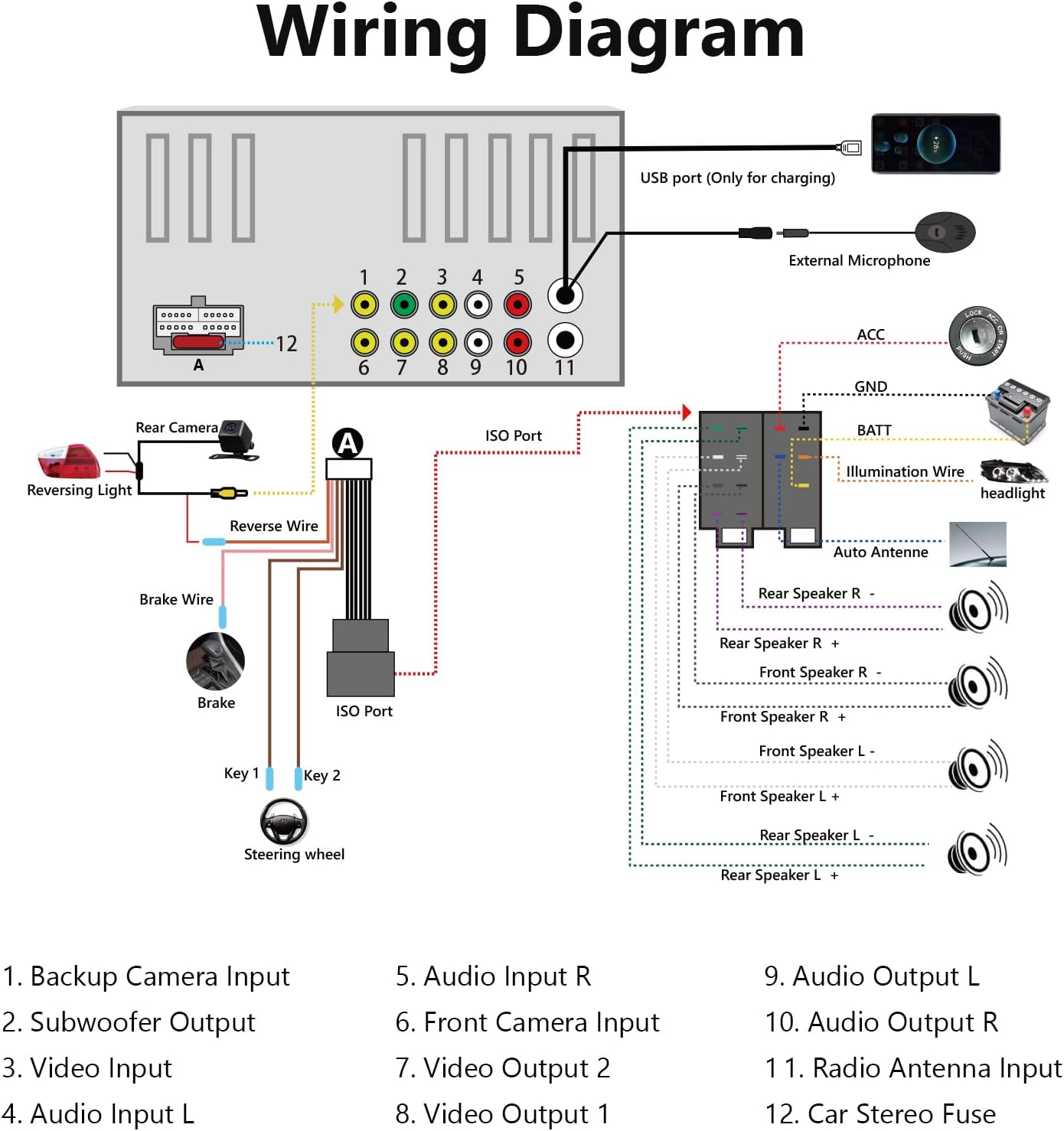
ചിത്ര വിവരണം: A comprehensive wiring diagram for the Eonon X20 car stereo, clearly labeling all input and output connections including backup camera, subwoofer, video, audio, front camera, radio antenna, reverse wire, brake wire, steering wheel controls, ISO port, external microphone, and USB port for charging.
3. ഓപ്പറേഷൻ
3.1. അടിസ്ഥാന പ്രവർത്തനങ്ങൾ
The Eonon X20 features a 7-inch QLED touchscreen display for clear visuals and easy navigation. It supports Bluetooth 5.0 for hands-free calls and music streaming, and includes AM/FM radio functionality with 18 FM and 12 AM station memory.

ചിത്ര വിവരണം: This image compares a standard 1024x600 display with the Eonon X20's QLED 1024x600 display, emphasizing the wider 178° viewing angles of the QLED screen for enhanced visual clarity and experience.

ചിത്ര വിവരണം: The Eonon X20 display showing the Bluetooth 5.0 phone call interface. The screen displays a dial pad, contact information, and options for managing calls, indicating smooth hands-free communication.

ചിത്ര വിവരണം: The Eonon X20 display showing the AM/FM radio interface. It features frequency selection, preset station buttons (P1-P18), and options for AM/FM band selection, enhancing the driving experience with various radio options.
3.2. CarPlay & Android Auto
The Eonon X20 supports both wired and wireless Apple CarPlay and Android Auto, allowing seamless integration with your smartphone for navigation, music, calls, and more. It also features MirrorLink for screen mirroring.
വീഡിയോ വിവരണം: This video demonstrates how to connect and use Apple CarPlay and Android Auto with the Eonon X20 Car Stereo, providing step-by-step instructions for both wired and wireless connections.

ചിത്ര വിവരണം: The Eonon X20 car stereo screen showing the Apple CarPlay interface, with various iOS apps displayed. A smartphone is shown next to it, indicating a wireless connection to CarPlay.

ചിത്ര വിവരണം: The Eonon X20 car stereo screen displaying the Android Auto interface, with various Android apps. A smartphone is shown next to it, indicating a wireless connection to Android Auto.
3.3. Audio Customization (DSP)
The built-in Digital Sound Processor (DSP) allows for advanced audio customization, including a 16-band graphic equalizer and 7 EQ modes. You can adjust sound field, time delay, balance, loudness, and filter settings to optimize your listening experience.

ചിത്ര വിവരണം: The Eonon X20 display showing the Digital Sound Processor (DSP) audio settings. Options for Vbass, Balance, Loudness, Emperor, Filter, and a graphic equalizer (EQ) are visible, allowing for detailed sound customization.
3.4. ബാക്കപ്പ് ക്യാമറ
The X20 supports a 720P HD backup camera (model A0125, included in some packages) for enhanced safety and parking assistance. The camera provides a 140° wide viewing angle and is IP68 waterproof.

ചിത്ര വിവരണം: The Eonon X20 display showing a clear 720P HD backup camera view with dynamic parking guidelines. An inset image shows the A0125 backup camera, highlighting its IP68 waterproof rating and 140° wide viewing ആംഗിൾ.
4. പരിപാലനം
4.1. സ്ക്രീൻ വൃത്തിയാക്കൽ
To clean the QLED touchscreen, use a soft, lint-free cloth. For stubborn smudges, lightly dampen the cloth with a screen cleaner solution specifically designed for electronics. Avoid using harsh chemicals, abrasive materials, or excessive moisture, as these can damage the screen.
4.2. ജനറൽ കെയർ
Keep the unit free from dust and debris. Ensure all connections are secure to prevent intermittent issues. Avoid exposing the unit to extreme temperatures or direct sunlight for prolonged periods, as this can affect performance and longevity.
5. പ്രശ്നപരിഹാരം
5.1. Audio Balance/Fade Issues
If the audio balance or fade settings reset or become incorrect after turning off the car, navigate to the DSP settings menu. Manually adjust the balance and fade to your preferred settings. If the issue persists, check for firmware updates or consult customer support.
5.2. Bluetooth Connectivity Problems
If Bluetooth fails to connect or maintain a stable connection, ensure both the car stereo and your phone have Bluetooth enabled. Try forgetting the device on both ends and re-pairing. Restarting both devices can also resolve temporary glitches. Verify that the car stereo's Bluetooth is discoverable during the pairing process.
5.3. Dim Display
If the display dims unexpectedly or is difficult to see, check the brightness settings in the system menu. Some vehicles may have automatic dimming linked to headlights; ensure this feature is configured correctly or disabled if it causes issues. If the problem is persistent, a factory reset might be necessary, or contact support.
6 സ്പെസിഫിക്കേഷനുകൾ
| ഫീച്ചർ | വിശദാംശങ്ങൾ |
|---|---|
| ഉൽപ്പന്ന അളവുകൾ | 7.01"D x 4.92"W x 3.94"H (10 x 10 x 10 ഇഞ്ച്) |
| ഇനത്തിൻ്റെ ഭാരം | 0.028 ഔൺസ് |
| റാം | 2 ജിബി |
| വയർലെസ് കമ്മ്യൂണിക്കേഷൻ | സെല്ലുലാർ, ബ്ലൂടൂത്ത്, വൈ-ഫൈ |
| കണക്റ്റിവിറ്റി ടെക്നോളജികൾ | Bluetooth, Cellular, USB, Wi-Fi |
| പ്രത്യേക സവിശേഷതകൾ | Spotify, CarPlay, Android Auto, MirrorLink, QLED Display, BC1.2 Fast Charge, Physical Buttons, DSP + Power Amp Chip, AM/FM Radio, AHD Backup Camera A0125 |
| മറ്റ് ഡിസ്പ്ലേ സവിശേഷതകൾ | വയർലെസ് |
| ഹ്യൂമൻ ഇന്റർഫേസ് ഇൻപുട്ട് | ബട്ടണുകൾ, മൈക്രോഫോൺ, ടച്ച്സ്ക്രീൻ |
| നിറം | കറുപ്പ് |
| കൺട്രോളർ തരം | ആൻഡ്രോയിഡ് |
| അനുയോജ്യമായ ഉപകരണങ്ങൾ | സ്പീക്കർ |
| കണക്റ്റർ തരം | USB |
| ഓഡിയോ put ട്ട്പുട്ട് മോഡ് | സ്റ്റീരിയോ |
| സറൗണ്ട് സൗണ്ട് ചാനൽ കോൺഫിഗറേഷൻ | 4.0 |
7. വാറൻ്റിയും പിന്തുണയും
7.1. വാറൻ്റി വിവരങ്ങൾ
Eonon products typically come with a manufacturer's warranty covering defects in materials and workmanship. Please refer to the warranty card included in your product packaging or visit the official Eonon webനിർദ്ദിഷ്ട വാറന്റി നിബന്ധനകൾക്കും വ്യവസ്ഥകൾക്കും സൈറ്റ്.
7.2. ഉപഭോക്തൃ പിന്തുണ
For technical assistance, troubleshooting, or any questions regarding your Eonon X20 Car Radio, please contact Eonon customer support through their official website or the contact information provided in your product documentation. Ensure you have your product model and purchase details ready when contacting support.


