1. ഉൽപ്പന്നം കഴിഞ്ഞുview
The Hemudu Universal Swivel TV Stand HT07B-002 is designed to provide a stable, adjustable, and versatile mounting solution for your television. Constructed with heavy-duty steel and a tempered glass base, it offers enhanced safety and a clean aesthetic for various room setups.
- Heavy Duty & Reliable: Features a solid steel elliptical tube, steel bracket panel, and heavy-duty tempered glass base, supporting TVs up to 88lbs.
- വളരെ അനുയോജ്യം: Suitable for 13 to 39 inch TVs, compatible with major brands like Samsung, Vizio, Sony, LG, Panasonic, Sharp, Toshiba, Philips, Pioneer.
- ഉയരം ക്രമീകരിക്കാവുന്ന: Offers 4 levels of height adjustment for optimal viewing.
- സ്വിവൽ ഫംഗ്ഷൻ: Provides a 100-degree swivel range (-50 to +50 degrees) for flexible viewകോണുകൾ.
- കേബിൾ മാനേജുമെന്റ്: Integrated wire management system to conceal cables for a tidy appearance.
2 സുരക്ഷാ വിവരങ്ങൾ
Please read and understand all instructions before installation and use. Keep this manual for future reference. Improper installation or use may result in property damage or personal injury.
- Ensure the TV weight and size are within the stand's specified limits (max 88lbs, 13-39 inches).
- Verify that the VESA mounting pattern of your TV is compatible with the stand.
- ഘടകങ്ങൾക്ക് കേടുപാടുകൾ സംഭവിക്കാതിരിക്കാൻ അസംബ്ലി സമയത്ത് സ്ക്രൂകൾ അമിതമായി മുറുക്കരുത്.
- സ്റ്റാൻഡ് വളയുന്നത് തടയാൻ സ്ഥിരതയുള്ളതും നിരപ്പായതുമായ ഒരു പ്രതലത്തിൽ വയ്ക്കുക.
- Keep children and pets away from the TV stand during assembly and ensure all parts are securely fastened.
- Use all provided safety screws and rubber pads for maximum stability.
3. പാക്കേജ് ഉള്ളടക്കം
Before starting assembly, ensure all parts listed below are present and undamaged. If any parts are missing or damaged, do not proceed with assembly and contact customer support.
- Steel Support Pillar
- ടെമ്പർഡ് ഗ്ലാസ് ബേസ്
- TV Mounting Bracket (with various VESA holes)
- Mounting Arms (2 pieces)
- Various Screw Sets (S1, S2, S3, S4, etc.) for different TV models
- Spacers and Washers
- കേബിൾ മാനേജ്മെന്റ് ക്ലിപ്പുകൾ/ടൈകൾ
- Allen Wrench and Open-end Wrench
- ഇൻസ്ട്രക്ഷൻ മാനുവൽ
4. സജ്ജീകരണവും അസംബ്ലി നിർദ്ദേശങ്ങളും
Follow these steps carefully to assemble your Hemudu Universal Swivel TV Stand.
ഘട്ടം 1: ടിവിയിലേക്ക് മൗണ്ടിംഗ് ആയുധങ്ങൾ അറ്റാച്ചുചെയ്യുക
Carefully place your TV face down on a soft, clean surface. Attach the two mounting arms to the back of your TV using the appropriate screws and spacers from the provided hardware kit. Ensure the arms are securely fastened and aligned with your TV's VESA mounting holes.

Figure 1: Back of TV with mounting arms attached, illustrating various VESA compatibility.
Step 2: Assemble the Stand Base and Pillar
Connect the steel support pillar to the tempered glass base using the designated screws. Ensure the connection is firm but do not fully tighten until all components are aligned. Attach the main TV mounting bracket to the top of the steel pillar.
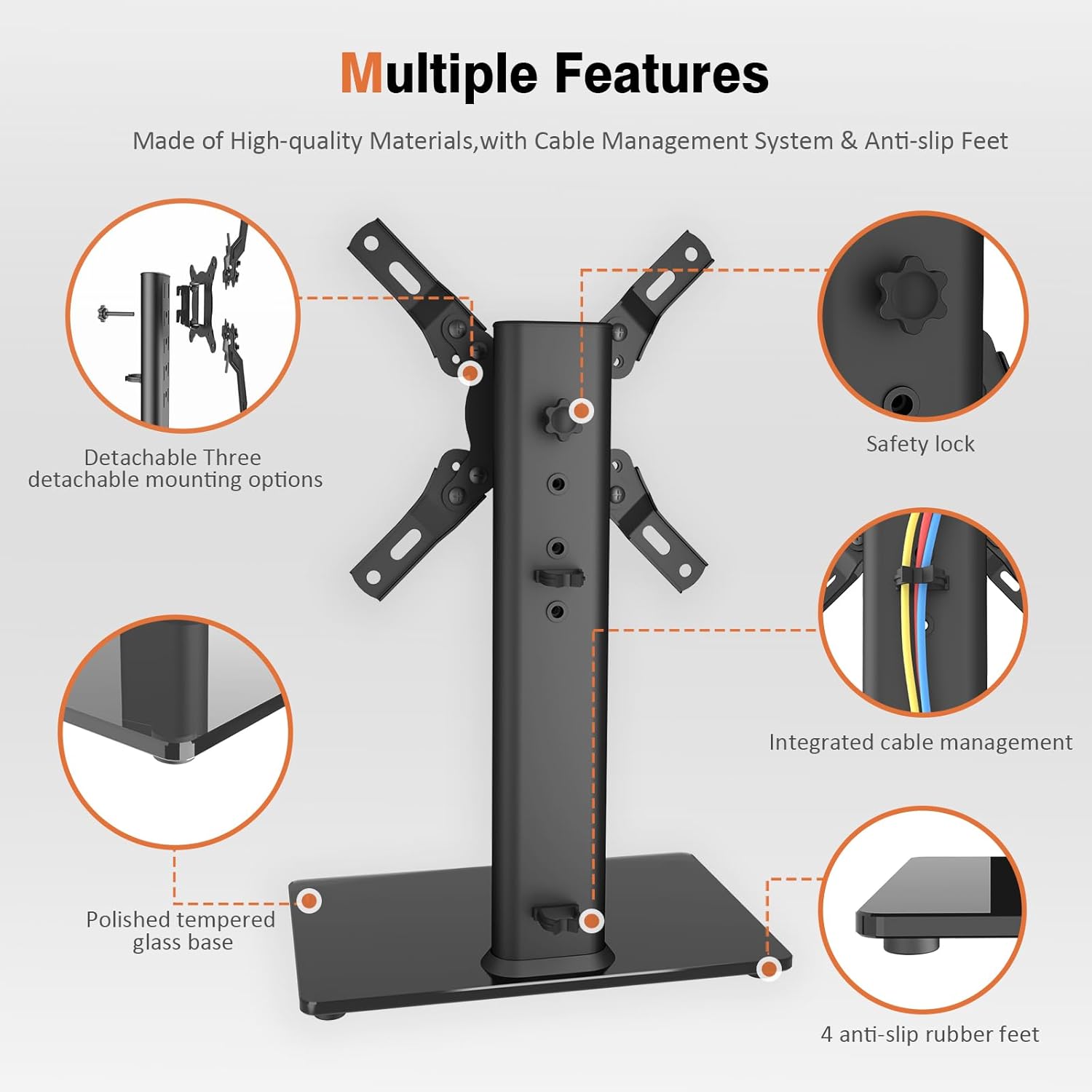
ചിത്രം 2: പൊട്ടിത്തെറിച്ചു view of the stand's components and assembly points, including safety lock and anti-slip feet.
Step 3: Mount the TV onto the Stand
Carefully lift the TV (with mounting arms attached) and hook the arms onto the main TV mounting bracket. Ensure both arms are securely seated. Use the safety screws to lock the TV in place, preventing accidental dislodgement.
Video 1: Official Hemudu video demonstrating the assembly process of the Swivel TV Stand HT07B-002.
Video 2: Another official Hemudu video showcasing the assembly and features of the universal TV stand HT07B-002.
5. പ്രവർത്തന നിർദ്ദേശങ്ങൾ
ഉയരം ക്രമീകരിക്കൽ
The TV stand offers 4 levels of height adjustment. To adjust the height, you must first unhook the TV from the main bracket. Re-attach the mounting arms to a different set of holes on the steel pillar to achieve your desired viewing height. Secure with safety screws.

Figure 3: Illustration of the 4-level height adjustment feature, allowing users to optimize viewഅനുഭവം.
സ്വിവൽ ഫംഗ്ഷൻ
Once assembled, your TV can swivel 100 degrees (-50 to +50 degrees) left or right. Gently push the sides of the TV to adjust the viewing angle as needed. This feature allows for optimal viewing from various positions in your room.

Figure 4: Visual representation of the ±50° swivel adjustment, enhancing viewആശ്വാസം.
6. പരിപാലനം
To ensure the longevity and proper functioning of your TV stand, follow these maintenance guidelines:
- വൃത്തിയാക്കൽ: Use a soft, dry cloth to clean the steel components and tempered glass base. For stubborn marks on the glass, a mild glass cleaner can be used. Avoid abrasive cleaners or materials that could scratch the surfaces.
- പരിശോധന: എല്ലാ സ്ക്രൂകളും കണക്ഷനുകളും ഇറുകിയതും സുരക്ഷിതവുമാണെന്ന് ഉറപ്പാക്കാൻ ഇടയ്ക്കിടെ പരിശോധിക്കുക. ആവശ്യമെങ്കിൽ വീണ്ടും മുറുക്കുക.
- ഭാരം പരിധി: പരമാവധി ഭാരം ശേഷി 88 പൗണ്ട് കവിയരുത്.
- കേബിൾ മാനേജുമെന്റ്: Regularly check the cable management system to ensure cables are not pinched or damaged.
7. പ്രശ്നപരിഹാരം
If you encounter any issues with your TV stand, refer to the following common troubleshooting tips:
- TV is Wobbly:
- എല്ലാ സ്ക്രൂകളും സുരക്ഷിതമായി ഉറപ്പിച്ചിട്ടുണ്ടെന്ന് ഉറപ്പാക്കുക.
- Verify the stand is placed on a flat, stable surface.
- Check that the TV's weight does not exceed the stand's capacity.
- Confirm the rubber pads are correctly installed on the base.
- ടിവി നിലവാരമില്ലാത്തത്:
- Recheck the mounting arms on the back of the TV to ensure they are aligned evenly.
- Adjust the height settings on the steel pillar to correct any tilt.
- തിരിയാനുള്ള ബുദ്ധിമുട്ട്:
- Ensure no cables are obstructing the swivel mechanism.
- Check for any debris or foreign objects around the swivel joint.
- മറച്ചുവെക്കാത്ത കേബിളുകൾ:
- Utilize the provided cable management clips to route and secure cables along the support pillar.
8 സ്പെസിഫിക്കേഷനുകൾ
| ഫീച്ചർ | വിശദാംശങ്ങൾ |
|---|---|
| മോഡൽ നമ്പർ | HT07B-002 |
| ബ്രാൻഡ് | ഹേമുഡു |
| മൗണ്ടിംഗ് തരം | ടേബിൾടോപ്പ് മൗണ്ട് |
| ചലന തരം | Swivel (100 Degree: -50 to +50) |
| മെറ്റീരിയൽ | അലോയ് സ്റ്റീൽ, ടെമ്പർഡ് ഗ്ലാസ് |
| നിറം | കറുപ്പ് |
| അനുയോജ്യമായ ടിവി വലുപ്പങ്ങൾ | 13 മുതൽ 39 ഇഞ്ച് വരെ |
| ഭാരം ശേഷി | 88 പൗണ്ട് വരെ (40 കി.ഗ്രാം) |
| ഉയരം ക്രമീകരിക്കൽ | 4 ലെവലുകൾ |
| ഇനത്തിൻ്റെ ഭാരം | 5.98 പൗണ്ട് |
| പാക്കേജ് അളവുകൾ | 16.61 x 9.21 x 2.44 ഇഞ്ച് |

Figure 5: Product dimensions and VESA compatibility chart to ensure proper fit for your television.
9. വാറൻ്റിയും പിന്തുണയും
For warranty information or technical support, please refer to the product packaging or contact Hemudu customer service directly. Keep your purchase receipt as proof of purchase.


