1. ആമുഖം
The Logitech MX Keys Advanced Wireless Illuminated Keyboard for Mac is designed for seamless integration with macOS, iPadOS, and iOS devices. This full-size keyboard features a Mac key layout, spherically-dished keys for comfortable typing, and dynamic backlighting that adjusts to ambient light. It offers multi-device connectivity, allowing you to switch between up to three devices with ease, and can follow a Flow-enabled mouse for a fluid multi-computer workflow. The keyboard is built with a metal construction for stability and precision, and recharges via a USB-C to USB-C cable.
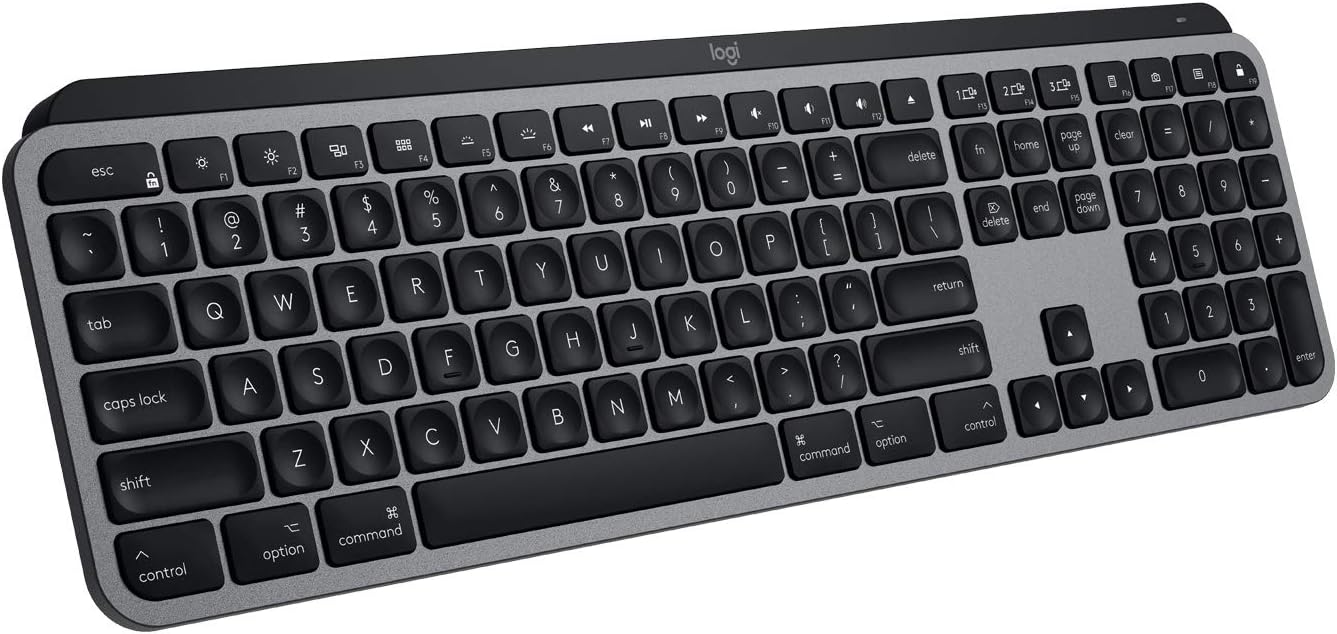
Image: The Logitech MX Keys Advanced Wireless Illuminated Keyboard for Mac, showcasing its full-size layout and Space Grey finish.
2. സജ്ജീകരണം
2.1 ബോക്സിൽ എന്താണുള്ളത്
Upon unboxing your Logitech MX Keys for Mac, you will find the following components:
- Logitech MX Keys Advanced Wireless Illuminated Keyboard for Mac
- ലോജിടെക് യൂണിഫൈയിംഗ് യുഎസ്ബി റിസീവർ
- USB-C മുതൽ USB-C വരെ ചാർജിംഗ് കേബിൾ (1 മീറ്റർ)
- ഉപയോക്തൃ ഡോക്യുമെൻ്റേഷൻ

Image: A diagram illustrating the contents included in the Logitech MX Keys for Mac packaging, including the keyboard, USB receiver, and charging cable.
2.2 പ്രാരംഭ ചാർജിംഗ്
Before first use, it is recommended to fully charge your keyboard. Connect the supplied USB-C to USB-C charging cable to the keyboard's USB-C port and to a compatible USB-C power source (e.g., your Mac, a wall adapter). A full charge can last up to 10 days with backlighting on, or up to 5 months with backlighting off.

Image: A close-up of the Logitech MX Keys for Mac showing the USB-C charging port and the USB-C to USB-C cable connected.
2.3 നിങ്ങളുടെ കീബോർഡ് ബന്ധിപ്പിക്കുന്നു
The MX Keys for Mac offers two primary connection methods: Bluetooth Low Energy and the Logitech Unifying USB Receiver.
- ബ്ലൂടൂത്ത് കണക്ഷൻ:
- Turn on the keyboard using the power switch on the top right edge.
- Press and hold one of the Easy-Switch keys (F1, F2, or F3) for three seconds until the LED indicator on the key starts blinking rapidly. This indicates pairing mode.
- On your Mac or iPad, go to System Settings (or System Preferences) > Bluetooth and select "MX Keys for Mac" from the list of available devices.
- Follow any on-screen prompts to complete the pairing.
- Logitech Unifying USB Receiver Connection:
- Plug the Unifying USB receiver into an available USB-A port on your Mac.
- കീബോർഡ് ഓണാക്കുക. അത് സ്വയമേവ റിസീവറുമായി കണക്റ്റ് ചെയ്യണം.
- For advanced setup and customization, download and install the Logitech Options software from the official Logitech webസൈറ്റ്.
3. കീബോർഡ് പ്രവർത്തിപ്പിക്കൽ
3.1 പ്രധാന സവിശേഷതകൾ
The MX Keys for Mac is designed for an optimal typing experience:
- പെർഫെക്റ്റ് സ്ട്രോക്ക് കീകൾ: Spherically-dished keys are contoured to match the shape of your fingertips, providing a comfortable and precise typing experience.
- സ്മാർട്ട് പ്രകാശം: The backlighting automatically adjusts to ambient lighting conditions and illuminates when your hands approach the keyboard, saving battery life.
- Multi-Computer Control (Flow): When paired with a Flow-enabled Logitech mouse (e.g., MX Master 3 for Mac), the keyboard can seamlessly switch between multiple Mac computers by simply moving your mouse cursor from one screen to another.

ചിത്രം: ഒരു ക്ലോസ്-അപ്പ് view of the Logitech MX Keys, highlighting the spherically-dished Perfect Stroke keys designed for comfortable and precise typing.

Image: The Logitech MX Keys keyboard with its smart backlighting activated in a dimly lit setting, demonstrating how the keys illuminate.

Image: An illustration of the Logitech Flow feature, showing how the MX Keys can be used to type across multiple computers (laptop and desktop) seamlessly.
3.2 Customizable Keys and Easy-Switch
The MX Keys for Mac features a row of Fn keys that can be customized using the Logitech Options software. This allows you to assign specific functions or shortcuts to these keys to enhance your workflow.
The Easy-Switch buttons (F1, F2, F3) located on the top row allow you to quickly switch between up to three paired devices. Simply press the desired Easy-Switch button to connect to the corresponding device.

Image: A detailed diagram of the Logitech MX Keys for Mac, labeling key features such as Mac layout, Perfect Stroke Keys, Space Gray finish, Smart backlighting, Customizable keys, Comfort & Stability, USB-C to C charging, and Easy-Switch buttons.

Image: A visual representation of the Easy-Switch functionality, showing the keyboard connected to a MacBook Pro, an iMac, and an iPad, allowing seamless switching between them.
3.3 ഉൽപ്പന്നം കഴിഞ്ഞുview വീഡിയോ
Watch this official product video for a quick overview of the Logitech MX Keys for Mac's features and design.
വീഡിയോ: ഒരു ഔദ്യോഗിക ഉൽപ്പന്ന വീഡിയോ പ്രദർശനംasing the Logitech MX Keys for Mac, highlighting its design and key functionalities.
4. പരിപാലനം
To ensure the longevity and optimal performance of your Logitech MX Keys for Mac, follow these maintenance guidelines:
- വൃത്തിയാക്കൽ: Use a soft, lint-free cloth to wipe down the keyboard surface. For deeper cleaning, a slightly damp കീ സ്വിച്ചുകളിലോ ആന്തരിക ഘടകങ്ങളിലോ ദ്രാവകം പ്രവേശിക്കുന്നില്ലെന്ന് ഉറപ്പാക്കാൻ വീര്യം കുറഞ്ഞ സോപ്പ് ഉള്ള തുണി ഉപയോഗിക്കാം. അബ്രാസീവ് ക്ലീനറുകളോ ലായകങ്ങളോ ഒഴിവാക്കുക.
- ബാറ്ററി കെയർ: While the keyboard has a long battery life, avoid completely draining the battery frequently. Recharge it when the battery indicator glows red or when prompted by Logitech Options. Store the keyboard in a cool, dry place if not in use for extended periods.
- സംഭരണം: When transporting or storing the keyboard, ensure it is placed in a protective sleeve or case to prevent scratches and damage to the keys or body.
5. പ്രശ്നപരിഹാരം
If you encounter issues with your Logitech MX Keys for Mac, refer to the following common troubleshooting steps:
5.1 കണക്റ്റിവിറ്റി പ്രശ്നങ്ങൾ
- കീബോർഡ് കണക്റ്റ് ചെയ്യുന്നില്ല: Ensure the keyboard is turned on and fully charged. Check that Bluetooth is enabled on your device or that the Unifying receiver is securely plugged in. Try re-pairing the keyboard by holding an Easy-Switch key until it blinks and re-selecting it in your device's Bluetooth settings.
- ഇടവിട്ടുള്ള കണക്ഷൻ: Move the keyboard closer to your device or Unifying receiver to reduce interference. Avoid placing the keyboard near other wireless devices that might cause signal disruption.
5.2 ബാക്ക്ലൈറ്റിംഗ് പ്രശ്നങ്ങൾ
- ബാക്ക്ലൈറ്റ് പ്രവർത്തിക്കുന്നില്ല: Ensure the keyboard has sufficient charge. The backlighting automatically adjusts based on ambient light; try using it in a darker environment to see if it activates. Check Logitech Options software for backlight settings.
- ബാക്ക്ലൈറ്റ് വളരെ മങ്ങിയതാണ്/തെളിച്ചമുള്ളതാണ്: Adjust the backlight intensity using the dedicated keys on the keyboard (F5 and F6) or through the Logitech Options software.
5.3 ചാർജിംഗ് പ്രശ്നങ്ങൾ
- കീബോർഡ് ചാർജ് ചെയ്യുന്നില്ല: Verify that the USB-C cable is properly connected to both the keyboard and the power source. Try a different USB-C port or power adapter. Ensure the cable itself is not damaged.
- Battery indicator not accurate: Allow the keyboard to fully charge and discharge a few times to recalibrate the battery indicator. If issues persist, contact Logitech support.
6 സ്പെസിഫിക്കേഷനുകൾ
| ഫീച്ചർ | വിശദാംശങ്ങൾ |
|---|---|
| ബ്രാൻഡ് | ലോജിടെക് |
| മോഡലിൻ്റെ പേര് | MX Keys For Mac |
| ഇനം മോഡൽ നമ്പർ | 920-009552 |
| കണക്റ്റിവിറ്റി ടെക്നോളജി | Bluetooth, USB Unifying Receiver |
| അനുയോജ്യമായ ഉപകരണങ്ങൾ | MacBook Pro, MacBook Air, iMac, iPad (macOS 10.15 & later, iPadOS 13.4 & later, iOS 9 & later) |
| കീബോർഡ് വിവരണം | Wireless, QWERTY, Full Size |
| പ്രത്യേക സവിശേഷതകൾ | Hand Proximity Detection, Rechargeable Battery, Integrated Backlighting, Ambient Light Sensor, On/Off Switch, Battery Indicator |
| നിറം | സ്പേസ് ഗ്രേ |
| കീകളുടെ എണ്ണം | 104 |
| ഇനത്തിൻ്റെ ഭാരം | 1.79 പൗണ്ട് |
| ഉൽപ്പന്ന അളവുകൾ | 17.7 x 5.7 x 1.6 ഇഞ്ച് |
| പവർ ഉറവിടം | ബാറ്ററി പവർ (1 ലിഥിയം പോളിമർ ബാറ്ററി ഉൾപ്പെടുത്തിയിട്ടുണ്ട്) |
| ബാറ്ററി ലൈഫ് | Up to 10 days (with backlighting), up to 5 months (backlighting off) |
7. വാറൻ്റിയും പിന്തുണയും
Logitech products are designed for reliability and performance. For detailed warranty information, please refer to the warranty card included with your product or visit the official Logitech support webസൈറ്റ്.
For further assistance, technical support, or to download the latest Logitech Options software and user manuals, please visit the Logitech support page:
PDF ഫോർമാറ്റിലുള്ള ഒരു സമഗ്രമായ ഉപയോക്തൃ മാനുവൽ ഡൗൺലോഡ് ചെയ്യാൻ ലഭ്യമാണ്:


