1. ആമുഖം
വാങ്ങിയതിന് നന്ദി.asing the E-YOOSO Z-7900 Gaming Mouse. This manual provides detailed instructions for setting up, operating, and maintaining your new gaming mouse. Please read this manual thoroughly to ensure optimal performance and longevity of your device.

Figure 1: E-YOOSO Z-7900 Gaming Mouse and its storage case.
2. ഉൽപ്പന്ന സവിശേഷതകൾ
- എർഗണോമിക് ഡിസൈൻ: Engineered for comfort during extended use, reducing hand fatigue.
- ഉയർന്ന കൃത്യതയുള്ള ഒപ്റ്റിക്കൽ സെൻസർ: Utilizes an optical sensor for accurate movement detection.
- 14 പ്രോഗ്രാം ചെയ്യാവുന്ന ബട്ടണുകൾ: Customize functionality for various tasks and gaming scenarios.
- ക്രമീകരിക്കാവുന്ന DPI: Up to 10000 DPI for precise movement control.
- വിശാലമായ അനുയോജ്യത: Compatible with Windows 8, Windows 7, Windows Vista, Windows XP, and Windows 10 operating systems.
- Weight Tuning Set: Allows for adjustment of mouse weight to suit user preference.
- RGB ലൈറ്റിംഗ്: Customizable RGB lighting effects.

Figure 2: Illustration of the ergonomic design for comfortable grip.
3. പാക്കേജ് ഉള്ളടക്കം
അൺബോക്സിംഗ് ചെയ്യുമ്പോൾ പാക്കേജ് ഉള്ളടക്കങ്ങൾ പരിശോധിക്കുക:
- E-YOOSO Z-7900 Gaming Mouse
- Weight Tuning Set (pre-installed or separate)
- ഉപയോക്തൃ മാനുവൽ (ഈ പ്രമാണം)
- Note: Software CD may not be included. Refer to Section 5 for software installation.
4. സജ്ജീകരണം
- മൗസ് ബന്ധിപ്പിക്കുക: Plug the USB connector of the E-YOOSO Z-7900 Gaming Mouse into an available USB port on your computer.
- ഡ്രൈവർ ഇൻസ്റ്റാളേഷൻ: Your operating system (Windows) should automatically detect and install the necessary drivers. This is a plug-and-play device for basic functionality.
- സോഫ്റ്റ്വെയർ ഇൻസ്റ്റാളേഷൻ (ഓപ്ഷണൽ എന്നാൽ ശുപാർശ ചെയ്യുന്നത്): For full customization of programmable buttons, DPI settings, and RGB lighting, install the dedicated software. Refer to Section 5 for detailed instructions.

Figure 3: The mouse is compatible with various Windows operating systems.
5. സോഫ്റ്റ്വെയർ ഇൻസ്റ്റാളേഷനും ഇഷ്ടാനുസൃതമാക്കലും
To unlock the full potential of your E-YOOSO Z-7900 Gaming Mouse, including macro programming, advanced DPI settings, polling rate adjustments, and RGB lighting customization, you will need to install the dedicated software.
5.1 Obtaining the Software
As a physical software CD may not be included, please visit the official E-YOOSO support website or the product page where you purchased the mouse to find the download link for the latest software. Look for a link typically labeled "Driver Download" or "Software."
5.2 ഇൻസ്റ്റലേഷൻ ഘട്ടങ്ങൾ
- Download the software package to your computer.
- ഡൗൺലോഡ് ചെയ്തത് കണ്ടെത്തുക file (usually a .exe or .zip file) and extract it if necessary.
- ഇൻസ്റ്റാളർ പ്രവർത്തിപ്പിച്ച് ഇൻസ്റ്റാളേഷൻ പൂർത്തിയാക്കാൻ ഓൺ-സ്ക്രീൻ നിർദ്ദേശങ്ങൾ പാലിക്കുക.
- Once installed, launch the software. Ensure your mouse is connected to the computer.
5.3 ഇഷ്ടാനുസൃതമാക്കൽ ഓപ്ഷനുകൾ
- ബട്ടൺ അസൈൻമെന്റ്: Reassign functions to any of the 14 programmable buttons, including keyboard keys, multimedia controls, or macros.
- DPI ക്രമീകരണങ്ങൾ: Adjust DPI levels and create custom profileവ്യത്യസ്ത ആപ്ലിക്കേഷനുകൾക്കോ ഗെയിമുകൾക്കോ വേണ്ടിയുള്ളത്.
- പോളിംഗ് നിരക്ക്: Modify the mouse's polling rate (e.g., 125/250/500/1000Hz) for faster response times.
- RGB ലൈറ്റിംഗ്: Customize lighting effects, colors, and brightness.
- മാക്രോ എഡിറ്റർ: Create and assign complex macro sequences to programmable buttons.

Figure 4: The mouse supports macro editing for customizable keys.
6. പ്രവർത്തന നിർദ്ദേശങ്ങൾ
6.1 അടിസ്ഥാന പ്രവർത്തനം
- ഇടത് ക്ലിക്ക്: പ്രാഥമിക പ്രവർത്തനം.
- വലത് ക്ലിക്കിൽ: ദ്വിതീയ പ്രവർത്തന/സന്ദർഭ മെനു.
- സ്ക്രോൾ വീൽ: മുകളിലേക്കും/താഴേക്കും സ്ക്രോൾ ചെയ്യുക, മധ്യത്തിൽ ക്ലിക്ക് ചെയ്യുക.

Figure 5: Main click buttons and scroll wheel.
6.2 ഡിപിഐ അഡ്ജസ്റ്റ്മെന്റ്
The mouse features dedicated DPI buttons (usually located near the scroll wheel) to cycle through preset DPI levels. You can customize these levels using the software.
- അമർത്തുക DPI+ സംവേദനക്ഷമത വർദ്ധിപ്പിക്കുന്നതിനുള്ള ബട്ടൺ.
- അമർത്തുക DPI- സെൻസിറ്റിവിറ്റി കുറയ്ക്കുന്നതിനുള്ള ബട്ടൺ.
- Default DPI settings typically include 500, 1000, 2000, 3000, 5000, and up to 10000 DPI.
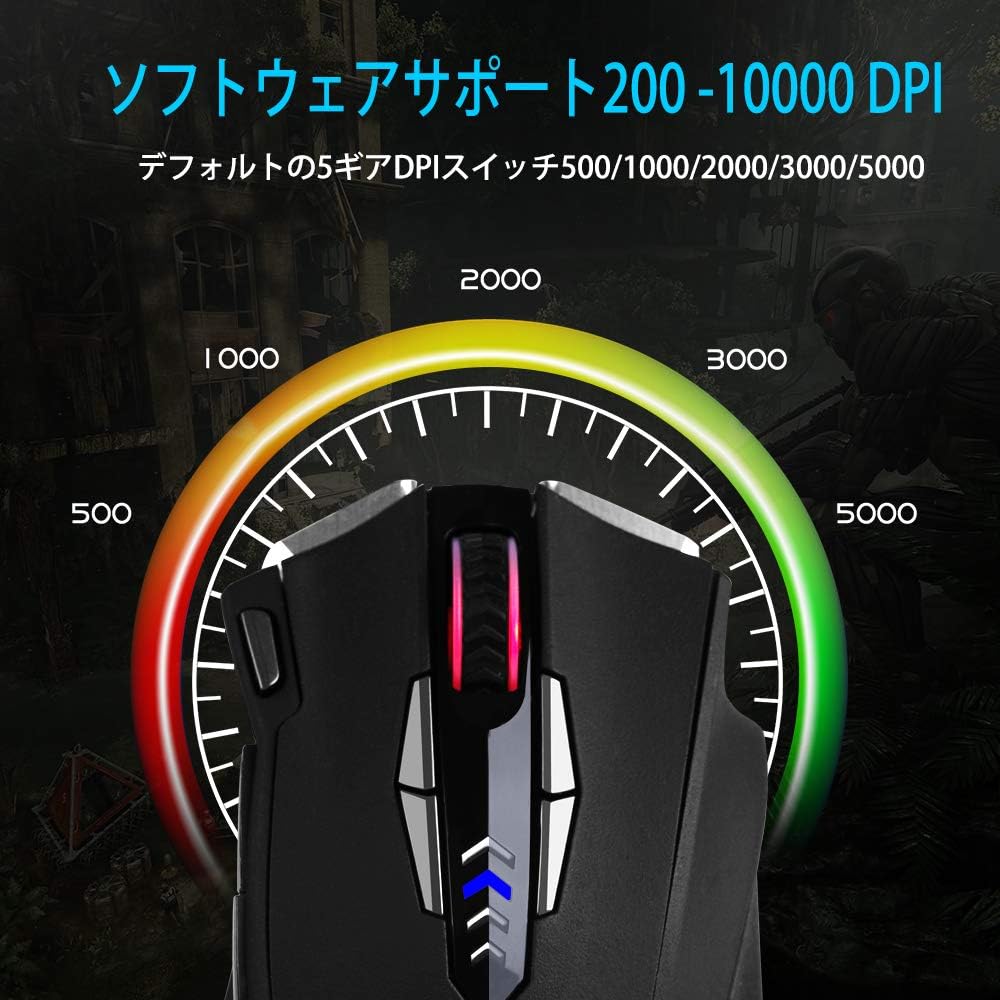
ചിത്രം 6: ക്രമീകരിക്കാവുന്ന DPI ലെവലുകളുടെ ദൃശ്യ പ്രാതിനിധ്യം.
6.3 പോളിംഗ് നിരക്ക് ക്രമീകരണം
The polling rate determines how often the mouse reports its position to the computer. A higher polling rate results in faster response times. This can typically be adjusted via the software or a physical switch on the mouse's underside.
- Common polling rates: 125Hz, 250Hz, 500Hz, 1000Hz.
- Adjust the polling rate according to your preference and system capabilities.

Figure 7: Polling rate switch located on the underside of the mouse.
7. പരിപാലനം
ശരിയായ അറ്റകുറ്റപ്പണികൾ നിങ്ങളുടെ ഗെയിമിംഗ് മൗസിന്റെ ദീർഘായുസ്സും പ്രകടനവും ഉറപ്പാക്കുന്നു.
- വൃത്തിയാക്കൽ: മൗസിന്റെ പ്രതലം തുടയ്ക്കാൻ മൃദുവായതും ഉണങ്ങിയതുമായ ഒരു തുണി ഉപയോഗിക്കുക. കഠിനമായ അഴുക്കിന്, ചെറുതായി dampതുണിയിൽ വെള്ളം അല്ലെങ്കിൽ നേരിയ ക്ലീനിംഗ് ലായനി ഉപയോഗിക്കുക. കഠിനമായ രാസവസ്തുക്കൾ ഒഴിവാക്കുക.
- സെൻസർ ക്ലീനിംഗ്: Occasionally clean the optical sensor on the underside of the mouse with a cotton swab to prevent tracking issues.
- കേബിൾ കെയർ: കേടുപാടുകൾ ഒഴിവാക്കാൻ മൂർച്ചയുള്ള വളവുകളോ യുഎസ്ബി കേബിളിൽ അമിതമായി വലിക്കുന്നതോ ഒഴിവാക്കുക.
- സംഭരണം: When not in use, store the mouse in a clean, dry environment, away from extreme temperatures.
8. പ്രശ്നപരിഹാരം
| പ്രശ്നം | സാധ്യമായ കാരണം | പരിഹാരം |
|---|---|---|
| മൗസ് പ്രതികരിക്കുന്നില്ല | അയഞ്ഞ യുഎസ്ബി കണക്ഷൻ, തകരാറുള്ള യുഎസ്ബി പോർട്ട്, ഡ്രൈവർ പ്രശ്നം. |
|
| കൃത്യമല്ലാത്ത ട്രാക്കിംഗ് അല്ലെങ്കിൽ കഴ്സർ ജമ്പുകൾ | Dirty sensor, unsuitable mouse pad surface, high DPI setting. |
|
| പ്രോഗ്രാം ചെയ്യാവുന്ന ബട്ടണുകൾ പ്രവർത്തിക്കുന്നില്ല | Software not installed, incorrect button assignment, software conflict. |
|
| RGB ലൈറ്റിംഗ് പ്രവർത്തിക്കുന്നില്ല | സോഫ്റ്റ്വെയർ സെറ്റിംഗ്, പവർ പ്രശ്നം. |
|
9 സ്പെസിഫിക്കേഷനുകൾ
| ഫീച്ചർ | വിശദാംശങ്ങൾ |
|---|---|
| ബ്രാൻഡ് | ഇ-യൂസോ |
| മോഡൽ നമ്പർ | Z-7900 |
| കണക്റ്റിവിറ്റി ടെക്നോളജി | USB, വയർഡ് |
| മൂവ്മെന്റ് ഡിറ്റക്ഷൻ ടെക്നോളജി | ഒപ്റ്റിക്കൽ |
| ബട്ടണുകളുടെ എണ്ണം | 14 (including scroll wheel click) |
| ഡിപിഐ ശ്രേണി | 10000 DPI വരെ (ക്രമീകരിക്കാവുന്നത്) |
| പോളിംഗ് നിരക്ക് | 125/250/500/1000Hz (Adjustable) |
| പ്രത്യേക ഫീച്ചർ | Ergonomic Design, Programmable Buttons, RGB Lighting, Weight Tuning |
| ഉൽപ്പന്ന അളവുകൾ | 4.8 x 2.8 x 1.5 ഇഞ്ച് |
| ഇനത്തിൻ്റെ ഭാരം | 4.6 ഔൺസ് |
| അനുയോജ്യത | Windows 8, 7, Vista, XP, 10 |
10. വാറൻ്റിയും പിന്തുണയും
E-YOOSO products are designed for reliability and performance. For specific warranty information, please refer to the warranty card included with your product or visit the official E-YOOSO website. For technical support, driver downloads, or further assistance, please contact E-YOOSO customer service through their official channels.
കുറിപ്പ്: ഉൽപ്പന്ന സവിശേഷതകളും സവിശേഷതകളും മുൻകൂർ അറിയിപ്പ് കൂടാതെ മാറ്റത്തിന് വിധേയമാണ്.


