ആമുഖം
This manual provides detailed instructions for the setup, operation, maintenance, and troubleshooting of your EasySMX Wireless Controller, model SP5226-R-EU. This controller is designed for use with Nintendo Switch, Nintendo Switch Lite, and Windows PC. Please read this manual thoroughly before use to ensure proper functionality and to maximize your gaming experience.
പാക്കേജ് ഉള്ളടക്കം
നിങ്ങളുടെ പാക്കേജിൽ എല്ലാ ഇനങ്ങളും ഉണ്ടെന്ന് ഉറപ്പാക്കുക:
- 1 x EasySMX Wireless Pro Controller for Nintendo Switch
- 1 x 1.2 Meter USB-C Charging Cable
- 1 x ഉപയോക്തൃ മാനുവൽ (ഈ പ്രമാണം)
ഉൽപ്പന്നം കഴിഞ്ഞുview
The EasySMX Wireless Controller features an ergonomic design for comfortable use and includes various buttons and functions for an enhanced gaming experience. Below are images illustrating the controller's layout and key features.

ചിത്രം: ഫ്രണ്ട് view of the EasySMX Wireless Controller. This image highlights the controller's main buttons, dual analog sticks, D-pad, and action buttons (A, B, X, Y). Icons above the controller indicate key features such as 6-Axis Gyro, Bluetooth connectivity, Vibration feedback, Switch Host compatibility, and Screenshot functionality.

ചിത്രം: തിരികെ view of the EasySMX Wireless Controller. This image displays the rear of the controller, including the R and L triggers, and regulatory markings such as "SWITCH Wireless Controller," "Input: DC 5V 500mA," and "Made in China."
കൺട്രോളർ ചാർജ് ചെയ്യുന്നു
The controller is equipped with a built-in 500mAh rechargeable lithium battery. To charge the controller:
- Connect the provided USB-C charging cable to the USB-C port on the controller.
- Connect the other end of the cable to a USB power source (e.g., a Nintendo Switch dock, a computer USB port, or a USB wall adapter).
- The indicator lights on the controller will show the charging status.
A full charge typically takes approximately 2-3 hours. Once fully charged, the controller provides approximately 8 hours of operating time.
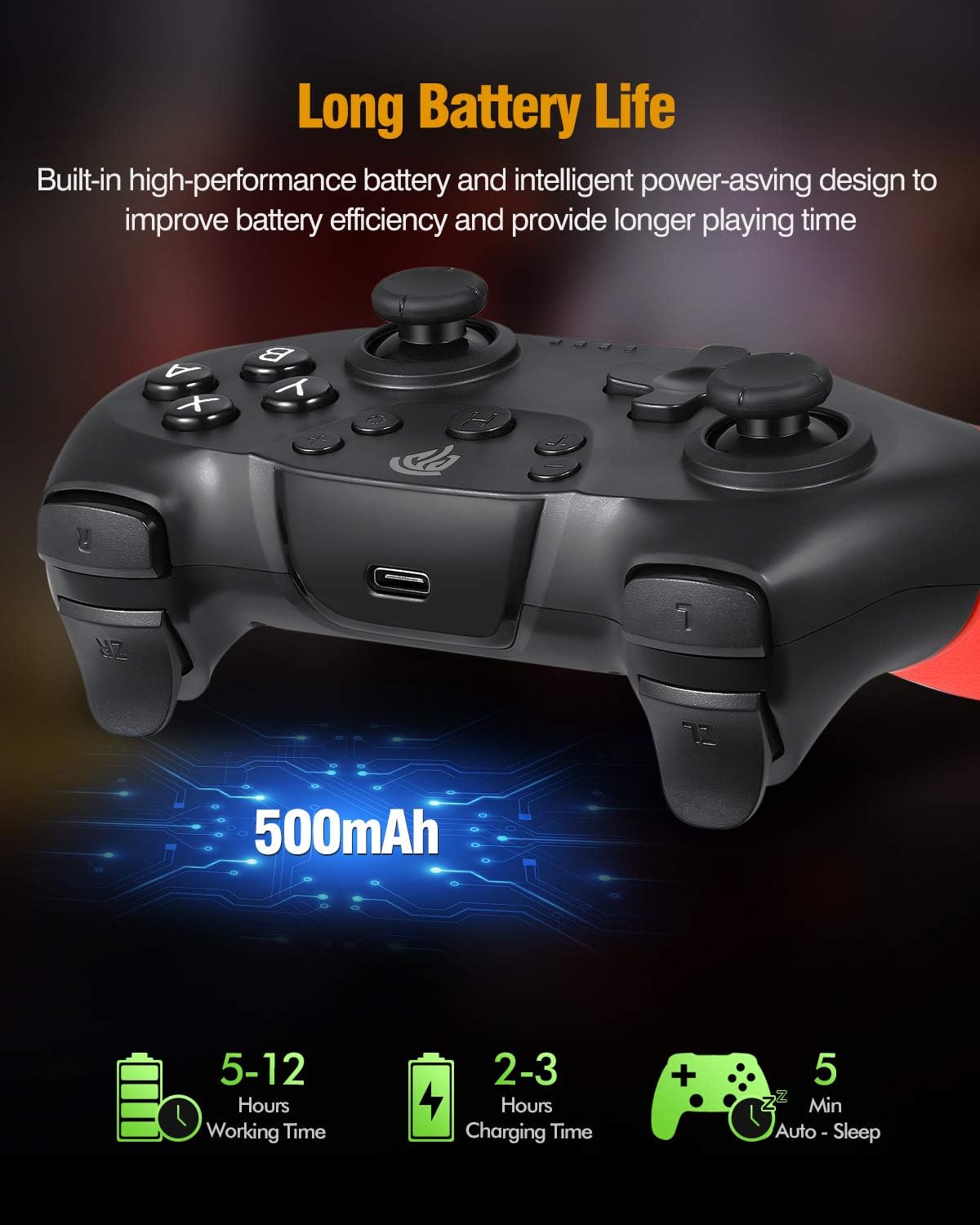
ചിത്രം: Illustration of the controller's battery life and charging. The image shows the controller with a USB-C port, indicating a 500mAh battery. Text overlays specify a working time of 5-12 hours (note: actual working time is approximately 8 hours as per product features), a charging time of 2-3 hours, and an auto-sleep function after 5 minutes of inactivity.
Nintendo സ്വിച്ചിലേക്ക് കണക്റ്റ് ചെയ്യുന്നു
Follow these steps to pair your EasySMX Wireless Controller with your Nintendo Switch console:
- From the Nintendo Switch HOME Menu, select "Controllers" > "Change Grip/Order."
- On the controller, press and hold the SYNC button (usually a small button on the top or back) for a few seconds until the LED indicators begin to flash rapidly.
- Once the controller is successfully paired, the player LED(s) corresponding to the controller number will remain lit.
- The controller will automatically connect to the Switch console when powered on if it has been paired previously.
Connecting to PC (Windows)
The controller can be connected to a Windows PC via Bluetooth or a USB cable.
ബ്ലൂടൂത്ത് കണക്ഷൻ:
- നിങ്ങളുടെ പിസിയിൽ ബ്ലൂടൂത്ത് പ്രവർത്തനക്ഷമമാക്കിയിട്ടുണ്ടെന്ന് ഉറപ്പാക്കുക.
- On your PC, go to "Settings" > "Devices" > "Bluetooth & other devices."
- Select "Add Bluetooth or other device" > "Bluetooth."
- Press and hold the SYNC button on the controller until the LED indicators flash rapidly.
- Select the controller from the list of available Bluetooth devices on your PC.
- ജോടിയാക്കൽ പ്രക്രിയ പൂർത്തിയാക്കാൻ ഏതെങ്കിലും ഓൺ-സ്ക്രീൻ നിർദ്ദേശങ്ങൾ പാലിക്കുക.
വയർഡ് കണക്ഷൻ:
- Connect the USB-C end of the charging cable to the controller.
- Connect the USB-A end of the cable to an available USB port on your PC.
- The PC should automatically detect and install the necessary drivers. The controller will be recognized as a standard gamepad.
പ്രവർത്തന സവിശേഷതകൾ
ടർബോ പ്രവർത്തനം
The controller supports a Turbo function for rapid firing of buttons. To activate Turbo:
- Press and hold the button you wish to set to Turbo (e.g., A, B, X, Y, L, R, ZL, ZR).
- While holding the button, press the Turbo button once. The button will now continuously register input when held down.
- To deactivate Turbo for that button, repeat the process: hold the button and press the Turbo button again.
വൈബ്രേഷൻ ഫീഡ്ബാക്ക്
The controller features dual motors for vibration feedback, providing a more immersive gaming experience. Vibration intensity is typically controlled by the game itself.

ചിത്രം: Illustration of the controller's vibration feedback. The image shows the controller with visual effects emanating from the grips, symbolizing the dual motor vibration. A gaming scene is depicted in the background, suggesting an immersive experience.
Gyro Axis / 6-Axis Somatosensory
The built-in 6-axis gyro provides somatosensory assistance, allowing for subtle and precise aiming movements in compatible games.

ചിത്രം: Demonstration of the 6-axis somatosensory feature. The image shows hands holding the controller, with a game displayed on a screen in the background. Text indicates that the built-in 6-axis gyro assists subtle aiming with high precision, making aiming movements smoother and faster.
Sleep Function / Automatic Power Off
To conserve battery life, the controller will automatically enter sleep mode after approximately 5 minutes of inactivity. To wake the controller, press any button.
മെയിൻ്റനൻസ്
നിങ്ങളുടെ കൺട്രോളറിന്റെ ദീർഘായുസ്സും ഒപ്റ്റിമൽ പ്രകടനവും ഉറപ്പാക്കാൻ, ഈ പരിപാലന മാർഗ്ഗനിർദ്ദേശങ്ങൾ പാലിക്കുക:
- വൃത്തിയാക്കൽ: കൺട്രോളർ വൃത്തിയാക്കാൻ മൃദുവായതും ഉണങ്ങിയതുമായ തുണി ഉപയോഗിക്കുക. കഠിനമായ രാസവസ്തുക്കളോ ഉരച്ചിലുകളോ ഉള്ള വസ്തുക്കൾ ഉപയോഗിക്കുന്നത് ഒഴിവാക്കുക.
- സംഭരണം: കൺട്രോളർ നേരിട്ട് സൂര്യപ്രകാശം ഏൽക്കാത്തതും തീവ്രമായ താപനില ഏൽക്കാത്തതുമായ ഒരു തണുത്ത വരണ്ട സ്ഥലത്ത് സൂക്ഷിക്കുക.
- തുള്ളികൾ ഒഴിവാക്കുക: കൺട്രോളർ താഴെയിടുകയോ ശക്തമായ ആഘാതങ്ങൾക്ക് വിധേയമാക്കുകയോ ചെയ്യരുത്, കാരണം ഇത് ആന്തരിക ഘടകങ്ങളെ തകരാറിലാക്കും.
- ദ്രാവക എക്സ്പോഷർ: കൺട്രോളർ ദ്രാവകങ്ങളിൽ നിന്ന് അകറ്റി നിർത്തുക. ദ്രാവകവുമായി സമ്പർക്കം വന്നാൽ, ഉടൻ തന്നെ അത് ഓഫ് ചെയ്ത് വീണ്ടും ഉപയോഗിക്കാൻ ശ്രമിക്കുന്നതിന് മുമ്പ് പൂർണ്ണമായും ഉണങ്ങാൻ അനുവദിക്കുക.
ട്രബിൾഷൂട്ടിംഗ്
If you encounter issues with your EasySMX Wireless Controller, refer to the following common problems and solutions:
- Controller does not power on:
- Ensure the controller is fully charged. Connect it to a power source using the provided USB-C cable.
- Controller does not pair with Nintendo Switch/PC:
- Ensure the controller is in pairing mode (LEDs flashing rapidly).
- For Switch: Confirm you are in the "Change Grip/Order" menu.
- For PC: Ensure Bluetooth is enabled on your PC and the controller is discoverable.
- Try restarting the controller and the console/PC.
- മറ്റ് വയർലെസ് ഉപകരണങ്ങളൊന്നും തടസ്സപ്പെടുത്തുന്നില്ലെന്ന് ഉറപ്പാക്കുക.
- ഇൻപുട്ട് ലാഗ് അല്ലെങ്കിൽ വിച്ഛേദിക്കൽ:
- Ensure the controller is within the 10-meter operating range of the console/PC.
- Check for potential wireless interference from other devices.
- കൺട്രോളറിന് ആവശ്യത്തിന് ബാറ്ററി ചാർജ് ഉണ്ടെന്ന് ഉറപ്പാക്കുക.
- Buttons or analog sticks are unresponsive:
- Restart the controller and the console/PC.
- Ensure the controller's firmware is up to date (check EasySMX official webലഭ്യമാണെങ്കിൽ അപ്ഡേറ്റുകൾക്കായി സൈറ്റ് കാണുക).
- പ്രശ്നം നിലനിൽക്കുകയാണെങ്കിൽ, ഉപഭോക്തൃ പിന്തുണയുമായി ബന്ധപ്പെടുക.
സ്പെസിഫിക്കേഷനുകൾ
| മോഡൽ നമ്പർ | SP5226-R-EU |
| നിർമ്മാതാവ് | EasySMX |
| കണക്റ്റിവിറ്റി | ബ്ലൂടൂത്ത് വയർലെസ് |
| വയർലെസ് ശ്രേണി | 10 മീറ്റർ വരെ |
| ബാറ്ററി ശേഷി | 500mAh ലിഥിയം ബാറ്ററി |
| ചാർജിംഗ് സമയം | 2-3 മണിക്കൂർ |
| പ്രവർത്തന സമയം | ഏകദേശം 8 മണിക്കൂർ |
| ഇൻപുട്ട് വോളിയംtage | DC 5V 500mA |
| അനുയോജ്യത | Nintendo Switch, Switch Lite, Windows PC (Not compatible with Xbox 360/One, Mac, iOS) |
| ഫീച്ചറുകൾ | 6-Axis Gyro, Dual Vibration Motors, Turbo Function, Automatic Sleep Mode |
| അളവുകൾ (പാക്കേജ്) | 16.61 x 16.31 x 7.19 സെ.മീ |
| ഭാരം (പാക്കേജ്) | 340 ഗ്രാം |
വാറൻ്റിയും പിന്തുണയും
EasySMX products are designed for reliability and performance. For warranty information, technical support, or further assistance, please refer to the warranty card included with your product or visit the official EasySMX webസൈറ്റ്. ഏതെങ്കിലും വാറന്റി ക്ലെയിമുകൾക്കായി നിങ്ങളുടെ വാങ്ങലിന്റെ തെളിവ് സൂക്ഷിക്കുക.


