ആമുഖം
Thank you for choosing the TOPTECH Jet-4 Portable Bluetooth Speaker. This manual provides essential information for setting up, operating, and maintaining your speaker to ensure optimal performance and longevity. Please read this manual thoroughly before using the product.

Image: The TOPTECH Jet-4 Bluetooth Speaker, showcasing its compact design and vibrant LED lighting.
സുരക്ഷാ വിവരങ്ങൾ
To prevent fire or shock hazards, always follow basic safety precautions when using this product:
- സ്പീക്കറിനെ മഴയിലോ ഈർപ്പത്തിലോ തുറന്നുകാട്ടരുത്.
- Do not disassemble or modify the speaker. Refer all servicing to qualified personnel.
- നേരിട്ടുള്ള സൂര്യപ്രകാശം, താപ സ്രോതസ്സുകൾ, തീവ്രമായ താപനില എന്നിവയിൽ നിന്ന് സ്പീക്കറിനെ അകറ്റി നിർത്തുക.
- സ്പീക്കറെ ശക്തമായ ആഘാതങ്ങൾക്ക് വിധേയമാക്കുകയോ താഴെയിടുകയോ ചെയ്യുന്നത് ഒഴിവാക്കുക.
- നിർദ്ദിഷ്ട ചാർജിംഗ് കേബിളും പവർ അഡാപ്റ്ററും മാത്രം ഉപയോഗിക്കുക.
പാക്കേജ് ഉള്ളടക്കം
- TOPTECH Jet-4 Bluetooth Speaker
- യുഎസ്ബി ചാർജിംഗ് കേബിൾ
- ഉപയോക്തൃ മാനുവൽ
ഉൽപ്പന്നം കഴിഞ്ഞുview
നിയന്ത്രണങ്ങളും തുറമുഖങ്ങളും
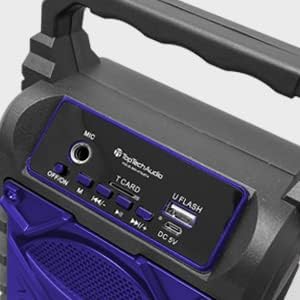
ചിത്രം: വിശദമായത് view of the speaker's top control panel, showing various buttons and input ports.
- MIC ഇൻപുട്ട്: Connect an external microphone for karaoke.
- ഓഫ്/ഓൺ സ്വിച്ച്: Power the speaker on or off.
- എം (മോഡ്) ബട്ടൺ: Switch between Bluetooth, AUX, USB, and TF Card modes.
- Previous / Volume Down Button: മുമ്പത്തെ ട്രാക്കിനായി ഹ്രസ്വമായി അമർത്തുക, ശബ്ദം കുറയ്ക്കാൻ ദീർഘനേരം അമർത്തുക.
- പ്ലേ / താൽക്കാലികമായി നിർത്തുക ബട്ടൺ: ഓഡിയോ പ്ലേബാക്ക് പ്ലേ ചെയ്യുക അല്ലെങ്കിൽ താൽക്കാലികമായി നിർത്തുക.
- Next / Volume Up Button: അടുത്ത ട്രാക്കിനായി ഷോർട്ട് പ്രസ്സ് ചെയ്യുക, വോളിയം കൂട്ടാൻ ദീർഘനേരം അമർത്തുക.
- T CARD Slot: Insert a TF (MicroSD) card for direct audio playback.
- U FLASH (USB) Port: നേരിട്ടുള്ള ഓഡിയോ പ്ലേബാക്കിനായി ഒരു യുഎസ്ബി ഫ്ലാഷ് ഡ്രൈവ് ഇടുക.
- DC 5V പോർട്ട്: Connect the USB charging cable to power and charge the speaker.
പ്രധാന സവിശേഷതകൾ

Image: An infographic showing the TOPTECH Jet-4 speaker with icons representing its key features: easy portability, mic port, mode karaoke, disco light, TF card port, and USB port.
- ശക്തമായ ശബ്ദം: Dual-driver stereo output delivers crisp highs and deep bass for a premium audio experience.
- മൾട്ടി-മോഡ് പ്ലേബാക്ക്: Supports Bluetooth, AUX, USB, and TF card input for versatile music streaming.
- കരോക്കെ റെഡി: Built-in karaoke mode with light effects and mic support makes any party more fun.
- TWS Pairing Support: Connect two speakers wirelessly for immersive, room-filling sound.
- നീണ്ട ബാറ്ററി ലൈഫ്: Enjoy up to 6 hours of playtime with a rechargeable battery, perfect for all-day events.
സജ്ജമാക്കുക
പ്രാരംഭ ചാർജ്
Before first use, fully charge the speaker. Connect the provided USB charging cable to the DC 5V port on the speaker and the other end to a USB power adapter (not included) or a computer USB port.

Image: A visual representation of a fully charged battery, symbolizing the speaker's long battery life.
The charging indicator light will illuminate during charging and turn off or change color when fully charged. A full charge typically takes a few hours.
പ്രവർത്തന നിർദ്ദേശങ്ങൾ
ബ്ലൂടൂത്ത് ജോടിയാക്കൽ
- Turn on the speaker by sliding the OFF/ON switch to the 'ON' position. The speaker will enter Bluetooth pairing mode automatically, indicated by a flashing LED light and an audible prompt.
- നിങ്ങളുടെ സ്മാർട്ട്ഫോണിലോ, ടാബ്ലെറ്റിലോ, അല്ലെങ്കിൽ മറ്റ് ബ്ലൂടൂത്ത് പ്രവർത്തനക്ഷമമാക്കിയ ഉപകരണത്തിലോ ബ്ലൂടൂത്ത് പ്രവർത്തനക്ഷമമാക്കുക.
- ഇതിനായി തിരയുക available Bluetooth devices and select "JET-4" from the list.
- Once connected, the speaker will provide an audible confirmation, and the LED light will stop flashing.
- ഇപ്പോൾ നിങ്ങളുടെ ഉപകരണത്തിൽ നിന്ന് സ്പീക്കറിലൂടെ ഓഡിയോ പ്ലേ ചെയ്യാൻ കഴിയും.
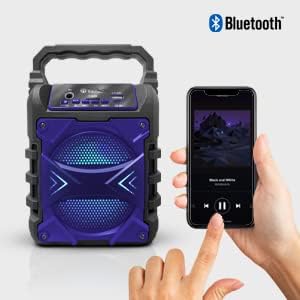
Image: The TOPTECH Jet-4 speaker positioned next to a smartphone, illustrating the seamless Bluetooth connection process.
Playback Modes (AUX, USB, TF Card)
ലഭ്യമായ പ്ലേബാക്ക് മോഡുകളിലൂടെ സഞ്ചരിക്കാൻ 'M' (മോഡ്) ബട്ടൺ അമർത്തുക:
- ഓക്സ് മോഡ്: Connect an external audio device using a 3.5mm audio cable (not included) to the AUX input.
- യുഎസ്ബി മോഡ്: Insert a USB flash drive into the 'U FLASH' port. The speaker will automatically detect and play compatible audio files.
- ടിഎഫ് കാർഡ് മോഡ്: Insert a TF (MicroSD) card into the 'T CARD' slot. The speaker will automatically detect and play compatible audio files.
കരോക്കെ മോഡ്
To use the karaoke function, connect a microphone (not included) to the 'MIC' input port. Adjust the microphone volume as needed. The speaker's built-in light effects will enhance the karaoke experience.
TWS ജോടിയാക്കൽ (ട്രൂ വയർലെസ് സ്റ്റീരിയോ)
For an enhanced stereo sound experience, you can pair two TOPTECH Jet-4 speakers together:
- Ensure both Jet-4 speakers are powered on and not connected to any Bluetooth device.
- On one speaker (this will be the primary speaker), long press the 'M' (Mode) button until you hear a pairing tone.
- രണ്ട് സ്പീക്കറുകളും പരസ്പരം യാന്ത്രികമായി ബന്ധിപ്പിക്കും. കണക്റ്റ് ചെയ്തുകഴിഞ്ഞാൽ, നിങ്ങൾക്ക് ഒരു സ്ഥിരീകരണ ടോൺ കേൾക്കാനാകും.
- Now, connect your Bluetooth device to the primary speaker as described in the 'Bluetooth Pairing' section. Audio will play through both speakers in stereo.

Image: Two TOPTECH Jet-4 speakers wirelessly connected to a smartphone, demonstrating the True Wireless Stereo (TWS) pairing feature for expanded sound.
മെയിൻ്റനൻസ്
- മൃദുവായതും ഉണങ്ങിയതുമായ തുണി ഉപയോഗിച്ച് സ്പീക്കർ വൃത്തിയാക്കുക. അബ്രസീവ് ക്ലീനറുകളോ ലായകങ്ങളോ ഉപയോഗിക്കരുത്.
- ഉപയോഗിക്കാത്തപ്പോൾ തണുത്തതും വരണ്ടതുമായ സ്ഥലത്ത് സ്പീക്കർ സൂക്ഷിക്കുക.
- Avoid prolonged exposure to extreme temperatures or humidity.
ട്രബിൾഷൂട്ടിംഗ്
| പ്രശ്നം | പരിഹാരം |
|---|---|
| സ്പീക്കർ പവർ ഓൺ ചെയ്യുന്നില്ല. | ബാറ്ററി ചാർജ്ജ് ചെയ്തിട്ടുണ്ടെന്ന് ഉറപ്പാക്കുക. USB കേബിൾ ഉപയോഗിച്ച് സ്പീക്കർ ഒരു പവർ സ്രോതസ്സുമായി ബന്ധിപ്പിക്കുക. |
| സ്പീക്കറിൽ നിന്ന് ശബ്ദമൊന്നുമില്ല. | Check the volume level on both the speaker and your connected device. Ensure the correct playback mode is selected. |
| ബ്ലൂടൂത്ത് ജോടിയാക്കൽ പരാജയപ്പെട്ടു. | Ensure the speaker is in pairing mode. Turn off Bluetooth on your device and turn it back on. Try restarting both the speaker and your device. Make sure no other devices are connected to the speaker. |
| മോശം ശബ്ദ നിലവാരം. | Move the speaker closer to your Bluetooth device to reduce interference. Ensure the audio source is of good quality. |
സ്പെസിഫിക്കേഷനുകൾ
| ഫീച്ചർ | വിശദാംശങ്ങൾ |
|---|---|
| ബ്രാൻഡ് | TOPTECH |
| മോഡൽ നമ്പർ | JET-4-BLUE |
| പവർ ഉറവിടം | ബാറ്ററി പവർ |
| കണക്റ്റിവിറ്റി ടെക്നോളജി | ബ്ലൂടൂത്ത്, യുഎസ്ബി |
| ഓഡിയോ ഇൻപുട്ട് | Guitar Input, Karaoke Input, USB |
| ചാനലുകളുടെ എണ്ണം | 2 |
| മെറ്റീരിയൽ | പ്ലാസ്റ്റിക്, മെറ്റൽ |
| ഇനത്തിൻ്റെ ഭാരം | 1.54 പൗണ്ട് |
| പാക്കേജ് അളവുകൾ | 9.29 x 6.38 x 4.17 ഇഞ്ച് |
| യു.പി.സി | 689259338593 |
വാറൻ്റിയും പിന്തുണയും
For warranty information and customer support, please refer to the contact details provided on the product packaging or visit the official TOPTECH webസൈറ്റ്. ഏതെങ്കിലും വാറന്റി ക്ലെയിമുകൾക്ക് വാങ്ങിയതിന്റെ തെളിവായി നിങ്ങളുടെ വാങ്ങൽ രസീത് സൂക്ഷിക്കുക.


