1. ആമുഖവും അവസാനവുംview
The Top Tech Audio Jet-4 is a versatile and powerful 400W Bluetooth portable speaker designed for both indoor and outdoor use. It offers seamless connectivity, enhanced karaoke features, and a long-lasting battery, making it ideal for various audio needs.

ചിത്രം 1: മുൻഭാഗം view of the Top Tech Audio Jet-4 Portable Speaker, showcasing its illuminated speaker grille and integrated handle.
പ്രധാന സവിശേഷതകൾ:
- തടസ്സമില്ലാത്ത കണക്റ്റിവിറ്റി: Built-in Bluetooth for wireless pairing, 3.5mm AUX jack, and support for TF/USB input.
- Enhanced Karaoke Mode: Features colorful lights, accompaniment and voice modes, and wired microphone compatibility.
- Simple Multi-Function Control: Intuitive console for adjusting sound effects, microphone settings, and mode switching.
- ട്രൂ വയർലെസ് സ്റ്റീരിയോ (TWS): Pair two Jet-4 speakers for an immersive stereo experience.
- വിപുലീകരിച്ച കളിസമയം: ഒറ്റ ചാർജിൽ 6 മണിക്കൂർ വരെ തുടർച്ചയായി സംഗീതം പ്ലേബാക്ക്.
2. സജ്ജീകരണ ഗൈഡ്
2.1 സ്പീക്കർ ചാർജ് ചെയ്യുന്നു
Before first use, fully charge the speaker. The Jet-4 is equipped with a rechargeable DC 5V battery. Use the provided USB cable to connect the speaker to a compatible power source.

Figure 2: The speaker's internal battery provides up to 6 hours of playtime.
2.2 ബ്ലൂടൂത്ത് ജോടിയാക്കൽ
- Turn on the Jet-4 speaker using the ON/OFF switch located on the control panel.
- The speaker will enter Bluetooth pairing mode automatically.
- നിങ്ങളുടെ സ്മാർട്ട്ഫോണിലോ ടാബ്ലെറ്റിലോ, ബ്ലൂടൂത്ത് പ്രവർത്തനക്ഷമമാക്കി ലഭ്യമായ ഉപകരണങ്ങൾക്കായി തിരയുക.
- Select "JET-4" from the list of devices to connect. A confirmation sound will indicate successful pairing.
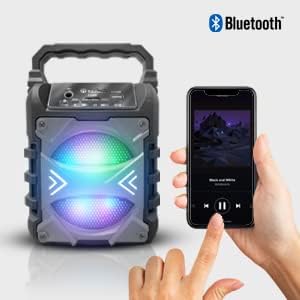
Figure 3: Easily pair your smartphone or other Bluetooth-enabled device with the Jet-4 speaker for wireless audio streaming.
2.3 ട്രൂ വയർലെസ് സ്റ്റീരിയോ (TWS) ജോടിയാക്കൽ (ഓപ്ഷണൽ)
For an enhanced stereo experience, you can pair two Jet-4 speakers together:
- Ensure both Jet-4 speakers are powered on and not connected to any other Bluetooth device.
- On one speaker (this will be the primary speaker), press and hold the TWS button (if available, or follow specific instructions in the minimal manual provided with the product).
- The speakers will automatically search and connect to each other. A confirmation sound will indicate successful TWS pairing.
- വിഭാഗം 2.2-ൽ വിവരിച്ചിരിക്കുന്നതുപോലെ ബ്ലൂടൂത്ത് വഴി നിങ്ങളുടെ ഉപകരണം പ്രാഥമിക സ്പീക്കറുമായി ബന്ധിപ്പിക്കുക. സ്റ്റീരിയോയിൽ രണ്ട് സ്പീക്കറുകളിലൂടെയും ഓഡിയോ ഇപ്പോൾ പ്ലേ ചെയ്യും.

Figure 4: Achieve immersive sound by pairing two Jet-4 speakers using TWS functionality.
3. പ്രവർത്തന നിർദ്ദേശങ്ങൾ
3.1 കൺട്രോൾ പാനൽ ഓവർview
The Jet-4 features an intuitive control panel for easy operation.
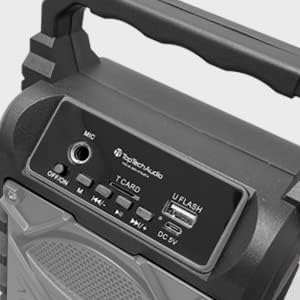
Figure 5: The top control panel includes ports for microphone, TF card, and USB, along with power and playback controls.
- ഓൺ/ഓഫ് സ്വിച്ച്: സ്പീക്കർ ഓൺ അല്ലെങ്കിൽ ഓഫ് ആക്കുന്നു.
- MIC ഇൻപുട്ട്: Connect a wired microphone for karaoke.
- T.CARD Slot: Insert a TF (microSD) card for direct audio playback.
- U FLASH (USB) Port: നേരിട്ടുള്ള ഓഡിയോ പ്ലേബാക്കിനായി ഒരു യുഎസ്ബി ഫ്ലാഷ് ഡ്രൈവ് ഇടുക.
- ഡിസി 5 വി: Charging port for the speaker.
- എം (മോഡ്) ബട്ടൺ: Switches between Bluetooth, AUX, TF card, and USB input modes.
- പ്ലേബാക്ക് നിയന്ത്രണങ്ങൾ: Buttons for Play/Pause, Previous Track, and Next Track.
- വോളിയം നിയന്ത്രണം: Adjust volume directly from your connected device or via the speaker's controls.
3.2 Karaoke Mode
Activate Karaoke Mode to enhance your singing experience:
- Connect a wired microphone to the MIC input.
- The speaker's colorful lights will activate, creating a dynamic atmosphere.
- Toggle between accompaniment and voice modes using the designated button (refer to the minimal manual for specific button identification if not clearly marked).
3.3 Using AUX, TF Card, and USB Inputs
The Jet-4 supports multiple audio input methods:
- AUX ഇൻപുട്ട്: Connect non-Bluetooth devices using a 3.5mm audio cable to the AUX jack.
- TF കാർഡ്: Insert a TF (microSD) card into the T.CARD slot. The speaker will automatically detect and play compatible audio files.
- യുഎസ്ബി ഇൻപുട്ട്: Insert a USB flash drive into the U FLASH port. The speaker will automatically detect and play compatible audio files.
- Use the 'M' (Mode) button to switch between these input sources.
4. പരിപാലനം
To ensure the longevity and optimal performance of your Top Tech Audio Jet-4 speaker, follow these maintenance guidelines:
- വൃത്തിയാക്കൽ: Use a soft, dry cloth to clean the exterior of the speaker. Avoid using abrasive cleaners, solvents, or strong chemicals, as these can damage the finish.
- സംഭരണം: ദീർഘനേരം ഉപയോഗിക്കാത്തപ്പോൾ, നേരിട്ടുള്ള സൂര്യപ്രകാശത്തിൽ നിന്നും കടുത്ത താപനിലയിൽ നിന്നും മാറി തണുത്തതും വരണ്ടതുമായ സ്ഥലത്ത് സ്പീക്കർ സൂക്ഷിക്കുക.
- ബാറ്ററി കെയർ: To preserve battery life, avoid fully discharging the battery frequently. Recharge the speaker regularly, even if not in constant use.
- വാട്ടർ എക്സ്പോഷർ: ഔട്ട്ഡോർ ഉപയോഗത്തിനായി രൂപകൽപ്പന ചെയ്തിരിക്കുമ്പോൾ, സ്പീക്കർ വെള്ളത്തിൽ മുക്കുകയോ കനത്ത മഴയിൽ തുറന്നുകാട്ടുകയോ ചെയ്യുന്നത് ഒഴിവാക്കുക.
- ശ്രദ്ധയോടെ കൈകാര്യം ചെയ്യുക: Do not drop the speaker or subject it to strong impacts, as this can damage internal components.
5. പ്രശ്നപരിഹാരം
If you encounter issues with your Jet-4 speaker, refer to the following common troubleshooting steps:
| പ്രശ്നം | സാധ്യമായ കാരണം | പരിഹാരം |
|---|---|---|
| No power/Speaker won't turn on | ബാറ്ററി കുറവാണ്; പവർ സ്വിച്ച് ഓഫ് | Charge the speaker fully; Ensure the ON/OFF switch is in the 'ON' position. |
| ബ്ലൂടൂത്ത് വഴി ജോടിയാക്കാൻ കഴിയില്ല | Speaker not in pairing mode; Device Bluetooth off; Too far from device | Ensure speaker is on and in Bluetooth mode; Turn on Bluetooth on your device; Move device closer to speaker (within 100ft). |
| No sound/Low volume | Volume too low on speaker or device; Incorrect input mode selected; Corrupt audio file (for TF/USB) | Increase volume on both speaker and connected device; Press 'M' button to cycle through modes; Try a different audio file. |
| TWS ജോടിയാക്കൽ പരാജയപ്പെട്ടു | Speakers too far apart; Already connected to another device | Ensure both speakers are close to each other; Disconnect any existing Bluetooth connections before TWS pairing. |
| കരോക്കെ മൈക്രോഫോൺ പ്രവർത്തിക്കുന്നില്ല. | Microphone not properly connected; Microphone switch off | Ensure microphone is securely plugged into the MIC input; Check if the microphone has its own ON/OFF switch. |
If the problem persists after trying these steps, please contact TOPTECH customer support for further assistance.
6. ഉൽപ്പന്ന സവിശേഷതകൾ
| ഫീച്ചർ | വിശദാംശങ്ങൾ |
|---|---|
| ബ്രാൻഡ് | TOPTECH |
| മോഡൽ | Jet-4 |
| പവർ ഔട്ട്പുട്ട് | 400W |
| കണക്റ്റിവിറ്റി ടെക്നോളജി | ബ്ലൂടൂത്ത്, യുഎസ്ബി |
| കണക്റ്റർ തരം | USB |
| പവർ ഉറവിടം | Battery Powered (DC 5V) |
| ബാറ്ററി ലൈഫ് | 6 മണിക്കൂർ വരെ |
| ഇനത്തിൻ്റെ ഭാരം | 0.7 കിലോഗ്രാം (1.54 പൗണ്ട്) |
| ചാനലുകളുടെ എണ്ണം | 2 |
| ഓഡിയോ ഇൻപുട്ട് | Guitar & Karaoke Inputs (via MIC port), AUX, TF Card, USB |
| അനുയോജ്യമായ ഉപകരണങ്ങൾ | Smartphone, Tablet, MP3 Players (via AUX) |
| നിറം | ചാരനിറം |
| പാക്കേജ് അളവുകൾ | 9.17 x 4.65 x 4.33 ഇഞ്ച് |
| മാതൃരാജ്യം | ചൈന |
| യു.പി.സി | 689259388932 |
7. വാറൻ്റിയും പിന്തുണയും
TOPTECH stands behind the quality of its products. For specific warranty information and terms, please refer to the documentation included with your purchase or visit the official TOPTECH webസൈറ്റ്.
For technical support, troubleshooting assistance, or any inquiries regarding your Jet-4 speaker, please contact TOPTECH customer service. Have your product model and UPC ready when contacting support.
നിർമ്മാതാവ്: TOPTECH
UPC: 689259388932
ആദ്യം ലഭ്യമായ തീയതി: 9 ജനുവരി 2020
നിങ്ങൾക്ക് സന്ദർശിക്കാനും കഴിയും TOPTECH Store on Amazon കൂടുതൽ ഉൽപ്പന്ന വിവരങ്ങൾക്കും പിന്തുണാ ഉറവിടങ്ങൾക്കും.


