1. ആമുഖം
വാങ്ങിയതിന് നന്ദി.asing the GLIDiC Sound Air TW-5000s True Wireless Earbuds. This manual provides essential information for the safe and effective use of your device. Please read it thoroughly before use and retain it for future reference.
2 സുരക്ഷാ വിവരങ്ങൾ
- ഇയർബഡുകളോ ചാർജിംഗ് കേസോ തീവ്രമായ താപനിലയിലോ നേരിട്ടുള്ള സൂര്യപ്രകാശത്തിലോ ഉയർന്ന ആർദ്രതയിലോ തുറന്നുകാട്ടരുത്.
- Avoid dropping, impacting, or disassembling the device. This may cause damage and void the warranty.
- Keep the device away from water and liquids. While sweatproof, immersion can cause damage.
- നൽകിയിരിക്കുന്ന ചാർജിംഗ് കേബിളോ സാക്ഷ്യപ്പെടുത്തിയ തത്തുല്യമായതോ മാത്രം ഉപയോഗിക്കുക.
- ഉയർന്ന ശബ്ദത്തിൽ ദീർഘനേരം കേൾക്കുന്നത് കേൾവിക്ക് കേടുപാടുകൾ വരുത്താം. സുരക്ഷിതമായ തലത്തിലേക്ക് ശബ്ദം ക്രമീകരിക്കുക.
- Be aware of your surroundings when using earbuds, especially in traffic or hazardous environments.
3. പാക്കേജ് ഉള്ളടക്കം
നിങ്ങളുടെ പാക്കേജിൽ എല്ലാ ഇനങ്ങളും ഉണ്ടെന്ന് ഉറപ്പാക്കുക:
- GLIDiC Sound Air TW-5000s True Wireless Earbuds (Left and Right)
- ചാർജിംഗ് കേസ്
- യുഎസ്ബി ചാർജിംഗ് കേബിൾ (ടൈപ്പ്-എ മുതൽ മൈക്രോ-യുഎസ്ബി വരെ)
- ചെവി നുറുങ്ങുകളുടെ ഒന്നിലധികം വലുപ്പങ്ങൾ (എസ്, എം, എൽ)
- നിർദ്ദേശ മാനുവൽ (ഈ പ്രമാണം)
4. ഉൽപ്പന്നം കഴിഞ്ഞുview
Familiarize yourself with the components of your GLIDiC Sound Air TW-5000s earbuds and charging case.

Figure 4.1: GLIDiC Sound Air TW-5000s Earbuds and Charging Case. The image displays the black charging case with the GLIDiC logo on top, positioned next to the two black earbuds.
ഇയർബഡ് ഘടകങ്ങൾ
- മൾട്ടിഫങ്ഷൻ ബട്ടൺ: Located on the outer surface of each earbud, used for playback control, call management, and voice assistant activation.
- LED സൂചകം: Provides status information (pairing, charging, power).
- മൈക്രോഫോൺ: For voice calls and voice assistant commands.
- ചാർജിംഗ് കോൺടാക്റ്റുകൾ: Located on the underside of each earbud, for charging within the case.
- ചെവി നുറുങ്ങ്: Silicone tip for in-ear comfort and sound isolation.
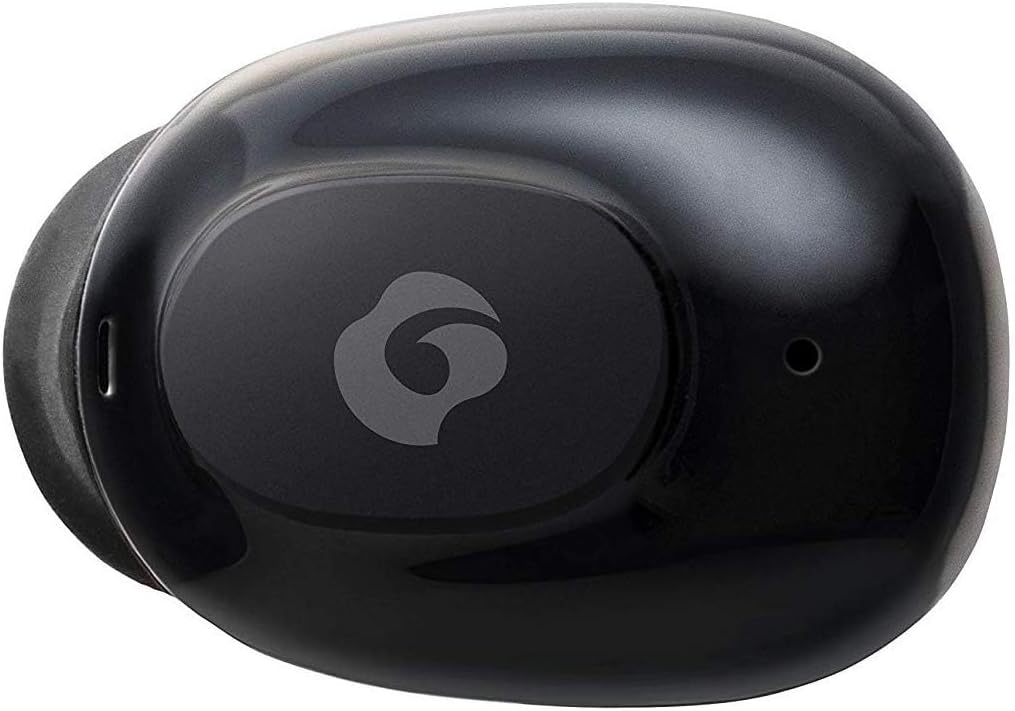
ചിത്രം 4.2: ക്ലോസപ്പ് view of a single GLIDiC earbud, highlighting the multifunction button with the GLIDiC logo and the microphone opening.
ചാർജിംഗ് കേസ് ഘടകങ്ങൾ
- ചാർജിംഗ് പോർട്ടുകൾ: Internal contacts for earbuds, external port for case charging.
- കേസ് LED സൂചകം: Shows charging status of the case.
- ലിഡ്: Protects earbuds and secures them during charging.
5. സജ്ജീകരണം
5.1 പ്രാരംഭ ചാർജിംഗ്
- Place both earbuds into the charging case. Ensure they are correctly seated, and the LED indicators on the earbuds illuminate.
- കേസിലെ ചാർജിംഗ് പോർട്ടിലേക്ക് USB ചാർജിംഗ് കേബിൾ ബന്ധിപ്പിച്ച് മറ്റേ അറ്റം ഒരു USB പവർ സ്രോതസ്സിലേക്ക് (ഉദാ: കമ്പ്യൂട്ടർ, വാൾ അഡാപ്റ്റർ) പ്ലഗ് ചെയ്യുക.
- The case LED indicator will show charging status. Allow approximately 2 hours for a full charge of both earbuds and the case.
- Once fully charged, disconnect the charging cable. The earbuds offer up to 60 days of standby time when stored in the fully charged case.
5.2 ഒരു ബ്ലൂടൂത്ത് ഉപകരണവുമായി ജോടിയാക്കൽ
- ഇയർബഡുകൾ ചാർജ്ജ് ചെയ്തിട്ടുണ്ടെന്ന് ഉറപ്പാക്കുക.
- ചാർജിംഗ് കേസ് തുറക്കുക. ഇയർബഡുകൾ സ്വയമേവ ജോടിയാക്കൽ മോഡിലേക്ക് പ്രവേശിക്കുകയും അവയുടെ LED ഇൻഡിക്കേറ്ററുകൾ മിന്നുകയും ചെയ്യും.
- നിങ്ങളുടെ ബ്ലൂടൂത്ത് പ്രാപ്തമാക്കിയ ഉപകരണത്തിൽ (സ്മാർട്ട്ഫോൺ, ടാബ്ലെറ്റ് മുതലായവ), ബ്ലൂടൂത്ത് ക്രമീകരണങ്ങളിലേക്ക് പോകുക.
- ഇതിനായി തിരയുക available devices. Select "GLIDiC TW-5000s" from the list.
- Once connected, the earbud LED indicators will stop flashing and may show a solid light or turn off, depending on the model. A voice prompt may also confirm the connection.
- ജോടിയാക്കൽ പരാജയപ്പെട്ടാൽ, ഇയർബഡുകൾ കേസിൽ തിരികെ വയ്ക്കുക, ലിഡ് അടയ്ക്കുക, കുറച്ച് നിമിഷങ്ങൾ കാത്തിരിക്കുക, തുടർന്ന് ഘട്ടങ്ങൾ ആവർത്തിക്കുക.
6. പ്രവർത്തന നിർദ്ദേശങ്ങൾ
6.1 പവർ ഓൺ/ഓഫ്
- പവർ ഓൺ: Open the charging case, or press and hold the multifunction button on each earbud for approximately 3 seconds.
- പവർ ഓഫ്: Place the earbuds back into the charging case and close the lid, or press and hold the multifunction button on each earbud for approximately 5 seconds.
6.2 മ്യൂസിക് പ്ലേബാക്ക്
- പ്ലേ/താൽക്കാലികമായി നിർത്തുക: Press the multifunction button once on either earbud.
- അടുത്ത ട്രാക്ക്: Double-press the multifunction button on the right earbud.
- മുമ്പത്തെ ട്രാക്ക്: Double-press the multifunction button on the left earbud.
- വോളിയം കൂട്ടുക: Triple-press the multifunction button on the right earbud.
- വോളിയം താഴേക്ക്: Triple-press the multifunction button on the left earbud.
6.3 കോൾ മാനേജ്മെന്റ്
- ഉത്തരം/അവസാന കോൾ: Press the multifunction button once on either earbud.
- കോൾ നിരസിക്കുക: Press and hold the multifunction button on either earbud for approximately 2 seconds.
6.4 വോയ്സ് അസിസ്റ്റന്റ്
- വോയ്സ് അസിസ്റ്റന്റിനെ സജീവമാക്കുക: Press and hold the multifunction button on either earbud for approximately 2 seconds (when not on a call).
6.5 Multi-Communication Mode
The GLIDiC Sound Air TW-5000s features a multi-communication mode that allows select ambient sounds to be heard without compromising audio quality. This enhances user awareness and safety.
- Activate/Deactivate Multi-Communication Mode: Consult the specific instructions provided with your device, as activation methods can vary. Typically, this involves a specific press sequence on the multifunction button or an option within a companion app if available.
7. പരിപാലനം
7.1 വൃത്തിയാക്കൽ
- ഇയർബഡുകളും ചാർജിംഗ് കെയ്സും മൃദുവായതും ഉണങ്ങിയതും ലിന്റ് രഹിതവുമായ തുണി ഉപയോഗിച്ച് തുടയ്ക്കുക.
- അബ്രാസീവ് ക്ലീനറുകൾ, ആൽക്കഹോൾ, കെമിക്കൽ ലായകങ്ങൾ എന്നിവ ഉപയോഗിക്കരുത്.
- Gently remove ear tips and clean them with mild soap and water if necessary. Ensure they are completely dry before reattaching.
- Use a dry cotton swab to carefully clean the charging contacts on both the earbuds and the case.
7.2 സംഭരണം
- ഉപയോഗത്തിലില്ലാത്തപ്പോൾ, ഇയർബഡുകൾ സംരക്ഷിക്കുന്നതിനും അവ ചാർജ് ചെയ്തിട്ടുണ്ടെന്ന് ഉറപ്പാക്കുന്നതിനും ചാർജിംഗ് കേസിൽ സൂക്ഷിക്കുക.
- ഉപകരണം തണുത്തതും വരണ്ടതുമായ സ്ഥലത്ത് സൂക്ഷിക്കുക, നേരിട്ടുള്ള സൂര്യപ്രകാശത്തിൽ നിന്നും തീവ്രമായ താപനിലയിൽ നിന്നും അകറ്റി നിർത്തുക.
8. പ്രശ്നപരിഹാരം
If you encounter issues with your GLIDiC Sound Air TW-5000s, refer to the following common problems and solutions:
| പ്രശ്നം | സാധ്യമായ പരിഹാരം |
|---|---|
| ഇയർബഡുകൾ പവർ ഓൺ ആകുന്നില്ല. | Ensure earbuds are charged. Place them in the charging case and connect the case to a power source. |
| ഇയർബഡുകൾ ഉപകരണവുമായി ജോടിയാക്കുന്നില്ല. |
|
| ഒരു ഇയർബഡിന് മാത്രമേ ശബ്ദമുള്ളൂ. |
|
| ചാർജിംഗ് കേസ് ചാർജ് ചെയ്യുന്നില്ല. |
|
| ശബ്ദ നിലവാരം മോശമാണ് അല്ലെങ്കിൽ ഇടവിട്ടുള്ളതാണ്. |
|
9 സ്പെസിഫിക്കേഷനുകൾ
| ഫീച്ചർ | വിശദാംശങ്ങൾ |
|---|---|
| മോഡലിൻ്റെ പേര് | TW-5000s |
| കണക്റ്റിവിറ്റി ടെക്നോളജി | വയർലെസ് (ബ്ലൂടൂത്ത്) |
| ബ്ലൂടൂത്ത് ശ്രേണി | 10 മീറ്റർ |
| ഫ്രീക്വൻസി റേഞ്ച് | 20 ഹെർട്സ് - 20,000 ഹെർട്സ് |
| Battery Life (Carrying Case Standby) | 60 ദിവസം വരെ |
| ജല പ്രതിരോധ നില | ജല പ്രതിരോധം (വിയർപ്പ് പ്രതിരോധം) |
| നിയന്ത്രണ തരം | Media Control, Touch, Voice |
| പ്രത്യേക സവിശേഷതകൾ | Microphone Included, Noise Cancellation, Multi-communication mode |
| മെറ്റീരിയൽ | Plastic, TPE, and Silicone |
| അളവുകൾ (ഇയർബഡ്) | 0.98 x 0.67 x 0.91 ഇഞ്ച് (ഏകദേശം) |
| ഇനത്തിൻ്റെ ഭാരം | 9.6 ഔൺസ് (ആകെ പാക്കേജ് ഭാരം) |
| യു.പി.സി | 811559030024 |
10. വാറൻ്റിയും പിന്തുണയും
GLIDiC products are designed for reliability and performance. For specific warranty details, please refer to the warranty card included with your purchase or visit the official GLIDiC website. If you require technical support or have questions not covered in this manual, please contact GLIDiC customer service through their official channels.
വാറൻ്റി ക്ലെയിമുകൾക്കായി നിങ്ങളുടെ വാങ്ങിയതിൻ്റെ തെളിവ് സൂക്ഷിക്കുക.


