1. ആമുഖം
This manual provides detailed instructions for the setup, operation, maintenance, and troubleshooting of your Oversteel Iron Mechanical Gaming Keyboard. Please read this manual thoroughly before using the product to ensure optimal performance and longevity.
The Oversteel Iron keyboard features Kailh Red mechanical switches, full RGB backlighting, anti-ghosting technology, and a detachable wrist rest for enhanced comfort during extended use.
2. പാക്കേജ് ഉള്ളടക്കം
- Oversteel Iron Mechanical Gaming Keyboard
- വേർപെടുത്താവുന്ന റിസ്റ്റ് റെസ്റ്റ്
- ഉപയോക്തൃ മാനുവൽ (ഈ പ്രമാണം)
3. സജ്ജീകരണം
3.1 കീബോർഡ് ബന്ധിപ്പിക്കുന്നു
- കീബോർഡ് ഒരു സ്ഥിരതയുള്ളതും പരന്നതുമായ പ്രതലത്തിൽ വയ്ക്കുക.
- Attach the detachable wrist rest by aligning the clips and gently pressing until it clicks into place.
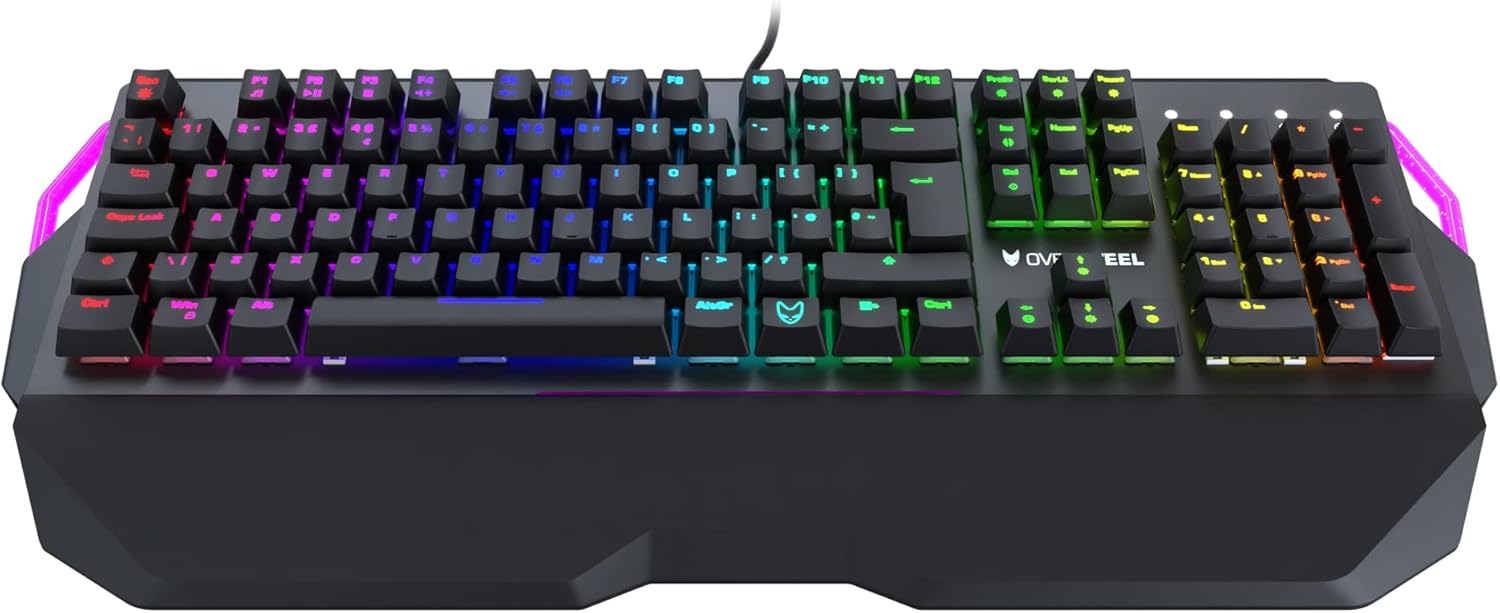
Image: Oversteel Iron keyboard with its detachable wrist rest. The wrist rest provides ergonomic support for comfortable typing.
- നിങ്ങളുടെ കമ്പ്യൂട്ടറിൽ (പിസി അല്ലെങ്കിൽ ലാപ്ടോപ്പ്) ലഭ്യമായ ഒരു യുഎസ്ബി പോർട്ട് കണ്ടെത്തുക.
- Plug the USB connector of the Oversteel Iron keyboard into the USB port.
- നിങ്ങളുടെ ഓപ്പറേറ്റിംഗ് സിസ്റ്റം ആവശ്യമായ ഡ്രൈവറുകൾ സ്വയമേവ കണ്ടെത്തി ഇൻസ്റ്റാൾ ചെയ്യണം. ഈ പ്രക്രിയയ്ക്ക് കുറച്ച് നിമിഷങ്ങൾ എടുത്തേക്കാം.
3.2 സോഫ്റ്റ്വെയർ ഇൻസ്റ്റാളേഷൻ (ഓപ്ഷണൽ)
For advanced customization of RGB backlighting and macro functions, dedicated software may be available. Please visit the official Oversteel webഏറ്റവും പുതിയ സോഫ്റ്റ്വെയർ ഡൗൺലോഡുകൾക്കും ഇൻസ്റ്റാളേഷൻ നിർദ്ദേശങ്ങൾക്കുമുള്ള സൈറ്റ്.
Note: The integrated software allows configuration of 19 standard lighting modes and 9 lateral lighting modes.
4. പ്രവർത്തന നിർദ്ദേശങ്ങൾ
4.1 അടിസ്ഥാന കീബോർഡ് പ്രവർത്തനങ്ങൾ
The Oversteel Iron keyboard functions as a standard QWERTY keyboard. Key presses will register as expected in your operating system and applications.

ചിത്രം: മുകളിൽ നിന്ന് താഴേക്ക് view of the Oversteel Iron keyboard, showcasing അതിന്റെ പൂർണ്ണമായ ലേഔട്ടും ഊർജ്ജസ്വലമായ RGB ബാക്ക്ലൈറ്റിംഗും.
4.2 RGB ബാക്ക്ലൈറ്റിംഗ് നിയന്ത്രണം
കീബോർഡിൽ ഇഷ്ടാനുസൃതമാക്കാവുന്ന RGB ബാക്ക്ലൈറ്റിംഗ് ഉണ്ട്. ലൈറ്റിംഗ് ഇഫക്റ്റുകൾ ക്രമീകരിക്കുന്നതിന് ഇനിപ്പറയുന്ന കീ കോമ്പിനേഷനുകൾ ഉപയോഗിക്കുക:
- എഫ്എൻ + [കീ]: Specific function keys (F1-F12) may have secondary functions for lighting control. Refer to the keycaps for symbols indicating these functions.
- Dedicated Lighting Keys: Some keyboards include dedicated keys for cycling through lighting modes or adjusting brightness.
- സോഫ്റ്റ്വെയർ നിയന്ത്രണം: For granular control over individual key lighting, effects, and colors, use the Oversteel software (if installed).
Note: The keyboard offers 19 standard lighting modes and 9 lateral lighting modes. The software allows for full configuration.
4.3 മൾട്ടിമീഡിയ കീകൾ
The Oversteel Iron keyboard includes multimedia function keys, typically accessed by pressing the Fn key in combination with the F-keys (F1-F12). These allow control over media playback, volume, and other system functions.
- Fn+F1-F12: Common functions include Play/Pause, Stop, Previous Track, Next Track, Mute, Volume Up, Volume Down, Email, Web Browser, My Computer, Calculator.
4.4 ആന്റി-ഗോസ്റ്റിംഗ് സവിശേഷത
The keyboard is equipped with an anti-ghosting effect, ensuring precise registration of simultaneous key presses. This is particularly beneficial for gaming, where multiple keys are often pressed at once.
5. പരിപാലനം
5.1 കീബോർഡ് വൃത്തിയാക്കൽ
- വൃത്തിയാക്കുന്നതിനുമുമ്പ് നിങ്ങളുടെ കമ്പ്യൂട്ടറിൽ നിന്ന് കീബോർഡ് വിച്ഛേദിക്കുക.
- കീക്യാപ്പുകൾക്കിടയിൽ നിന്ന് പൊടിയും അവശിഷ്ടങ്ങളും നീക്കം ചെയ്യാൻ ഒരു കംപ്രസ് ചെയ്ത വായു ക്യാൻ ഉപയോഗിക്കുക.
- കീക്യാപ്പുകളും കീബോർഡ് പ്രതലവും മൃദുവായ, ചെറുതായി ഡി-ടച്ച് ഉപയോഗിച്ച് തുടയ്ക്കുക.amp, ലിന്റ് രഹിത തുണി. അമിതമായ ഈർപ്പം ഒഴിവാക്കുക.
- Do not use harsh chemicals, abrasive cleaners, or solvents, as these can damage the keyboard's finish and keycap legends.
5.2 പൊതു പരിചരണം
- കീബോർഡിൽ ദ്രാവകങ്ങൾ ഒഴിക്കുന്നത് ഒഴിവാക്കുക. ചോർച്ചയുണ്ടായാൽ, ഉടൻ തന്നെ കീബോർഡ് വിച്ഛേദിച്ച് പൂർണ്ണമായും ഉണങ്ങാൻ അനുവദിക്കുക, തുടർന്ന് വീണ്ടും ബന്ധിപ്പിക്കുക.
- കീബോർഡ് ദീർഘനേരം ഉയർന്ന താപനിലയിലോ നേരിട്ടുള്ള സൂര്യപ്രകാശത്തിലോ തുറന്നുകാട്ടരുത്.
- Handle the USB cable carefully to prevent damage.
6. പ്രശ്നപരിഹാരം
6.1 കീബോർഡ് പ്രതികരിക്കുന്നില്ല
- യുഎസ്ബി കേബിൾ കീബോർഡിലും കമ്പ്യൂട്ടറിലും സുരക്ഷിതമായി പ്ലഗിൻ ചെയ്തിട്ടുണ്ടെന്ന് ഉറപ്പാക്കുക.
- നിങ്ങളുടെ കമ്പ്യൂട്ടറിലെ മറ്റൊരു USB പോർട്ടിലേക്ക് കീബോർഡ് പ്ലഗ് ചെയ്യാൻ ശ്രമിക്കുക.
- നിങ്ങളുടെ കമ്പ്യൂട്ടർ പുനരാരംഭിക്കുക.
- പ്രശ്നം കീബോർഡിലാണോ അതോ നിങ്ങളുടെ സിസ്റ്റത്തിലാണോ എന്ന് നിർണ്ണയിക്കാൻ മറ്റൊരു കമ്പ്യൂട്ടറിൽ കീബോർഡ് പരിശോധിക്കുക.
6.2 RGB ലൈറ്റിംഗ് പ്രവർത്തിക്കുന്നില്ല അല്ലെങ്കിൽ തെറ്റാണ്.
- Check the keyboard's lighting control key combinations (e.g., Fn + F-keys) to ensure lighting is not turned off or set to a very dim level.
- If using the Oversteel software, ensure it is running and correctly configured. Try resetting lighting profileസോഫ്റ്റ്വെയറിനുള്ളിൽ.
- Ensure the keyboard's firmware is up to date (check the Oversteel webഅപ്ഡേറ്റുകൾക്കായി സൈറ്റ്).
6.3 കീകൾ രജിസ്റ്റർ ചെയ്യുന്നില്ല അല്ലെങ്കിൽ ഇരട്ട-ടൈപ്പിംഗ് ചെയ്യുന്നില്ല
- സ്വിച്ചിന് തടസ്സമാകുന്ന ഏതെങ്കിലും അവശിഷ്ടങ്ങൾ നീക്കം ചെയ്യുന്നതിന്, കംപ്രസ് ചെയ്ത വായു ഉപയോഗിച്ച് ബാധിച്ച കീ(കൾ) വൃത്തിയാക്കുക.
- പ്രശ്നം നിലനിൽക്കുകയാണെങ്കിൽ, അത് ഹാർഡ്വെയർ തകരാറിനെ സൂചിപ്പിക്കാം. ഉപഭോക്തൃ പിന്തുണയുമായി ബന്ധപ്പെടുക.
7 സ്പെസിഫിക്കേഷനുകൾ
| ഫീച്ചർ | വിശദാംശങ്ങൾ |
|---|---|
| ബ്രാൻഡ് | ഓവർസ്റ്റീൽ |
| മോഡൽ നമ്പർ | NAT-OV-IRON-RED-UK |
| കണക്റ്റിവിറ്റി ടെക്നോളജി | USB |
| കീബോർഡ് വിവരണം | ഗെയിമിംഗ് മെക്കാനിക്കൽ കീബോർഡ് |
| സ്വിച്ച് തരം | Kailh Red Mechanical Switches |
| Backlight Color Management | RGB (19 standard modes, 9 lateral modes) |
| പ്രത്യേക സവിശേഷതകൾ | Backlit, Anti-Ghosting, Detachable Wrist Rest, Adjustable Height |
| അനുയോജ്യമായ ഉപകരണങ്ങൾ | ലാപ്ടോപ്പ്, പി.സി |
| മെറ്റീരിയൽ | അക്രിലോണിട്രൈൽ ബ്യൂട്ടാഡിയൻ സ്റ്റൈറീൻ, അലുമിനിയം |
| നിറം | Red (referring to switch type/accent, product chassis is black) |
| ലേഔട്ട് | UK Layout (as per model number and feature bullets) |
8. വാറൻ്റിയും പിന്തുണയും
For warranty information and technical support, please refer to the documentation provided with your purchase or visit the official Oversteel webസൈറ്റ്. വാറന്റി ക്ലെയിമുകൾക്കായി നിങ്ങളുടെ വാങ്ങലിന്റെ തെളിവ് സൂക്ഷിക്കുക.
നിർമ്മാതാവ്: ഓവർസ്റ്റീൽ
മാതൃരാജ്യം: ചൈന


