1. ഉൽപ്പന്നം കഴിഞ്ഞുview
The atolla 60M Laser Rangefinder (Model T201) is a high-precision measuring device designed for both indoor and outdoor construction work. It offers various measurement modes, ensuring accuracy and ease of use for professionals and DIY enthusiasts.

Image: atolla 60M Laser Rangefinder with features such as high precision, AAA battery, dustproof, multiple modes, waterproof, 4-line display, 20 data records, and mute button.
പ്രധാന സവിശേഷതകൾ:
- ഒന്നിലധികം അളവെടുപ്പ് മോഡുകൾ: Includes single measurement, continuous measurement (with min/max function), area, volume, and indirect measurement (Pythagorean function with 2 or 3 points). Measurement range from 0.15m to 60m.
- ഉയർന്ന കൃത്യത: Achieves a measurement accuracy of +/- 2mm with advanced laser technology.
- LCD ഡിസ്പ്ലേ മായ്ക്കുക: Four-line backlit LCD for easy reading, even in dark environments.
- Integrated Bubble Levels: Two bubble levels for vertical and horizontal laser alignment.
- വിപുലമായ പ്രവർത്തനങ്ങൾ: Unit adjustment (meter/inch/foot), 20 data record storage, addition, subtraction, auto-calibration, and mute function.
- മോടിയുള്ള ഡിസൈൻ: High-quality PC and ABS plastic casing provides IP54 dust and splash protection.
- ഊർജ്ജ സംരക്ഷണം: 3 മിനിറ്റ് നിഷ്ക്രിയത്വത്തിന് ശേഷം യാന്ത്രിക ഷട്ട്ഡൗൺ.
- ഒതുക്കമുള്ളതും പോർട്ടബിൾ: Easy to carry in a bag or jacket pocket, includes a hand strap for secure handling.
2. സജ്ജീകരണം
2.1 ബാറ്ററി ഇൻസ്റ്റാളേഷൻ
The atolla T201 Laser Rangefinder requires 2 AAA batteries (included). To install or replace batteries:
- ഉപകരണത്തിന്റെ പിൻഭാഗത്ത് ബാറ്ററി കമ്പാർട്ട്മെന്റ് കവർ കണ്ടെത്തുക.
- കവർ തുറക്കുക.
- ശരിയായ പോളാരിറ്റി (+/-) ഉറപ്പാക്കിക്കൊണ്ട് രണ്ട് AAA ബാറ്ററികൾ ഇടുക.
- ബാറ്ററി കമ്പാർട്ട്മെൻ്റ് കവർ സുരക്ഷിതമായി അടയ്ക്കുക.
2.2 ഹാൻഡ് സ്ട്രാപ്പ് ഘടിപ്പിക്കൽ
For secure handling and to prevent accidental drops, attach the included hand strap:
- Thread the thin loop of the hand strap through the designated slot on the side of the device.
- Pass the larger end of the strap through the loop you just created and pull tight to secure it.
Video: Demonstrates the features and usage of a digital laser meter, including USB charging and multiple measurement modes. (Duration: 0:41)
3. പ്രവർത്തന നിർദ്ദേശങ്ങൾ
3.1 ഉപകരണ ലേഔട്ടും ബട്ടണുകളും
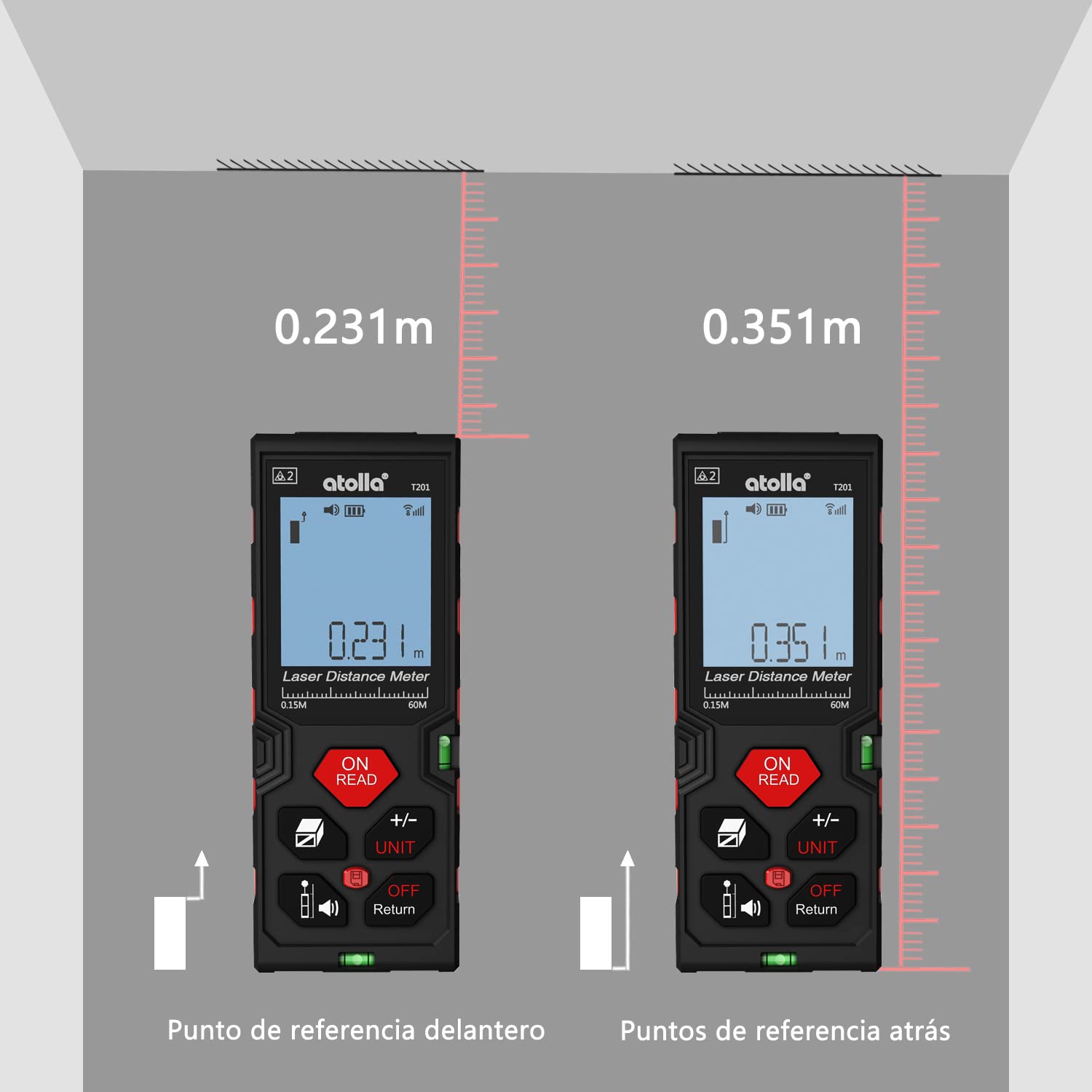
Image: Detailed diagram showing the function of each button on the atolla laser rangefinder, including Power/Read, Area/Volume/Indirect Measurement, Reference/Mute, Add/Subtract/Unit, History, and Off/Return.
- ഓൺ/റീഡ് ബട്ടൺ: Powers on the device and initiates a measurement.
- +/- യൂണിറ്റ് ബട്ടൺ: Switches between measurement units (meters, inches, feet) and performs addition/subtraction.
- വിസ്തീർണ്ണം/ശബ്ദം/പരോക്ഷ അളക്കൽ ബട്ടൺ: Cycles through area, volume, and Pythagorean measurement modes.
- Reference/Mute Button: Changes the measurement reference point (front or rear edge) and toggles the sound.
- ചരിത്ര ബട്ടൺ: സംഭരിച്ചിരിക്കുന്ന അളവെടുപ്പ് രേഖകൾ ആക്സസ് ചെയ്യുന്നു.
- ഓഫ്/റിട്ടേൺ ബട്ടൺ: ഉപകരണം ഓഫാക്കുന്നു അല്ലെങ്കിൽ മുമ്പത്തെ സ്ക്രീൻ/മോഡിലേക്ക് മടങ്ങുന്നു.
3.2 അടിസ്ഥാന അളവ് (ഒറ്റ ദൂരം)
- അമർത്തുക ഓൺ/വായിക്കുക ഉപകരണം ഓണാക്കാൻ ബട്ടൺ.
- ലക്ഷ്യ പ്രതലത്തിലേക്ക് ലേസർ ചൂണ്ടിക്കാണിക്കുക.
- അമർത്തുക ഓൺ/വായിക്കുക button again to take a single measurement. The result will be displayed on the screen.
3.3 തുടർച്ചയായ അളവ് (കുറഞ്ഞത്/പരമാവധി)
This mode is useful for finding the shortest or longest distance to a moving target or for scanning a room.
- അമർത്തുക ഓൺ/വായിക്കുക പവർ ഓണാക്കാനുള്ള ബട്ടൺ.
- അമർത്തുക ഓൺ/വായിക്കുക button and hold it for a few seconds until "MIN/MAX" appears on the display.
- Move the device slowly across the desired area. The display will continuously update with the current, minimum, and maximum measurements.
- അമർത്തുക ഓൺ/വായിക്കുക തുടർച്ചയായ അളവ് നിർത്താൻ വീണ്ടും ബട്ടൺ അമർത്തുക.
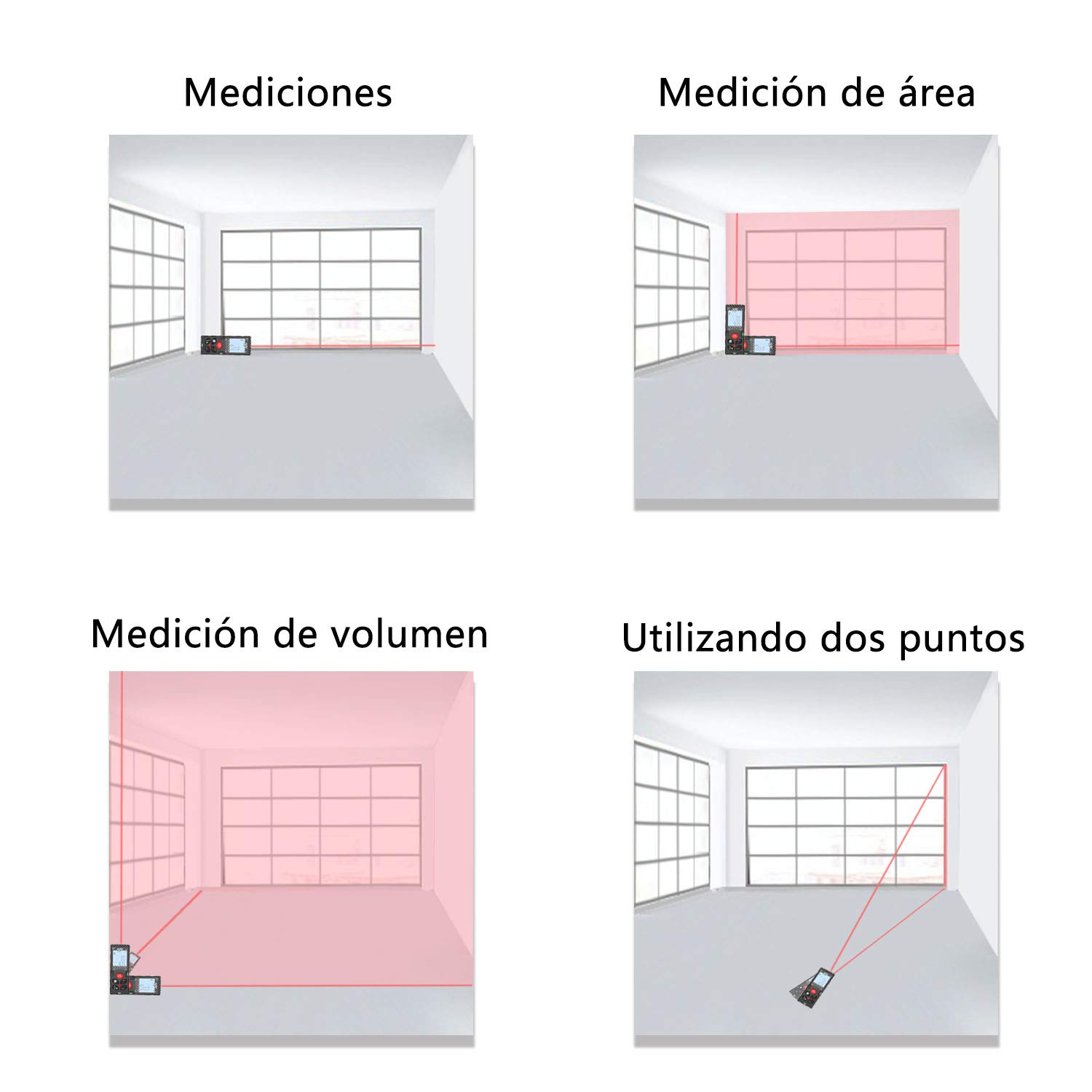
Image: The laser rangefinder displaying continuous measurement results, showing current, minimum, and maximum values.
3.4 വിസ്തീർണ്ണവും വോളിയം അളക്കലും
To measure area or volume:
- അമർത്തുക വിസ്തീർണ്ണം/വ്യാപ്തം/പരോക്ഷ അളവ് button once for area measurement (square icon) or twice for volume measurement (cube icon).
- Follow the on-screen prompts to measure the required dimensions (length, width, height). The device will automatically calculate and display the area or volume.
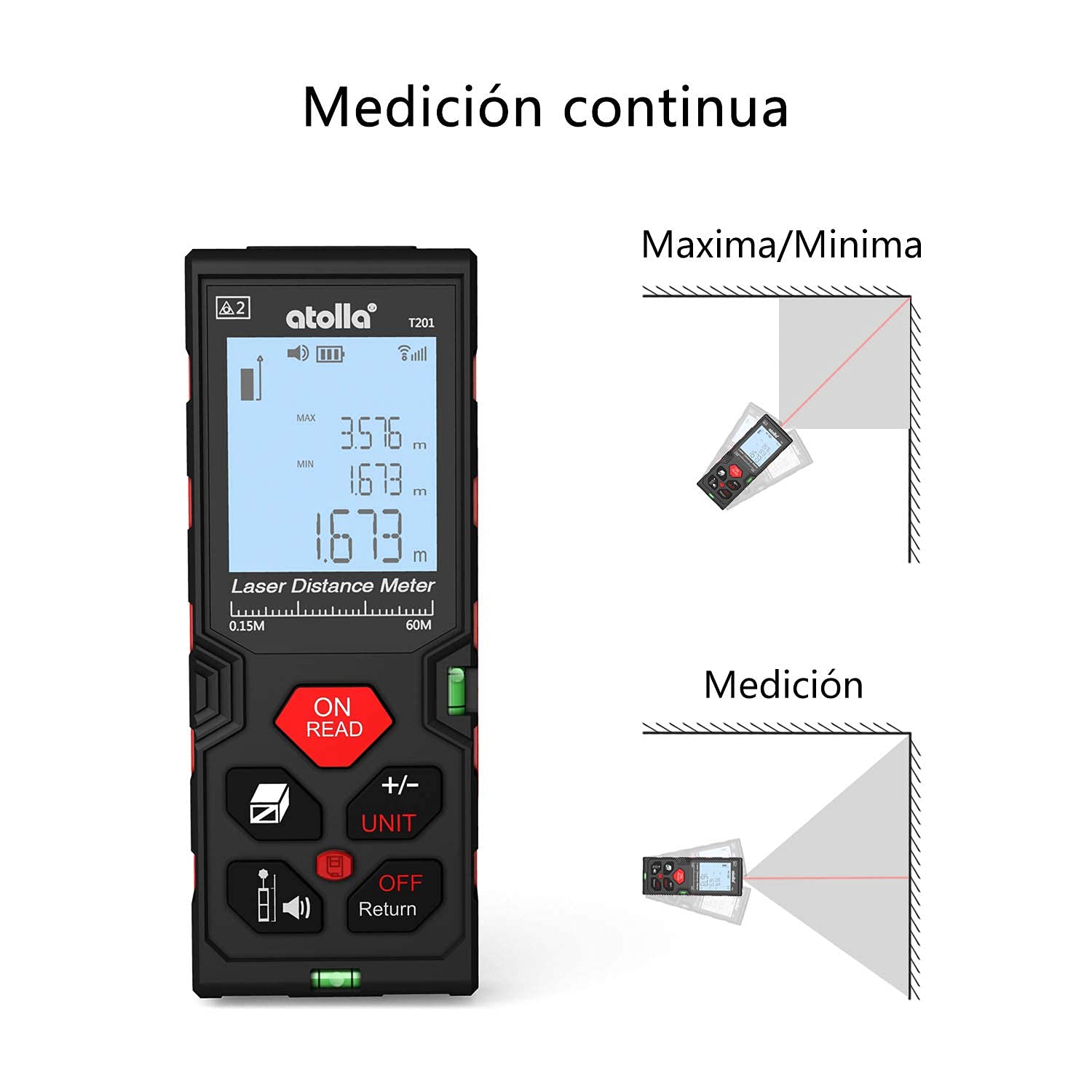
Image: The device screen illustrating how to change measurement units between meters, inches, and feet.
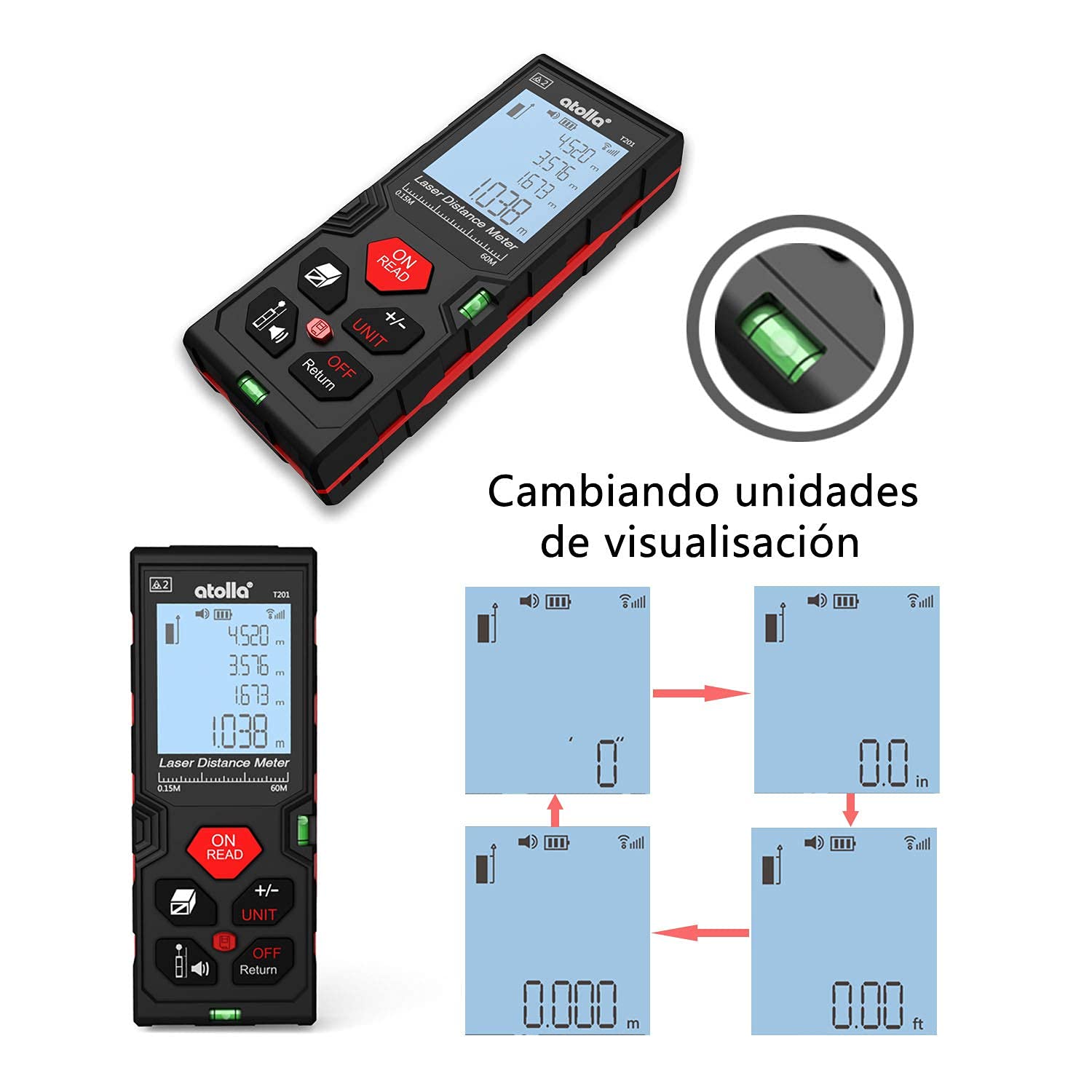
Image: Comparison of measurements taken from the front reference point and the rear reference point of the device.
Video: Demonstrates various measurement functions of the laser distance meter, including area and volume calculations. (Duration: 0:47)
3.5 Pythagorean Indirect Measurement
This mode allows for indirect height or distance measurements using the Pythagorean theorem.
- അമർത്തുക വിസ്തീർണ്ണം/വ്യാപ്തം/പരോക്ഷ അളവ് button until the desired Pythagorean mode icon appears (e.g., triangle with two or three points).
- Follow the on-screen instructions to take the necessary measurements (e.g., hypotenuse, base). The device will calculate the unknown dimension.

ചിത്രം: വിഷ്വൽ എക്സ്amples of single distance measurement, area measurement, volume measurement, and indirect measurement using two points.
3.6 യൂണിറ്റ് പരിവർത്തനം
To change the measurement unit (meter, inch, foot):
- ഉപകരണം ഓണായിരിക്കുമ്പോൾ, +/- യൂണിറ്റ് ലഭ്യമായ യൂണിറ്റുകളിലൂടെ സൈക്കിൾ ചെയ്യാൻ ബട്ടൺ ആവർത്തിച്ച് അമർത്തുക.
- തിരഞ്ഞെടുത്ത യൂണിറ്റ് സ്ക്രീനിൽ പ്രദർശിപ്പിക്കും.
3.7 Data Storage and Recall
The device can store up to 20 measurement records.
- After a measurement, the result is automatically stored.
- അമർത്തുക ചരിത്രം എന്നതിലേക്കുള്ള ബട്ടൺ view സംഭരിച്ച രേഖകൾ.
- Use the arrow buttons (if available, or +/- UNIT) to navigate through the records.

Image: A hand holding the laser rangefinder, demonstrating the data storage feature on the display.
3.8 നിശബ്ദ പ്രവർത്തനം
To mute the device's sound:
- അമർത്തുക Reference/Mute ശബ്ദം ഓണാക്കാനോ ഓഫാക്കാനോ ഉള്ള ബട്ടൺ.
- A mute icon will appear on the screen when the sound is off.

Image: The laser rangefinder being used in a library-like setting, with the mute function active, indicated by a speaker-off icon.
4. പരിപാലനം
4.1 വൃത്തിയാക്കൽ
- സോഫ്റ്റ്, ഡി ഉപയോഗിച്ച് ഉപകരണം തുടയ്ക്കുകamp തുണി. ഉരച്ചിലുകളുള്ള ക്ലീനറുകളോ ലായകങ്ങളോ ഉപയോഗിക്കരുത്.
- Keep the laser lens clean to ensure accurate measurements. Use a soft, lint-free cloth specifically designed for optical lenses.
4.2 സംഭരണം
- നേരിട്ടുള്ള സൂര്യപ്രകാശത്തിൽ നിന്നും കടുത്ത താപനിലയിൽ നിന്നും മാറി തണുത്തതും വരണ്ടതുമായ സ്ഥലത്ത് ഉപകരണം സൂക്ഷിക്കുക.
- ദീർഘനേരം സൂക്ഷിക്കുകയാണെങ്കിൽ, ചോർച്ച തടയാൻ ബാറ്ററികൾ നീക്കം ചെയ്യുക.
4.3 IP54 Protection
The atolla T201 is rated IP54, meaning it is dust-protected and protected against splashing water from any direction. While durable, avoid submerging the device in water or exposing it to heavy rain.

Image: The laser rangefinder demonstrating its IP54 rating, showing resistance to dust and water splashes.
5. പ്രശ്നപരിഹാരം
If you encounter issues with your atolla Laser Rangefinder, please refer to the following common problems and solutions:
- ഉപകരണം ഓണാക്കുന്നില്ല:
- Check if the batteries are correctly inserted with the right polarity.
- പുതിയ AAA ബാറ്ററികൾ ഉപയോഗിച്ച് മാറ്റിസ്ഥാപിക്കുക.
- കൃത്യമല്ലാത്ത അളവുകൾ:
- Ensure the laser lens is clean and free from obstructions.
- Verify the measurement reference point (front or rear) is correctly set for your application.
- Perform auto-calibration if necessary (refer to the device's on-screen menu or specific instructions for auto-calibration).
- Avoid measuring through glass or highly reflective surfaces, which can cause errors.
- ഡിസ്പ്ലേ മങ്ങിയതോ വായിക്കാൻ കഴിയാത്തതോ ആണ്:
- ബാറ്ററി ലെവൽ പരിശോധിക്കുക, കുറവാണെങ്കിൽ മാറ്റി വയ്ക്കുക.
- Ensure the backlight is enabled.
- Device beeps continuously:
- The device might be in continuous measurement mode. Press the ഓൺ/വായിക്കുക നിർത്താനുള്ള ബട്ടൺ.
- If an error code appears, consult the full manual or contact customer support.
For further assistance, please contact atolla customer support.
6 സ്പെസിഫിക്കേഷനുകൾ
| ഫീച്ചർ | വിശദാംശങ്ങൾ |
|---|---|
| മോഡൽ നമ്പർ | T201 |
| അളക്കൽ ശ്രേണി | 0.15 മീറ്റർ മുതൽ 60 മീറ്റർ വരെ |
| കൃത്യത | ± 2 മി.മീ |
| അളവെടുപ്പ് യൂണിറ്റുകൾ | Meter, Inch, Foot |
| അളക്കൽ മോഡുകൾ | Single, Continuous (Min/Max), Area, Volume, Pythagorean (2-point, 3-point) |
| ഡാറ്റ സംഭരണം | 20 റെക്കോർഡുകൾ വരെ |
| പ്രദർശിപ്പിക്കുക | 4-line Backlit LCD |
| പവർ ഉറവിടം | 2 x AAA ആൽക്കലൈൻ ബാറ്ററികൾ (ഉൾപ്പെടുത്തിയിരിക്കുന്നു) |
| യാന്ത്രിക ഷട്ട്ഡൗൺ | 3 മിനിറ്റ് നിഷ്ക്രിയത്വത്തിന് ശേഷം |
| മെറ്റീരിയൽ | പിസി, എബിഎസ് പ്ലാസ്റ്റിക് |
| ഇൻഗ്രെസ്സ് പ്രൊട്ടക്ഷൻ (IP) റേറ്റിംഗ് | IP54 (Dust-protected, Splash-proof) |
| ഉൽപ്പന്ന അളവുകൾ | 12.2 x 4.7 x 2.5 സെ.മീ |
| ഉൽപ്പന്ന ഭാരം | 111 ഗ്രാം |
| നിറം | കറുപ്പും ചുവപ്പും |
7. വാറൻ്റിയും പിന്തുണയും
7.1 റിട്ടേൺ പോളിസി
This product is typically eligible for a 30-day return policy from the date of purchase. Please refer to your retailer's specific return policy for detailed terms and conditions.
7.2 ഉപഭോക്തൃ പിന്തുണ
For any questions, technical support, or warranty claims, please contact atolla customer service through the retailer's platform or the official atolla website. Ensure you have your purchase details and product model number (T201) ready when contacting support.


